
Bestier H103016A
Bestier L-Shaped Standing Desk User Manual
Model: H103016A | Brand: Bestier
1. Introduction
This manual provides detailed instructions for the assembly, operation, and maintenance of your Bestier L-Shaped Standing Desk. This desk features an adjustable height mechanism, dual motors, memory presets, and anti-collision technology, designed to enhance your workspace ergonomics. Please read this manual thoroughly before assembly and use to ensure proper function and safety.
2. Safety Information
- Ensure all components are present and undamaged before assembly. Do not use if any parts are missing or broken.
- Assembly requires two people for safety and ease.
- Keep children and pets away from the desk during operation to prevent injury.
- Do not overload the desk. The maximum stable weight capacity is 176 lbs (80 kg).
- Ensure there are no obstacles in the desk's path during height adjustment to prevent damage or injury. The desk is equipped with a collision avoidance system, but manual vigilance is still recommended.
- Only use the provided power adapter and control panel.
- Disconnect power before cleaning or maintenance.
3. Package Contents
Your Bestier L-Shaped Standing Desk will be shipped in two separate packages. Please verify all components are present upon arrival.
- Desktop Panels (L-shaped configuration)
- Desk Frame Components (legs, crossbars)
- Dual Motor System
- Control Panel with LED Display and Memory Presets
- Power Adapter and Cables
- 2 Headphone Hooks
- Assembly Hardware (screws, tools, etc.)
- Instruction Manual
4. Setup and Assembly
Assembly of this desk requires two individuals. All necessary hardware and illustrated instructions are included in the packaging. Follow the step-by-step guide provided with your desk for detailed assembly instructions.
4.1 Assembly Options
The L-shaped desktop can be assembled in two configurations to match your preferred orientation and room layout.

Diagram showing two possible assembly configurations for the L-shaped desk, allowing users to choose the orientation that best suits their space.
4.2 Key Components Overview

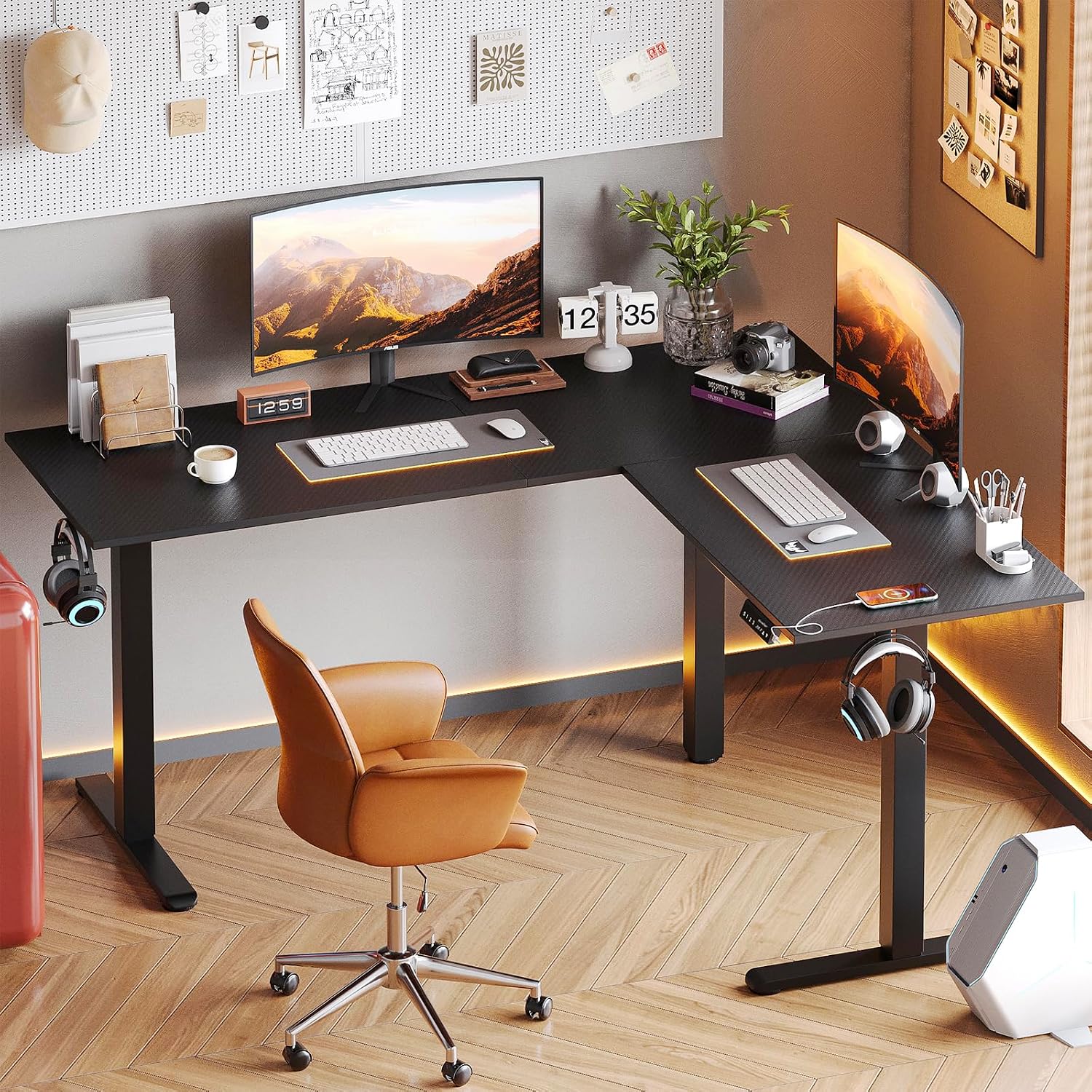
The Bestier L-Shaped Standing Desk in a gaming setup, showcasing its spacious design and ability to accommodate multiple monitors and accessories.
Collage of key features: practical headset hook, stylish carbon fiber texture, adjustable feet for leveling, and unwavering stability.
5. Operating Instructions
5.1 Height Adjustment
The desk's height can be adjusted electrically from 28.5 inches to 46.8 inches (72.4 cm to 118.9 cm).

Visual representation of the desk's adjustable height feature, showing a user standing and another sitting, with height range indicated from 28.3 to 46.45 inches.
5.2 Control Panel Functions

Close-up view of the desk's control panel, showing the LED display, up/down buttons, and three memory preset buttons for height adjustment.
- Up/Down Buttons (▲ / ▼): Press and hold to raise or lower the desk to your desired height.
- LED Display: Shows the current desk height in inches.
- Memory Preset Buttons (1, 2, 3): To save a height setting: Adjust the desk to the desired height, then press the 'S' (Set) button followed by the desired number (1, 2, or 3). To recall a saved height: Press the corresponding number button (1, 2, or 3).
5.3 Collision Avoidance System
The desk is equipped with a built-in collision avoidance system. If the desk encounters an obstacle during height adjustment, it will automatically stop and reverse slightly to prevent damage.

Illustration of the anti-collision technology, demonstrating how the desk detects and avoids obstacles during height adjustment.
5.4 Integrated Features
- USB Charging Port: Located on the control panel for convenient device charging.
- Headphone Hooks: Two hooks are provided for organizing headphones or other accessories.
6. Maintenance
- Cleaning: Wipe the desk surface and frame with a dry cloth. Avoid using abrasive cleaners or harsh chemicals that could damage the finish.
- Inspection: Periodically check all screws and connections to ensure they are tight. Retighten if necessary.
- Cable Management: Ensure power cables and other cords are neatly managed to prevent entanglement with the moving parts of the desk.
7. Troubleshooting
| Problem | Possible Cause | Solution |
|---|---|---|
| Desk does not move or respond to controls. | Power cable disconnected; Motor overload; Control panel malfunction. | Check power connections. Unplug and replug the power cord. Reduce weight on the desk. Contact customer support if the issue persists. |
| Desk moves unevenly or makes unusual noises. | Loose connections; Obstruction; Uneven weight distribution. | Check all assembly screws. Ensure no objects are interfering with the legs. Redistribute weight evenly on the desktop. |
| Collision avoidance system triggers frequently without obvious obstacles. | Sensor sensitivity; Minor obstruction. | Ensure the area around the desk legs is clear. If the issue persists, a reset may be required (refer to specific instructions in the full manual or contact support). |
| Memory presets are not saving or recalling correctly. | Incorrect saving procedure; Power interruption. | Review Section 5.2 for correct memory preset saving steps. Ensure stable power supply. |
8. Specifications
| Feature | Detail |
|---|---|
| Brand | Bestier |
| Model Number | H103016A |
| Product Dimensions | 55.1"D x 63"W x 28.3"H (140cm D x 160cm W x 72cm H) |
| Adjustable Height Range | 28.3" to 46.8" (72cm to 119cm) |
| Maximum Weight Capacity | 176 lbs (80 kg) |
| Motor Type | Dual Electric Motor |
| Desktop Material | P2 Grade Particle Board with Carbon Fiber Texture |
| Frame Material | Industrial Metal |
| Special Features | 3 Memory Presets, Anti-Collision System, USB Charging Port, Headphone Hooks, Reversible Assembly |
| Color | Black 3D Carbon Fiber |
| Assembly Required | Yes (Recommended 2 people) |
| Item Weight | 75.2 Pounds (34.1 kg) |
9. Warranty and Support
The Bestier L-Shaped Standing Desk comes with a Three-year limited warranty. This warranty covers manufacturing defects and malfunctions under normal use conditions.
For any product issues, questions, or warranty claims, please contact Bestier customer service. Our professional customer service team is available to assist you, and all inquiries will be replied to within 24 hours.
Please refer to the contact information provided in your product packaging or visit the official Bestier website for support details.
Ask a question about this manual
Ask about setup, troubleshooting, compatibility, parts, safety, or missing instructions. Manuals+ will review the question and use this page’s manual context to help answer it.