
Introduction
Welcome to your GZXNKEY 4-Button Keyless Entry Remote Key. This manual provides essential information for the proper setup, operation, and maintenance of your new remote key. Please read these instructions carefully before attempting to use or program the key to ensure optimal performance and avoid potential issues.
Product Overview
This remote key fob is designed as a replacement for specific Ford vehicle models. It features four buttons for keyless entry functions and includes the necessary internal electronics, a transponder chip, and a pre-installed battery.
Key Features:
- 4-button design for Lock, Unlock, Panic, and Trunk/Remote Start functions.
- Integrated transponder chip for vehicle immobilization.
- Pre-installed battery for immediate use after programming.
- Supports traditional turn-the-key ignition systems.
- Supports standard keyless entry systems.
- Does NOT support push-start button vehicles.
Components Included:
- 1 x GZXNKEY 4-Button Remote Key Fob (with electronics, transponder chip, and battery)

Image of the GZXNKEY 4-button keyless entry remote key, showing the front with lock, unlock, panic, and trunk/remote start buttons, and the integrated key blade.
Vehicle Compatibility
This remote key is compatible with the following Ford vehicle models and years. It is crucial to verify your vehicle's original key FCC ID and Part Number match those listed below to ensure compatibility.
- Ford Transit Connect: 2014, 2015, 2016, 2017, 2018, 2019
- Ford C-Max: 2013, 2014, 2015, 2016, 2017, 2018
- Ford Escape: 2013, 2014, 2015, 2016, 2017, 2018, 2019
- Ford Focus: 2012, 2013, 2014, 2015, 2016, 2017, 2018, 2019
Important Identification Information:
- FCC ID: OUCD6000022
- Part Numbers: 164-R8046, CM5Z-15K601-A
- Frequency: 315 MHz
- Chip Type: 4D63
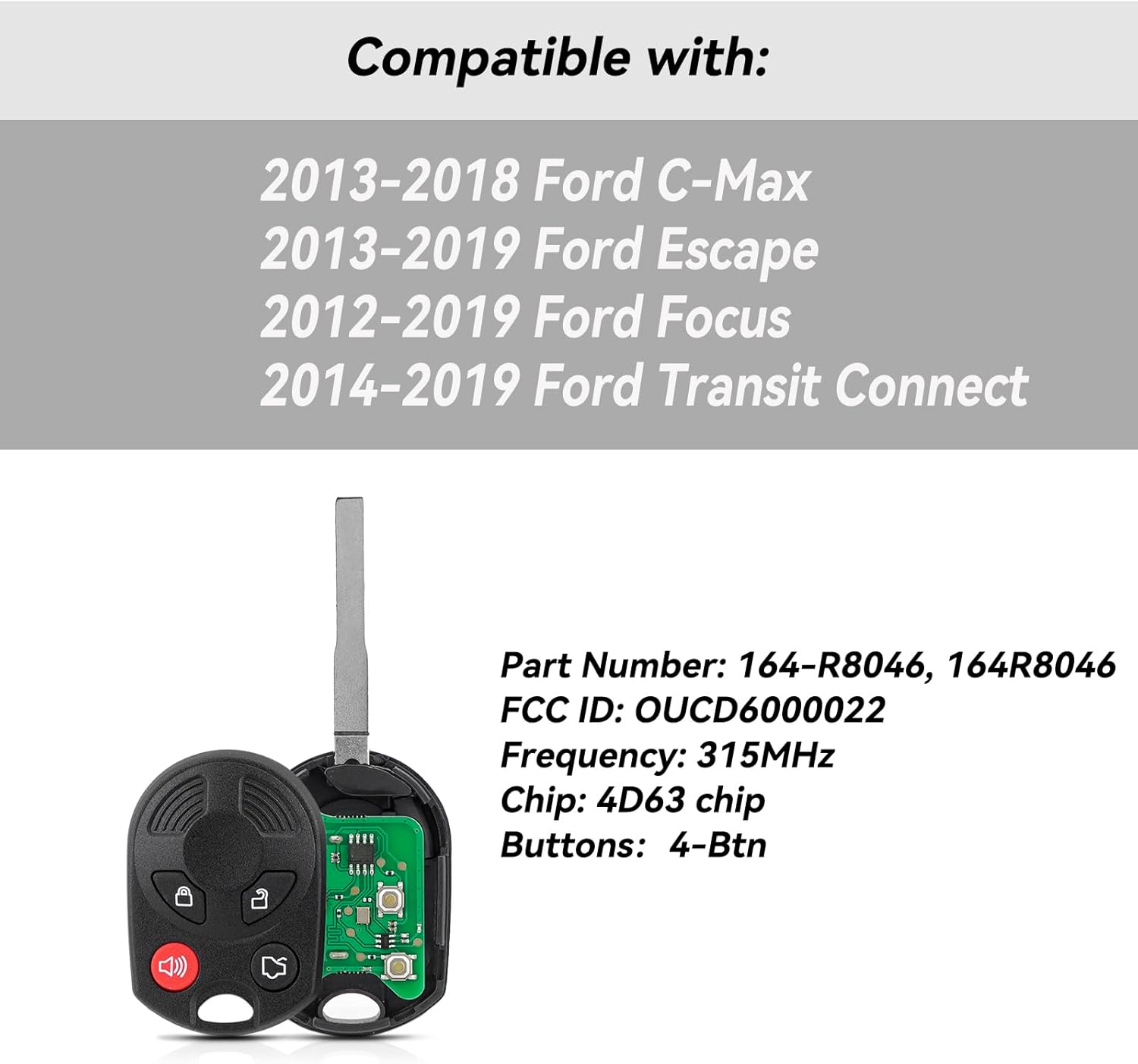
Image displaying the compatible Ford vehicle models and years, along with the key's technical specifications including FCC ID, Part Number, Frequency, and Chip Type.
Setup and Programming
Programming this remote key requires specific steps to link it with your vehicle's security system. It is crucial to follow these instructions carefully. Additionally, the physical key blade will need to be cut by a professional locksmith.
Programming Options:
- DIY Programming (Requires Two Existing Working Keys):
If you possess two currently working original keys for your vehicle, you may be able to program this new remote key yourself. Search for instructional videos online using the FCC ID (OUCD6000022) and Part Number (164-R8046) for detailed steps. Please be aware that this process can be complex and may vary by vehicle model and year.
- Professional Programming (Recommended):
If you do not have two working original keys, or if you are uncomfortable with the DIY programming process, it is strongly recommended to seek assistance from a professional automotive locksmith or a Ford dealership. They have specialized equipment and expertise to program both the remote functions and the transponder chip correctly.
Key Blade Cutting:
The physical key blade included with this remote key fob is uncut. It must be cut by a professional locksmith to match your vehicle's ignition and door locks. This service is separate from programming the remote functions and transponder chip.
Video demonstrating the frequency detection of the GZXNKEY 4-button remote key, showing a device reading the 315 MHz frequency when buttons are pressed. This video illustrates a step in verifying the key's functionality before programming.
Operating Instructions
Once your remote key is successfully programmed and the key blade is cut, it will function as follows:
- Lock Button: Press once to lock all vehicle doors.
- Unlock Button: Press once to unlock the driver's door. Press twice within a few seconds to unlock all doors.
- Panic Button (Red Speaker Icon): Press and hold for approximately 3 seconds to activate the vehicle's alarm. Press again to deactivate the alarm.
- Trunk/Remote Start Button (Trunk Icon or '2x' symbol): Press and hold to open the trunk or activate remote start, depending on your vehicle's specific features and configuration. Refer to your vehicle's owner's manual for detailed functionality.

Close-up image of the GZXNKEY 4-button remote key, clearly showing the lock, unlock, panic, and trunk/remote start buttons.
Maintenance
Battery Replacement:
The remote key uses a standard coin cell battery. When the remote's operating range decreases significantly or it stops responding consistently, the battery may need replacement.
- Carefully open the key fob casing. This usually involves prying it apart gently with a small flat-head screwdriver or a specialized tool at the seam.
- Note the orientation (positive and negative sides) of the existing battery before removal.
- Remove the old battery and insert a new one of the same type, ensuring correct polarity.
- Align the two halves of the key fob casing and press them firmly together until they snap securely into place.
General Care:
- Avoid exposing the remote key to extreme temperatures, such as leaving it in direct sunlight for prolonged periods or in very cold conditions.
- Do not immerse the key fob in water or expose it to excessive moisture.
- Protect the key fob from strong impacts or drops, which can damage internal components.
- Keep the key fob away from strong magnetic fields, which can interfere with its electronic functions.
Troubleshooting
Remote Not Responding:
- Check Battery: The battery may be low or dead. Replace it following the maintenance instructions.
- Reprogramming Needed: The key may have lost its programming due to battery replacement or other factors. Attempt DIY programming if you have two working keys, or consult a professional locksmith.
- Interference: Ensure there are no strong radio frequency sources nearby (e.g., cell towers, power lines, other electronic devices) that could interfere with the remote's signal.
Vehicle Not Starting (After Key Blade Cut):
- Transponder Chip Issue: The transponder chip, which is separate from the remote functions, may not be programmed correctly to your vehicle's immobilizer system. This requires professional programming.
- Incorrect Key Blade Cut: Ensure the key blade was cut accurately by a professional locksmith. An improperly cut blade will not turn the ignition.
Limited Range:
- Low Battery: A weak battery is the most common cause of reduced remote range. Replace the battery.
- Environmental Factors: Physical obstacles (buildings, other vehicles) or atmospheric conditions can affect the remote's signal range.
Technical Specifications
| Feature | Detail |
|---|---|
| Brand | GZXNKEY |
| Model Numbers | OUCD6000022, 164-R8046, CM5Z-15K601-A |
| Number of Buttons | 4 |
| Frequency | 315 MHz |
| Transponder Chip | 4D63 |
| Color | Black |
| Item Weight | 50 Grams |
Warranty and Support
Manufacturer Warranty:
This product comes with a manufacturer's warranty. For specific warranty terms, conditions, and duration, please refer to the product packaging or contact GZXNKEY customer support directly.
Customer Support:
For further assistance, technical support, or warranty claims, please contact GZXNKEY customer service through the retailer where the product was purchased. Provide your purchase details and the product model number for efficient service.