
Goplus Remote Control
GOPLUS Remote Control Instruction Manual
Model: Remote Control (B0CXD14F5K)
Brand: Goplus
Introduction
This manual provides essential information for the proper setup, operation, and maintenance of your Goplus Remote Control. This remote is designed as a replacement for various Goplus/Superfit treadmills, offering precise and easy control over your exercise equipment. Please read these instructions carefully before use to ensure optimal performance and longevity of your device.

Image: The Goplus Remote Control, featuring power, speed increase, and speed decrease buttons.
Compatibility
This remote control is compatible with a range of Goplus/Superfit treadmills. Specific compatible ASINs include: B07ZRSBP5S, B07ZRRS26L, B07ZRNQ74K, B081JDMJ4J, B081JMW6FJ, B08515G965, B084ZM1C8C, B084ZLH89T, B0842L6YJC, B0842KZQ6V, B0842LPY98, B09RJZ1XGV, B09RJYTS7C, B09RJZZ4ZW, B09RJZT9LP.

Image: Illustration showing the remote control's compatibility with different Goplus/Superfit treadmill models.
Setup
Battery Installation
The remote control requires a CR2032 button battery (not included). Follow these steps to install the battery:
- Unplug the white insulation paper from the battery compartment, if present.
- Gently pry up the battery back cover.
- Install the CR2032 button battery correctly, ensuring proper polarity.
- Reinstall the battery back cover securely.
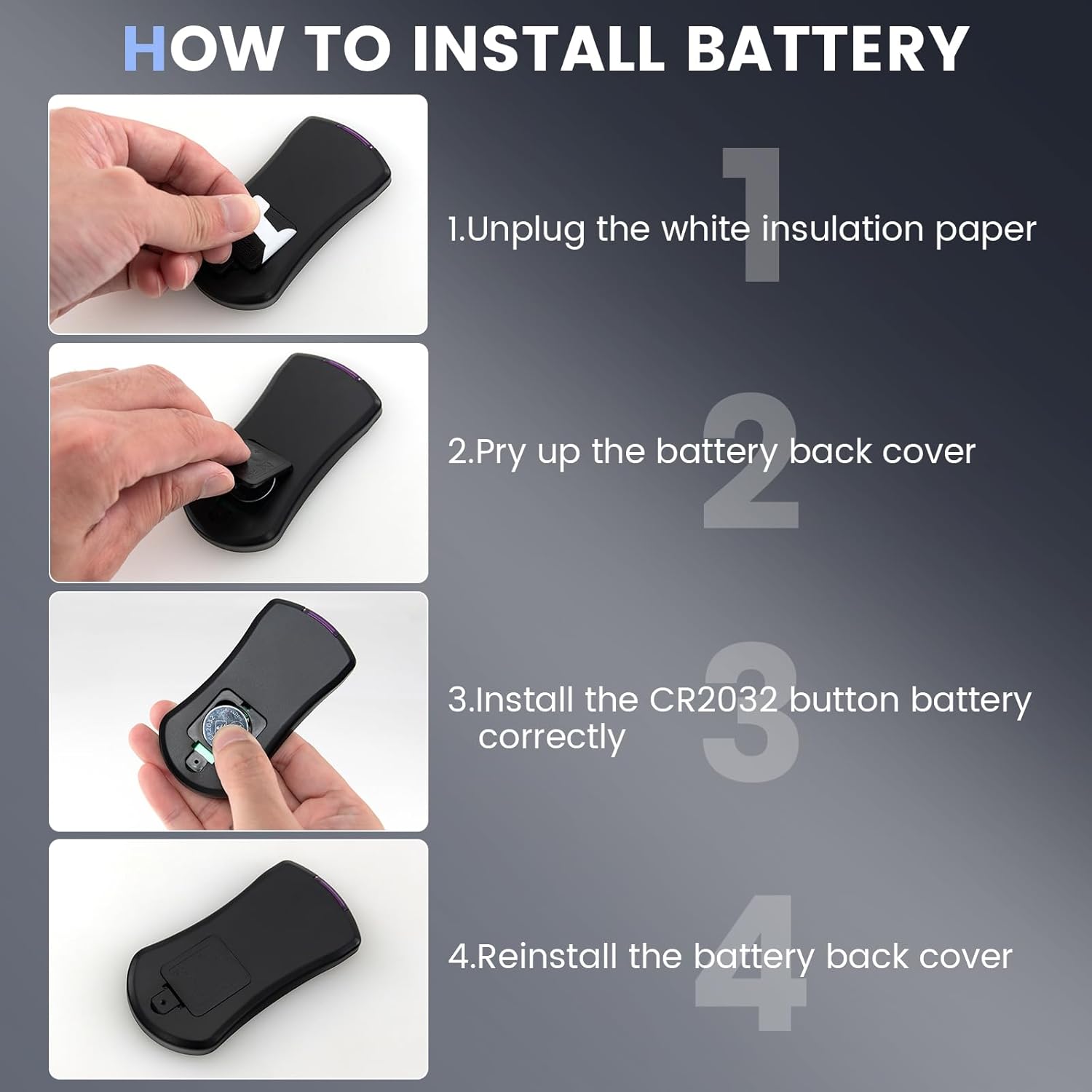
Image: A four-panel guide illustrating the process of installing the CR2032 battery into the remote control.
Pairing Method
To establish a connection between the remote control and your treadmill, follow these pairing instructions:
- First, unplug the safety lock from the treadmill.
- Within 10 seconds of unplugging the safety lock, aim the remote control directly at the treadmill's display window.
- Press and hold the Start/Pause button (power button) on the remote control for approximately 3 seconds.
- Upon hearing a beep from the treadmill system, the pairing process is successful.

Image: A visual guide demonstrating the three steps to pair the remote control with a treadmill, including unplugging the safety lock, pointing the remote, and holding the start/pause button.
Operating Instructions
The Goplus Remote Control provides intuitive control over your treadmill's basic functions.
- Power Switch (Start/Pause): Press the circular button with the power symbol to start or pause the treadmill.
- Speed Increase (+): Press the '+' button to increase the treadmill's speed. Each press accelerates the speed by 0.1 mph.
- Speed Decrease (-): Press the '-' button to decrease the treadmill's speed. Each press decelerates the speed by 0.1 mph.

Image: A user operating a treadmill with the remote control, highlighting the power switch, speed increase, and speed decrease buttons.
The remote control utilizes infrared technology, offering a control range of up to 33 feet (10 meters). Its 360-degree effective angle ensures reliable operation without requiring precise alignment with the treadmill's display.

Image: The remote control being used to control a treadmill, illustrating its 33-foot control distance and 360-degree effective angle.
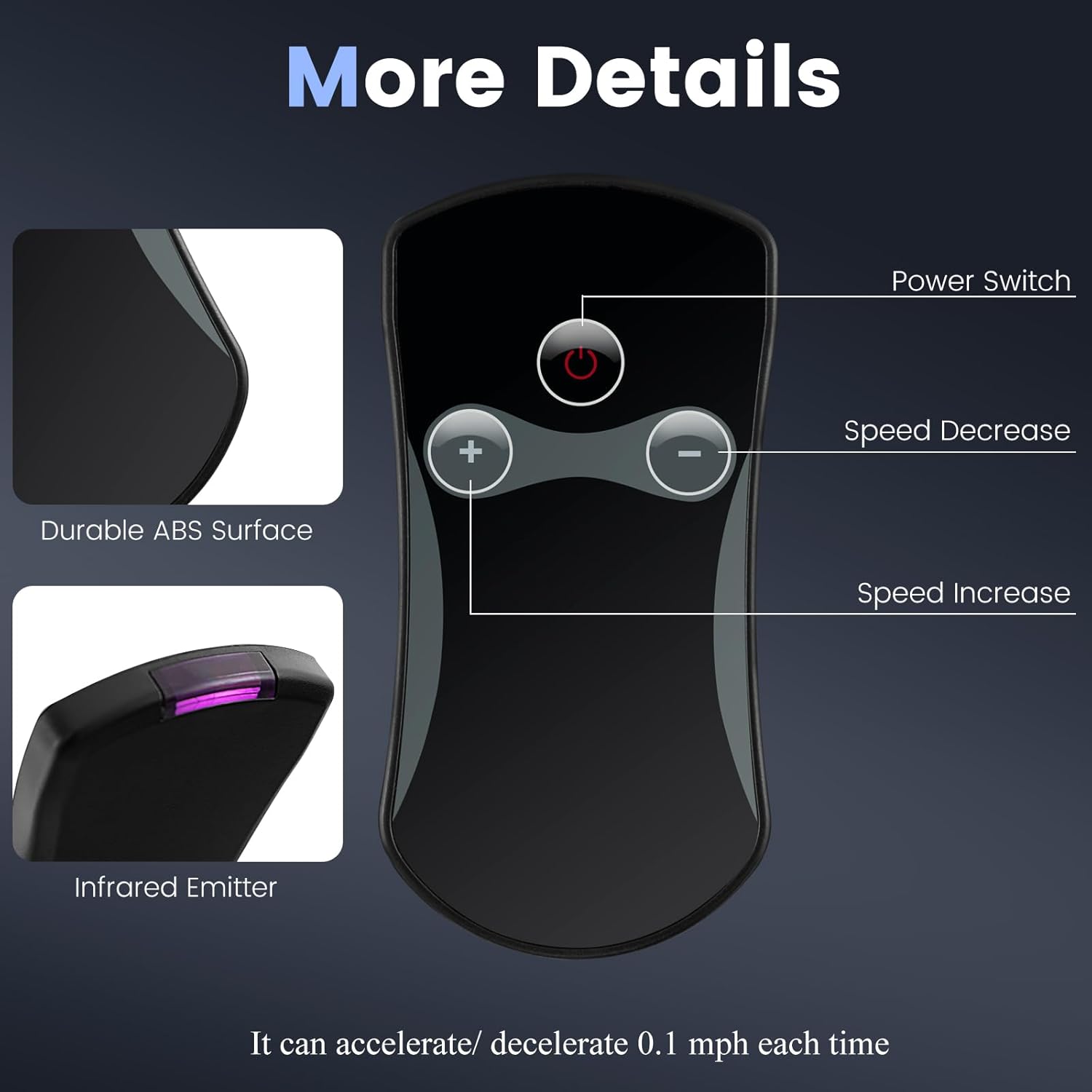
Image: Close-up views of the remote control, detailing its durable ABS surface and the infrared emitter, along with button functions.
Maintenance
The Goplus Remote Control is constructed from high-quality PET material, providing excellent resistance to both high and low temperatures. The buttons are designed for durability, withstanding 80,000-100,000 presses.
- Cleaning: Wipe the remote control with a soft, dry cloth. Avoid using abrasive cleaners or solvents.
- Storage: Store the remote in a dry place away from direct sunlight and extreme temperatures when not in use.
- Battery Replacement: Replace the CR2032 battery when the remote's responsiveness decreases or it fails to operate the treadmill.
Troubleshooting
| Problem | Possible Cause | Solution |
|---|---|---|
| Remote control does not respond. | Battery is dead or incorrectly installed. | Check battery polarity and replace the CR2032 battery if necessary. |
| Remote control does not pair with treadmill. | Incorrect pairing procedure or timing. | Ensure the safety lock is unplugged, aim directly at the display, and hold the Start/Pause button for 3 seconds within 10 seconds of unplugging the safety lock. Repeat the pairing steps carefully. |
| Limited range or intermittent control. | Obstruction between remote and treadmill, or low battery. | Ensure a clear line of sight. Replace the battery. |
Specifications
| Feature | Detail |
|---|---|
| Brand | Goplus |
| Model Name | Remote Control |
| Color | Black+Gray |
| Material | PET |
| Included Components | 1 x Remote Control |
| Control Distance | Up to 33 ft (10 meters) |
| Effective Angle | 360-degree |
| Button Durability | 80,000-100,000 presses |
| Dimensions (Approx.) | 1.7 inches (width) x 3.7 inches (length) |

Image: Diagram showing the approximate dimensions of the remote control: 1.7 inches in width and 3.7 inches in length.
Warranty and Support
Warranty Information
This Goplus Remote Control comes with a 3-month warranty from the date of purchase. This warranty covers manufacturing defects under normal use. Please retain your proof of purchase for warranty claims.
Customer Support
For further assistance, technical support, or warranty inquiries, please contact Goplus customer service. Refer to your product packaging or the Goplus official website for contact details.
Ask a question about this manual
Ask about setup, troubleshooting, compatibility, parts, safety, or missing instructions. Manuals+ will review the question and use this page’s manual context to help answer it.