
AOSU 3-Cam Kit
AOSU 5MP Solar Security Camera System User Manual
Model: 3-Cam Kit
1. Introduction
This manual provides comprehensive instructions for the installation, operation, and maintenance of your AOSU 5MP Solar Security Camera System. This system is designed to provide reliable outdoor surveillance with advanced features such as 5MP UHD resolution, solar power, and intelligent detection capabilities. Please read this manual thoroughly before using the product to ensure proper setup and optimal performance.
2. Package Contents
Verify that all components are present in your package. If any items are missing or damaged, please contact customer support.
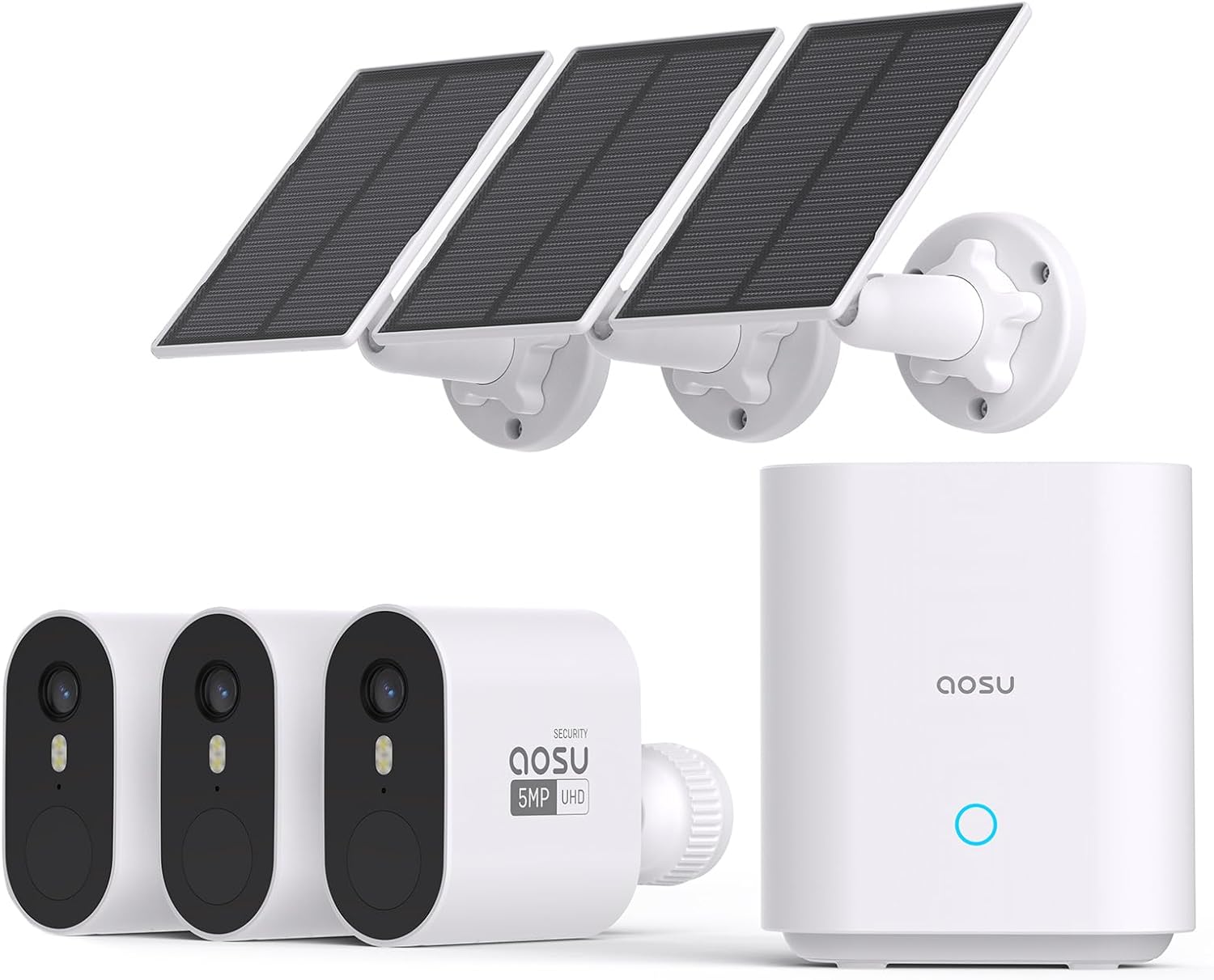
Image: The complete AOSU 5MP Solar Security Camera System, featuring three white bullet-style cameras, three rectangular solar panels with mounting brackets, and a white cylindrical home base unit.
- AOSU 5MP Wireless Outdoor Camera (3 units)
- Solar Panel with 10ft Cable (3 units)
- Home Base Unit (1 unit)
- Mounting Screws and Wall Anchors
- USB Charging Cable
- Ethernet Cable
- Quick Start Guide
- Warning Sticker
3. Product Overview
3.1 Camera Components
- Lens: Captures video footage.
- Infrared LEDs: Provides illumination for night vision.
- Spotlight: Activates upon detection for color night vision and deterrence.
- Microphone: Captures audio for two-way communication.
- Speaker: Enables two-way audio and siren output.
- PIR Motion Sensor: Detects motion for alerts and recording.
- Mounting Thread: For attaching to the solar panel or other mounts.
- Charging Port: Connects to the solar panel or USB charger.
3.2 Home Base Components
- Status Indicator Light: Shows the operational status of the home base.
- Sync Button: Used for pairing cameras.
- Ethernet Port: Connects to your router.
- USB Port: For external storage (if applicable) or charging.
- Power Port: Connects to the power adapter.
- Built-in 32GB eMMC Storage: Secure local storage for recordings.
4. Setup
4.1 Initial Charging
Before installation, fully charge each camera using the provided USB cable and a standard 5V/2A USB power adapter (not included). The indicator light on the camera will turn solid blue when fully charged.
4.2 Home Base Connection
- Connect the Home Base to your router using the provided Ethernet cable.
- Connect the Home Base to a power outlet using the provided power adapter.
- Wait for the status indicator light on the Home Base to turn solid blue, indicating it is ready for pairing.
4.3 App Installation and Account Creation
- Download the "AOSU Security" app from the App Store (iOS) or Google Play Store (Android).
- Open the app and follow the on-screen instructions to create an account.
4.4 Pairing Cameras
- In the AOSU Security app, tap the "+" icon to add a new device.
- Select your camera model from the list.
- Press and hold the Sync button on the Home Base until the indicator light flashes blue.
- Bring the camera close to the Home Base (within 1-3 feet).
- Press the Sync button on the camera (usually located under a rubber flap) until you hear a chime or see an indicator light flash.
- Follow the app's instructions to complete the pairing process for each camera.
4.5 Camera and Solar Panel Installation
Choose an installation location that provides optimal sunlight exposure for the solar panel and a clear view for the camera. Ensure the camera is within range of the Home Base's Wi-Fi signal.

Image: An AOSU security camera mounted on a wall, connected via a 10-foot cable to a solar panel mounted higher on the house, illustrating flexible installation options.
- Mounting Location: Select a sturdy surface for mounting the camera and solar panel. The solar panel should receive at least 2-3 hours of direct sunlight daily for continuous charging.
- Drilling: Use the provided mounting template (if available) to mark and drill holes. Insert wall anchors if installing on masonry or stucco.
- Attach Mounts: Secure the camera mount and solar panel mount to the wall using screws.
- Attach Camera and Solar Panel: Fasten the camera to its mount and the solar panel to its mount. Adjust the angles for optimal coverage and sunlight.
- Connect Cable: Connect the 10-foot cable from the solar panel to the camera's charging port.

Image: A diagram depicting a house with a central home base unit and four security cameras positioned around the perimeter, connected via a broad Wi-Fi signal, indicating enhanced security coverage.
The Home Base provides broad Wi-Fi coverage, approximately 5200 sq ft (484 m²), ensuring stable connections for your cameras.
5. Operating Your System
5.1 Live View and Remote Monitoring
Open the AOSU Security app to access live feeds from your cameras. You can view multiple cameras simultaneously in a quad-view layout.

Image: A hand holding a smartphone showing a quad-view display of four live camera feeds, demonstrating remote monitoring capabilities.
5.2 Event Playback
Recorded events are stored locally on the Home Base's 32GB memory. Access and review these events through the app. The system supports cross-camera tracking, linking related events from different cameras for a comprehensive timeline.

Image: A visual representation of the camera-to-camera track and sync feature, where events from different cameras (Front Door, Side Yard, Back Yard, Garage) are consolidated and displayed on a smartphone app via the home base.

Image: A smartphone screen showing the "Day at a Glance" feature within the app, with a video playback timeline and thumbnails of recorded events, enabling easy review and download.
5.3 Smart Control Modes
Configure custom security modes (e.g., Away mode, Home mode) within the app to automate camera behavior based on your schedule or presence.

Image: A smartphone displaying the "Smart Control" section of the app, with options for "Away mode" and "Home mode" that allow one-click execution of pre-set security settings.
6. Key Features
6.1 5MP High-Definition Clarity
The cameras capture video in 5MP UHD quality, offering 40% more detail than traditional 2K systems. This ensures clear and vivid visuals day and night.

Image: A side-by-side comparison of a security camera image, highlighting the enhanced detail and color reproduction of AOSU 5MP compared to a standard 2K resolution.
6.2 166° Ultra-Wide-Angle View
Equipped with advanced wide-angle lenses, the cameras provide a 166° field of view, minimizing blind spots and offering extensive coverage of your property. Sophisticated image correction technology ensures an accurate and expansive view.

Image: A visual comparison showing the significantly broader coverage provided by a 166° ultra-wide-angle lens compared to a 110° lens, capturing more of the surrounding environment.
6.3 Day and Color Night Vision
The cameras automatically detect ambient light. In low-light conditions, they absorb 20% more light to reveal details in the dark. The integrated spotlight enables full-color night vision when activated by motion.

Image: A split image illustrating the camera's performance in different lighting conditions, showing clear visibility during the day and detailed footage at night, enhanced by ambient light absorption.
6.4 Solar-Powered Operation
The included solar panels efficiently convert up to 30% of direct sunlight into energy, ensuring continuous operation for 365 days a year. This eliminates the need for frequent battery replacements.

Image: A close-up view of a solar panel under bright sunlight, emphasizing its high efficiency in converting solar energy for continuous power, with text indicating "2Hrs Sunlight for All-Day Power" and "1.5X Improvement in Solar Charging".
6.5 Local Storage with No Subscription
The Home Base features a built-in 32GB eMMC memory, providing up to 120 days of encrypted video recording without any subscription fees. All data is stored locally for enhanced privacy.

Image: The AOSU home base unit with an illuminated graphic highlighting a 32GB storage chip, indicating secure, local, and private storage for recorded footage.

Image: A large numeral '0' covered in green grass, accompanied by a dollar sign, representing "Lifetime Security No Monthly Fees" for the system.
6.6 AI Precision Detection
Advanced AI with motion sensors provides accurate human detection, reducing false alerts and ensuring reliable monitoring.

Image: A security camera view of a backyard scene with a child, a dog, and an adult, all highlighted by AI detection boxes, demonstrating the system's precision detection capabilities.
6.7 Night Guard Security (Spotlight & Siren)
Upon detecting intruders at night, the camera can automatically activate its spotlight for clear color night vision and trigger a 120dB siren to deter unwanted visitors. You will receive prompt notifications.

Image: A person standing near a garage at night, illuminated by a security camera's spotlight, illustrating the "Night Guard Security" feature designed to deter intruders.
6.8 Customizable Activity Zones & Privacy Zones
Define specific activity zones to focus detection on important areas of your property. Configure privacy zones to shield sensitive areas from recording, ensuring personal privacy.

Image: A security camera's view of a driveway with a car and a person, showing a highlighted "activity zone" to focus monitoring on specific areas.

Image: A house with certain areas (windows, porch) obscured by black rectangles labeled "privacy," demonstrating the ability to configure discreet area settings to protect sensitive spaces.
6.9 Immediate Alerts with Thumbnails
Receive instant notifications on your smartphone with lock screen thumbnail previews when motion is detected. Tap the notification to directly access live monitoring.

Image: A smartphone displaying an "Immediate Alert" notification from the AOSU app, featuring a lock screen thumbnail preview of a person detected at the front door, with options to snooze, quick reply, or go live.
6.10 Two-Way Audio
Communicate with visitors or deter unwanted guests using the built-in microphone and speaker for two-way audio communication via the app.

Image: An indoor scene with a security camera mounted on a wall, showing speech bubbles between an adult inside and a child outside, illustrating the two-way audio communication feature.
6.11 Voice-Device Compatibility
Integrate your security system with Amazon Alexa and Google Home for convenient voice control and management of your cameras.

Image: A woman interacting with a smart display device, with a speech bubble showing "Hey, Alexa, show me the courtyard," illustrating the voice-device compatibility feature.
6.12 Family Sharing
Share access to your security system with family members, allowing multiple users to monitor and manage the cameras.

Image: A smartphone showing a live camera feed of a child and a dog in a yard, with small circular icons representing other family members, illustrating the "Together for Safety" family sharing feature.
6.13 Dual-Band Wi-Fi Support
The Home Base supports both 2.4G and 5G Wi-Fi routers, offering flexibility and stable connections. Cameras pair easily with the Home Base upon power-on.

Image: A diagram illustrating a home base unit positioned in a house, emitting both 2.4G (long transmission distance) and 5G (fast data speed) Wi-Fi signals, signifying support for dual-band routers.
6.14 Outdoor Design
The cameras are built to withstand various outdoor elements, providing reliable monitoring in rain, sun, heat, or cold.

Image: An AOSU security camera mounted on an outdoor wall, with raindrops visible, illustrating its robust design for outdoor use in various weather conditions.
7. Maintenance
- Clean Lenses: Regularly wipe the camera lenses with a soft, damp cloth to ensure clear image quality. Avoid abrasive cleaners.
- Check Solar Panels: Ensure solar panels are free from dirt, leaves, or snow to maintain optimal charging efficiency.
- Firmware Updates: Keep your camera and Home Base firmware updated through the AOSU Security app for improved performance and security features.
- Battery Health: While solar-powered, monitor battery levels in the app, especially during prolonged cloudy periods, to ensure continuous operation.
- Wi-Fi Signal: Periodically check the Wi-Fi signal strength in the app to ensure stable connectivity between cameras and the Home Base.
8. Troubleshooting
- Camera not powering on:
- Ensure the camera battery is charged. Connect it to the solar panel or a USB power adapter for charging.
- Camera not connecting to Home Base:
- Ensure the Home Base is powered on and connected to your router, with its indicator light solid blue.
- Bring the camera closer to the Home Base during the pairing process.
- Reset both the camera and Home Base and attempt pairing again.
- Verify your router supports 2.4G or 5G Wi-Fi and is configured correctly.
- Poor image quality:
- Clean the camera lens.
- Ensure there are no obstructions in the camera's field of view.
- Check the camera's position relative to light sources that might cause glare.
- Solar panel not charging:
- Ensure the solar panel is receiving direct sunlight for several hours daily.
- Clean the surface of the solar panel from any dirt or debris.
- Verify the cable connection between the solar panel and the camera is secure.
- Frequent false alerts:
- Adjust the motion detection sensitivity in the app.
- Configure activity zones to exclude areas with irrelevant motion (e.g., public roads, swaying trees).
- Ensure the camera is not pointing directly at reflective surfaces or areas with constant movement.
- No notifications:
- Check your smartphone's notification settings for the AOSU Security app.
- Ensure the camera's motion detection is enabled in the app.
- Verify your phone has an active internet connection.
9. Specifications
| Feature | Detail |
|---|---|
| Video Resolution | 5MP UHD (2560x1920) |
| Field of View | 166° Ultra-Wide-Angle |
| Night Vision | Color Night Vision with Spotlight |
| Power Source | Rechargeable Battery (built-in), Solar Panel |
| Storage | 32GB eMMC Local Storage (up to 120 days) |
| Connectivity | Wi-Fi (2.4G & 5G supported by Home Base) |
| Audio | Two-Way Audio |
| Detection | AI Human Detection, Motion Sensor |
| Siren | 120dB Integrated Siren |
| Weather Resistance | Designed for Outdoor Use |
| Home Base Wi-Fi Coverage | Approx. 5200 sq ft (484 m²) |
10. Warranty and Support
AOSU products come with a standard manufacturer's warranty. For detailed warranty information, please refer to the warranty card included in your package or visit the official AOSU website. For technical support, troubleshooting assistance, or to report any issues, please contact AOSU customer service through the contact information provided on their website or within the AOSU Security app.
Online Resources: