
Introduction
This manual provides detailed instructions for the installation, operation, and maintenance of your Fuluku CYA46 Android 15 Car Stereo. This unit is designed for Mitsubishi Lancer models from 2008 to 2017, offering advanced features such as wireless CarPlay, Android Auto, GPS navigation, and a 10.1-inch touchscreen display.
Product Compatibility and Installation
The Fuluku CYA46 Android 15 Car Stereo is specifically designed for Mitsubishi Lancer vehicles manufactured between 2008 and 2017. It includes a plug-and-play harness for simplified installation.
Important Note:
- This unit is not compatible with original car systems that have a low configuration and a power amplifier. Please verify your vehicle's audio system configuration before installation.
Wiring Harness Connection
Refer to the diagram below for proper wire harness connections. Ensure all cables are securely connected to their respective ports.
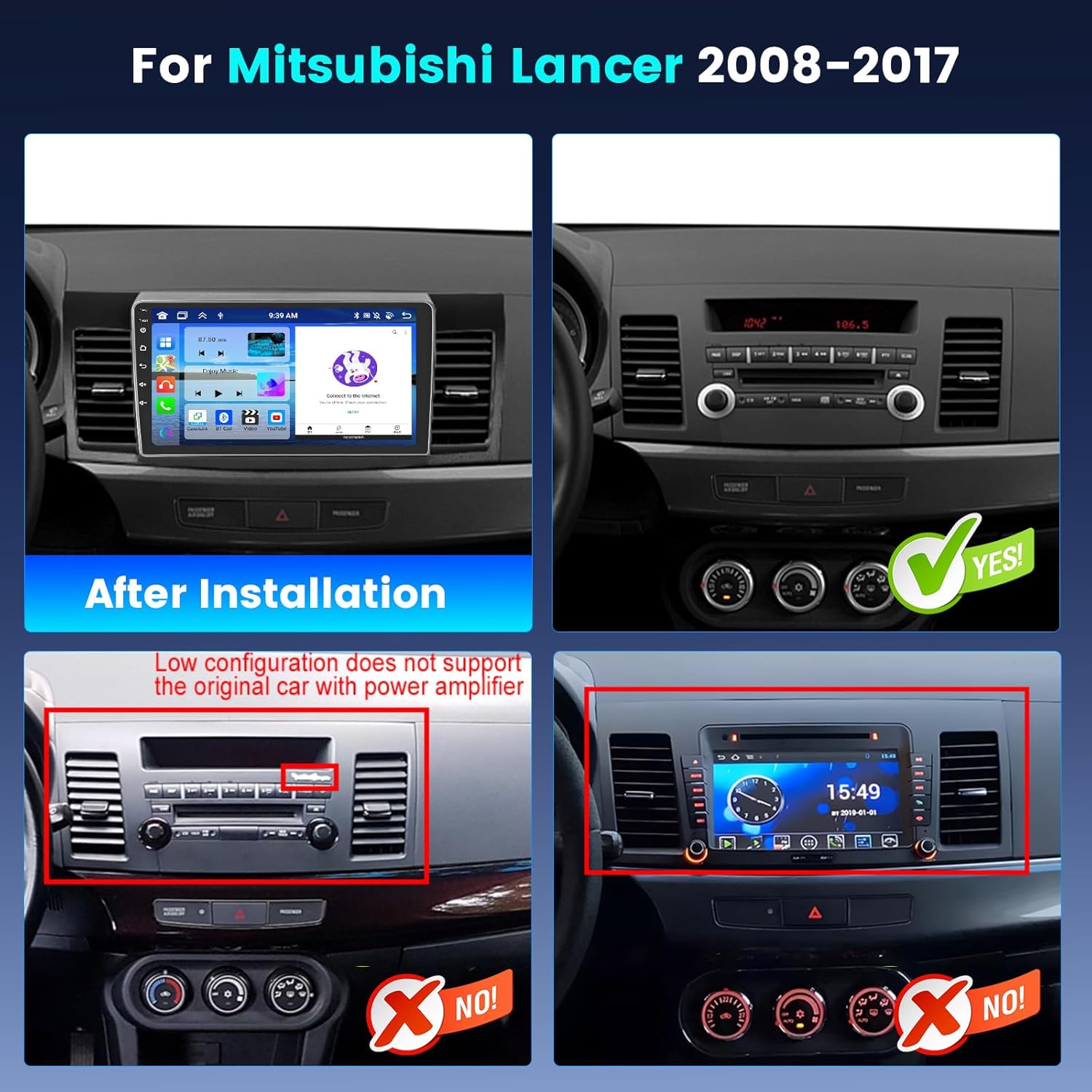
Image: Compatibility check for Mitsubishi Lancer dashboards. The top image shows a successful installation, while the bottom images show incompatible factory radio setups.

Image: Detailed wiring diagram for connecting the car stereo components.
Operating Instructions
System Overview
Your car stereo features an 8-core processor and 4GB RAM with 64GB ROM, running on the latest Android 15 system for a smooth and fast user experience. The 10.1-inch touchscreen has a resolution of 1280x720 pixels and supports 1080P video playback, utilizing advanced IPS technology for wide viewing angles and accurate color reproduction.

Image: Visual representation of the 8-core processor and 4GB RAM + 64GB ROM storage.

Image: Display specifications including screen size, resolution, and IPS technology benefits.
CarPlay and Android Auto
The unit supports both wireless and wired CarPlay and Android Auto. Connect your smartphone to access navigation, make calls, send messages, and listen to music through voice commands (Siri or Google Assistant).

Image: CarPlay and Android Auto interfaces on the car stereo screen.
GPS Navigation and WiFi
Utilize the built-in GPS system for accurate navigation. Download maps and use online navigation services. Connect to a Wi-Fi hotspot to download applications from the Play Store, such as YouTube and TikTok, enhancing your in-car entertainment.

Image: GPS navigation, 5G WiFi, UI themes, and split-screen features.
Audio Features (DSP, Bluetooth, FM/RDS)
The pre-installed DSP tuning software allows for precise audio adjustments, including Frequency, AE, and 32-band equalization, providing clear sound. Bluetooth 5.0 ensures faster transmission speeds for hands-free calls, phonebook access, and music streaming. The FM/RDS radio offers 30 preset stations for news and entertainment.

Image: DSP audio customization options.

Image: Bluetooth 5.0, FM RDS radio, Steering Wheel Control, and AHD Camera details.
Steering Wheel Control (SWC)
The unit supports steering wheel controls, allowing you to adjust volume, answer calls, and switch songs safely while driving.
AHD Backup Camera
The included wide-angle AHD backup camera provides a 170° viewing angle, HD 1080P resolution, waterproof design, and night vision capabilities to assist in eliminating blind spots during reversing maneuvers.
Split Screen Functionality
Enjoy multitasking with the split-screen feature, allowing you to use GPS navigation and watch videos simultaneously on the 10.1-inch screen.
User Interface (UI) Themes
Personalize your car stereo experience with 59 available UI desktop themes.
Official Product Video
Video: Overview of the Fuluku 8 Core 4+64G Android Carplay Car Stereo (CYA46) features, including hands-free calling and voice control.
Maintenance
To ensure the longevity and optimal performance of your car stereo, follow these general maintenance guidelines:
- Cleaning: Use a soft, dry cloth to clean the screen and exterior. Avoid abrasive cleaners or solvents.
- Temperature: Operate the unit within recommended temperature ranges. Extreme heat or cold can affect performance.
- Software Updates: Periodically check for and install available software updates to ensure system stability and access to new features.
- Cable Connections: Ensure all cables remain securely connected to prevent intermittent issues.
Troubleshooting
If you encounter issues with your Fuluku car stereo, refer to the following common troubleshooting steps:
- No Power: Check all power cable connections. Ensure the vehicle's ignition is on.
- No Sound: Verify speaker connections. Check volume levels and audio output settings (e.g., DSP settings). If using CarPlay/Android Auto, ensure audio is routed correctly.
- Touchscreen Unresponsive: Try restarting the unit. If the issue persists, a factory reset might be necessary (consult support).
- GPS Signal Loss: Ensure the GPS antenna is properly installed and has a clear view of the sky.
- Bluetooth Connectivity Issues: Ensure Bluetooth is enabled on both the stereo and your device. Try unpairing and re-pairing the device.
- CarPlay/Android Auto Not Connecting: Check USB cable connection (for wired). Ensure Wi-Fi and Bluetooth are enabled for wireless connections. Verify your phone's settings for CarPlay/Android Auto.
- System Lag/Freezing: Close unnecessary background applications. Clear cache if possible. A system restart often resolves temporary performance issues.
For persistent issues, please contact customer support.
Specifications
| Feature | Detail |
|---|---|
| Brand | Fuluku |
| Vehicle Service Type | Car (Mitsubishi Lancer 2008-2017) |
| Screen Size | 10.1 Inches |
| Resolution | 1280 x 720 |
| Operating System | Android 15 |
| Processor | 8 Core |
| Memory (RAM) | 4 GB |
| Storage (ROM) | 64 GB |
| Connectivity Technology | Bluetooth 5.0, USB, Wi-Fi (5G) |
| Special Features | 32 EQ DSP, 59 UI Themes, Wireless CarPlay/Android Auto, Mirror Link, GPS Navigation, FM RDS, Backup Camera |
| Supported Navigation Systems | GLONASS, GPS, Galileo |
| Map Type | North America, Worldwide |
| Audio Output Mode | Stereo |
| Human-Interface Input | Buttons, Microphone, Touchscreen |
| Compatible Devices | Amplifier, Camera, Smartphone, Speaker |
Package Contents
The following items are included in your package:
- Fuluku Android Stereo Unit for Mitsubishi Lancer 2008-2017
- Backup Camera
- Microphone
- Power Cable
- GPS Antenna
- Rear Camera Input Cable
- RCA Cable
- USB Cable (multiple)
- User Manual
- Installation Tool

Image: Product dimensions and a visual list of all included accessories.
Warranty and Support
Fuluku offers comprehensive support for your product:
- Money-Back Guarantee: 30-day money-back policy.
- Replacement: 12-month replacement warranty.
- Technical Support: Lifetime technical support.
For any inquiries or assistance, please contact Fuluku customer support.