
1. Introduction
This manual provides essential instructions for the proper use and care of your Sakar Polaroid Underwater Camera. Designed for capturing high-quality photos and videos in aquatic environments, this camera features 18MP still image resolution, 4K UHD video recording, and is waterproof up to 10 feet (3 meters). Please read this manual thoroughly before operating the device to ensure optimal performance and longevity.

The Polaroid Underwater Camera is designed for capturing moments in aquatic environments, featuring 18MP photos, 4K video, and a 2.4-inch LCD screen.
2. Product Overview
2.1 Camera Components

Front view of the Polaroid Underwater Camera, showcasing its compact and waterproof design.
2.2 Controls and Indicators
- Shutter Release Button: Located on the top-front, used to capture photos or start/stop video recording.
- LED Flash: Provides illumination for photos in low-light conditions.
- Zoom In/Out Buttons: Adjust the digital zoom level.
- Mode/Menu Button: Cycles through camera modes (photo, video, playback) and accesses the settings menu.
- 2.4" LCD Preview Screen: Displays live view, captured media, and menu options.
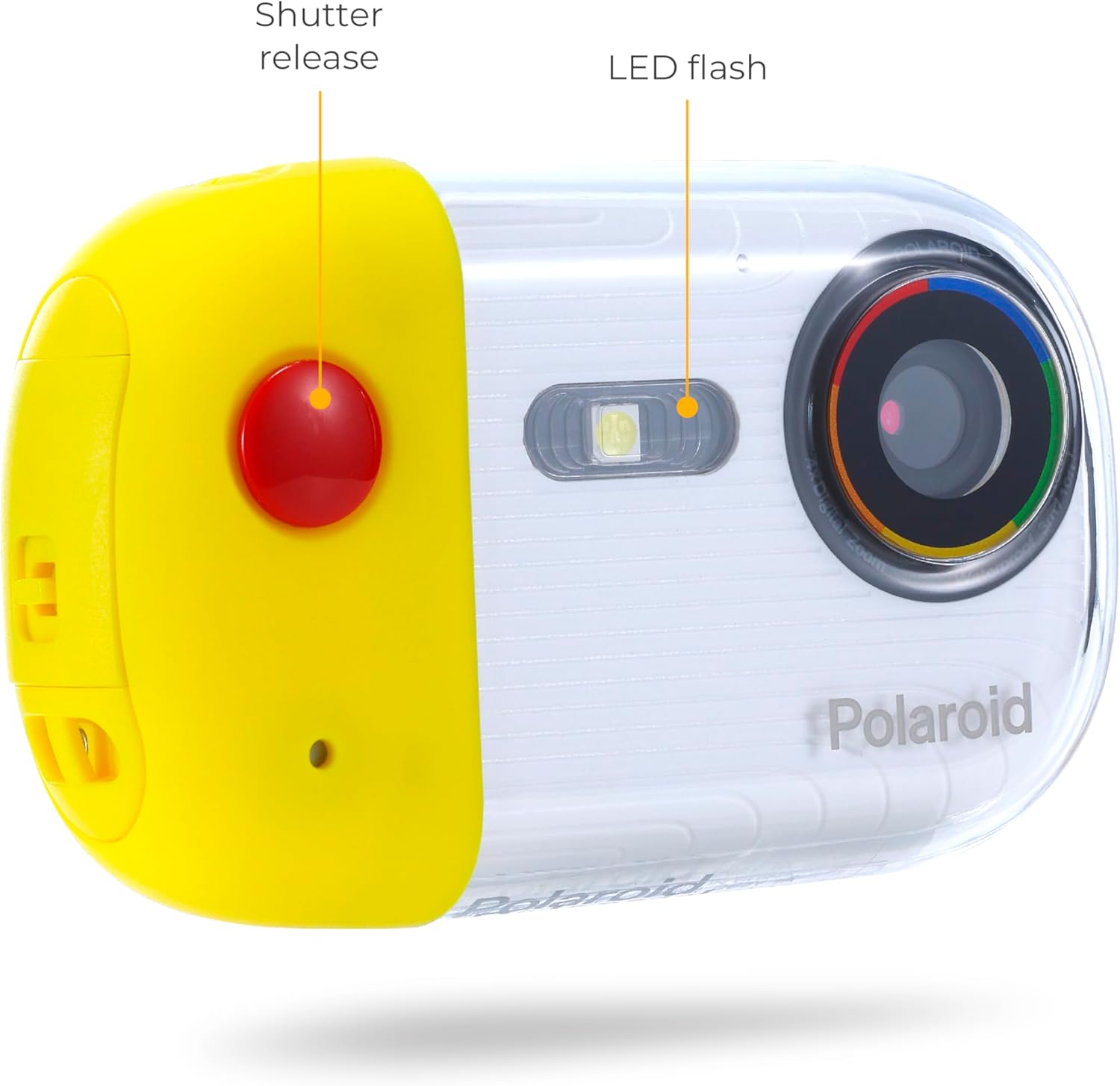
Front controls: Shutter Release and LED Flash.

Rear controls: Zoom, Mode/Menu, and LCD Screen.
3. Getting Started
3.1 Charging the Battery
The camera features a built-in rechargeable lithium-ion battery. To charge:
- Connect the included USB cable to the camera's USB port.
- Connect the other end of the USB cable to a USB power adapter (not included), a computer, or a power bank.
- The charging indicator light will illuminate. Charging is complete when the light turns off or changes color (refer to camera display for battery status).
3.2 Inserting a Micro SD Card
A Micro SD card (not included) is required to store photos and videos. The camera supports cards up to a certain capacity (refer to specifications for details). To insert:
- Locate the Micro SD card slot, typically behind a waterproof seal.
- Carefully open the waterproof cover, ensuring no water or debris enters.
- Insert the Micro SD card with the gold contacts facing the correct direction (usually towards the front of the camera) until it clicks into place.
- Close the waterproof cover securely. Ensure a tight seal before exposing the camera to water.
3.3 Powering On/Off
To power on the camera, press and hold the Power button (often integrated with the Mode/Menu button) for a few seconds until the LCD screen illuminates. To power off, press and hold the Power button again until the screen turns off.
4. Operating Instructions
4.1 Taking Photos
- Ensure the camera is in Photo mode (indicated on the LCD screen). If not, press the Mode/Menu button to cycle through modes.
- Frame your shot using the 2.4" LCD preview screen.
- Press the Shutter Release button firmly to capture the photo.
4.2 Recording Videos
- Switch to Video mode using the Mode/Menu button.
- Press the Shutter Release button once to start recording. A recording indicator (e.g., a red dot or flashing timer) will appear on the screen.
- Press the Shutter Release button again to stop recording.
4.3 Zoom Function
Use the Zoom In and Zoom Out buttons to digitally magnify or reduce your view. Note that digital zoom may reduce image quality.
4.4 Flash Usage
The camera has a built-in LED flash. Flash modes (Auto, Manual, Bright Flash) can typically be adjusted through the camera's menu settings. Refer to the on-screen menu for specific options.

The camera is designed to be used underwater, capturing moments during snorkeling or diving.

Capture your favorite moments underwater with ease.
5. Care and Maintenance
5.1 Waterproofing Precautions
- Before each use in water, inspect all seals and covers for any signs of damage or debris.
- Ensure all covers (battery compartment, SD card slot, USB port) are securely closed and latched.
- Do not open the camera's compartments while underwater or when wet.
- Rinse the camera with fresh water after use in saltwater to prevent corrosion.
5.2 Cleaning
- Wipe the camera body with a soft, damp cloth.
- For the lens, use a specialized lens cleaning cloth and solution to avoid scratches.
- Do not use harsh chemicals or abrasive cleaners.
5.3 Storage
Store the camera in a cool, dry place away from direct sunlight and extreme temperatures. Ensure the battery is partially charged (around 50%) if storing for extended periods.
6. Troubleshooting
| Problem | Possible Cause | Solution |
|---|---|---|
| Camera does not power on. | Low battery. | Charge the battery using the provided USB cable. |
| Cannot take photos/videos. | No Micro SD card inserted or card is full. | Insert a Micro SD card or delete existing files to free up space. |
| Water inside camera. | Waterproof seals not properly closed or damaged. | Immediately power off the camera, open all compartments, and allow to dry completely. Do not use in water again. Contact customer support. |
| Poor image quality. | Dirty lens, low light, digital zoom. | Clean the lens. Ensure adequate lighting. Avoid excessive digital zoom. |
| Wi-Fi connection issues. | Incorrect settings, interference. | Check Wi-Fi settings on camera and connected device. Ensure devices are within range. |
7. Specifications
| Feature | Detail |
|---|---|
| Model Name | Underwater Camera |
| Model Number | IE50FE-YEL-STK-4 |
| Effective Still Resolution | 18 MP |
| Video Resolution | 4K UHD 2160p |
| Water Resistance Level | Waterproof (up to 10 feet / 3 meters) |
| Display Type | LCD |
| Screen Size | 2.4 Inches |
| Connectivity Technology | USB, Wi-Fi |
| Storage Media | Micro SD (not included) |
| Battery Type | Lithium Ion (Rechargeable) |
| Optical Zoom | 2x |
| Image Stabilization | Digital |
| Flash Modes | Auto, Manual, Bright Flash |
| Item Weight | 0.31 Kilograms |
8. Warranty and Support
8.1 Limited Warranty
This product is covered by a limited warranty provided by Sakar International. The warranty covers defects in materials and workmanship under normal use. Specific terms and conditions, including duration and exclusions, are detailed in the warranty card included with your purchase or available on the manufacturer's website.
8.2 Customer Support
For technical assistance, troubleshooting not covered in this manual, or warranty claims, please contact Sakar International customer support. You can typically find contact information (phone, email, website) on the product packaging or by visiting the official Sakar website:
Please have your model number (IE50FE-YEL-STK-4) and proof of purchase ready when contacting support.