
Introduction
Thank you for choosing the Atrium A610-19 Radio-Controlled Analog Alarm Clock. This clock combines classic design with modern functionality, offering precise timekeeping and user-friendly features. Its radio-controlled movement ensures accurate time, while the silent quartz mechanism guarantees an undisturbed sleep. The large, clear numerals and luminous hands, along with an on-demand backlight, make it easy to read the time in any lighting condition. The alarm includes a convenient snooze function and is activated via an easily accessible top switch.
Package Contents
- Atrium A610-19 Radio-Controlled Analog Alarm Clock
- 1 x AA Battery (included)
Setup
1. Inserting the Battery
- Open the battery compartment cover located on the back of the alarm clock.
- Insert one AA battery, ensuring the correct polarity (+ and -).
- Close the battery compartment cover securely.
2. Initial Time Setting (Radio Control)
Upon battery insertion, the clock will automatically attempt to receive the radio time signal. This process may take several minutes. Place the clock near a window for optimal reception. The hands will move to the correct time once the signal is successfully received.
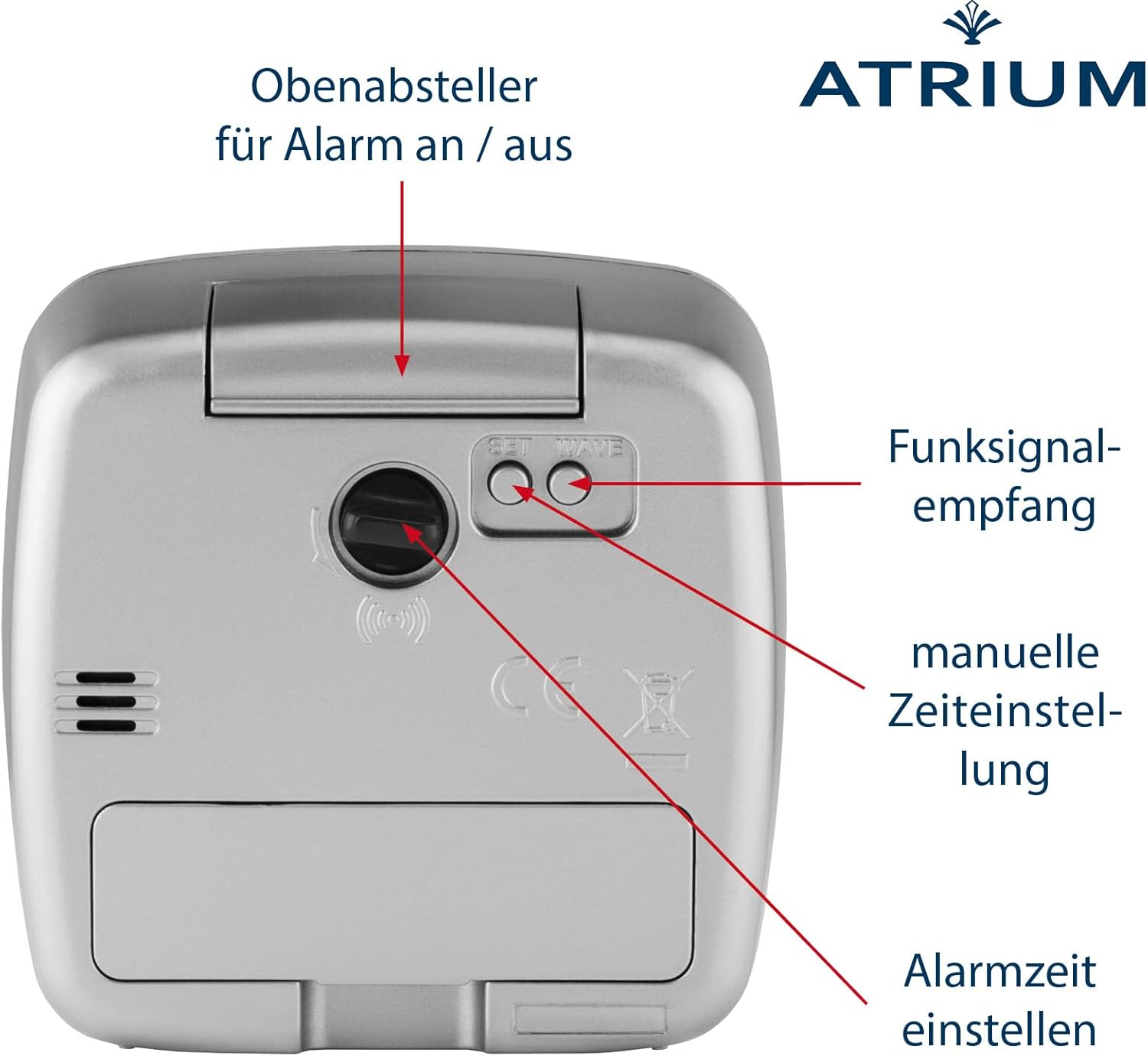
Figure 1: Rear view of the alarm clock showing controls for radio signal reception and manual time setting.
3. Manual Time Setting (If Radio Signal Fails)
If the clock does not set itself automatically after an extended period (e.g., overnight), or if you are in an area with poor radio signal reception, you can set the time manually:
- Locate the manual time setting button (often labeled 'SET TIME' or similar) on the back of the clock (refer to Figure 1).
- Press and hold this button to advance the minute hand. Release the button when the correct time is displayed.
Operating Instructions
1. Setting the Alarm
- Locate the alarm setting knob on the back of the clock (refer to Figure 1).
- Rotate the knob to move the alarm hand to your desired alarm time.
- To activate the alarm, slide the ON/OFF switch (often a large button on top) to the 'ON' position.

Figure 2: Front view of the alarm clock, showing the light/snooze button.
2. Using the Snooze Function
When the alarm sounds, press the large 'LIGHT/SNOOZE' button located on the top of the clock (refer to Figure 2). The alarm will pause and sound again after approximately 5 minutes.
3. Activating the Backlight
To illuminate the dial in low light conditions, press the 'LIGHT/SNOOZE' button on the top of the clock (refer to Figure 2). The backlight will activate for a few seconds.

Figure 3: Night view of the alarm clock with the backlight activated.
4. Disabling the Alarm
To turn off the alarm completely, slide the ON/OFF switch on the top of the clock to the 'OFF' position.
Maintenance
1. Battery Replacement
When the clock's display dims or the alarm function weakens, it is time to replace the battery. Follow the steps in the "Inserting the Battery" section under Setup.
2. Cleaning
Wipe the clock with a soft, dry cloth. Do not use abrasive cleaners or solvents, as these can damage the casing and dial.
Troubleshooting
- Clock not setting time automatically: Ensure the battery is correctly inserted and has sufficient power. Place the clock near a window and away from electronic devices that might cause interference. Allow several hours for the clock to receive the radio signal. If it still fails, set the time manually.
- Alarm not sounding: Check if the alarm ON/OFF switch is in the 'ON' position. Verify that the alarm time is correctly set. Ensure the battery has enough power.
- Backlight not working: Check the battery level. Replace the battery if necessary.
- No ticking sound: This is normal. The Atrium A610-19 features a silent quartz movement with a sweeping second hand, designed to operate without an audible ticking sound.
Specifications
| Brand | Atrium |
| Model Number | A610-19 |
| Display Type | Analog |
| Movement Type | Radio-Controlled Quartz (Silent) |
| Color | Silver |
| Material | Plastic |
| Dimensions (W x H x D) | 8 cm x 8 cm x 4 cm |
| Item Weight | 115 Grams |
| Power Source | Battery Powered (1 x AA battery) |
| Special Features | Illuminated, Radio-Controlled, Snooze/Alarm Repeat, Silent Movement |
| Room Type | Bedroom |
| Mounting Type | Tabletop |
Warranty Information
ATRIUM provides a warranty for the clock movement for a period of 2 years from the date of purchase. This warranty covers manufacturing defects and ensures straightforward service within Germany. Please retain your proof of purchase for warranty claims.
Customer Support
Should you encounter any issues or have questions regarding your Atrium A610-19 alarm clock that are not covered in this manual, please contact Atrium customer support. Refer to the product packaging or the official Atrium website for contact details.