
1. Introduction
This manual provides detailed instructions for the assembly, operation, maintenance, and troubleshooting of your ERGOMAKER Dual Motor 2-Stage Electric Height Adjustable Standing Desk Frame. Please read this manual thoroughly before installation and use to ensure proper function and safety.
1.1 Safety Information
- The desk frame has a maximum weight capacity of 80 kg (176 lbs). Do not exceed this limit.
- It is recommended to assemble the desk with two people due to the weight of the components.
- This product meets safety certifications CE/UL/ROHS/EN527/PSE.
- Keep children and pets away from the desk during operation.
- Ensure no obstacles are in the path of the desk's movement (up or down) to prevent damage or injury.
- Do not open or attempt to repair the motor or control box yourself. Contact customer support for assistance.
2. Package Contents
The ERGOMAKER Dual Motor 2-Stage Electric Height Adjustable Standing Desk Frame package includes the following components:
- Desk Legs (2-stage, dual motor)
- Crossbeams and Frame Supports
- Control Box
- Memory Control Panel
- Power Adapter and Cable
- Allen Wrench
- Mounting Hardware (screws, cable ties)
- Instruction Manual
Note: This package includes the desk frame only. A desktop surface is not included and must be purchased separately or used from an existing setup.

Image: ERGOMAKER Dual Motor 2-Stage Electric Height Adjustable Standing Desk Frame, showing the frame, control panel, and a phone charging via USB.
3. Assembly Instructions
Assembly of the ERGOMAKER desk frame is designed to be straightforward. It can typically be completed in under 20 minutes with the included Allen wrench. A screwdriver or power drill will be required for attaching your desktop.
3.1 Preparation
- Clear a spacious area for assembly.
- Unpack all components and verify against the package contents list.
- Gather necessary tools: included Allen wrench, screwdriver or power drill (for desktop attachment).
3.2 Step-by-Step Assembly
- Assemble the Legs and Feet: Attach the feet to the bottom of each desk leg using the provided screws.
- Connect Crossbeams: Secure the adjustable crossbeams between the two desk legs. Ensure all bolts are started before fully tightening to allow for proper alignment.
- Install Side Brackets: Attach the side brackets to the top of the desk legs, which will support your desktop.
- Mount Control Box: Secure the control box to the underside of one of the crossbeams.
- Connect Cables: Plug the motor cables from each leg into the control box. Connect the control panel cable to the control box. Finally, connect the power adapter to the control box.
- Attach Desktop: Carefully place your chosen desktop onto the assembled frame. Align it as desired and secure it to the frame using appropriate screws and a screwdriver or power drill.
- Cable Management: Use the provided cable ties to organize and secure all cables, preventing them from interfering with desk movement.

Image: Diagram illustrating the enhanced heavy-duty frame with sturdy legs (50x80mm) and a double crossbeam for stability.
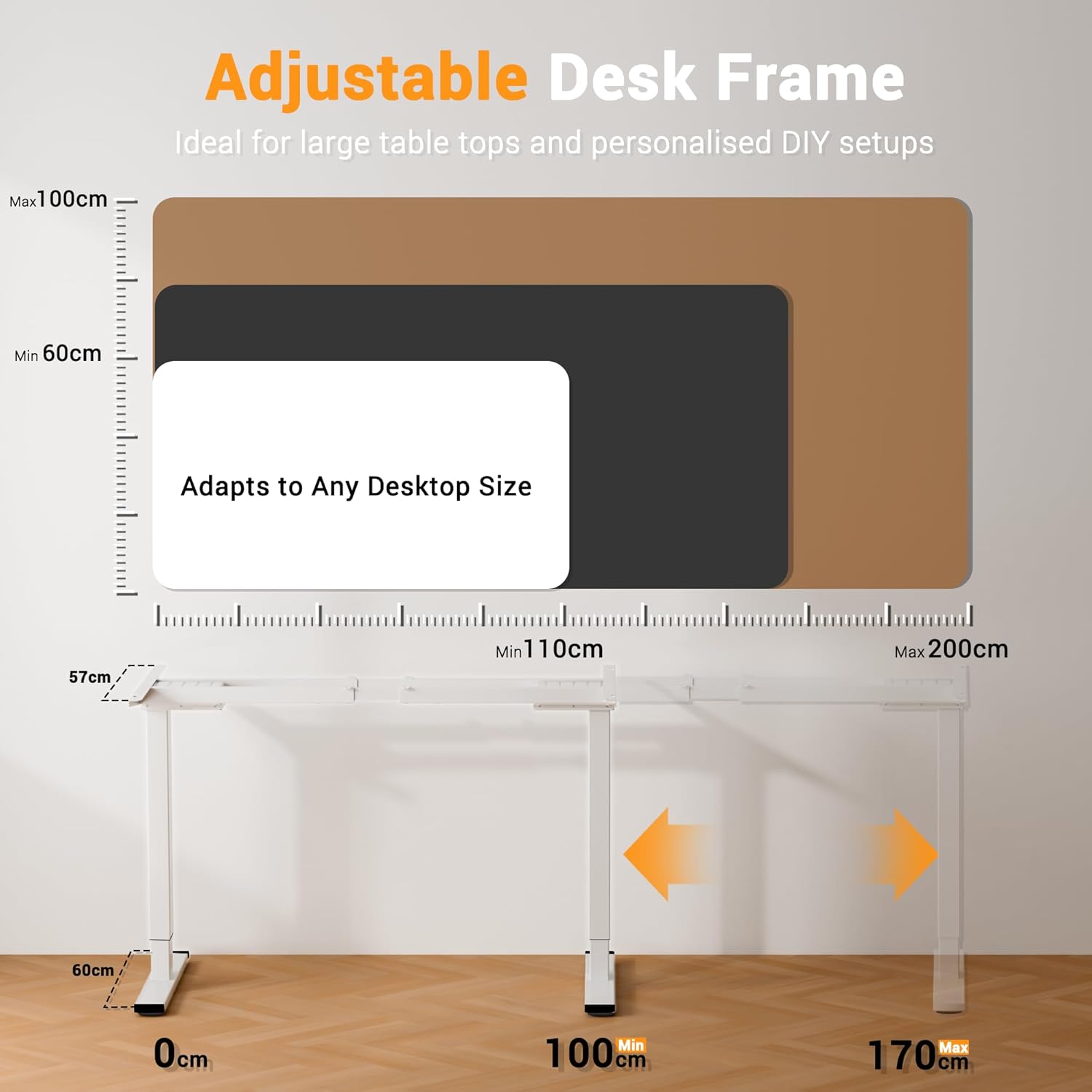
Image: Diagram detailing the adjustable desk frame, showing width adjustment from 100cm (39.4") to 170cm (67") and compatibility with various desktop sizes (Min 110cm to Max 200cm width, Min 60cm to Max 100cm depth).
4. Operating Instructions
The ERGOMAKER desk frame features electric height adjustment and a smart memory control panel for convenient operation.
4.1 Height Adjustment
- Press the UP (▲) or DOWN (▼) button on the control panel to adjust the desk height.
- The desk can be adjusted from 73 cm (28.7") to 120 cm (47.2").
- The dual motor system ensures smooth and quiet operation (<50dB) with a lifting speed of 25mm/s.

Image: Diagram illustrating the customizable height range from 73cm (28.7") to 120cm (47.2").
4.2 Memory Presets
The control panel allows you to save two preferred height settings.
- Adjust the desk to your desired height using the UP/DOWN buttons.
- Press the S button (Set).
- Immediately press either button 1 or 2 to save the current height to that memory position.
- To recall a saved height, simply press the corresponding memory button (1 or 2). The desk will automatically move to the saved position.
4.3 Childproof Lock
To activate the childproof lock, press and hold the S button for 5 seconds until 'LOC' appears on the LED display. To unlock, press and hold the S button again for 5 seconds.
4.4 Sit-Stand Reminder
The control panel includes a sit-stand reminder function to encourage regular movement. Consult the full manual for specific programming instructions for this feature.
4.5 Anti-Collision Function
The desk frame is equipped with an anti-collision system. If the desk encounters an obstacle during movement, it will automatically stop and reverse slightly to prevent damage.

Image: Close-up of the memory control panel, highlighting the LED display, UP/DOWN buttons, memory presets (1, 2), Set button (S), and USB-A/USB-C charging ports. Note: USB-C port is not compatible with iPhone 15 & 16.

Image: Diagram illustrating the anti-collision function, showing the ERGOMAKER desk reversing upon impact, unlike other desks that might continue to push against an obstacle.
5. Maintenance
Regular maintenance ensures the longevity and optimal performance of your ERGOMAKER standing desk frame.
- Cleaning: Wipe the desk frame with a soft, damp cloth. Avoid abrasive cleaners or solvents that could damage the finish.
- Cable Management: Periodically check that all cables are securely fastened and not interfering with the desk's movement.
- Fasteners: Occasionally check all screws and bolts to ensure they are tight. Do not overtighten.
- Weight Distribution: Ensure weight is evenly distributed on the desktop to prevent strain on the motors and frame.
6. Troubleshooting
If you encounter issues with your ERGOMAKER standing desk frame, refer to the following common troubleshooting steps:
| Problem | Possible Cause | Solution |
|---|---|---|
| Desk does not move or respond to controls. | Power cable disconnected; control box cable loose; overload protection activated. | Check all power and control cables for secure connections. Unplug the desk for 10 minutes, then plug back in to reset. Reduce weight on the desk. |
| Desk moves unevenly or makes unusual noises. | Uneven weight distribution; loose fasteners; obstruction. | Ensure weight is evenly distributed. Check and tighten all assembly screws. Inspect for any obstructions under or around the desk. |
| Anti-collision function triggers too easily or not at all. | Sensor sensitivity setting; obstruction. | Refer to the full manual for instructions on adjusting anti-collision sensitivity. Ensure no constant pressure or obstruction is near the desk's path. |
| Memory presets not saving or recalling correctly. | Incorrect saving procedure. | Follow the memory preset saving steps precisely: adjust height, press 'S', then immediately press '1' or '2'. |
If the issue persists after attempting these steps, please contact ERGOMAKER customer support for further assistance.
7. Specifications
| Feature | Detail |
|---|---|
| Brand | ERGOMAKER |
| Model Number | ED201-2R-WF |
| Colour | White |
| Material | Metal (Alloy Steel base) |
| Product Dimensions (Frame) | 26.5 x 104.5 x 23 cm (packaged); 60D x 140W x 73H Centimetres (assembled, minimum) |
| Item Weight | 21.2 kg |
| Height Adjustment Range | 73 cm (28.7") to 120 cm (47.2") |
| Width Adjustment Range | 100 cm (39.4") to 170 cm (67") |
| Motor Type | Dual Motor |
| Stages | 2-Stage Legs |
| Max Load Capacity | 80 kg (176 lbs) |
| Lifting Speed | 25 mm/s (1"/s) |
| Noise Level | <50dB |
| Control Panel Features | LED Display, 2 Memory Presets, Childproof Lock, Sit-Stand Reminder, USB-A & USB-C Charging Ports (USB-C not compatible with iPhone 15 & 16) |
| Safety Certifications | CE/UL/ROHS/EN527/PSE |
8. Warranty and Support
ERGOMAKER stands behind the quality of its products.
- Desk Frame Warranty: 5 years
- Motor, Handset & Power Adapter Warranty: 2 years
- Technical Support: Free lifetime technical support
For warranty claims, technical assistance, or any questions regarding your ERGOMAKER standing desk frame, please contact ERGOMAKER customer service. Refer to your purchase documentation for specific contact details.