
Introduction
Thank you for choosing the eazpower 3-in-1 Foldable Wireless Charging Station. This versatile device is designed to simultaneously charge your iPhone, Apple Watch, and AirPods, offering a convenient and clutter-free charging experience. Its foldable design makes it ideal for both home and travel use. This manual provides detailed instructions for setup, operation, maintenance, and troubleshooting to ensure optimal performance and longevity of your charging station.

The eazpower 3-in-1 Foldable Wireless Charging Station, showcasing its ability to charge multiple devices simultaneously.
What's in the Box
Please check the package contents upon unboxing:
- Multi device iPhone Wireless Charger Stand
- 20W Quick Charge Wall Charger
- USB Type C to C Cable
- User Manual
Setup Instructions
- Unpack the Charging Station: Carefully remove all components from the packaging.
- Connect the Power Adapter: Insert the USB Type-C end of the provided cable into the charging port on the back of the charging station.
- Connect to Power Outlet: Plug the 20W Quick Charge Wall Charger into a standard wall outlet. Ensure the connection is secure.
- Position the Station: Place the charging station on a flat, stable surface, such as a nightstand or desk. The station can be used in its folded, compact form or unfolded to provide a stand for your iPhone.

Optimize your space by consolidating multiple chargers into one compact unit.
Operating Instructions
Charging Your Devices
The eazpower charging station is designed for simultaneous charging of compatible Apple devices.
- iPhone Charging (MagSafe Compatible):
Place your MagSafe-compatible iPhone (iPhone 12 series and newer) onto the magnetic charging stand. The built-in magnets will ensure precise alignment for optimal charging. For iPhones without MagSafe or non-MagSafe cases, a MagSafe-compatible or magnetic case is required for proper magnetic alignment and charging.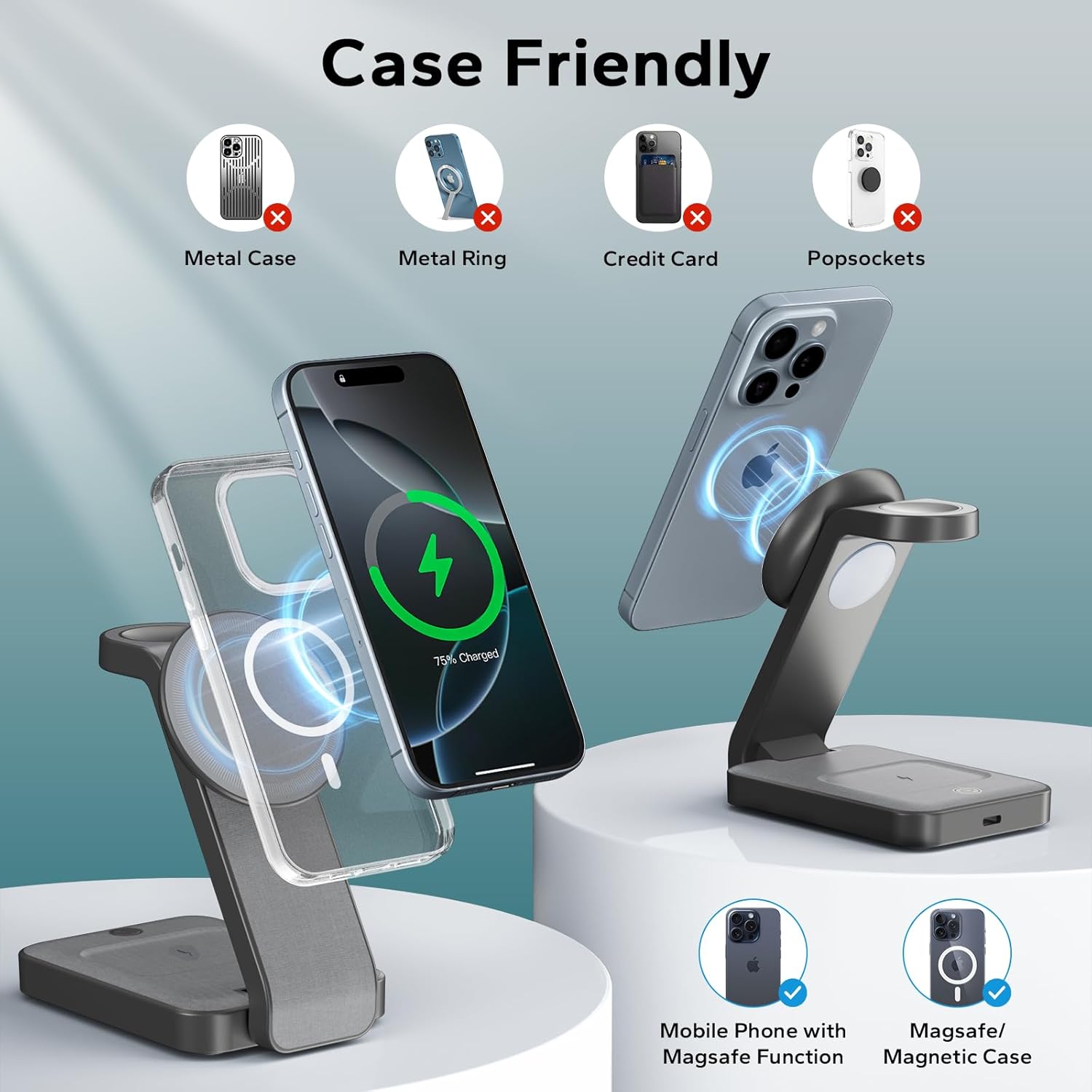
Ensure your iPhone has MagSafe functionality or is used with a MagSafe/magnetic case for proper charging.
- Apple Watch Charging:
Place your Apple Watch onto the dedicated magnetic charging puck. The watch will automatically align and begin charging. Compatible with Apple Watch Ultra 2/Ultra/10/9/8/7/6/5/4/3/2/SE. - AirPods Charging:
Place your AirPods (with a wireless charging case) onto the flat charging pad at the base of the station. Ensure the charging case is properly centered on the pad for efficient charging. Compatible with AirPods Pro 2/Pro/4/3/2 (with wireless charging case).
Adjustable Night Light
The charging station features a 3-level adjustable LED nightlight.
- Turning On/Off: Lightly touch the designated touch switch on the base of the charging station to turn the nightlight on or off.
- Adjusting Brightness: Continue touching the switch to cycle through the three brightness levels (low, medium, high). Release your finger when the desired brightness is reached.

Easily control the night light's brightness with a simple touch.
StandBy Mode Support
When your iPhone is placed horizontally on the magnetic charging stand and running iOS 17 or later, it will automatically enter StandBy Mode, transforming your device into a smart display for clocks, widgets, and Live Activities.

Utilize StandBy Mode for a convenient nightstand clock and information display.
Compatibility
This charging station is designed for a wide range of devices:
- Compatible Devices: iPhone 16 Pro Max, iPhone 16 Pro, iPhone 16 Plus, iPhone 16, iPhone 16e, iPhone 15 Pro Max, iPhone 15 Pro, iPhone 15 Plus, iPhone 15, iPhone 14 Pro Max, iPhone 14 Pro, iPhone 14 Plus, iPhone 14, iPhone 13 Pro Max, iPhone 13 Pro, iPhone 13, iPhone 13 mini, iPhone 12 Pro Max, iPhone 12 Pro, iPhone 12, iPhone 12 mini, Apple Watch Ultra 2/Ultra/10/9/8/7/6/5/4/3/2/SE, AirPods Pro 2/Pro/4/3/2 (with wireless charging case).
- Compatible Phone Models (additional): iPhone 11 Pro Max, iPhone 11 Pro, iPhone 11, iPhone SE (2nd generation), iPhone XS MAX, iPhone XS, iPhone XR, iPhone X, iPhone 8 Plus, iPhone 8, Samsung S25 Ultra, S25+, S25, S24 Ultra, S24+, S24, S23, S22, S22+, S22 Ultra, S21 FE, Z Fold 4, Z Flip 4, Z Fold 3, Z Flip 3, S21, S21 Ultra, S20, S20 Ultra, S10, Note 10, Note 9 and more.

Overview of device compatibility and charging speeds.
Maintenance
To ensure the longevity and optimal performance of your charging station, follow these maintenance guidelines:
- Cleaning: Disconnect the power before cleaning. Use a soft, dry, lint-free cloth to wipe the surface of the charging station. Do not use abrasive cleaners, solvents, or chemical sprays, as these may damage the finish or internal components.
- Storage: When not in use for extended periods, store the charging station in a cool, dry place, away from direct sunlight and extreme temperatures. Its foldable design allows for compact storage.
- Cable Care: Avoid bending or crimping the charging cable excessively. Always grasp the plug, not the cable, when disconnecting from the power source or the charging station.
Troubleshooting
If you encounter issues with your charging station, please refer to the following common problems and solutions:
| Problem | Possible Cause | Solution |
|---|---|---|
| Device not charging | Loose connection, incompatible case, misaligned device, non-wireless charging case (AirPods) | Ensure all cables are securely connected. Remove any non-MagSafe or metal cases. Re-position the device to ensure proper alignment with the charging coil. Verify AirPods case supports wireless charging. |
| Charging is slow | Using a non-20W adapter, background apps, device overheating | Use the provided 20W Quick Charge Wall Charger. Close unnecessary background applications on your device. Ensure proper ventilation around the charging station. |
| Night light not working | No power, faulty touch sensor | Check power connection. Lightly touch the sensor multiple times. If the issue persists, contact customer service. |
| Overheating during charging | Poor ventilation, foreign objects, excessive load | Ensure the charging station is placed in a well-ventilated area. Remove any foreign objects between the device and the charging pad. The station has built-in overheating protection; if it gets too hot, it may temporarily stop charging. |
Safety Information
The eazpower charging station is equipped with multiple protection features to ensure safe and efficient charging:
- Overvoltage Protection: Protects against excessive voltage input.
- Overcurrent Protection: Safeguards against excessive current flow.
- Short Circuit Protection: Prevents damage from short circuits.
- Overheating Protection: Monitors temperature to prevent overheating.
- Foreign Object Detection: Detects metal objects on the charging pad to prevent damage and ensure safety.

Advanced safety features are integrated for reliable charging.
Specifications
| Feature | Detail |
|---|---|
| Product Dimensions | 2.7 x 1.5 x 5.4 inches (folded) |
| Item Weight | 7.2 ounces |
| Model Number | SR6 |
| Brand | eazpower |
| Connectivity Technology | USB |
| Connector Type | USB Type C |
| Input Voltage | 12 Volts |
| Mounting Type | Tabletop Mount |
| Color | Gray |
| Special Features | Bedside Nightstand Multi Device Charging, Fast Charging, Magnetic MagSafe Compatible, Travel, Wireless Charging |
Warranty and Support
eazpower is committed to providing high-quality products and excellent customer service.
- Warranty: This product comes with a 12-month warranty from the date of purchase. Please retain your proof of purchase for warranty claims.
- Customer Service: If you have any questions, concerns, or require assistance with your eazpower 3-in-1 Foldable Wireless Charging Station, please do not hesitate to contact our customer service team. We are dedicated to providing prompt and satisfied solutions.

24/7 Customer Service

30 Days Return & Refund
Official Product Videos
No official product videos from the seller are available in the provided data for embedding.