
CQCQ VGP-BPS34
CQCBD VGP-BPS2C Laptop Battery User Manual
Brand: CQCQ | Model: VGP-BPS34
1. Introduction
This user manual provides essential information for the safe and efficient use of your CQCBD VGP-BPS2C Laptop Battery. Please read this manual thoroughly before installation and operation to ensure optimal performance and longevity of your battery.
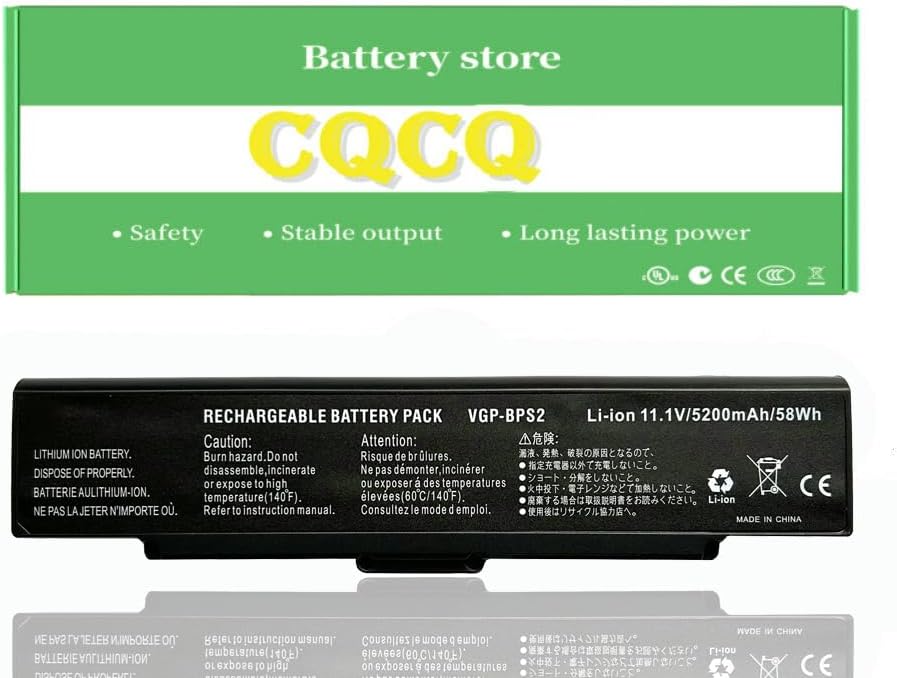
Figure 1.1: Front view of the CQCBD VGP-BPS2C Laptop Battery. This image shows the sleek, black design of the battery, highlighting its compact form factor suitable for various laptop models.
2. Product Specifications
| Specification | Detail |
|---|---|
| Battery Type | Li-ion |
| Voltage | 11.1V |
| Capacity | 4400mAh / 49Wh |
| Condition | 100% Brand New |
| Certifications | FCC / CE / RoHS Certified |
| Package Dimensions | 10.6 x 4 x 0.9 inches |
| Item Weight | 11.2 ounces |
| Model Number | VGP-BPS34 |
| Manufacturer | Foshan Eurasia Energy Technology Co., Ltd. |
3. Compatibility
This CQCBD laptop battery is compatible with a wide range of Sony VAIO laptop models and part numbers. Please verify your laptop model or existing battery part number against the lists below to ensure compatibility.
3.1 Compatible Part Numbers:
- VGP-BPS2
- VGP-BPS2A
- VGP-BPS2A/S
- VGP-BPS2B
- VGP-BPS2C
- VGP-BPL2
- VGP-BPL2C
3.2 Compatible Laptop Models (Partial List):
Due to the extensive list, only a partial list is provided here. For a complete list, please refer to the product description on the retail page or use "Ctrl+F" to search for your model.
- Sony VAIO AR Series: AR130, AR130G, AR150FG, AR170, AR170GU1, AR190, AR230G, AR250G, AR270, AR290FG, AR370, AR390E, AR590E, AR70B, AR72DB, AR80PS, AR90S, etc.
- Sony VAIO C Series: C110G/W, C120G/W, C130G/W, C140G, C150P, C190G, C190P, etc.
- Sony VAIO FE Series: FE550FM, FE570G, FE590, FE650FM, FE670G, FE690, FE770, FE780, FE790, etc.
- Sony VAIO FJ Series: FJ150, FJ170/B, FJ180, FJ230, FJ240, FJ250, FJ270, FJ290, FJ340, FJ370, etc.
- Sony VAIO FS Series: FS15SP, FS18SP, FS25SP, FS28SP, FS35SP, FS38SP, FS500, FS520B, FS540P, FS550, FS570, FS610, FS615, FS620, FS6230F, FS625, FS630, FS635B, FS640, FS645P, FS650F, FS655, FS660, FS670, FS675, FS680, FS690, FS710, FS715, FS720, FS730, FS740FP, FS740Q, FS742, FS745P, FS750F, FS750P, FS755, FS770, FS775P, FS780, FS790, FS810, FS812, FS815, FS830, FS840, FS850, FS875P, FS8900, FS920, FS930, FS940, FS950, FS960, FS965, FS970, FS980, FS985, FS990, etc.
- Sony VAIO N Series: N110G, N120G, N130, N150G, N170, etc.
- Sony VAIO PCG Series: PCG-6C1N, PCG-6P1L, PCG-6P1P, PCG-6P2L, PCG-6P2P, PCG-792L, etc.
- Sony VAIO S Series: S150, S16SP, S170, S18SP, S240P, S250F, S250FP, S260, S26SP, S270, S28SP, S350F, S360, S36SP, S370F, S380, S38SP, S430P/S, S450F, S460/B, S460F, S460P/B, S470P/S, S47SP, S480, S550P, S55SP, S560F, S560P, S570P, S57SP, S580, S660, SZ110, SZ120P, SZ140, SZ150P, SZ160P, SZ170, SZ210P, SZ220/B, SZ230P, SZ240, SZ250, SZ260, SZ270P, SZ280P, SZ281, SZ320P, SZ330P, SZ340, SZ360P, SZ370P, SZ381P, SZ390, etc.
- Sony VAIO VGC Series: VGC-LA38C, VGC-LA38C/S, VGC-LA38G, VGC-LA38T, VGC-LB50, VGC-LB50B, VGC-LB51, VGC-LB51B, VGC-LB52B, VGC-LB52HB, VGC-LB53B, VGC-LB53HB, VGC-LB61B/P, VGC-LB62B/P, VGC-LB62B/W, VGC-LB63B/L, VGC-LB63B/P, VGC-LB63B/W, VGC-LB90S, VGC-LB91S, VGC-LB92HS, VGC-LB92S, VGC-LB93HS, VGC-LB93S, etc.
- Sony VAIO VGN Series: VGN-AR, VGN-AR11, VGN-AR11S, VGN-AR130G, VGN-AR150G, VGN-AR170, VGN-AR170GU1, VGN-AR170PU2, VGN-AR18CP, VGN-AR18GP, VGN-AR18TP, VGN-AR190G, VGN-AR21, VGN-AR21B, VGN-AR21M, VGN-AR21S, VGN-AR230G, VGN-AR250G, VGN-AR25GP, VGN-AR270, VGN-AR28GP, VGN-AR290FG, VGN-AR290G, VGN-AR31E, VGN-AR31M, VGN-AR31S, VGN-AR320E, VGN-AR370, VGN-AR38C, VGN-AR38G, VGN-AR390E, VGN-AR390FG, VGN-AR50B, VGN-AR51DB, VGN-AR52DB, VGN-AR590E, VGN-AR70B, VGN-AR72DB, VGN-AR80PS, VGN-AR80S, VGN-AR81PS, VGN-AR81S, VGN-AR82PS, VGN-AR82S, VGN-AR82US, VGN-AR90PS, VGN-AR90S, VGN-AR91PS, VGN-AR91S, VGN-AR92PS, VGN-AR92S, VGN-AR92US, VGN-C, VGN-C11C, VGN-C11C/B, VGN-C11C/G, VGN-C11C/H, VGN-C11C/P, VGN-C11C/W, VGN-C12C, VGN-C12C/B, VGN-C12C/W, VGN-C12GPW, VGN-C13G/H, VGN-C140F, VGN-C140FP, VGN-C140G/B, VGN-C140QG/B, VGN-C150P/B, VGN-C15GP/B, VGN-C15GPB, VGN-C15TP/B, VGN-C15TP/W, etc.
4. Safety Information and Precautions
Your CQCBD laptop battery is designed with multiple safety features. However, it is crucial to follow these safety guidelines to prevent damage, injury, or fire.

Figure 4.1: Intelligent Security Technology features. This image illustrates the various protection mechanisms built into the battery, including antistatic impact, temperature anomaly, short circuit, overcurrent, voltage, overpower, discharge, electromagnetic safety, chip monitoring, power protection, and reserve protection.
- Do not disassemble, incinerate, or expose to high temperatures (140°F / 60°C).
- Do not short circuit the battery terminals.
- Keep the battery away from water or other liquids.
- Dispose of properly according to local regulations. Lithium-ion batteries should not be disposed of with general waste.
- Avoid dropping or subjecting the battery to strong mechanical shocks.
- If the battery shows signs of swelling, leakage, or damage, discontinue use immediately and contact support.
- Use only with compatible laptop models and chargers.
Figure 4.2: Warning labels on the battery. This image displays the caution and attention warnings printed on the battery itself, advising against disassembly, incineration, and exposure to high temperatures, and emphasizing proper disposal.
5. Setup and Installation
Before installing your new CQCBD laptop battery, ensure your laptop is powered off and disconnected from the AC adapter. Refer to your laptop's specific user manual for detailed instructions on battery removal and installation, as procedures may vary by model.
5.1 Identifying Your Laptop Battery Model:
If you are unsure of your laptop's exact model or compatible battery part number, you can often find this information through your operating system:
- Press Windows key + R on your keyboard to open the Run dialog box.
- Type msinfo32 and click OK. This will open the System Information window.
- In the System Information window, locate the "System Model" entry. This will provide your laptop's model number, which can then be cross-referenced with the compatibility list.

Figure 5.1: Steps to find your laptop's system model. This visual guide demonstrates how to use the 'msinfo32' command in Windows to identify your laptop's model number, which is crucial for ensuring battery compatibility.
5.2 Installation Steps (General):
- Power off your laptop completely and disconnect the AC adapter.
- Close the laptop lid and turn it upside down on a soft, clean surface.
- Locate the battery compartment. Most laptops have latches or screws securing the battery.
- If replacing an old battery, release the latches or unscrew the retaining screws and carefully remove the old battery.
- Align the new CQCBD battery with the battery slot. Ensure the connectors are properly aligned.
- Gently push the battery into place until it clicks or is securely seated. If there are latches, ensure they lock the battery in. If there are screws, fasten them.
- Turn the laptop back over and connect the AC adapter.
- Power on your laptop. The system should recognize the new battery.
6. Operating Instructions
For optimal performance and battery health, follow these operating guidelines:
- Initial Use: For the first use, it is recommended to fully charge the battery to 100%, then discharge it to about 5-10% before fully recharging it. Repeat this cycle 2-3 times to calibrate the battery.
- Charging: Always use the original or a certified compatible AC adapter for charging. Avoid using unapproved chargers.
- Discharging: Avoid completely draining the battery to 0% frequently, as this can reduce its lifespan. Aim to recharge when the battery level drops to 10-20%.
- Temperature: Operate your laptop and battery within normal room temperatures. Extreme heat or cold can negatively impact battery performance and lifespan.
- Storage: If storing the battery for an extended period, charge it to about 50-60% and store it in a cool, dry place. Recharge it every 3-6 months to prevent deep discharge.
7. Maintenance and Care
Proper maintenance can significantly extend the life of your CQCBD laptop battery:
- Clean Contacts: Periodically clean the battery contacts on both the battery and the laptop with a dry, lint-free cloth to ensure good connection.
- Software Updates: Keep your laptop's operating system and drivers updated, as power management software improvements can optimize battery usage.
- Avoid Physical Damage: Protect the battery from drops, impacts, and punctures.
- Ventilation: Ensure your laptop has proper ventilation to prevent overheating, which can degrade battery performance.

Figure 7.1: Internal components of the battery. This image highlights the high-quality circuit board and individual battery cells, emphasizing features like smooth operation, efficient conversion, short circuit rejection, and prevention of overheating, contributing to longer discharge time and more charging cycles.
8. Troubleshooting
If you encounter issues with your CQCBD laptop battery, try the following troubleshooting steps:
| Problem | Possible Cause / Solution |
|---|---|
| Battery not recognized by laptop |
|
| Battery not charging |
|
| Short battery life |
|
| Battery overheating |
|
9. Warranty and Support
For warranty information, technical support, or any inquiries regarding your CQCBD VGP-BPS2C Laptop Battery, please contact the seller or manufacturer directly through the platform where you purchased the product.
Manufacturer: Foshan Eurasia Energy Technology Co., Ltd.
Refer to your purchase receipt or the product listing for specific warranty terms and contact details.