
LIWAN RBX-S40
LIWAN 4G LTE Cellular Security Camera User Manual
Model: RBX-S40
1. Introduction
Thank you for choosing the LIWAN 4G LTE Cellular Security Camera. This wireless outdoor camera is designed for locations without traditional WiFi or power access, offering robust security monitoring through 4G LTE connectivity and solar power. It provides 2K high-definition video, color night vision, 360-degree panoramic coverage, motion detection, and two-way audio communication. This manual will guide you through the installation, operation, and maintenance of your new security camera system.
Key Features:
- No WiFi or external power needed: Operates via 4G LTE and solar power with a built-in rechargeable battery.
- 2K HD Resolution & Color Night Vision: Provides clear images day and night.
- 360° Panoramic Coverage: Pan 355° and Tilt 100° for comprehensive monitoring.
- PIR Motion Detection & Two-Way Audio: Receive alerts and communicate remotely.
- Local & Cloud Storage: Includes a 128GB memory card and offers a 30-day free trial for cloud storage.
- IP65 Waterproof: Durable design for outdoor use in various weather conditions.
2. What's in the Box
Please verify that all components are present and in good condition upon unpacking:
- LIWAN 4G LTE Cellular Security Camera (2 units)
- Solar Panel (2 units)
- 128GB Memory Card (2 units, pre-installed or included)
- SIM Card (2 units, pre-installed or included, with 300MB trial data)
- Mounting Bracket and Screws
- USB Charging Cable
- User Manual

Image: Contents of the LIWAN 4G LTE Cellular Security Camera package.
3. Setup and Installation
3.1 SIM Card and Memory Card Insertion
Your camera comes with a pre-installed 128GB memory card and a SIM card. If not pre-installed, locate the card slots on the camera body, typically protected by a rubber seal. Insert the SIM card and memory card as indicated by the diagrams or markings near the slots. Ensure the rubber seal is securely closed after insertion to maintain the IP65 waterproof rating.
3.2 Charging the Camera
Before initial use, fully charge the camera's built-in battery using the provided USB charging cable. Connect the cable to the camera's charging port and a standard USB power adapter (not included). The charging indicator light will show the charging status.
3.3 App Download and Account Registration
Download the UBox app from your smartphone's app store (iOS App Store or Google Play Store). Follow the on-screen instructions to register a new account or log in if you already have one.
3.4 Camera Pairing with App
- Open the UBox app and tap 'Add Device' or the '+' icon.
- Select '4G Camera' or the appropriate device type.
- Follow the app's instructions to power on the camera. The camera will enter pairing mode, indicated by a specific light pattern or voice prompt.
- Scan the QR code on the camera (if prompted) or manually enter the device ID.
- Once connected, you can name your camera and configure initial settings.
3.5 Mounting the Camera
The camera supports two mounting methods: integrated solar panel mounting or separate solar panel mounting. Choose the method that best suits your installation environment to ensure optimal sunlight exposure for the solar panel.
- Integrated Mounting: Attach the solar panel directly to the camera body. This is suitable for locations where the camera itself can be positioned to receive ample sunlight.
- Separate Mounting: Use the 9.8ft extension cord to mount the solar panel in a location with maximum sunlight, independent of the camera's position. This is ideal for shaded camera locations.
Use the provided mounting bracket and screws to securely attach the camera to a wall or pole. Ensure the camera has a clear line of sight to the area you wish to monitor.

Image: Camera mounted with integrated solar panel, highlighting 4G LTE connectivity.
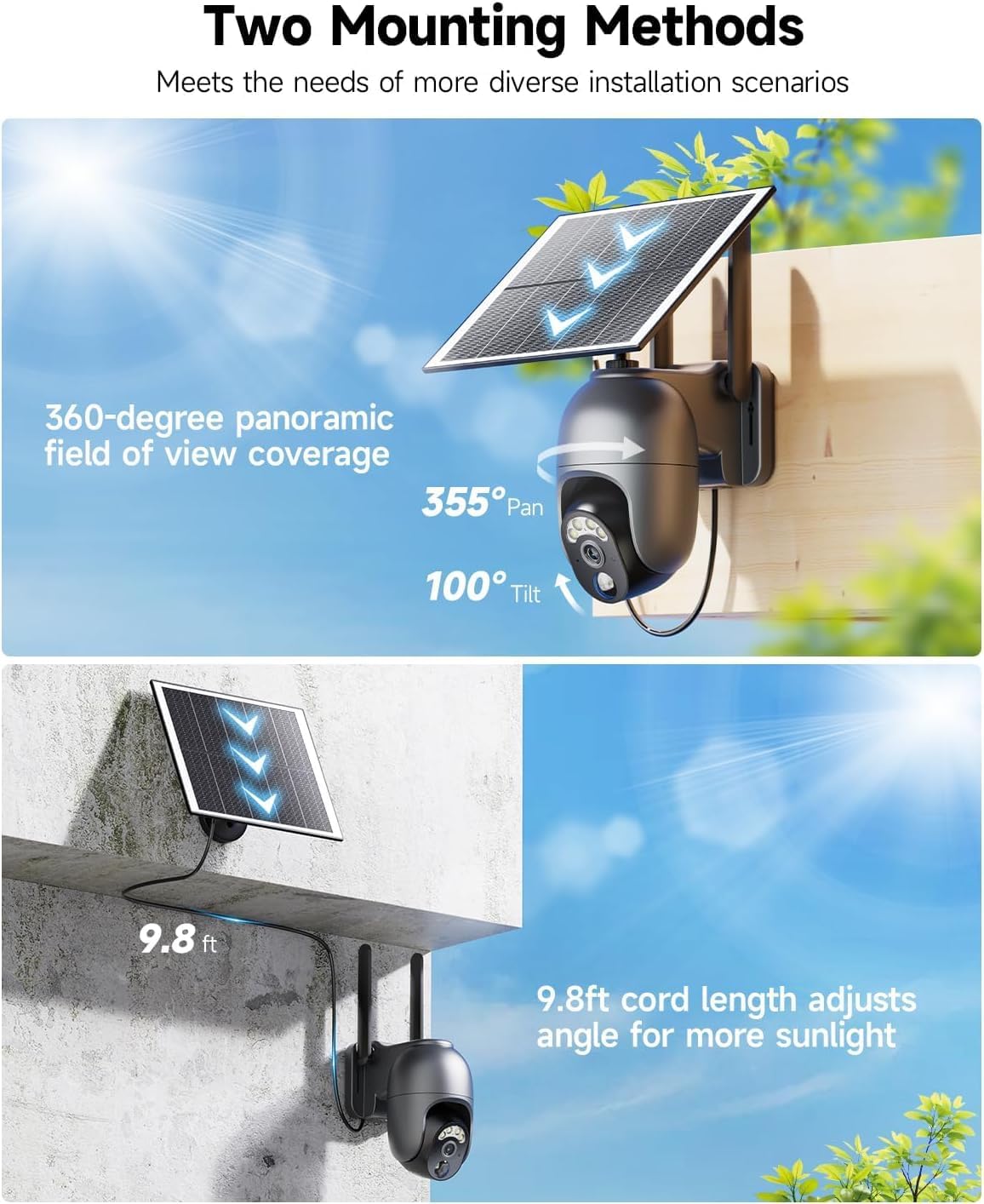
Image: Illustration of integrated and separate mounting options for the camera and solar panel.
4. Operating Your Camera
4.1 Live View and Panoramic Control
Access the UBox app to view the live feed from your camera. Use the on-screen controls to pan the camera 355° horizontally and tilt it 100° vertically, allowing you to cover a wide area without blind spots. The 2K resolution provides clear and detailed images.

Image: Demonstrates the clarity of 2K high-definition video.
4.2 Color Night Vision
The camera features color night vision, providing high-definition images with rich colors even in low-light conditions. When motion is detected at night, the built-in spotlight can activate to illuminate the area, enabling full-color recording. You can configure this setting within the UBox app.

Image: Illustrates the difference between color night vision and infrared night vision.
4.3 PIR Motion Detection and Alerts
The Passive Infrared (PIR) motion sensor accurately detects human and animal movement, minimizing false alarms. When motion is detected, the camera will immediately send an alarm notification to your smartphone via the UBox app. You can also configure the camera to activate a siren or spotlight upon detection.

Image: Features of PIR motion detection, including alerts and two-way audio.
4.4 Two-Way Audio
With the built-in microphone and speaker, you can engage in real-time two-way conversations through the camera. This allows you to communicate with visitors, deter intruders, or simply check in on your property from anywhere.
4.5 Video Playback and Storage
Recorded videos are saved to the included 128GB memory card. You can access and playback these recordings anytime, anywhere, through the UBox app. Additionally, a 30-day free trial of cloud storage is available for convenient off-site backup of your footage.

Image: Details on video playback and storage options.
5. Maintenance
- Cleaning: Regularly wipe the camera lens and solar panel with a soft, damp cloth to ensure clear images and efficient solar charging. Avoid abrasive cleaners.
- Battery Life: The solar panel continuously recharges the built-in battery. Ensure the solar panel is positioned to receive maximum direct sunlight throughout the day.
- Firmware Updates: Check the UBox app periodically for firmware updates. Keeping your camera's firmware up-to-date ensures optimal performance and security.
- IP65 Waterproof: The camera is designed to withstand outdoor elements. Ensure all ports and covers are securely sealed to maintain its waterproof integrity.
6. Troubleshooting
| Problem | Possible Cause | Solution |
|---|---|---|
| Camera not connecting to 4G network | No 4G signal; SIM card not inserted correctly; SIM card data plan expired. | Check 4G signal strength at installation location; Reinsert SIM card; Renew data plan via UBox app. |
| Battery not charging | Insufficient sunlight on solar panel; Dirty solar panel; Faulty charging cable. | Reposition solar panel for direct sunlight; Clean solar panel; Try a different USB charging cable. |
| Frequent false alarms | PIR sensitivity too high; Environmental factors (e.g., swaying branches, strong winds). | Adjust PIR sensitivity settings in the UBox app; Reposition camera to avoid common false alarm triggers. |
| No video recording | Memory card full or faulty; Cloud storage trial expired. | Check memory card status in app, format or replace if needed; Subscribe to cloud storage plan. |
| Two-way audio not working | Microphone/speaker muted in app; Network issues. | Ensure audio is enabled in UBox app; Check network connection. |
7. Specifications
| Feature | Detail |
|---|---|
| Model Name | 4G camera |
| Item Model Number | RBX-S40 |
| Brand | LIWAN |
| Connectivity Technology | Wireless (4G LTE Cellular) |
| Power Source | Solar Powered |
| Video Capture Resolution | 2K |
| Pan/Tilt Range | 355° Horizontal, 100° Vertical |
| Night Vision | Color Night Vision |
| Storage | 128GB Memory Card (included), Cloud Storage (30-day free trial) |
| Waterproof Rating | IP65 |
| Dimensions (L x W x H) | 5.71 x 2.76 x 4.72 inches |
| Item Weight | 5.03 pounds |
| Included Components | Camera, Solar Panel, Memory Card, SIM Card |
8. Warranty and Support
LIWAN products are manufactured with high-quality standards. For specific warranty details and terms, please refer to the warranty card included with your product packaging or visit the official LIWAN website. Keep your purchase receipt as proof of purchase for warranty claims.
For technical support, troubleshooting assistance, or any inquiries regarding your LIWAN 4G LTE Cellular Security Camera, please contact LIWAN customer service through the contact information provided on the product packaging or the official LIWAN website. Please have your model number (RBX-S40) and purchase details ready when contacting support.