
1. Important Safety Information
Please read and understand all safety instructions before operating the pump. Failure to follow these instructions may result in electric shock, fire, serious injury, or death.
- Electrical Safety: Always ensure the power supply matches the pump's voltage (115 Volts). Use a grounded outlet. Do not operate the pump with a damaged cord or plug. Never pull the pump by its power cord.
- Water Safety: This pump is designed for water. Do not use it for flammable or corrosive liquids. Ensure the pump is fully submerged during operation to prevent dry running and overheating.
- Personal Safety: Keep hands, feet, and clothing away from the pump's intake and discharge openings while it is operating. Always unplug the pump before performing any maintenance or cleaning.
- Children and Pets: Keep children and pets away from the pump and any water being pumped.
2. Setup Instructions
2.1 Unpacking and Inspection
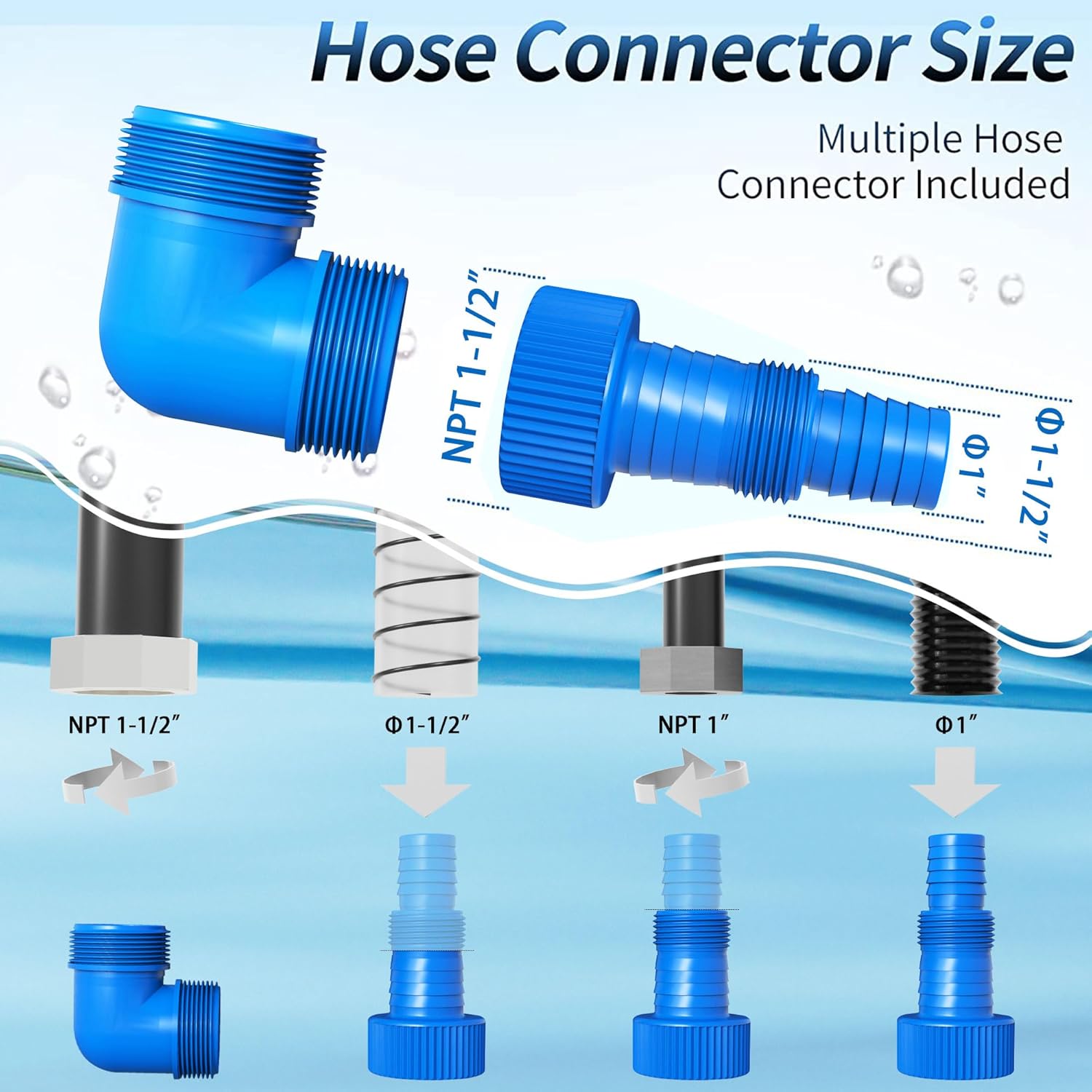
Carefully remove the pump and all accessories from the packaging. Inspect for any damage. The package should include: 1*10FT Power Cord, 1*Manual, 1*Multi Hose Adapter, 1*NPT1-1/2".
2.2 Attaching the Discharge Hose
The pump comes with NPT 1-1/2" and GHT 3/4" discharge ports, and a multi-hose adapter that fits Φ1-1/2", Φ1-1/4", Φ1", GHT3/4" or NPT 1" hoses. Select the appropriate adapter for your hose and securely attach it to the pump's discharge port.
2.3 Positioning the Pump
Place the pump on a level and solid foundation in the area to be drained. Ensure the intake is clear of debris. The pump can handle solids up to 1.5 inches in diameter. The maximum submersible depth is 14 feet.

2.4 Adjusting the Float Switch
The pump features a float switch for automatic or manual operation. The float switch automatically starts or stops the pump based on water level. For permanent operation (manual mode), the float switch can be fixed in an uplifted position using the clip on the handle.

Video: Float Switch Adjustment and Cleaning. This video demonstrates how to adjust the float switch for manual operation and how to clean the pump's base, which is crucial for maintaining pump efficiency and preventing issues like humming without pumping.
3. Operating Instructions
3.1 Initial Operation
- Ensure the discharge hose is securely attached and directed to a suitable drainage area.
- Submerge the pump completely in the water.
- Plug the pump into a grounded 115 Volt power outlet. The pump will begin operating if the float switch is in the 'on' position (either floating freely in sufficient water or fixed in the upright position for manual mode).

Video: Sump Pump in Action. This video illustrates the FOTING Sump Pump being lowered into a well and effectively pumping water for garden irrigation, showcasing its practical application and strong water flow.
3.2 Automatic Mode
In automatic mode, the float switch will rise with the water level. When the water reaches a certain height (approximately 23.6 inches), the pump will automatically start. As the water level drops (to approximately 5.9 inches), the float switch will lower, and the pump will automatically shut off.
3.3 Manual Mode
To operate the pump continuously, secure the float switch in the upright position using the clip on the handle. The pump will run until unplugged. Monitor the water level to prevent dry running, which can damage the motor.
Video: Manual Sump Pump Operation. This video demonstrates the FOTING Sump Pump operating in manual mode within a container, highlighting the continuous pumping action when the float switch is secured.
4. Maintenance
4.1 Cleaning the Pump Base and Impeller
The pump features a removable base for easy cleaning. Regularly clean the base and impeller to prevent debris buildup, which can reduce efficiency or cause the pump to hum without pumping. To clean, turn off and unplug the pump, then remove the bottom cover by unscrewing the fasteners. Rinse away any accumulated dirt or debris.

4.2 Thermal Overload Protection
The pump has a built-in automatic thermal overload protector that will shut off the motor if it overheats, for example, due to dry running or excessive debris. If the pump shuts off, unplug it, allow it to cool down, and check for any blockages before restarting.
5. Troubleshooting
- Pump Hums but Does Not Pump Water:
1. Turn off and unplug the pump. Remove the bottom cover and check for debris obstructing the impeller. Clean thoroughly.
2. Ensure the float switch is not stuck in the 'off' position. - Pump Does Not Start:
1. Check the power connection and ensure the outlet is functional.
2. Verify the float switch is not stuck in the 'off' position or that the water level is sufficient for automatic mode. - Reduced Water Flow:
1. Check the discharge hose for kinks or blockages.
2. Inspect the pump intake and impeller for debris. - Float Switch Malfunction:
If the float switch appears stuck or does not activate correctly, ensure it moves freely and is not obstructed by debris.
6. Specifications
| Feature | Specification |
|---|---|
| Brand | FOTING |
| Model Number | Q900B237M |
| Horsepower | 1.5 HP |
| Maximum Flow Rate | 6300 GPH (105 GPM) |
| Maximum Lifting Height | 35 Feet |
| Voltage | 115 Volts |
| Power Source | AC |
| Material | Thermoplastic |
| Max. Solids Handling | 1.5 inches |
| Minimum Water Level (Auto Off) | 1.5 inches |
| Product Dimensions | 6.25"L x 6.25"W x 14.09"H |
| Item Weight | 12.91 pounds |
| Cord Length | 10 feet |
| Waterproof Rating | IPX8 |
7. Warranty and Support
FOTING provides a 3-year warranty for this product. For technical support or any inquiries, please contact FOTING customer service. They are available to provide professional assistance and ensure your water system remains stable.

