1. Product Overview
The SAMTRONIK Retro Arcade Handheld Console is a portable gaming system designed to deliver a classic arcade experience. Featuring a 14-inch HD display and a built-in library of 5000 games, this console offers extensive connectivity options for various display devices and supports multiple players. Its compact, all-metal design allows for easy transport and setup in diverse environments.
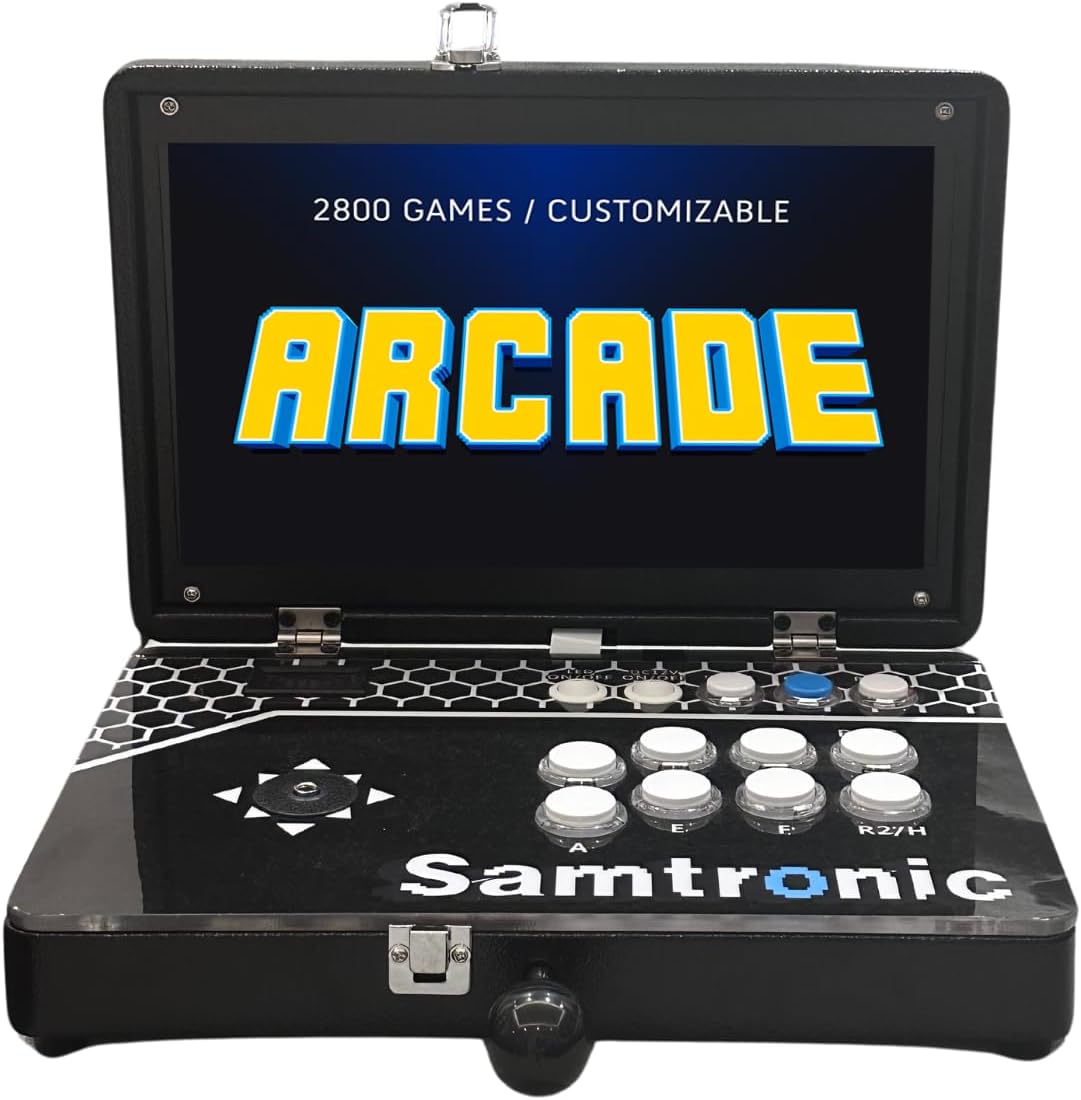
Figure 1.1: The SAMTRONIK Retro Arcade Handheld Console in its open configuration, showcasing the integrated display and control panel.
2. Safety Information
Please read and adhere to the following safety guidelines to ensure safe operation and prevent damage to the device or injury to users:
- For external use only.
- Avoid exposure to water or moisture. Use only in dry locations.
- Unplug the console from the power source before cleaning.
- Use a dry cloth for cleaning; do not use liquid or aerosol cleaners.
- This console is not recommended for children under 8 years of age.
- Adult supervision is advised for younger players to ensure safe and appropriate use.
3. Package Contents
Verify that all items listed below are included in your package:
- 1 x Game Console Body
- 1 x Power Adapter
- 2 x Replacement Buttons
- 1 x External Controller
- 1 x User Manual
- 1 x US Plug
4. Product Features
- Portable All-Metal Design: Transforms into a compact suitcase for easy travel and outdoor use.
- 14-inch HD Display: Provides an enhanced visual experience with 1280x720 resolution for detailed graphics.
- Extensive Game Library: Access 5000 classic arcade games with search, save, load, and favorite list functions.
- Versatile Connectivity: Includes HDMI for 4K TV connections, VGA for projectors, and USB ports for external controllers.
- Customizable Gaming Experience: Features adjustable operation buttons, language settings, unique graphic customization, reverse position, and a colorful, alternating backlight.

Figure 4.1: The console in its closed, portable suitcase form, highlighting its compact design.

Figure 4.2: Bottom view of the console, illustrating its sturdy construction and ventilation.
5. Setup
- Unpack the Console: Carefully remove all components from the packaging.
- Position the Joystick: The joystick serves as a handle when the console is closed. To use, take out the joystick from its storage position and insert it into the designated port on the control panel.
- Connect Power: Insert the power adapter into the DC IN port on the rear of the console, then plug it into a standard electrical outlet.
- Power On: Locate the power switch on the control panel and slide it to the 'ON' position. The screen will illuminate.

Figure 5.1: Control panel layout and key functions for initial setup and operation.
6. Operating Instructions
6.1 Game Navigation
- Use the joystick to navigate through the game menus.
- Press the 'A' button (or equivalent action button) to select a game or confirm an action.
- Press the 'B' button (or equivalent back button) to return to the previous menu.
6.2 Game Functions
- Search: Use the search function to quickly find games by name or genre.
- Save/Load: The console supports saving and loading game progress. Refer to the on-screen prompts within individual games for specific instructions.
- Favorite List: Add frequently played games to a favorite list for quick access.
- Pause: Press the 'PAUSE' button to temporarily halt gameplay.
- Coin: Press the 'COIN' button to simulate inserting a coin, typically required to start or continue arcade games.
7. Connectivity
The console offers various ports for connecting to external displays and controllers:
- HDMI Port: Connect an HDMI cable from the console to an HDMI-enabled TV or monitor for high-definition output, supporting up to 4K resolution.
- VGA Port: Connect a VGA cable to a projector or older monitor.
- USB Ports: Use the USB ports to connect external game controllers, allowing for up to 3 players simultaneously.
- Audio Output: Connect external speakers or headphones via the audio jack.
- SD Card Slot: For potential future expansion or game management.

Figure 7.1: Rear view of the console displaying the power input, HDMI, VGA, audio, SD card, and USB ports.

Figure 7.2: Detailed diagram of the console's rear connectivity ports and their functions.
8. Customization
The SAMTRONIK console offers several customization options to enhance your gaming experience:
- Adjustable Operation Buttons: Buttons can be remapped or adjusted to suit individual preferences. Refer to the system settings menu for button configuration options.
- Language Settings: Change the system language through the settings menu.
- Customized Graphics: Explore options for unique graphic settings within the system.
- Reverse Position: Adjust display orientation if needed.
- Alternating Backlight: The console features a colorful, alternating backlight for added ambiance, which can typically be configured or toggled in settings.
9. Maintenance
To ensure the longevity and optimal performance of your console, follow these maintenance guidelines:
- Cleaning: Always unplug the console before cleaning. Use a soft, dry cloth to wipe down the exterior surfaces. Do not use liquid, aerosol cleaners, or abrasive materials, as these can damage the finish or internal components.
- Storage: When not in use, store the console in a dry, cool place, away from direct sunlight and extreme temperatures. The console's suitcase design allows for compact and secure storage.
- Ventilation: Ensure that the ventilation openings on the console are not blocked during operation to prevent overheating.
10. Troubleshooting
If you encounter issues with your SAMTRONIK console, refer to the following common problems and solutions:
| Problem | Possible Cause | Solution |
|---|---|---|
| Console does not power on. | Power adapter not connected properly; power outlet issue; console switch off. | Ensure power adapter is securely connected to console and a working outlet. Check power switch is ON. |
| No display on screen/TV. | HDMI/VGA cable loose or incorrect input selected on TV/projector. | Check cable connections. Ensure TV/projector input source matches console connection (e.g., HDMI 1). |
| No sound. | Volume too low; external audio device not connected or faulty. | Increase console volume. Check external speaker/headphone connections and their volume. |
| External controller not working. | Controller not properly connected to USB port. | Ensure controller is firmly plugged into a USB port. Try a different USB port. |
| Game freezes or crashes. | Temporary software glitch. | Restart the console. If persistent, ensure console is well-ventilated. |
11. Specifications
| Feature | Detail |
|---|---|
| Product Dimensions | 11.41 x 9.44 x 13.77 inches |
| Item Weight | 11 pounds |
| ASIN | B0CX2M4JR2 |
| Item Model Number | 5000 Games |
| Manufacturer Recommended Age | 20 years and up |
| Manufacturer | SAMTRONIK |
| Input Device | Gamepad |
| Brand | SAMTRONIK |
| Model Name | 14Inch Portable Retro Game Console |
| Color | Black |
| Connectivity Technology | HDMI, USB, VGA |
12. Warranty and Support
For information regarding warranty coverage, technical support, or replacement parts, please refer to the contact information provided with your purchase documentation or visit the official SAMTRONIK website. Keep your purchase receipt as proof of purchase for warranty claims.