
1. Introduction
Thank you for choosing the HONEYWHALE F4 Electric Scooter. This manual contains important information regarding the safe operation, assembly, maintenance, and troubleshooting of your scooter. Please read it thoroughly before your first ride and keep it for future reference. The HONEYWHALE F4 is a foldable electric scooter designed for adults, featuring a 450W motor, a maximum speed of 30 KM/H, and a range of 13 KM, equipped with solid tires for a reliable ride.

Image 1.1: Main view of the HONEYWHALE F4 Electric Scooter.
2. Safety Information
Your safety is paramount. Always follow these guidelines to prevent injury or damage:
- Always wear a helmet and appropriate protective gear (knee pads, elbow pads) when riding.
- Do not ride in heavy rain or through puddles deeper than 2 cm.
- Avoid riding on slippery surfaces, loose gravel, or steep inclines.
- Maintain a safe distance from other vehicles and pedestrians.
- Obey all local traffic laws and regulations.
- Do not allow children under 16 years old to operate the scooter.
- Ensure the scooter is fully charged and all components are securely fastened before each ride.
- Do not perform stunts or sudden maneuvers.
- The maximum load capacity is 120 kg. Do not exceed this limit.

Image 2.1: The scooter features a front light, dual suspension, and a rear brake for safety.
3. Package Contents
Upon opening the box, please verify that all items are present and in good condition:
- 1 x HONEYWHALE F4 Electric Scooter
- 1 x Charger
- 1 x Installation Tool Kit
- 1 x User Manual (this document)
4. Assembly and Initial Setup
The HONEYWHALE F4 scooter comes mostly pre-assembled. Follow these steps for final assembly and initial preparation:
- Unfold the Scooter: Carefully lift the handlebar stem until it locks into place. Ensure the folding mechanism is securely latched.
- Attach Handlebars: Insert the handlebars into the stem and tighten any screws using the provided tool kit. Ensure they are firm and do not wobble.
- Adjust Handlebar Height: The handlebar height is adjustable. Loosen the quick-release clamp, adjust to your preferred height, and securely fasten the clamp.
- Initial Charge: Before first use, fully charge the scooter's battery. Connect the charger to the charging port (usually located on the side of the deck) and then to a power outlet. The charging indicator on the charger will change color (e.g., red to green) when fully charged. This typically takes about 6 hours.
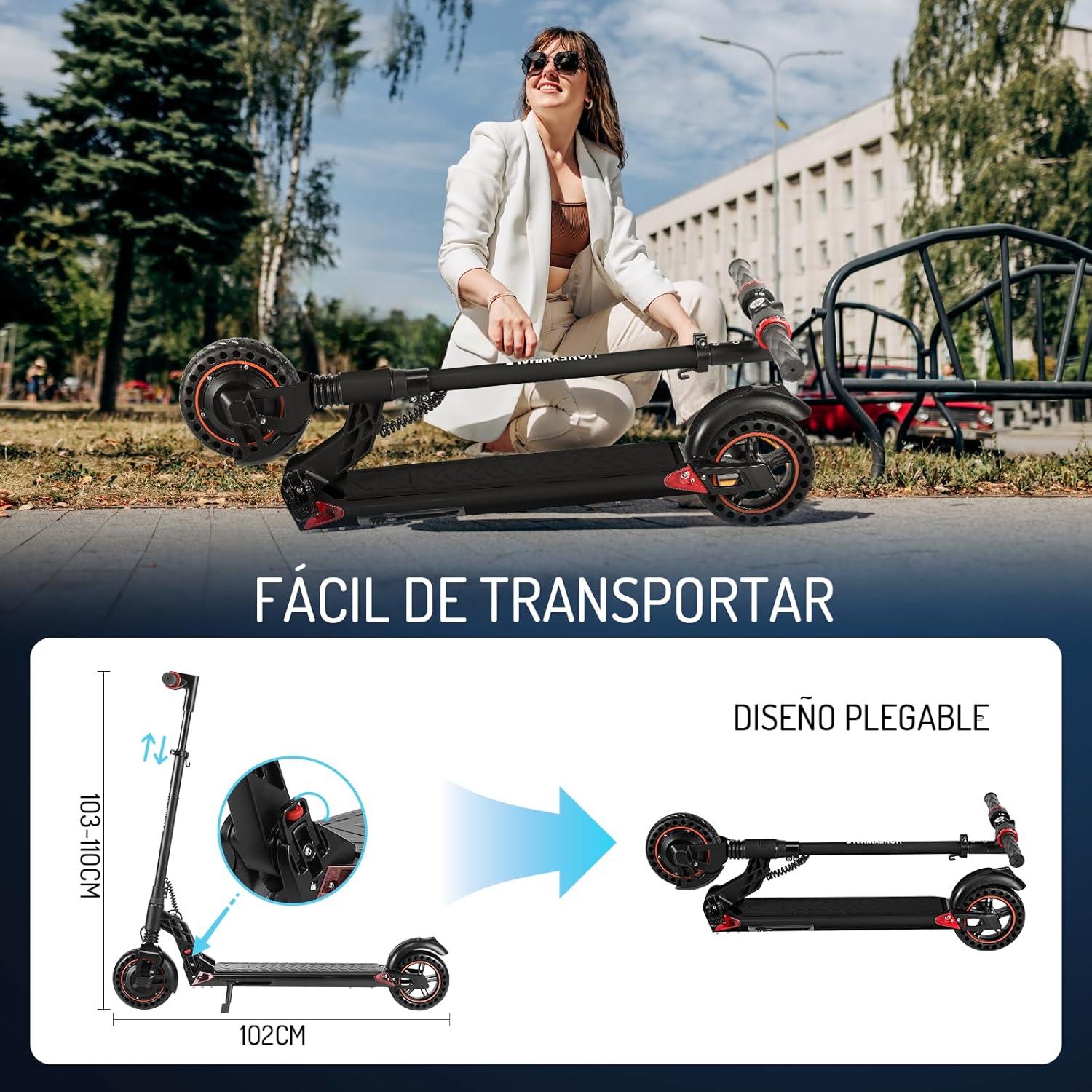
Image 4.1: The folding mechanism allows for easy transport and storage.

Image 4.2: Locate and use the charging port for battery replenishment.
5. Operating Instructions
Familiarize yourself with the controls before riding.
- Power On/Off: Press and hold the power button on the display to turn the scooter on or off.
- Speed Modes: The F4 offers three speed modes. Short press the power button to cycle through the modes (10 KM/H, 20 KM/H, 30 KM/H). The current mode will be displayed on the LCD screen.
- Acceleration: Use the thumb throttle on the right handlebar to accelerate.
- Braking: The scooter features a dual braking system.
- To engage the electronic brake, gently press the left thumb paddle. This will cut power to the motor.
- For additional braking power, step on the rear fender with your foot to activate the mechanical foot brake.
- Brake lights on both sides of the scooter will flash during braking to enhance safety.
- Lights: Press the light button to turn the front headlight and rear brake light on or off.
- Cruise Control: To activate cruise control, hold the accelerator at a consistent speed for more than 6 seconds. The scooter will maintain this speed. To exit cruise control, press the brake or accelerator.
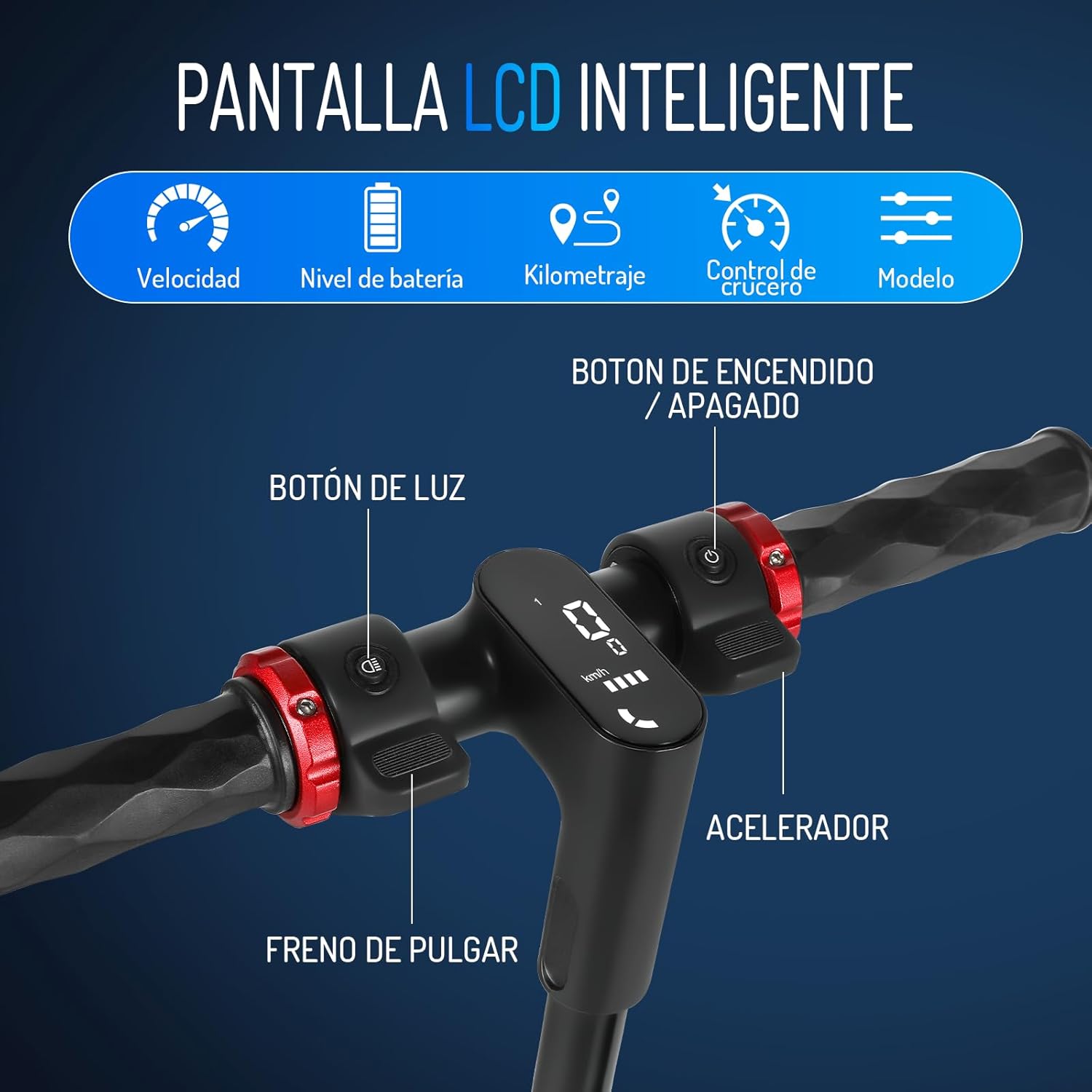
Image 5.1: The intelligent LCD display shows speed, battery level, gear, and mileage. Controls include power, light, thumb brake, and accelerator.

Image 5.2: The scooter features three distinct speed modes for varied riding conditions.
6. Features Overview
The HONEYWHALE F4 Electric Scooter is engineered with several key features for performance, comfort, and safety:
- High Performance Motor: Equipped with a 450W motor, providing a maximum speed of 30 KM/H for efficient travel.
- Long-lasting Battery: Features a 36V/5.2AH lithium-ion battery, offering a maximum range of 13 KM under optimal conditions.
- Comfortable Ride: Front and rear spring shock absorbers effectively absorb bumps from uneven roads, ensuring a smooth ride.
- Durable Tires: 8-inch solid honeycomb tires provide superior grip and stability, adapting to various road conditions without the risk of punctures.
- Enhanced Safety: Dual braking system (electronic and foot brake) for reliable stopping power. Flashing brake lights increase visibility.
- Adjustable Handlebar: The handlebar height can be adjusted to suit different rider heights for optimal comfort.
- Foldable Design: Lightweight and easy to fold, making it convenient for transport and storage in car trunks or small spaces.

Image 6.1: The powerful 450W motor provides strong acceleration and a top speed of 30 KM/H.

Image 6.2: The scooter is equipped with an improved lithium-ion battery for reliable performance and range.

Image 6.3: Excellent dual shock absorbers ensure a comfortable ride by minimizing impact from road imperfections.

Image 6.4: The 8-inch solid honeycomb tires offer enhanced grip and stability on various surfaces.
7. Maintenance
Regular maintenance ensures the longevity and safe operation of your scooter.
- Cleaning: Wipe the scooter with a damp cloth. Do not use high-pressure water jets or immerse the scooter in water.
- Battery Care:
- Charge the battery regularly, even if not in use, to maintain its health.
- Avoid completely draining the battery.
- Store the scooter in a cool, dry place when not in use, with the battery partially charged (around 50-70%).
- Tire Inspection: Although solid tires are puncture-proof, regularly check them for wear and tear.
- Brake Check: Periodically check the effectiveness of both the electronic and mechanical brakes. Adjust if necessary.
- Fastener Check: Ensure all screws and bolts are tight before each ride.
8. Troubleshooting
If you encounter issues with your HONEYWHALE F4 scooter, refer to this section:
| Problem | Possible Cause | Solution |
|---|---|---|
| Scooter does not turn on. | Low battery; loose connection. | Charge the battery; check all connections. |
| Reduced range or speed. | Battery degradation; heavy load; riding uphill. | Ensure battery is fully charged; reduce load; avoid steep inclines. |
| Brakes are not effective. | Brake pads worn; cable loose. | Inspect brake pads and cables; adjust or replace as needed. |
| Unusual noises during operation. | Loose components; foreign objects. | Inspect the scooter for loose parts or obstructions. Tighten fasteners. |
If the problem persists after attempting these solutions, please contact customer support.
9. Specifications
Key technical specifications for the HONEYWHALE F4 Electric Scooter:
| Feature | Specification |
|---|---|
| Model Name | F4 |
| Motor Power (Max) | 450W |
| Max Speed | 30 KM/H |
| Battery | 36V/5.2AH Lithium-ion |
| Max Range | 13 KM |
| Charging Time | Approx. 6 hours |
| Tire Type | 8-inch Solid Honeycomb Tires |
| Braking System | Dual (Electronic + Foot Brake) |
| Suspension | Dual Spring Suspension (Front & Rear) |
| Max Load Capacity | 120 kg |
| Product Dimensions (L x W x H) | 102 x 43.5 x 104 cm |
| Product Weight | 12.5 kg |
| Material | Iron and Aluminum |
| Special Features | Adjustable Handlebar Height, Cruise Control, Lights, Foldable, Rechargeable |
10. Warranty and Support
For warranty information, product support, or to purchase replacement parts, please refer to the official HONEYWHALE website or contact their customer service directly. Keep your purchase receipt as proof of purchase for warranty claims.