
VRTYVEYBB M5
Ebike LCD Display M5 User Manual
Model: M5 | Brand: VRTYVEYBB
Introduction
This manual provides comprehensive instructions for the installation, operation, maintenance, and troubleshooting of your VRTYVEYBB M5 Ebike LCD Display. Please read this manual carefully before use to ensure proper function and longevity of the product.
The M5 display is designed for electric bikes and scooters, providing essential information such as speed, assistance level, battery capacity, and more.
Product Overview
The VRTYVEYBB M5 Ebike LCD Display is a robust and versatile control panel for your electric bicycle or scooter. It features a durable ABS shell and a stalinite screen for enhanced longevity.

Figure 1: Overview of the M5 Ebike LCD Display with its connected wiring harness.
Key Features:
- Durable ABS material shell and stalinite screen.
- Displays speed, assistant level, battery capacity, error codes, ODO, trip distance, light status, and single riding time.
- User-friendly settings including battery button, front light button, 6 km/h walking mode, diameter setting, max speed setting, sleep time, backlight control, and voltage adjustment.
- Easy installation with a 2-meter line length.
Setup and Installation
Proper installation is crucial for the display's functionality and your safety. Please follow these steps carefully.
Package Contents:
- 1 x M5 Display Unit
- Integrated Wiring Harness
Installation Steps:
- Mounting the Display: Securely attach the M5 display unit to your ebike's handlebar using the provided mounting bracket. Ensure it is positioned for clear visibility and easy access to buttons.
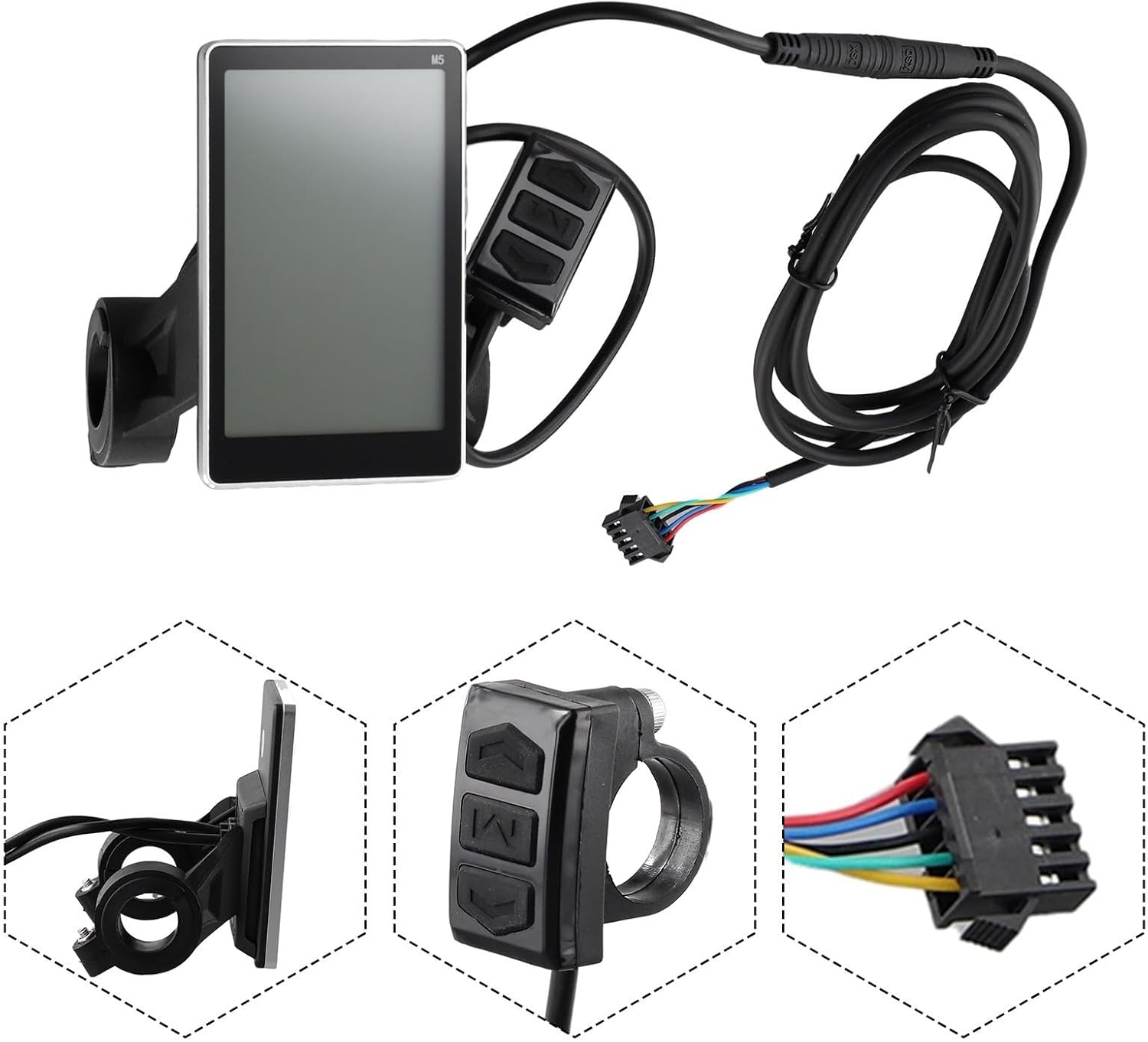
Figure 2: The M5 display and its control unit, showing how they attach to the handlebar and the wiring connection point.
- Wiring Connections: Connect the display's wiring harness to your ebike's controller. Refer to the wiring diagram below for correct connections.

Figure 3: Close-up of the 5-pin connector, illustrating the color-coded wires for proper connection.
- Wire Function:
- Red line: Power + (Positive)
- Blue wire: Electric Door Lock
- Black wire: Power - (Negative)
- Green line: RX (Receive Data)
- Yellow wire: TX (Transmit Data)
- Secure Connections: Ensure all connections are firm and protected from moisture and physical damage. Use cable ties if necessary to manage excess wire length.
Operating Instructions
The M5 display provides intuitive control and information at your fingertips.
Powering On/Off:
- Press and hold the power button (usually the middle button) to turn the display on or off.
Display Information:
Once powered on, the display will show various parameters:
- Speed: Current riding speed.
- Assistant Level: Current pedal assist level (PAS).
- Battery Capacity: Remaining battery charge.
- Error Code: Displays specific codes if a system error occurs.
- ODO: Odometer, total distance traveled.
- Trip: Trip distance for the current ride.
- Light: Indication of headlight status.
- Single Riding Time: Duration of the current ride.
Settings Adjustment:
Access and adjust settings using the control buttons:
- Battery Button: Used for battery-related settings or information.
- Front Light Button: Toggles the ebike's front light.
- 6 km/h Walking Mode: Activates a low-speed assist for walking alongside the bike.
- Diameter Setting: Adjusts wheel diameter for accurate speed and distance readings.
- Max Speed Setting: Sets the maximum assist speed (may be limited by local regulations).
- Sleep Time: Configures the auto-off duration for the display.
- Backlight Control: Adjusts the brightness of the display backlight.
- Voltage Setting: Configures the system voltage (e.g., 36V, 48V).
Maintenance
Regular maintenance ensures the longevity and optimal performance of your M5 display.
- Cleaning: Wipe the display screen and body with a soft, damp cloth. Avoid abrasive cleaners or solvents that could damage the screen or casing.
- Water Exposure: While the display has an IP54 rating (splash resistant), avoid submerging it in water or exposing it to heavy rain for prolonged periods.
- Cable Inspection: Periodically check all cables and connectors for signs of wear, fraying, or corrosion. Ensure connections remain secure.
- Storage: When not in use for extended periods, store the ebike and display in a dry, temperate environment, away from direct sunlight and extreme temperatures.
Troubleshooting
This section addresses common issues you might encounter with your M5 display.
| Problem | Possible Cause | Solution |
|---|---|---|
| Display does not power on. | Loose power connection, low battery, faulty wiring. | Check all wiring connections. Ensure ebike battery is charged. Inspect cables for damage. |
| Incorrect speed reading. | Incorrect wheel diameter setting, faulty speed sensor. | Verify and adjust the wheel diameter setting in the display menu. Check speed sensor for proper installation and function. |
| Display shows an error code. | System malfunction, sensor issue. | Refer to your ebike's controller manual for specific error code meanings. Check relevant components (e.g., motor, battery, sensors). |
| Buttons are unresponsive. | Dirt/debris, internal fault. | Clean around the buttons. If issue persists, contact customer support. |
If you encounter issues not listed here or if the suggested solutions do not resolve the problem, please contact VRTYVEYBB customer support.
Specifications
Detailed technical specifications for the M5 Ebike LCD Display.
- Material: ABS (shell), Stalinite (screen)
- Color: Black (as pictured)
- Dimensions (Display Unit): Approximately 9.4 x 8.8 x 6.4 cm (based on product image measurements)

Figure 4: Dimensional measurements of the M5 display and its separate control button unit.
- Line Length: 2 meters
- Weight: Approximately 230g
- Display Type: LCD
- Sensor Type: Speed Sensor
- Connectivity: Wired (5-pin connector)
- International Protection Rating: IP54 (Splash resistant)
- Mounting Type: Handlebar Mount
- Human Interface Input: Buttons
- Model Number: K75XIJ5SI12Y8680W1N72M
Warranty and Support
VRTYVEYBB is committed to providing high-quality products. For warranty information or technical support, please refer to the seller's policy or contact VRTYVEYBB directly through their official channels.
For product inquiries or assistance, you may visit the VRTYVEYBB Store on Amazon.