
1. Introduction
This manual provides essential information for the installation, operation, maintenance, and troubleshooting of the Generic AK668 series Injection Molding Machine Controller PLC Board. This controller is designed to manage and automate various functions within an injection molding machine, ensuring precise control and reliable performance. Please read this manual thoroughly before attempting to install or operate the device.
2. Safety Information
Always observe the following safety precautions to prevent injury and damage to the equipment:
- Ensure that all power to the injection molding machine is disconnected before installing or servicing the controller.
- Installation and wiring should only be performed by qualified personnel familiar with industrial electrical systems and safety standards.
- Protect the controller from moisture, dust, and extreme temperatures.
- Do not open the controller housing unless specifically instructed to do so by a qualified technician.
- Verify all wiring connections are secure and correct before applying power.
- Use appropriate personal protective equipment (PPE) during installation and maintenance.
3. Product Overview
The AK668 series controller is a robust PLC board designed for the demanding environment of injection molding machines. It integrates CPU and I/O functionalities to provide comprehensive control over machine operations.
3.1 Components
- CPU Board: The central processing unit responsible for executing control logic.
- I/O Board: Manages input and output signals from various sensors and actuators of the injection molding machine.
- Connectors: Various ports for power, communication, and sensor/actuator connections.
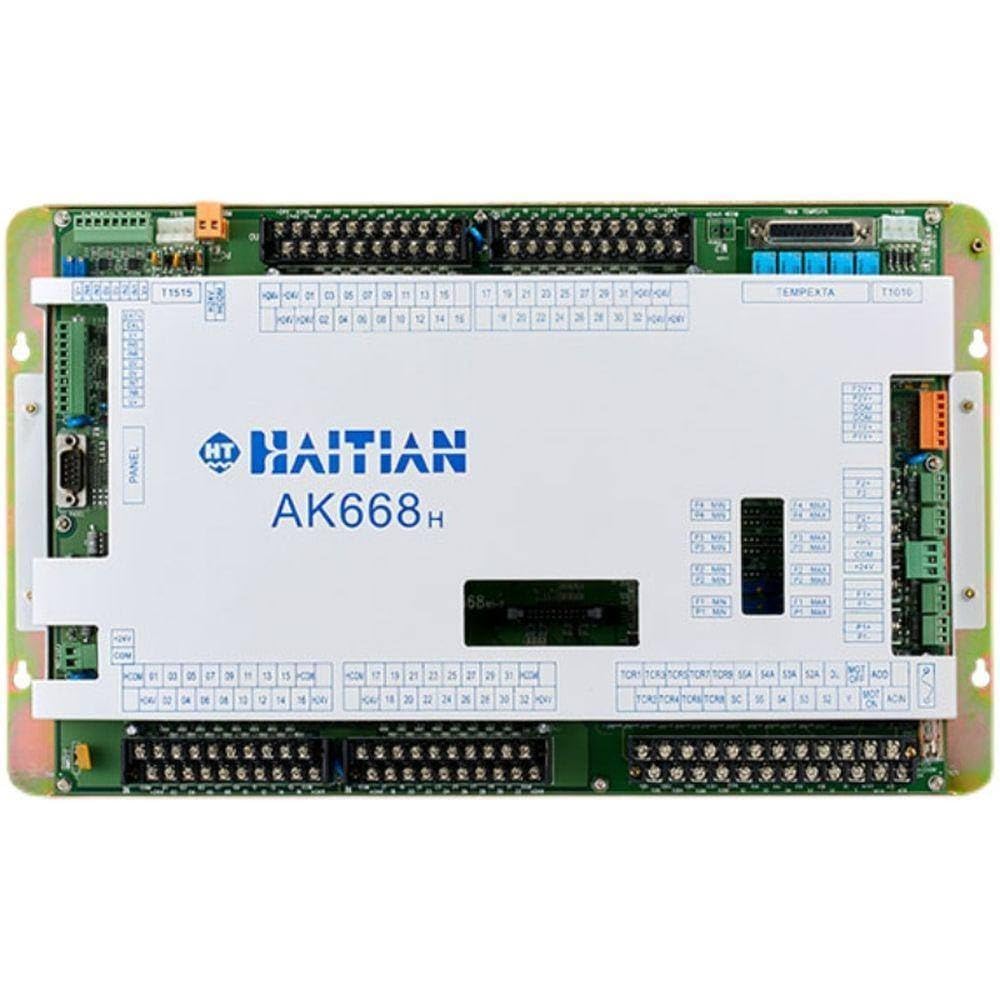
Figure 1: Image showing the main unit of the Generic AK668 Injection Molding Machine Controller PLC Board.
4. Setup and Installation
Follow these steps for proper installation of the AK668 controller:
- Power Disconnection: Ensure the main power supply to the injection molding machine is completely disconnected and locked out.
- Mounting: Securely mount the AK668 controller within the designated control cabinet using appropriate fasteners. Ensure adequate ventilation around the unit.
- Wiring Power: Connect the power supply cables to the designated power input terminals on the controller. Refer to the wiring diagram provided with your specific machine model for correct voltage and polarity.
- Wiring I/O: Connect all input and output signals from sensors, actuators, and other machine components to the corresponding I/O terminals on the AK668 board. Double-check each connection against the machine's electrical schematics.
- Communication Connections: If applicable, connect any communication cables (e.g., for HMI, network) to the appropriate ports.
- Final Inspection: Before restoring power, visually inspect all connections to ensure they are tight, correctly routed, and free from damage.
- Power Restoration: Carefully restore power to the machine and controller. Observe for any abnormal behavior or error indicators.
5. Operating Instructions
Once installed and powered, the AK668 controller operates in conjunction with the injection molding machine's Human-Machine Interface (HMI) or control panel. Specific operational steps will depend on the machine's programming and HMI design.
5.1 Basic Operation Sequence
- Power On: Turn on the main power to the injection molding machine. The controller will initiate its boot sequence.
- System Check: Monitor the HMI for any error messages or system warnings during startup. Address any issues before proceeding.
- Parameter Setting: Use the HMI to input or verify the required molding parameters (e.g., temperature, pressure, cycle time, injection speed).
- Manual Mode (if applicable): For initial setup or testing, operate machine functions individually (e.g., mold open/close, injection) via the HMI's manual controls.
- Automatic Mode: Once parameters are set and verified, switch the machine to automatic mode to begin the production cycle. The AK668 controller will execute the programmed sequence.
- Monitoring: Continuously monitor machine performance and product quality. The controller provides real-time data to the HMI.
- Emergency Stop: Familiarize yourself with the location and operation of the emergency stop button on the machine.
6. Maintenance
Regular maintenance ensures the longevity and reliable operation of your AK668 controller.
6.1 Cleaning
- Frequency: Clean the exterior of the controller and surrounding area periodically, or as needed, depending on the operating environment.
- Procedure: Disconnect power before cleaning. Use a soft, dry cloth to wipe down surfaces. For stubborn dirt, a slightly damp cloth with a mild, non-abrasive cleaner can be used, ensuring no liquid enters the unit.
- Avoid: Do not use harsh chemicals, solvents, or abrasive materials, as these can damage the housing or labels.
6.2 Inspection
- Connections: Periodically check all wiring connections for tightness and signs of corrosion or damage. Re-tighten loose connections.
- Cables: Inspect cables for fraying, cuts, or insulation damage. Replace damaged cables immediately.
- Environment: Ensure the operating environment remains within specified temperature and humidity ranges. Verify that ventilation openings are clear and unobstructed.
7. Troubleshooting
This section provides solutions to common issues you might encounter. For problems not listed here, contact technical support.
| Problem | Possible Cause | Solution |
|---|---|---|
| Controller does not power on. | No power supply; loose power connection; blown fuse. | Check main power supply. Verify power cable connections. Inspect and replace fuses if necessary. |
| Machine functions are unresponsive. | Incorrect I/O wiring; emergency stop engaged; software error. | Verify I/O connections. Check emergency stop status. Restart the controller. Consult machine's HMI for error codes. |
| Inconsistent machine operation. | Interference; faulty sensor/actuator; unstable power. | Check for sources of electrical interference. Inspect sensors and actuators. Ensure stable power supply. |
| Communication errors with HMI. | Loose communication cable; incorrect communication settings. | Check communication cable connections. Verify communication protocol and settings on both controller and HMI. |
8. Specifications
Technical specifications for the Generic AK668 Injection Molding Machine Controller PLC Board.
| Feature | Detail |
|---|---|
| Brand Name | Generic |
| Model Numbers | AK668, AK668H, AK668E |
| Part Number | WYQC_JEWD_19932 |
| ASIN | B0CWYS5RNX |
| Application | Injection Molding Machine Control |
| Type | CPU Board / I/O Board / PLC Controller |
9. Warranty and Support
This product is covered by a standard manufacturer's warranty against defects in materials and workmanship. The specific terms and duration of the warranty may vary. Please retain your proof of purchase for warranty claims.
For technical assistance, troubleshooting beyond this manual, or warranty inquiries, please contact your supplier or the manufacturer's customer support. Provide the model number (AK668, AK668H, AK668E) and part number (WYQC_JEWD_19932) when seeking support to ensure efficient service.