
1. Introduction
This instruction manual provides essential information for the safe and effective installation, operation, and maintenance of your TOMSHIELE Premium Solar Panel MC-4 Connectors. These connectors are designed for reliable and secure connections in solar power systems, ensuring optimal performance and durability. Please read this manual thoroughly before use and retain it for future reference.
2. Product Features
- Innovative IP67 Waterproof Design: Ensures reliable protection for your solar power system in harsh weather conditions.
- Windproof and Heat Resistant: Crafted from durable materials to withstand strong winds and high temperatures, guaranteeing stable operation.
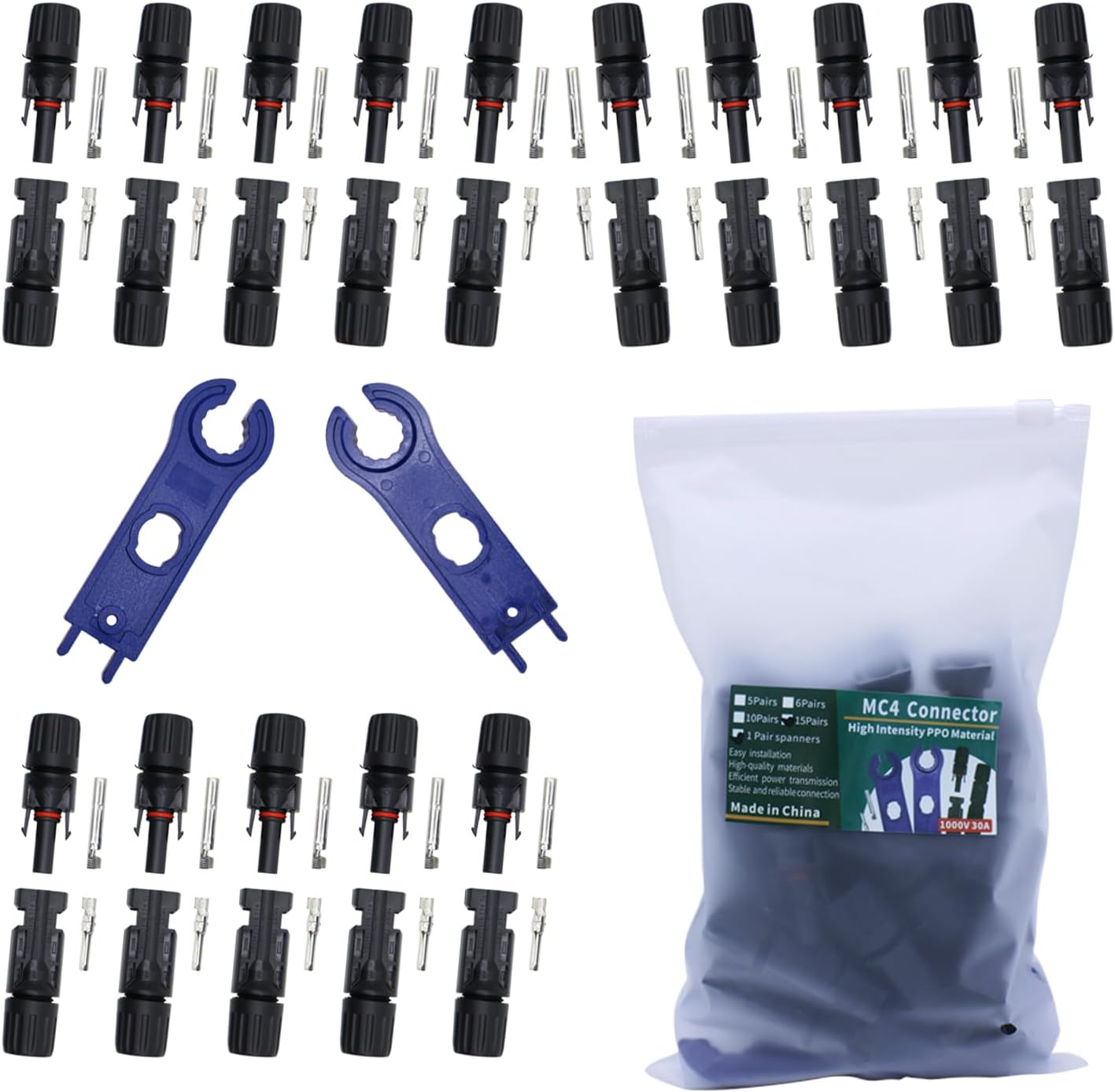
- Convenient Kit with Bonus Tools: Each set includes 15 pairs of male/female MC-4 solar connectors along with a complimentary pair of spanner tools for easier installation and maintenance.
- Premium Quality Construction: Manufactured to high industry standards using premium materials for exceptional performance and long-term durability.
- Versatile Compatibility: Seamlessly integrates with various solar panel systems, suitable for both outdoor and household applications.
3. Package Contents
Your TOMSHIELE Premium Solar Panel MC-4 Connectors package includes the following items:
- 15 Pairs (30 pieces) of MC-4 Male Connectors
- 15 Pairs (30 pieces) of MC-4 Female Connectors
- 1 Pair (2 pieces) of MC-4 Spanner Tools
4. Safety Information
Always observe the following safety precautions when working with solar electrical components:
- Ensure all power sources are disconnected before installation or maintenance.
- Wear appropriate personal protective equipment (PPE), including insulated gloves and eye protection.
- Avoid touching exposed wires or terminals.
- Do not attempt to disconnect connectors under load.
- Consult a qualified electrician if you are unsure about any installation steps.
5. Setup and Installation
Follow these steps to properly assemble and connect your MC-4 solar connectors:
- Prepare the Cable: Strip approximately 1/4 inch (6mm) of insulation from the end of your solar cable. Ensure the copper strands are clean and untwisted.
- Crimp the Metal Pin: Select the appropriate metal pin (male for male connector body, female for female connector body). Insert the stripped cable end into the metal pin and use a dedicated MC-4 crimping tool to securely crimp the pin onto the cable.
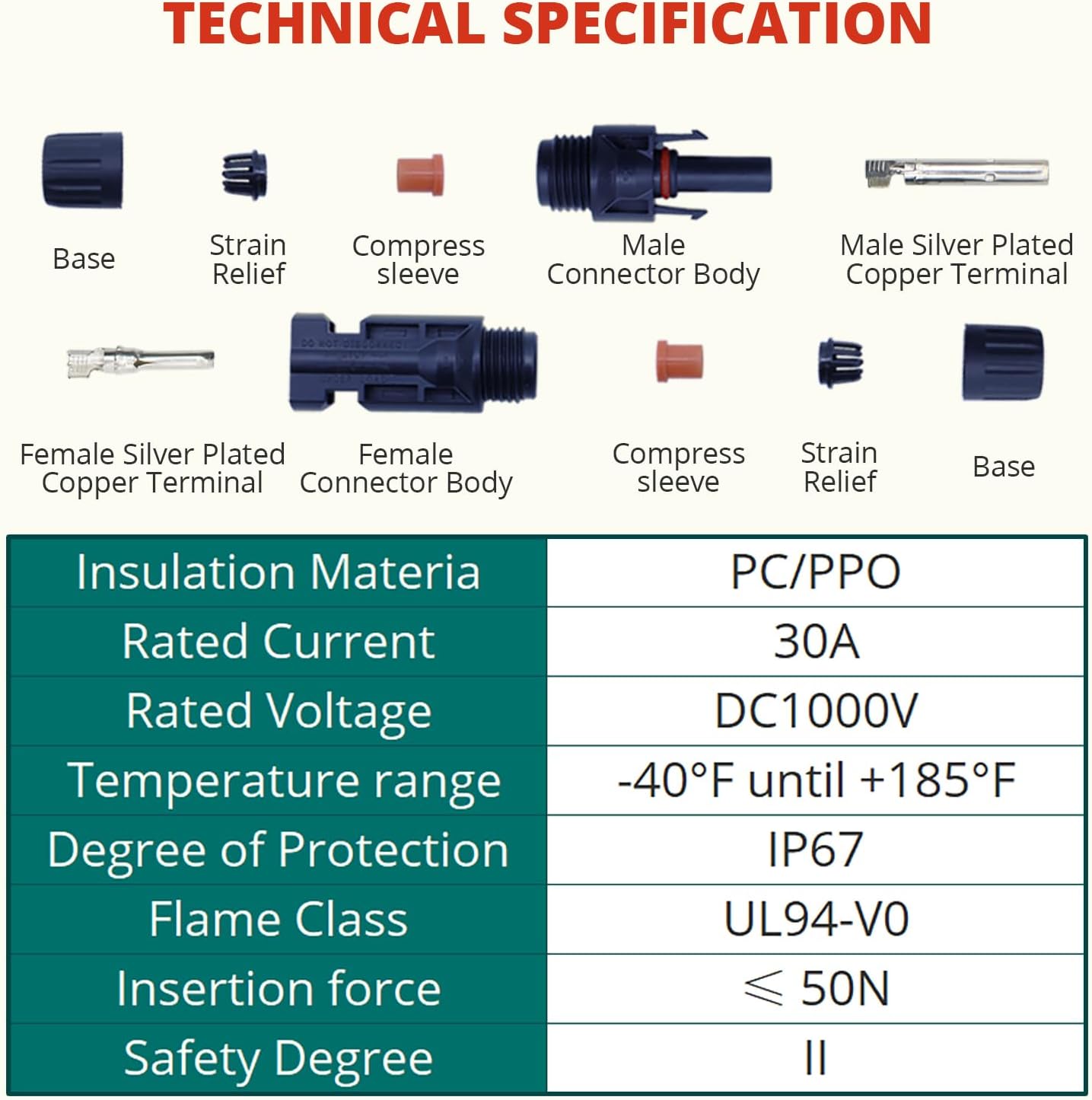
- Assemble the Connector Body: Slide the cable gland (the threaded cap) onto the cable first, followed by the rubber seal (strain relief), and then the main connector body. Ensure the metal pin clicks securely into place inside the connector body.
- Tighten the Cable Gland: Screw the cable gland onto the connector body. Use the provided MC-4 spanner tools to tighten it firmly, ensuring a waterproof and secure connection. The spanner tools help to grip the base of the connector and tighten the gland without damaging the connector.
- Connect Male and Female: Align the male and female MC-4 connectors and push them firmly together until they click. This click indicates a secure and locked connection.


Installation Video Guide
Video 1: Official TOMSHIELE guide demonstrating the assembly and connection of MC-4 solar connectors.
Video 2: Detailed installation instructions for MC-4 solar panel connectors, including crimping and assembly steps.
6. Operating Instructions
Once assembled, MC-4 connectors provide a secure and weather-resistant connection for your solar panels. To connect, simply align the male and female connectors and push them firmly together until you hear a click. To disconnect, use the provided spanner tools to release the locking tabs and pull the connectors apart. Always ensure the system is de-energized before disconnecting.
7. Maintenance
Regular maintenance helps ensure the longevity and performance of your MC-4 connectors:
- Periodically inspect connectors for any signs of damage, corrosion, or wear.
- Ensure all connections are tight. Use the spanner tools if re-tightening is necessary.
- Keep connectors clean from dirt, dust, and debris. Use a soft, dry cloth for cleaning.
- Verify that the waterproof seals are intact and properly seated.
8. Troubleshooting
If you encounter issues with your MC-4 connectors, consider the following:
- Loose Connection: Ensure the metal pins are properly crimped and fully inserted into the connector body. Re-tighten the cable gland with the spanner tools.
- Water Ingress: Check that the cable gland is fully tightened and the rubber seal is correctly positioned. Replace any damaged connectors or seals.
- Difficulty Connecting/Disconnecting: Ensure connectors are properly aligned. Use the spanner tools to assist with separation if the locking tabs are stiff.
9. Specifications
| Feature | Specification |
|---|---|
| Product Dimensions | 1 x 1 x 1 inches |
| Item Weight | 11.8 ounces |
| Insulation Material | PC/PPO |
| Rated Current | 30A |
| Rated Voltage | DC1000V |
| Temperature Range | -40°F until +185°F |
| Degree of Protection | IP67 |
| Flame Class | UL94-V0 |
| Insertion Force | ≤ 50N |
| Safety Degree | II |

10. Warranty and Support
For warranty information or technical support, please contact TOMSHIELE customer service through the retailer where the product was purchased or visit the official TOMSHIELE website. Please have your model number (TS-MC4-15BAG) and purchase details ready.