
1. Product Overview
The TPOB Black X Trimmer with Charging Stand is a precision grooming tool designed for professional and home use. This manual provides essential information for the safe and effective operation, maintenance, and care of your trimmer.

Image: Front view of the TPOB Black X Trimmer securely placed on its dedicated charging stand.
2. Important Safety Information
Please read all safety instructions carefully before using the trimmer. Failure to follow these instructions may result in electric shock, fire, or serious injury.
General Safety Precautions:
- Avoid contact with eyes, skin, and water. Do not immerse the trimmer or charging stand in water or other liquids.
- Keep away from children and inexperienced users. This appliance is not intended for use by persons with reduced physical, sensory, or mental capabilities, or lack of experience and knowledge, unless they have been given supervision or instruction concerning use of the appliance by a person responsible for their safety.
- Follow proper cleaning and maintenance procedures as outlined in this manual.
- Always unplug the trimmer from the power source when not in use, before cleaning, or before performing any maintenance.
- Do not use on infants or near water sources such as bathtubs, showers, basins, or other vessels containing water.
- Do not operate the trimmer with a damaged cord or plug, or if it is not working properly, has been dropped, or damaged. Contact customer support for assistance.
- Use only the charging stand and power adapter supplied with the trimmer.
Legal Disclaimer:
Statements regarding dietary supplements have not been evaluated by the FDA and are not intended to diagnose, treat, cure, or prevent any disease or health condition. This product is a personal grooming appliance and should be used solely for its intended purpose.
3. Package Contents
Upon opening your TPOB Black X Trimmer package, please verify that all the following items are included:
- TPOB Black X Trimmer
- Charging Stand
- USB Charging Cable
- Power Adapter
- Blade Oil
- Cleaning Brush
- Blade Guard/Attachment (if applicable)
- Adjustment Tool (for blade alignment)
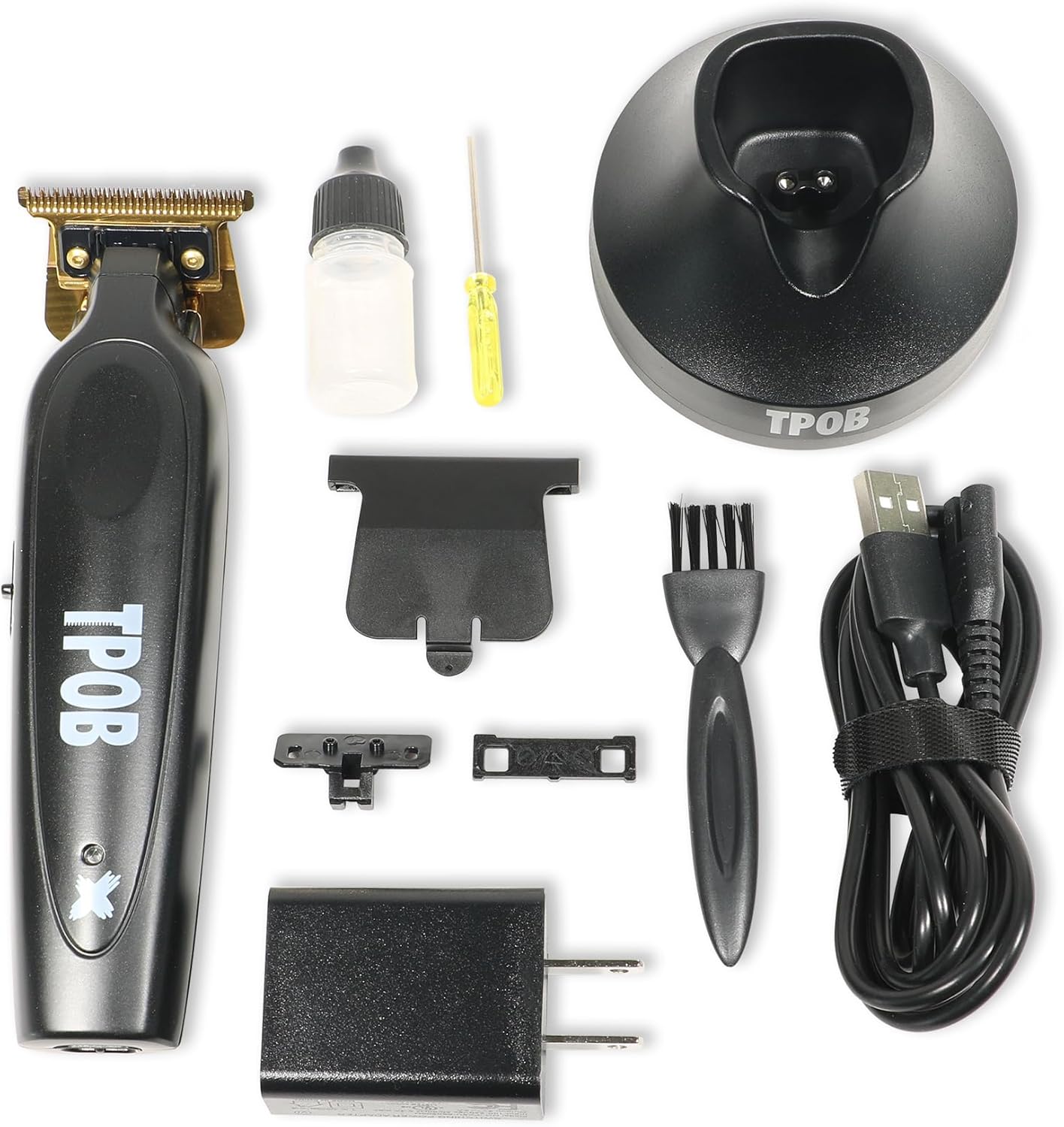
Image: A complete view of all items included in the TPOB Black X Trimmer package, including the trimmer, charging stand, cables, and accessories.
4. Setup and Initial Use
4.1 Charging the Trimmer
- Connect the USB charging cable to the power adapter.
- Plug the power adapter into a standard electrical outlet.
- Insert the small end of the USB cable into the charging port located on the back of the charging stand.
- Place the TPOB Black X Trimmer onto the charging stand, ensuring it is seated correctly. The indicator light on the trimmer (if present) will illuminate to show it is charging.
- Allow the trimmer to charge fully before its first use. A full charge typically takes approximately 2-3 hours.

Image: Rear view of the TPOB Black X Trimmer on its charging stand, highlighting the charging interface and product details.
4.2 Attaching/Detaching Trimming Heads (if applicable)
Your TPOB Black X Trimmer comes with a fixed blade designed for precision trimming. If your model includes additional attachments or guards:
- To attach: Align the desired trimming guard with the trimmer blade and gently push until it clicks into place.
- To detach: Gently pull the guard away from the blade.

Image: Detailed close-up of the trimmer's blade, labeled 'TPOB PSYCHO GOLD 6.9', indicating its precision design.
5. Operating Instructions
5.1 Basic Operation:
- Ensure the trimmer is fully charged.
- Attach the desired trimming head or guard if needed.
- Locate the power switch on the side of the trimmer.
- Slide the switch to the 'ON' (I) position to activate the trimmer.
- Adjust the trimming length if your model features an adjustable blade or includes multiple guards.
- Gently apply the trimmer to the hair, moving against the direction of hair growth for optimal results.
- After use, slide the power switch to the 'OFF' (O) position.

Image: Side profile of the TPOB Black X Trimmer on its charging stand, illustrating the position of the power switch.
5.2 Tips for Best Results:
- For a clean cut, ensure hair is dry and free of styling products.
- Use slow, controlled movements.
- Regularly clean the blade during use to prevent hair buildup.
6. Cleaning and Maintenance
Proper maintenance ensures the longevity and optimal performance of your TPOB Black X Trimmer.
6.1 Cleaning the Blades:
- Ensure the trimmer is turned OFF and unplugged from the charging stand.
- Use the provided cleaning brush to remove any loose hairs from the blades and the trimmer head.
- For a more thorough cleaning, you may carefully remove the blade assembly (refer to specific instructions if provided with your model for blade removal).
- Do not rinse the entire trimmer under water unless explicitly stated as waterproof.
6.2 Oiling the Blades:
Regular oiling is crucial for maintaining blade sharpness and smooth operation.
- After cleaning, apply 1-2 drops of the supplied blade oil (or a suitable clipper oil) to the teeth of the blades.
- Turn the trimmer ON for a few seconds to allow the oil to distribute evenly across the blades.
- Wipe off any excess oil with a soft cloth.
6.3 Storage:
Store the trimmer in a cool, dry place, away from direct sunlight and moisture. Keep it out of reach of children.
7. Troubleshooting
If you encounter issues with your TPOB Black X Trimmer, refer to the following common problems and solutions:
| Problem | Possible Cause | Solution |
|---|---|---|
| Trimmer does not turn on. | Battery is depleted. | Charge the trimmer fully. Ensure the charging stand and adapter are properly connected. |
| Trimmer pulls hair or cuts poorly. | Blades are dull or dirty. | Clean and oil the blades. If blades are dull, consider professional sharpening or replacement. |
| Trimmer makes unusual noise. | Blades are not properly aligned or lubricated. | Ensure blades are clean and oiled. Check blade alignment. |
| Charging indicator light not working. | Improper connection or faulty charger. | Verify all connections. Try a different outlet. If problem persists, contact customer support. |
If the problem persists after attempting these solutions, please contact TPOB customer support.
8. Product Specifications
| Feature | Detail |
|---|---|
| Model Number | Trimmer |
| Power Source | Battery Powered |
| Battery Type | 1 Lithium Ion battery (included) |
| Color | Black |
| Item Weight | 0.67 Kilograms (approximately 1.47 Pounds) |
| Package Dimensions | 8.23 x 6.3 x 2.68 inches |
| Manufacturer | TPOB |
| Recommended Use | Professional Barber |
9. Warranty and Support
TPOB stands behind the quality of its products. For specific warranty information, please refer to the warranty card included in your product packaging or visit the official TPOB website. Keep your purchase receipt as proof of purchase for any warranty claims.
Customer Support:
For technical assistance, troubleshooting, or warranty inquiries, please contact TPOB customer support through their official website or the contact information provided in your product documentation.
You can also visit the TPOB Store on Amazon for more information and product updates.