1. Introduction
The ULANZI 40W Pro Portable LED Video Light is a compact and powerful continuous output lighting solution designed for video production and photography. It features adjustable color temperature, high color rendering, and multiple power options, including a built-in battery. This manual provides essential information for the safe and effective use of your device.

Image: The ULANZI 40W Pro LED Video Light mounted on a stand with its reflector attached, highlighting its compact design and powerful output.
Video: An overview of the ULANZI 40W Pro Portable LED Video Light, demonstrating its features and applications.
2. What's in the Box
Please check the contents of your package upon receipt to ensure all items are present:
- 1 x 40W Pro COB Light
- 1 x Reflector
- 1 x Silicone Cover
- 1 x Velvet Bag
- 1 x User Manual
- 1 x DC Charging Adapter

Image: All components included in the ULANZI 40W Pro package: the light unit, reflector, power adapter, and carrying bag.
3. Product Features
- Upgraded Charging Capability: Features a new Type-C charging port, allowing connection to an external power bank. The device can be fully charged in approximately 3 hours when using a 65W/20V Type-C charger.
- Enhanced Power Output: Capable of overclocking to a maximum brightness power of 50W, delivering up to 125% of its nominal brightness. Achieves an illumination of up to 13150 Lux.
- Compact and Portable Design: Weighs approximately 490g and is designed to be handheld, offering high versatility without significant burden.
- Integrated 3400mAh Battery: Offers three power supply options: DC power adapter, Type-C power, or the built-in 3400mAh high-capacity battery. Provides up to 3 hours of continuous use at minimum brightness and 50 minutes at maximum brightness. Supports charging while in use.
- High Color Accuracy and Adjustable Temperature: Experience accurate color rendition with CRI≥95 and TLCI≥96. Full control over color temperature (2500K-6500K) and brightness allows for precise lighting customization.
- Mini Bowens Mount Compatibility: Expandable with external mini reflectors, mini diffusers, mini softboxes, and other mini light modifiers to achieve various lighting effects. Note: The Mini Bowens Mount is not compatible with standard Bowens Mount accessories.
- Efficient Cooling System: Equipped with ventilation holes on all four sides and a built-in cooling fan to effectively prevent overheating during extended use.
- Eight Lighting Effects: Includes 8 creative scene lighting effects to enhance the aesthetic of your shots and suit different moods.

Image: A visual comparison detailing the specifications and capabilities of the ULANZI 40W and 40W Pro models.

Image: A graphic illustrating the light's brightness range (0-125%), color temperature (2500K-6500K), and high CRI (>95).

Image: A visual representation of the ULANZI 40W Pro's 3400mAh built-in battery, indicating a 75-minute runtime at high brightness.
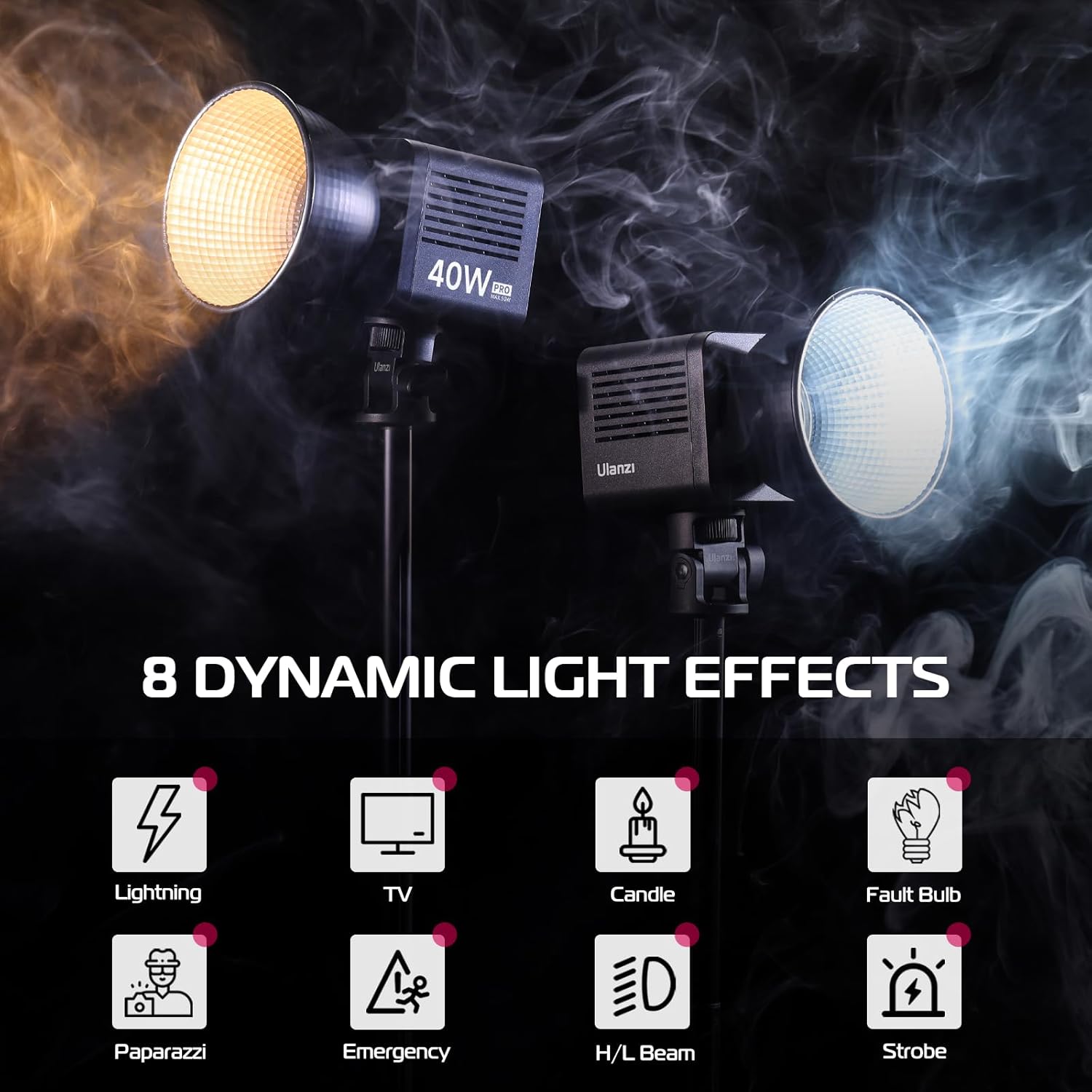
Image: Icons representing the 8 dynamic light effects: Lightning, TV, Candle, Fault Bulb, Paparazzi, Emergency, H/L Beam, and Strobe.
4. Setup
- Attach the Reflector: Align the reflector with the Mini Bowens Mount on the front of the light. Twist clockwise until it locks securely into place.
- Mounting the Light: The ULANZI 40W Pro features a standard 1/4-inch screw hole at the bottom for mounting onto light stands, tripods, or other compatible accessories. Securely attach the light to your desired mounting equipment.
- Powering the Device: The light can be powered in three ways:
- DC Power Adapter: Connect the included DC power adapter to the DC 19V port on the back of the light and plug it into a wall outlet.
- Type-C Power: For external power bank use, connect a Type-C cable to the PD 65W port. Ensure your power bank and cable support 65W/20V output for optimal performance.
- Built-in Battery: The light has an internal 3400mAh battery for portable operation. Ensure it is charged before use.
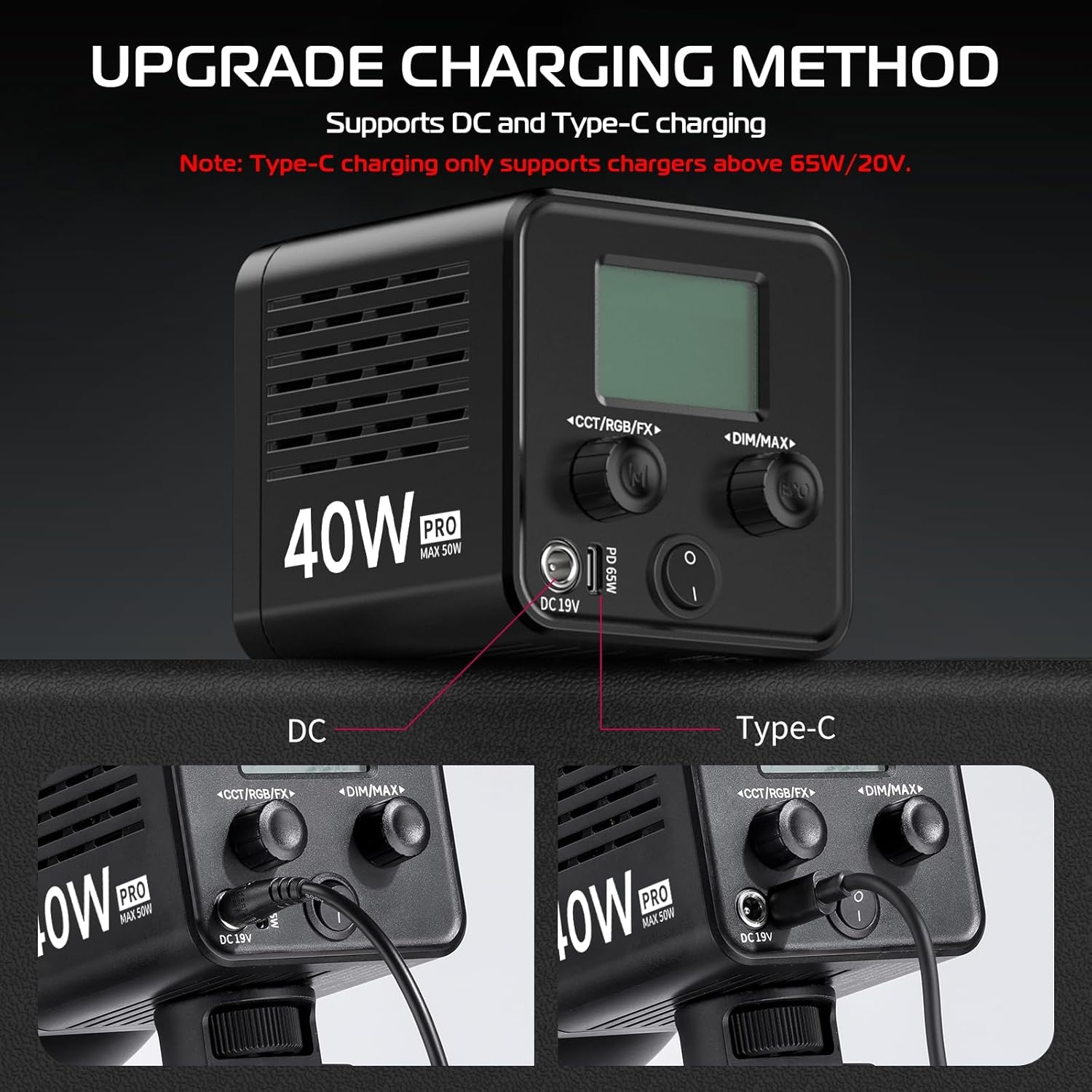
Image: Close-up view of the ULANZI 40W Pro's rear panel, illustrating the DC 19V and PD 65W (Type-C) charging ports with power cables connected.
5. Operating Instructions
The ULANZI 40W Pro features intuitive controls for easy operation.

Image: A hand demonstrating the adjustment of the control knobs on the back of the ULANZI 40W Pro, showing the display screen.
- Power On/Off: Press and hold the power button located on the back panel to turn the light on or off.
- Adjusting Brightness: Rotate the DIM/MAX knob to adjust the light's brightness from 1% to 100%.
- Activating Overclock Mode: To achieve 101%-125% brightness (overclock mode), continue rotating the DIM/MAX knob past 100%.
- Adjusting Color Temperature: Rotate the CCT/RGB/FX knob to change the color temperature between 2500K (warm) and 6500K (cool).
- Selecting Lighting Effects: Press the CCT/RGB/FX knob to cycle through the 8 built-in lighting effects. Rotate the knob to adjust parameters within each effect if applicable.
- Charging: When the battery indicator on the display shows low power, connect the appropriate power source (DC adapter or 65W/20V Type-C charger) to recharge the built-in battery. The light can be used while charging.
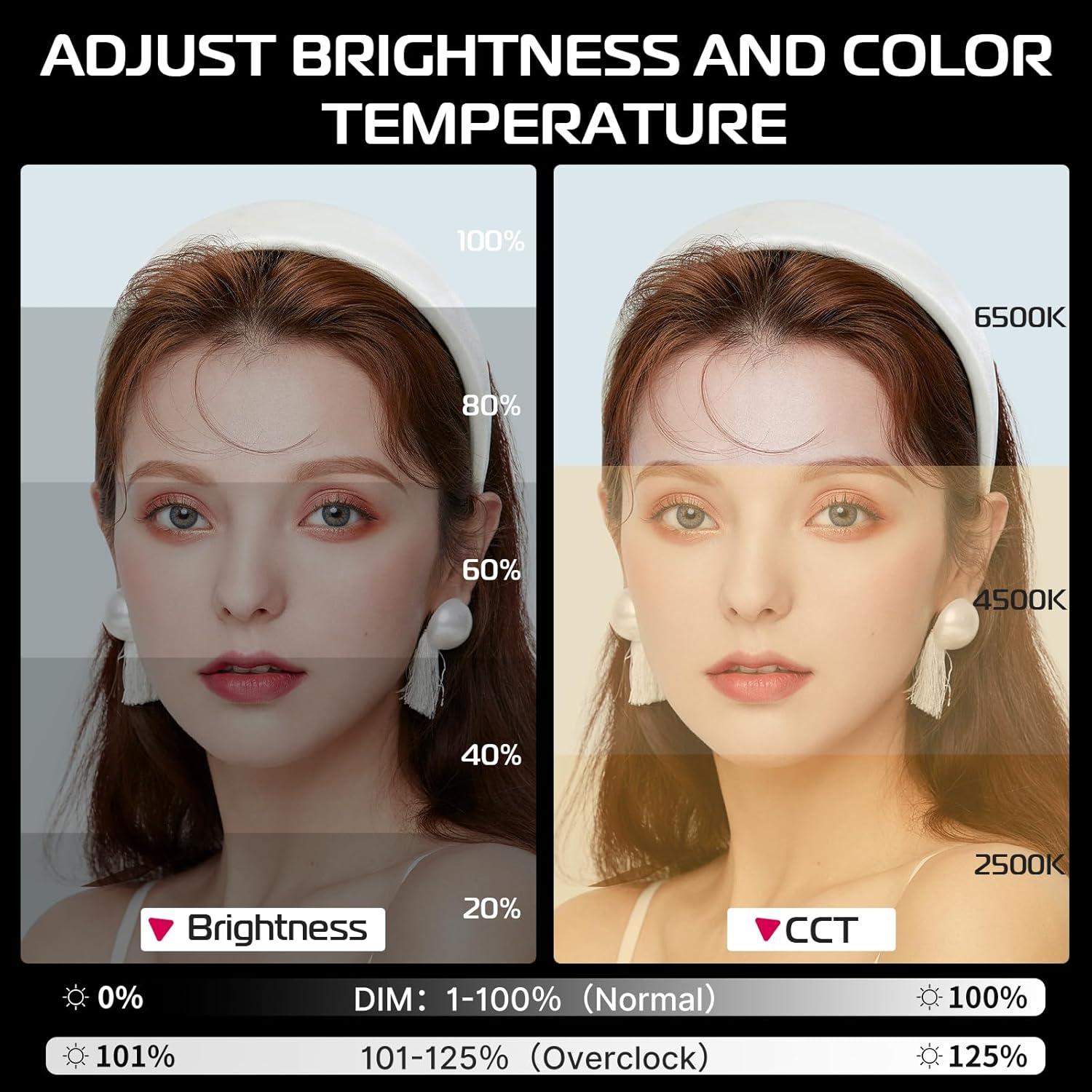
Image: A visual guide demonstrating how to adjust brightness (DIM) from 0% to 125% and color temperature (CCT) from 2500K to 6500K.
6. Maintenance
- Cleaning: Use a soft, dry cloth to clean the light's exterior. Do not use liquid cleaners or solvents, as they may damage the finish or internal components.
- Storage: When not in use, store the light in a cool, dry place, away from direct sunlight and extreme temperatures. Use the provided velvet bag for protection.
- Battery Care: For optimal battery life, avoid fully discharging the battery frequently. If storing for an extended period, charge the battery to approximately 50-70% every three months.
- Ventilation: Ensure the ventilation holes are clear of obstructions to maintain proper airflow and prevent overheating.
7. Troubleshooting
| Problem | Possible Cause | Solution |
|---|---|---|
| Light does not turn on. | Battery is depleted. Power adapter is not connected or faulty. | Charge the battery using the DC adapter or a compatible Type-C charger. Ensure the power adapter is securely connected and functional. |
| Brightness is low or inconsistent. | Brightness setting is too low. Battery is low. Overheating protection activated. | Adjust the DIM/MAX knob to increase brightness. Charge the battery. Allow the light to cool down. Ensure ventilation is not blocked. |
| Type-C charging is not working. | Charger/power bank does not meet 65W/20V requirement. Cable is faulty. | Use a Type-C charger or power bank that supports 65W/20V output. Try a different Type-C cable. |
| Light feels hot. | Normal operation at high power. Ventilation blocked. | The light may become warm during use, especially at high power. This is normal. Ensure ventilation holes are not obstructed. If excessively hot, reduce brightness or turn off to cool. |
8. Specifications
| Feature | Detail |
|---|---|
| Model | 40W Pro |
| Brand | ULANZI |
| Maximum Output Power | 40W (Normal), 50W (Overclock) |
| Maximum Illuminance | 13150 Lux (at 0.5m) |
| Color Temperature Range | 2500K-6500K |
| Color Rendering Index (CRI) | ≥95 |
| Television Lighting Consistency Index (TLCI) | ≥96 |
| Battery Capacity | 3400mAh (Built-in Lithium Metal) |
| Battery Life | Up to 3 hours (minimum brightness), 50 minutes (maximum brightness) |
| Charging Ports | DC 19V, USB Type-C (PD 65W/20V) |
| Item Weight | 2.59 pounds (approx. 490g for light unit) |
| Package Dimensions | 13.7 x 10.98 x 5.75 inches |
| Hardware Interface | USB Type C |
| Connectivity Technology | USB |
| ASIN | B0CWV7B4LP |
9. Warranty and Support
For warranty information and technical support, please refer to the official ULANZI website or contact ULANZI customer service directly. Keep your purchase receipt as proof of purchase for any warranty claims.


