
1. Introduction
This manual provides instructions for the PZL HK-3390 replacement remote control, designed for use with Harman Kardon Stereo Receivers. This remote offers a direct replacement solution, eliminating the need for complex programming or pairing procedures.
The package includes one (1) IR Remote Control. Please note that batteries and detailed instructions beyond this manual are not included.
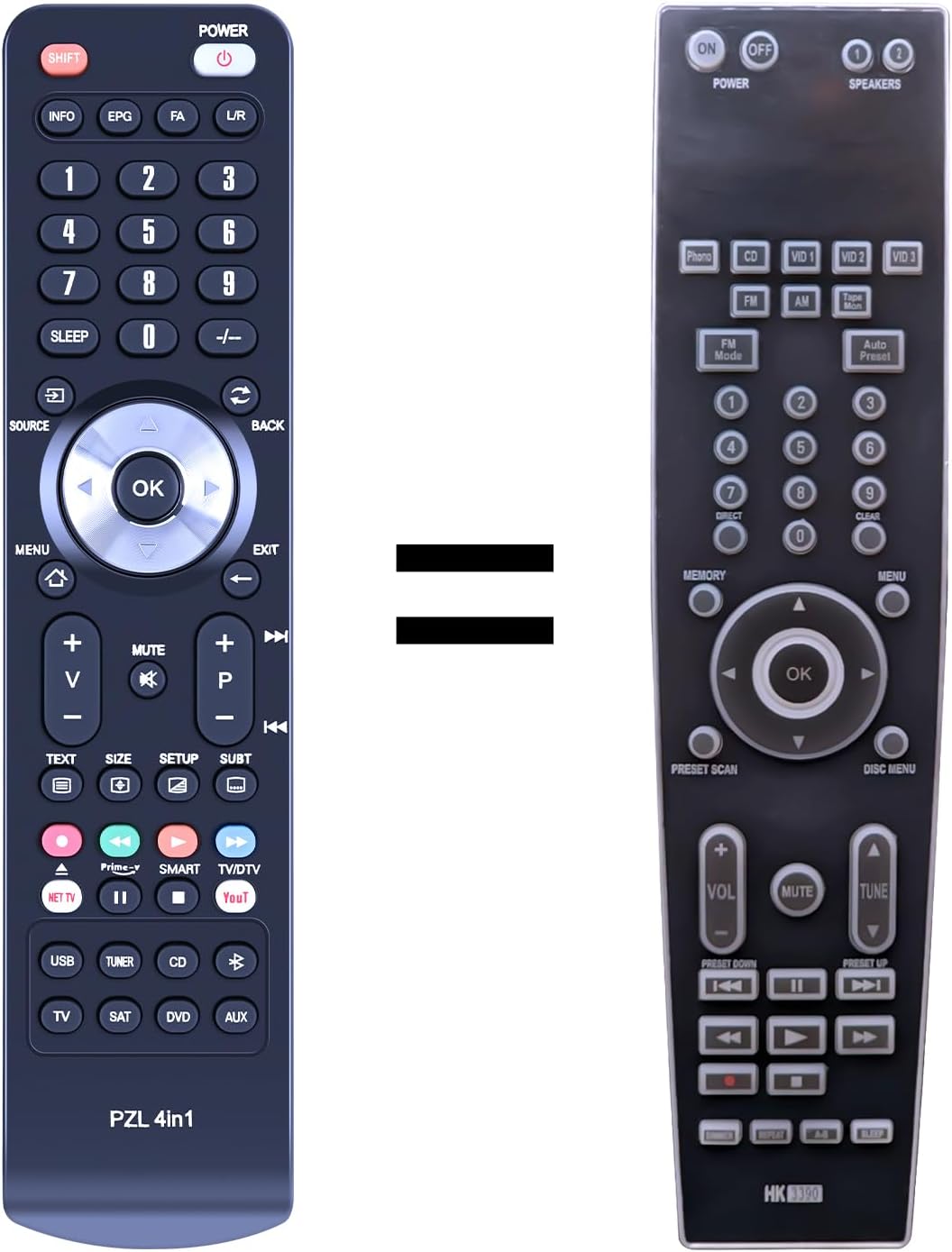
Image 1.1: Comparison of the PZL HK-3390 replacement remote (left) with the original Harman Kardon remote (right).
2. Setup
2.1 Battery Installation
The PZL HK-3390 remote control requires two (2) 1.5V AAA batteries. Batteries are not included with the product.
- Locate the battery compartment on the back of the remote control.
- Slide the battery cover downwards to open it.
- Insert two AAA batteries, ensuring the positive (+) and negative (-) terminals align correctly with the markings inside the compartment.
- Slide the battery cover back into place until it clicks securely.

Image 2.1: Proper insertion of two AAA batteries into the remote control's battery compartment.
2.2 Initial Use
This replacement remote control is designed for immediate use with compatible Harman Kardon Stereo Receivers. No programming or pairing is required. Once batteries are installed, the remote is ready to operate your device.

Image 2.2: The remote control is ready to use without programming or pairing.
3. Operating Instructions
The PZL HK-3390 remote control provides precise control over distances of up to 12 meters (40 feet) using infrared (IR) technology. It offers a fast response time of less than 0.2 seconds.
3.1 Key Functions Layout
Refer to the table below for a detailed comparison of the original Harman Kardon remote's key functions and their corresponding functions on the PZL HK-3390 replacement remote.

Image 3.1: Key functions layout and mapping between original and replacement remote controls.
| Original Function | PZL Key Function | Original Function | PZL Key Function |
|---|---|---|---|
| POWER ON | POWER | PHONO | SHIFT+4 |
| MUTE | MUTE | VIDEO 1 | SHIFT+6 |
| MENU | MENU | VIDEO 2 | SHIFT+7 |
| CLEAR | EXIT | VIDEO 3 | SHIFT+8 |
| 1/2/3/4/5 | 1/2/3/4/5 | TAPE MON | SHIFT+5 |
| 6/7/8/9/0 | 6/7/8/9/0 | TUNE- | SHIFT+DOWN |
| AUTO PRESET | -/-- | TUNE+ | SHIFT+UP |
| PRESET SCAN | SPEAKER 1 | SHIFT+LEFT | |
| VOL+ | VOL+ | SPEAKER 2 | SHIFT+RIGHT |
| VOL- | VOL- | FM | SHIFT+3 |
| SKIP NEXT | P+ | AM | SHIFT+1 |
| SKIP PREV | P- | CD | SHIFT+2 |
| UP | UP | POWER OFF | SHIFT+POWER |
| DOWN | DOWN | MEMORY | EPG |
| LEFT | LEFT | DIRECT | FAV |
| RIGHT | RIGHT | FM MODE | TV/DTV |
| OK | OK | DIMMER | INFO |
| SLEEP | SLEEP |
3.2 Remote Control Range
The remote control utilizes advanced infrared technology for strong signal transmission, allowing for multi-angle induction and reliable operation from up to 10 meters (33 feet) away.

Image 3.2: The remote offers long-distance, precise control.
4. Maintenance
4.1 Cleaning
The remote control is constructed from durable ABS material with soft plastic buttons. To clean, gently wipe the surface with a soft, dry, or slightly damp cloth. Avoid using abrasive cleaners, solvents, or harsh chemicals, as these can damage the remote's finish or internal components.
4.2 Battery Replacement
Replace batteries when the remote's response becomes sluggish or it ceases to function. Always replace both batteries simultaneously with new 1.5V AAA batteries. Do not mix old and new batteries, or different types of batteries.
5. Troubleshooting
If you experience issues with your PZL HK-3390 remote control, please refer to the following common troubleshooting steps:
- Remote Not Responding:
- Ensure batteries are correctly installed with the proper polarity (+/-).
- Replace old batteries with fresh 1.5V AAA batteries.
- Check for any obstructions between the remote control and your Harman Kardon Stereo Receiver. The remote requires a clear line of sight to the receiver's IR sensor.
- Limited Range:
- Ensure batteries are fresh. Weak batteries can reduce the remote's effective range.
- Minimize sources of infrared interference, such as direct sunlight or strong artificial lighting, which can affect IR signal transmission.
- Specific Functions Not Working:
- Refer to the 'Key Function Mapping' table (Table 3.1) to ensure you are pressing the correct button for the desired function, especially for functions requiring the 'SHIFT' key.
- Verify that your Harman Kardon Stereo Receiver model is compatible with the HK-3390 replacement remote. While designed for broad compatibility, specific older or newer models might have variations.
6. Specifications
- Brand: PZL
- Model Number: HK3390
- Compatible Devices: Harman Kardon Stereo Receiver
- Special Feature: No Programming Required
- Color: Black
- Max Number of Supported Devices: 1
- Item Weight: 1.92 ounces
- Package Dimensions: 1.5 x 1 x 0.6 inches
- Material: ABS
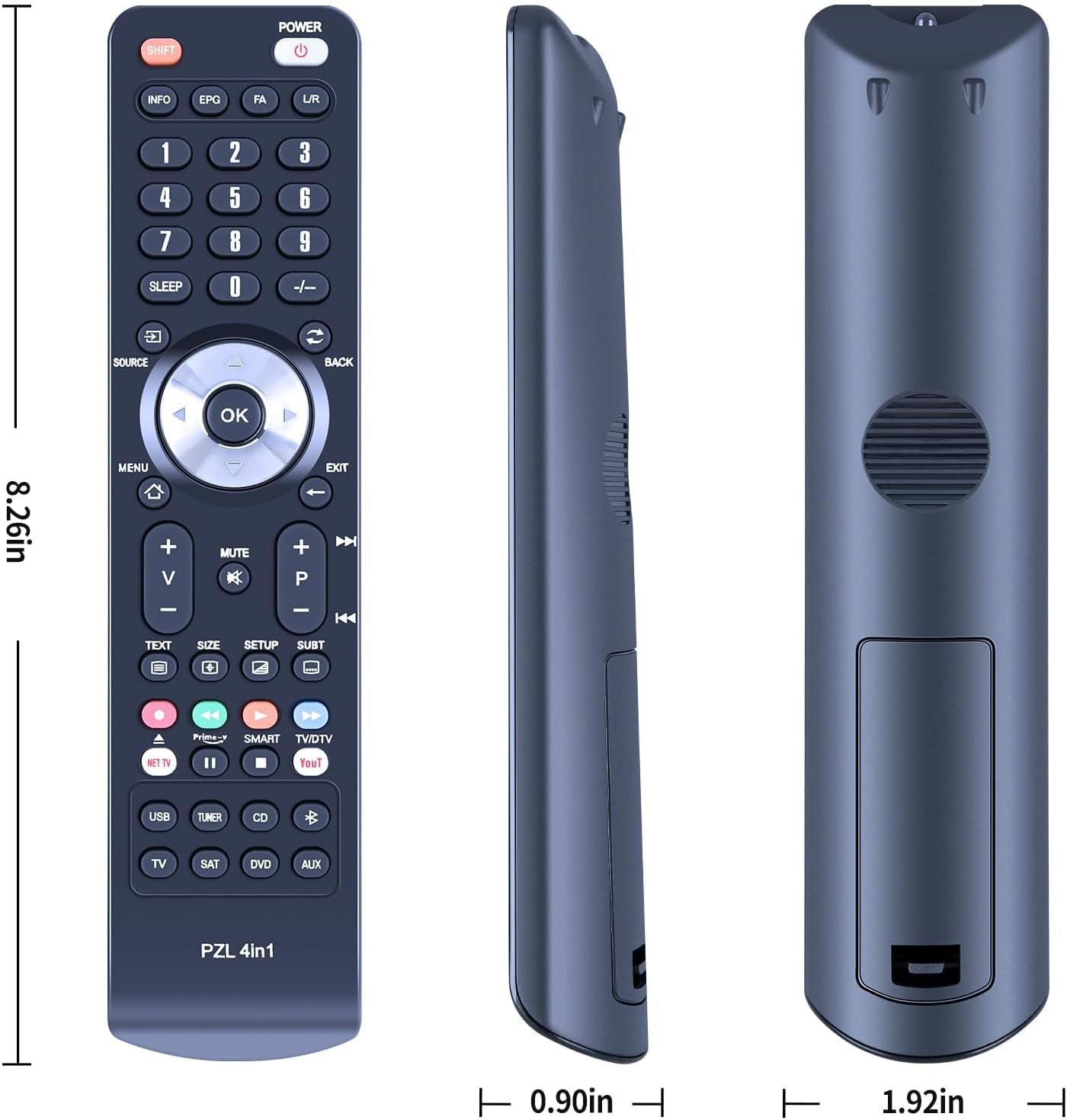
Image 6.1: Dimensions of the PZL HK-3390 remote control.
7. Warranty and Support
7.1 Customer Support
For any questions regarding your order, product compatibility, or if you encounter issues not covered in this manual, please contact PZL customer support. We aim to respond to inquiries within 12 hours on weekdays.
7.2 Warranty Information
Specific warranty details are not provided with this product. Please refer to your purchase documentation or contact the seller directly for information regarding return policies or any applicable warranty.