
CARPSDZY DS3678-5PIN
CARPSDZY DS3678 Cradle Charging Connector Replacement User Manual
Model: DS3678-5PIN
1. Introduction
This manual provides detailed instructions for the CARPSDZY DS3678 Cradle Charging Connector Replacement. It is designed to assist users in the proper installation, operation, and maintenance of this component, ensuring efficient and stable charging for compatible Zebra handheld barcode scanners.
2. Product Overview
The CARPSDZY DS3678 Cradle Charging Connector is a 5-pin replacement component engineered for specific Zebra barcode scanner models. It is constructed from oxygen-resistant and heat-resistant metal material, designed for durability and consistent performance under repeated use. This connector facilitates the electrical connection between the scanner and its charging cradle, enabling sensitive and rapid charging.

Figure 2.1: Front view of the 5-pin charging connector, highlighting the metallic contact pads.
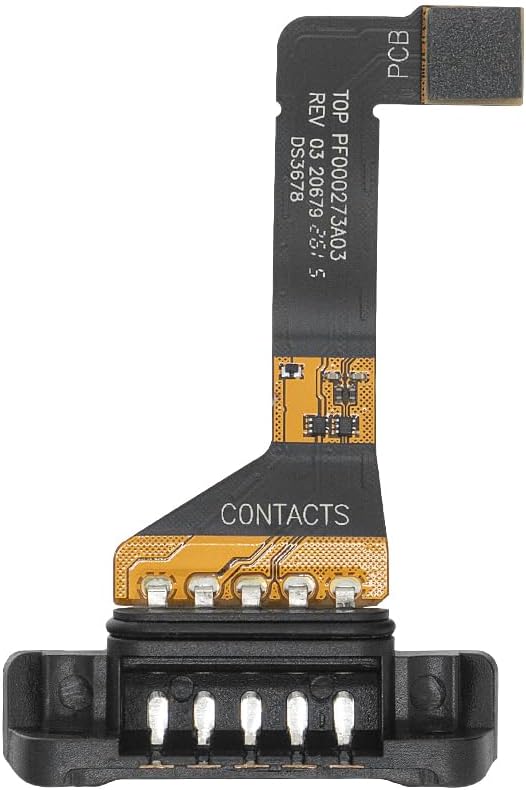
Figure 2.2: Rear view of the connector, displaying the printed circuit board (PCB) and internal contact points.
3. Compatibility
This replacement charging connector is specifically designed for use with the following Zebra handheld barcode scanner models:
- Zebra DS3678-DP
- Zebra DS3678-HP
- Zebra DS3678-SR
- Zebra DS3678-HD
- Zebra DS3678-ER
- Zebra LI3678
Important: Before proceeding with installation, verify that your device model matches one of the listed compatible scanners to ensure proper function and avoid incompatibility issues.

Figure 3.1: Visual representation of the connector's intended placement on a compatible Zebra DS3678 scanner.
4. Setup and Installation
The installation process for the CARPSDZY DS3678 Cradle Charging Connector is designed to be straightforward. This component is intended to replace a damaged or unusable charging connector within the scanner's cradle system.
Installation Steps:
- Preparation: Ensure the Zebra barcode scanner and its charging cradle are powered off and disconnected from any power source.
- Access: Carefully access the area of the charging cradle where the existing or damaged connector is located. This may involve disassembling parts of the cradle. Refer to your Zebra scanner's original service manual for specific disassembly instructions if needed.
- Removal: Gently remove the old or damaged charging connector. Note its orientation and connection points.
- Placement: Position the new CARPSDZY DS3678 Cradle Charging Connector into the designated slot, ensuring the 5 pins align correctly with the corresponding contacts.
- Connection: Securely connect the new connector. The design allows for easy and stable connection.
- Reassembly: Reassemble any parts of the charging cradle that were disassembled.
- Verification: Once installed, proceed to the "Operating Instructions" section to verify proper function.
If you are unsure about any step, it is recommended to consult a qualified technician or refer to the original equipment manufacturer's service guidelines.
5. Operating Instructions
After successful installation of the CARPSDZY DS3678 Cradle Charging Connector, follow these steps to charge your Zebra barcode scanner:
- Connect Power: Ensure the charging cradle is connected to a compatible power source.
- Place Scanner: Carefully place the Zebra DS3678 or LI3678 scanner onto the charging cradle.
- Verify Connection: Ensure the scanner is seated correctly and the charging connector makes full contact with the scanner's charging interface. The connector is designed to respond sensitively.
- Monitor Charging: The scanner should begin charging quickly. Refer to your scanner's indicator lights or display for charging status.
The efficient design of the connector ensures a stable and rapid charging experience.
6. Maintenance
The CARPSDZY DS3678 Cradle Charging Connector is manufactured from durable, oxygen-resistant, and heat-resistant metal, designed for longevity and to withstand the friction associated with multiple charges.
- Cleaning: Periodically inspect the connector pins for dust or debris. If necessary, gently clean the contact points with a dry, lint-free cloth or a soft brush. Avoid using liquids or abrasive materials.
- Inspection: Regularly check the connector for any signs of physical damage or wear. While designed for durability, excessive force or improper handling can cause damage.
- Storage: If the connector is not in use, store it in a clean, dry environment away from extreme temperatures.
Proper maintenance ensures the continued efficient and stable performance of the charging connector.
7. Troubleshooting
If you encounter issues with the CARPSDZY DS3678 Cradle Charging Connector, consider the following troubleshooting steps:
- Scanner Not Charging:
- Ensure the scanner is correctly seated in the cradle and the connector pins are making full contact.
- Verify the charging cradle is properly connected to a working power source.
- Check the connector pins for any visible debris or damage that might obstruct contact.
- Incompatibility:
- Double-check that your barcode scanner model is listed in the "Compatibility" section (Section 3). This connector is designed for specific Zebra DS3678 and LI3678 series scanners.
- Loose Connection:
- If the connection feels loose after installation, re-verify that the connector is securely fastened within the cradle.
If these steps do not resolve the issue, please refer to the "Warranty and Support" section for further assistance.
8. Specifications
| Brand | CARPSDZY |
| Model Number | CARPSDZY-DS3678-5PIN |
| Compatible Devices | Zebra DS3678-DP, DS3678-HP, DS3678-SR, DS3678-HD, DS3678-ER, LI3678 Handheld Barcode Scanners |
| Connector Type | Cradle Charging Connector |
| Number of Pins | 5 |
| Connector Gender | Male-to-Male |
| Outer Material | Metal (Oxygen-resistant, Heat-resistant) |
| Maximum Voltage | 5 Volts (DC) |
| Item Weight | 0.634 ounces (0.02 Kilograms) |
| Package Dimensions | 2.64 x 2.01 x 0.47 inches |
| Indoor/Outdoor Usage | Indoor, Outdoor |
9. Warranty and Support
CARPSDZY is committed to providing high-quality products and customer satisfaction. Each charging connector undergoes strict quality inspection and secure packaging prior to shipment.
If you have any questions, concerns, or require assistance with your CARPSDZY DS3678 Cradle Charging Connector, please contact our customer support team. We aim to provide a satisfactory solution within 24 hours of your inquiry.
For support, please refer to the contact information provided with your purchase or on the official CARPSDZY website.
Ask a question about this manual
Ask about setup, troubleshooting, compatibility, parts, safety, or missing instructions. Manuals+ will review the question and use this page’s manual context to help answer it.