
GUGUMO GUGUMO-240301-01
GUGUMO Range Hood LED Light Bulbs User Manual
Model: GUGUMO-240301-01
Introduction
This manual provides essential information for the safe and effective use of your GUGUMO Range Hood LED Light Bulbs. These bulbs are designed as a direct replacement for existing range hood lights, offering efficient and stable illumination. Please read this manual thoroughly before installation and operation to ensure proper functionality and safety.
Safety Information
WARNING: Always disconnect power to the range hood before attempting any installation, maintenance, or troubleshooting. Failure to do so may result in electric shock or injury.
- Ensure the power supply matches the bulb's specifications (DC 12V).
- Do not attempt to modify the bulb or its wiring.
- Handle the bulbs with care to avoid damage to the glass or internal components.
- Keep out of reach of children.
- If the bulb flickers, turn off the power, wait a few seconds, and turn it back on. If flickering persists, consult the troubleshooting section.
Product Overview
The GUGUMO Range Hood LED Light Bulbs are designed for durability and ease of installation. Each bulb features a robust stainless steel frame and efficient LED beads, providing bright, cool white light for your kitchen.

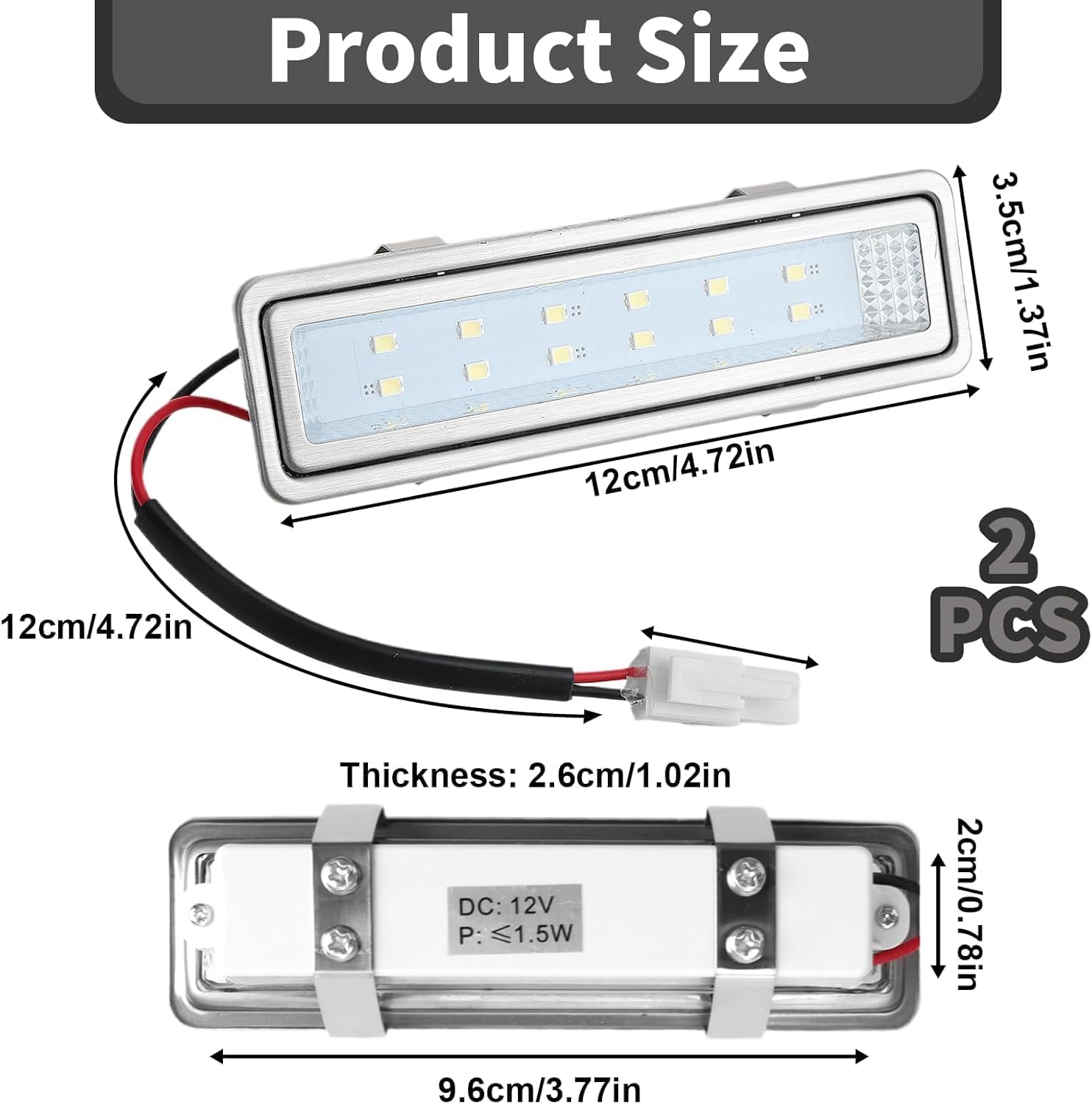

Key Features:
- Voltage: DC 12V compatible (AC/DC without polarity distinction).
- Material: High-quality stainless steel frame and durable LED beads.
- Protection: Overcurrent, short circuit, overvoltage, and high voltage surge protection.
- Dimensions: 120mm x 35mm (approx. 4.72" x 1.38").
- Light Color: Cool White.
- Brightness: Two brightness levels (as per product description, though not explicitly detailed how to switch).
Specifications
| Attribute | Value |
|---|---|
| Brand | GUGUMO |
| Model Number | GUGUMO-240301-01 |
| Light Source Type | LED |
| Wattage | 1.5 Watts (LED), 20 Watts (Equivalent) |
| Incandescent Equivalent Wattage | 3 Watts |
| Brightness | 110 Lumens |
| Voltage | DC 12V (Accepted voltage frequency: 100 to 240 Volts and 50 Hertz to 60 Hertz) |
| Bulb Shape Size | ED18 |
| Product Dimensions | 1.38"W x 4.72"H (120mm x 35mm) |
| Item Weight | 5.3 ounces |
| Finish Type | Stainless steel |
| Indoor/Outdoor Usage | Indoor |
| Connectivity Technology | Normal bulb |
| UPC | 664792120751 |
Setup and Installation
These LED bulbs are designed for easy replacement of existing range hood lights. Please follow these steps carefully:
- Disconnect Power: Locate the circuit breaker for your kitchen or range hood and turn off the power supply. Verify that the power is off before proceeding.
- Access Old Bulb: Refer to your range hood's manufacturer instructions to safely access and remove the old light bulb. This may involve removing filters, covers, or panels.
- Remove Old Bulb: Carefully disconnect the wiring from the old bulb. Note the connection type. If the connector on the new bulb does not match, you may need to splice the old connector onto the new bulb's wires (consult a qualified electrician if unsure). The GUGUMO bulbs are designed to connect easily without distinguishing between positive and negative poles.
- Install New Bulb: Connect the GUGUMO LED bulb's male EL socket to the corresponding female socket in your range hood. Ensure a secure connection.
- Secure Bulb: Place the new LED bulb into its housing. The stainless steel frame and mounting brackets are designed for a secure fit.
- Reassemble Hood: Reattach any filters, covers, or panels that were removed during the process.
- Restore Power: Turn the power supply back on at the circuit breaker.
- Test Functionality: Turn on the range hood light to confirm the new LED bulb is working correctly.


Operating Instructions
Once installed, the GUGUMO Range Hood LED Light Bulbs operate in conjunction with your range hood's existing light controls. Simply use the light switch on your range hood to turn the bulbs on or off.
The product description mentions "two brightness levels." If your range hood has a dimmer function or multiple light settings, these bulbs are designed to be compatible. If your halogen bulb flickers, simply turn it off and on again to restore normal operation.

Maintenance
The GUGUMO LED Light Bulbs are designed for long-term, maintenance-free operation. However, to ensure optimal performance and longevity:
- Cleaning: If the bulb surface becomes dirty, gently wipe it with a soft, dry cloth. Do not use abrasive cleaners or solvents. Ensure power is off before cleaning.
- Inspection: Periodically inspect the bulb and its connections for any signs of wear or damage. If damage is observed, disconnect power and replace the bulb.
- Heat Dissipation: Ensure the range hood's ventilation system is clean and unobstructed to allow for proper heat dissipation from the bulb.
Troubleshooting
| Problem | Possible Cause | Solution |
|---|---|---|
| Bulb does not light up. | No power to the range hood. Loose connection. Incorrect voltage. Defective bulb. | Check circuit breaker. Ensure connections are secure. Verify range hood voltage is 12V DC. If all else fails, the bulb may be defective; contact support. |
| Bulb flickers. | Temporary power fluctuation. Incompatibility with dimmer (if applicable). | Turn off the light, wait a few seconds, then turn it back on. Ensure your range hood's dimmer is compatible with LED bulbs. |
| Light is dim or inconsistent. | Insufficient power. Dirty bulb surface. | Ensure stable 12V DC power supply. Clean the bulb surface gently with a dry cloth. |
| Connector does not fit. | Different connector type on range hood. | You may need to splice the existing connector from your old bulb onto the new GUGUMO bulb's wires. Consult a qualified electrician if you are not comfortable with electrical wiring. |
Warranty and Support
GUGUMO stands behind the quality of its products. For warranty information or technical support, please refer to the product packaging or contact GUGUMO customer service through the retailer where the product was purchased. Please have your model number (GUGUMO-240301-01) and purchase date available when contacting support.
For further assistance, you may visit the official GUGUMO store on Amazon: GUGUMO Store
Ask a question about this manual
Ask about setup, troubleshooting, compatibility, parts, safety, or missing instructions. Manuals+ will review the question and use this page’s manual context to help answer it.