
1. Introduction
This manual provides comprehensive instructions for the safe and effective use of your GOYOJO NVG20 2K Night Vision Monocular. Please read this manual thoroughly before operating the device and retain it for future reference. The NVG20 is designed for enhanced visibility in low-light and nighttime conditions, featuring 2K resolution, 4x magnification, and multiple color modes.
2. Safety Information
- Do not look directly at strong light sources (e.g., sun, bright lamps) through the device, as this can damage the sensor and your eyes.
- Keep the device away from extreme temperatures, humidity, and direct sunlight.
- Avoid dropping or subjecting the device to severe impacts.
- Do not attempt to disassemble or repair the device yourself. Contact authorized service personnel for assistance.
- Ensure the battery is inserted correctly according to polarity markings.
- Dispose of batteries responsibly according to local regulations.
- This device is not intended for use while operating vehicles or heavy machinery.
3. Product Overview
The GOYOJO NVG20 is a high-performance night vision monocular designed for various nocturnal activities. It features a robust design and advanced imaging capabilities.
Key Features:
- 2K Image Quality: High-resolution imaging for clear observation.
- 4X Magnification: Optical magnification to bring distant objects closer.
- 4 Color Modes: Includes Color, Black and White, Fluorescent Green, and White Phosphor for varied viewing experiences.
- HD Recording & Playback: Capture 1920x1080 videos and review them directly on the device.
- Picture-in-Picture (PIP): Advanced magnification for precise target focus.
- WiFi Connectivity: Seamless connection to computers, smartphones, or tablets for data transfer and live streaming.
- Helmet Mountable: Designed for hands-free operation when mounted on a compatible helmet.
- IP66 Rating: Provides protection against dust and strong jets of water.
Components:

The image above displays the GOYOJO NVG20 monocular attached to a helmet, illustrating its primary use configuration. The monocular features an objective lens, eyepiece, and control buttons.

Figure 3.2 highlights the control buttons on the side of the NVG20 monocular, including the power button and directional controls for menu navigation and settings adjustment.
4. Setup
4.1 Charging the Battery
The NVG20 uses a Lithium Polymer battery (included). Before first use, fully charge the battery using the provided charger and cable. Connect the charger to a power source and the cable to the device's charging port. The charging indicator will show the charging status.
4.2 Inserting the Battery
- Locate the battery compartment on the device.
- Open the compartment cover.
- Insert the charged Lithium Polymer battery, ensuring correct polarity (+/-) as indicated inside the compartment.
- Close the battery compartment cover securely.
4.3 Helmet Mounting
The NVG20 is designed for helmet mounting for hands-free operation. A compatible helmet and mounting system are required.
- Attach the provided mounting bracket to your helmet's front shroud, if not already installed. Ensure it is securely fastened.
- Slide the NVG20 monocular onto the mounting bracket until it clicks into place.
- Adjust the monocular's position for optimal eye relief and field of view. Use the adjustment knobs on the mount to fine-tune height and angle.
- Ensure the monocular is stable and does not obstruct your vision or movement.
This image shows the NVG20 monocular correctly mounted on a helmet, ready for use. The mounting system allows for quick attachment and detachment.
4.4 Powering On/Off
- To Power On: Press and hold the power button (refer to Figure 3.2) for a few seconds until the display illuminates.
- To Power Off: Press and hold the power button again until the display shuts down.
5. Operating Instructions
5.1 Basic Viewing and Focus
- Once powered on, look through the eyepiece.
- Adjust the eyepiece diopter for your individual vision to achieve a sharp image of the internal display.
- Rotate the objective lens focus ring to bring distant objects into sharp focus.
- Use the digital zoom function (if available via menu) to further magnify the image up to 4x.

This image illustrates the effect of the NVG20's magnification, demonstrating how the device can reveal more detail at 4x zoom compared to 1x.
5.2 Color Modes
The NVG20 offers four distinct color modes to adapt to different environments and user preferences. Navigate through the menu to select your desired mode.
- Color Mode: Provides vivid color imagery during daylight conditions.
- Black and White Mode: Standard night vision display, offering high contrast.
- Fluorescent Green Mode: Classic green night vision display.
- White Phosphor Mode: Offers an improved observational experience with a white and black display, similar to 3rd generation tubes.
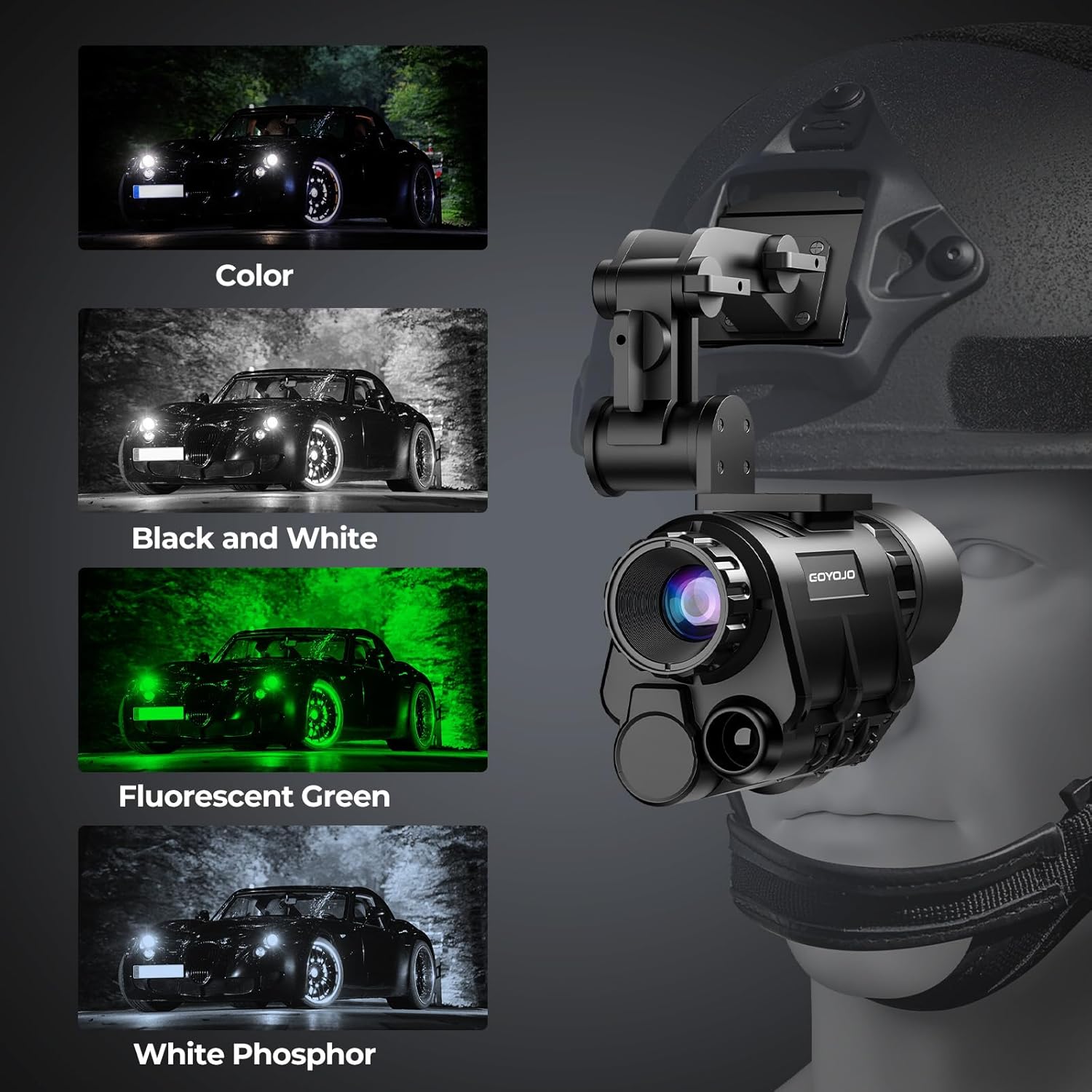
This image visually demonstrates the appearance of the four different color modes, allowing users to understand their visual characteristics.
5.3 Recording and Playback
The NVG20 can record high-definition videos (1920x1080 pixels) and supports immediate playback.
- To Record: Press the dedicated record button (refer to manual for exact button location) to start recording. Press again to stop.
- Picture-in-Picture (PIP): Activate PIP mode through the menu for magnified focus on specific targets during recording or observation.
- Playback: Access the playback menu to review recorded videos and images directly on the device's screen.

This image shows the NVG20's recording function, with footage displayed on a laptop, highlighting its ability to capture and review observations.
5.4 WiFi Connectivity
The NVG20 supports WiFi connectivity for seamless data transfer and live viewing on external devices.
- Download the official GOYOJO app for Android or iOS from your device's app store.
- Enable WiFi on your NVG20 through the device menu.
- Connect your smartphone or tablet to the NVG20's WiFi network.
- Open the app to view live footage, transfer files, or control certain device functions remotely.

This image highlights the WiFi connection feature of the NVG20, showing how it can connect to smart devices and providing QR codes for app downloads.
5.5 Binocular Conversion
The NVG20 monocular can be combined with another unit and a specialized bracket system to form a binocular night vision device, effectively doubling your visual range and depth perception.
- Acquire a second NVG20 monocular and the dedicated binocular conversion bracket.
- Attach both NVG20 units to the binocular bracket according to the bracket's instructions.
- Mount the assembled binocular system onto a compatible helmet.
- Adjust each monocular individually for optimal focus and eye relief to achieve a unified binocular view.

This diagram visually explains the process of converting two NVG20 monoculars into a binocular system using additional brackets and mounting them on a helmet.
6. Maintenance
- Cleaning Lenses: Use a soft, lint-free cloth specifically designed for optical lenses. Gently wipe the lens surfaces. Avoid using abrasive materials or harsh chemicals.
- Cleaning Body: Wipe the device body with a soft, damp cloth. Do not use solvents or strong detergents.
- Storage: When not in use, store the NVG20 in its protective case in a cool, dry place, away from direct sunlight and extreme temperatures. Remove the battery if storing for extended periods.
- Battery Care: Recharge the battery regularly, even if not in use, to maintain its lifespan. Avoid fully discharging the battery.
7. Troubleshooting
| Problem | Possible Cause | Solution |
|---|---|---|
| Device does not power on. | Battery is dead or incorrectly inserted. | Charge the battery. Ensure battery is inserted with correct polarity. |
| Image is blurry. | Incorrect focus or diopter setting. | Adjust the objective lens focus ring and the eyepiece diopter. |
| No image in low light. | IR illuminator is off or insufficient ambient light. | Activate the built-in IR illuminator. Ensure there is some ambient light or use an external IR source if needed. |
| Cannot connect via WiFi. | WiFi is disabled on device or incorrect app settings. | Enable WiFi on the NVG20. Ensure the correct app is installed and configured. |
| Recorded video quality is poor. | Low light conditions, dirty lens, or incorrect settings. | Ensure lenses are clean. Check recording resolution settings. Use IR illuminator in very dark conditions. |
8. Specifications
| Feature | Detail |
|---|---|
| Model Number | NVG20 |
| Image Quality | 2K Resolution |
| Magnification | Up to 4X |
| Color Modes | Color, Black and White, Fluorescent Green, White Phosphor |
| Video Resolution | 1920x1080 pixels |
| Connectivity | WiFi |
| Field of View | 40° |
| Refresh Rate | 30Hz / 40Hz |
| IP Rating | IP66 |
| Battery Type | 1 Lithium Polymer battery (included) |
| Product Dimensions | 2.83 x 4.92 x 2.83 inches |
| Item Weight | 1.98 pounds (0.9 Kilograms) |
| Objective Lens Diameter | 20 Millimeters |
| Focus Type | Auto Focus |
| Compatible Devices | Smartphone |
9. Warranty Information
Specific warranty details are typically provided with your product packaging or on the manufacturer's official website. Please refer to these sources for the most accurate and up-to-date warranty terms and conditions. Keep your proof of purchase for warranty claims.
10. Customer Support
For technical assistance, troubleshooting, or further inquiries, please contact GOYOJO customer support. You can find contact information on the official GOYOJO website or through the retailer where you purchased the product.
Visit the official GOYOJO Store: GOYOJO Amazon Store


