
1. Introduction
This user manual provides essential information for the safe and effective use of your Goodsby Replacement Rechargeable Li-ion Battery. This battery is designed to replace the original battery in compatible LG CordZero A9 series cordless stick vacuum cleaners. Please read this manual thoroughly before installation and operation to ensure optimal performance and longevity of your battery.
2. Safety Information
Always observe the following safety precautions to prevent injury or damage to the battery and vacuum cleaner:
- Do not disassemble, open, or shred the battery pack.
- Do not expose the battery to heat or fire. Avoid storage in direct sunlight.
- Do not short-circuit the battery pack. Do not store battery packs indiscriminately in a box or drawer where they may short-circuit each other or be short-circuited by conductive materials.
- Do not subject the battery pack to mechanical shock.
- In the event of battery leakage, do not allow the liquid to come into contact with the skin or eyes. If contact has been made, wash the affected area with copious amounts of water and seek medical advice.
- Do not use any charger other than that specifically provided for use with the equipment.
- Keep the battery pack clean and dry.
- Do not leave a battery pack on prolonged charge when not in use.
- Dispose of used battery packs promptly and according to local regulations.
3. Compatibility
This Goodsby replacement battery is compatible with the following LG CordZero A9 series cordless stick vacuum cleaner models:
- LG CordZero A9, A9+
- A900, A902, A905, A906, A907, A908, A912, A913, A916, A926, A927, A929, A958
- A902RM, A905M, A905RM, A906SM, A907GMS, A908VMR, A912PM, A913BM, A916BM, A926KSM, A927KGMS, A927KVMS, A929KVM
- A958S, A958SA, A958SK, A9M, A9MASTER2X, A9MULTI, A9MULTI2X, A9PETNBED, A9PETNBED2X, A9 PLUS, A9K-PRO, A9 Kompressor, A9K-CORE, A9K MAX, A9T-ULTRA
It replaces the following part numbers:
- EAC63382201, EAC63382202, EAC63382204, EAC63758601, MEV65921201, EAC63382208
4. Specifications
| Feature | Specification |
|---|---|
| Battery Type | Rechargeable Li-ion |
| Capacity | 2300mAh |
| Voltage | 25.2V |
| Energy | 60.48Wh |
| Model Number | GFL - A9 Battery |
| Product Dimensions | 4 x 4 x 2.5 inches |
| Item Weight | 1 pound |
5. Installation and Initial Setup
Follow these steps to install your new Goodsby replacement battery:
- Ensure your LG CordZero vacuum cleaner is powered off and unplugged from its charging station.
- Locate the battery compartment on your vacuum cleaner. Refer to your vacuum cleaner's original manual for specific instructions on removing the old battery.
- Carefully remove the old battery.
- Insert the new Goodsby replacement battery into the compartment, ensuring it clicks securely into place. Verify that the interface is fully connected.
- If the new battery is not recognized immediately after installation, remove it and reinstall, ensuring a firm connection.
- For optimal performance, discharge the new battery to approximately 10-20% of its capacity (do not fully discharge to 0%). Then, fully charge the battery. Repeat this discharge-charge cycle 3-4 times to 'wake up' and calibrate the new battery.

Figure 1: Top-down view of the Goodsby Replacement Li-ion Battery, showing the connectors and label.
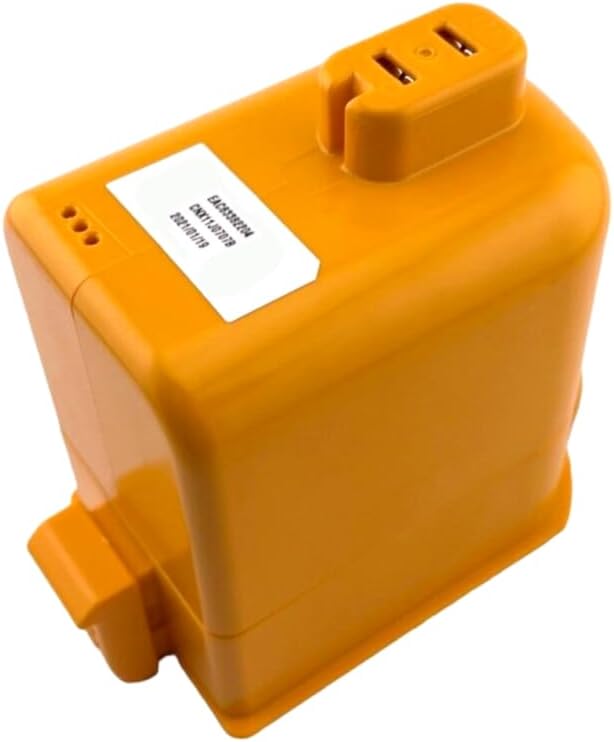
Figure 2: Angled view of the Goodsby Replacement Li-ion Battery, highlighting the connection points.
6. Operating Instructions
Once installed, operate the battery as part of your LG CordZero vacuum cleaner. The vacuum cleaner's charging system will manage the battery's charging process.
- Charging: Always use the original LG CordZero charging station or adapter to charge the battery. Ensure the battery is fully seated in the charging dock.
- Discharging: Use the vacuum cleaner as normal until the battery level is low. Avoid completely draining the battery to 0% frequently, as this can reduce its lifespan.
- Initial Cycles: As mentioned in the setup, perform 3-4 full discharge (to 10-20%) and charge cycles to optimize the new battery's performance.
7. Maintenance
Proper maintenance ensures the longevity of your battery:
- Storage: If storing the battery for an extended period, ensure it is charged to approximately 50-60% and stored in a cool, dry place away from direct sunlight and extreme temperatures.
- Cleaning: Keep the battery contacts clean and free from dust or debris. Use a dry, soft cloth to wipe the battery exterior if needed. Do not use liquids or abrasive cleaners.
- Inspection: Periodically inspect the battery for any signs of damage, swelling, or leakage. Discontinue use immediately if any issues are observed.
8. Troubleshooting
If you encounter issues with your Goodsby replacement battery, consider the following:
- Battery Not Recognized: Ensure the battery is fully and correctly inserted into the vacuum cleaner's compartment. Remove and reinsert the battery to confirm a secure connection.
- Short Run Time: If the battery's run time is shorter than expected, ensure you have completed the initial 3-4 discharge-charge cycles. Over time, battery capacity naturally degrades.
- Not Charging: Verify that the vacuum cleaner is properly connected to its charging station and that the power outlet is functional. Check for any obstructions on the charging contacts of both the battery and the vacuum cleaner.
- Unusual Heat or Smell: Immediately discontinue use and remove the battery if you notice excessive heat, smoke, or an unusual smell. Contact customer support.
9. Warranty and Support
Warranty information for this Goodsby replacement battery is not specified in the provided product details. For any product-related inquiries, technical support, or warranty claims, please contact the seller or manufacturer directly through your purchase platform.