
1. Introduction
The JCALLY JM6 Pro is a portable digital audio adapter designed to convert a USB Type-C port to a 3.5mm audio jack. It integrates dual DAC (Digital-to-Analog Converter) chips, specifically the CX31993 and MAX97220, to deliver high-fidelity audio output. This adapter is intended for use with various devices lacking a dedicated 3.5mm audio output, enabling connection of traditional headphones or audio systems.
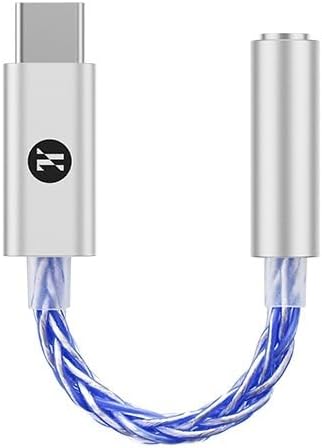
Image 1.1: The JCALLY JM6 Pro USB C to 3.5mm Dual DAC Audio Adapter, featuring a silver Type-C connector, a braided silver-blue cable, and a silver 3.5mm audio jack.
2. Product Overview
2.1 Key Features
- Dual DAC Chipset: Equipped with CX31993 and MAX97220 chips for enhanced audio processing.
- High-Resolution Audio Support: Supports PCM audio up to 32 bits/384 kHz.
- Superior Audio Performance: Features a Signal-to-Noise Ratio (SNR) of 124dB, THD+N of -95dB, and Crosstalk Suppression of -110dB.
- Durable Construction: Features a 3D curved aluminum casting and a 5N OFC silver-plated cable for improved signal transmission and durability.
- Wide Compatibility: Compatible with various USB Type-C devices including smartphones, tablets, and computers.

Image 2.1: Diagram illustrating the internal components of the JM6 Pro, highlighting the DAC Chip CX31993 and AMP Chip MAX97220, and its support for PCM 32bits 384KHz audio.
2.2 Package Contents
The package typically includes:
- 1 x JCALLY JM6 Pro USB C to 3.5mm Dual DAC Audio Adapter
- User Manual (this document)
3. Setup Instructions
The JCALLY JM6 Pro adapter is designed for plug-and-play functionality, requiring no additional drivers for most compatible devices.
- Connect to Source Device: Insert the USB Type-C connector of the JM6 Pro adapter into the USB Type-C port of your smartphone, tablet, laptop, or other compatible device.

Image 3.1: Diagram illustrating the wide compatibility of the JM6 Pro, showing connection to phones, computers, and tablets via the Type-C connector.
- Connect Audio Device: Plug your 3.5mm headphones, earphones, or other audio equipment into the 3.5mm audio jack of the JM6 Pro adapter.
Ensure the 3.5mm connector is fully inserted into the adapter's port to establish a secure connection.
- Device Recognition: Your device should automatically recognize the JM6 Pro as an external audio output device. Audio will now be routed through the adapter.
Compatible Devices include: iPhone 15 series (15, 15 Plus, 15 Pro, 15 Pro Max), Samsung Galaxy S series (S22, S22+, S22 Ultra, S21, S21+, S21 Ultra, S20 Ultra, S20, S20+, S10, S9, S8 Plus), Note series (20, 10, 10+, 9, 8), iPad Pro, iPad mini 6, MacBook, Google Pixel series (4, 3, 2 XL), Huawei Mate series (30, 20, 10 Pro), P series (30, 20), OnePlus (6T, 7, 7Pro), and other Android devices with a USB Type-C port.
4. Operating Instructions
Once connected, the JM6 Pro adapter functions as a direct audio output.
- Volume Control: Adjust the audio volume directly using the volume buttons on your connected source device (smartphone, tablet, laptop). The adapter does not have independent volume controls.
- Audio Playback: Play audio content (music, videos, calls) as you normally would on your device. The sound will be output through the headphones connected to the JM6 Pro.
- Microphone Support: If your connected 3.5mm headphones include a microphone, it should function normally through the adapter, allowing for calls and voice commands.
5. Maintenance
To ensure the longevity and optimal performance of your JCALLY JM6 Pro adapter, follow these maintenance guidelines:
- Cleaning: Use a soft, dry cloth to gently wipe the adapter. Avoid using liquid cleaners or abrasive materials.
- Storage: Store the adapter in a cool, dry place away from direct sunlight and extreme temperatures.
- Handling: Avoid bending or twisting the cable excessively, especially near the connectors, to prevent internal damage. Do not pull the adapter out by the cable; always grasp the connector housing.
- Moisture: Keep the adapter away from water and high humidity to prevent damage to electronic components.

Image 5.1: Close-up of the JM6 Pro's 5N OFC silver-plated cable, designed for improved low-frequency response and lossless audio transmission.
6. Troubleshooting
If you encounter issues with your JCALLY JM6 Pro adapter, refer to the following common troubleshooting steps:
| Problem | Possible Cause | Solution |
|---|---|---|
| No sound output. |
|
|
| Sound is distorted or crackling. |
|
|
| Headphone microphone not working. |
|
|
7. Specifications
Detailed technical specifications for the JCALLY JM6 Pro audio adapter:
| Product Name | JM6 Pro Audio Adapter |
| Brand | Girftu (JCALLY) |
| Model Number | A0519 |
| DAC Chip | Conexant CX31993 |
| AMP Chip | MAX97220 |
| PCM Support | Up to 32 bits/384 kHz |
| Signal-to-Noise Ratio (SNR) | >124 dB |
| Dynamic Frequency | >111 dB |
| THD+N | -95 dB |
| Crosstalk Suppression | -110 dB |
| Frequency Response (FR) | 20 Hz - 40 KHz |
| Output Voltage | 60mW @32Ω, 7.4mW @600Ω |
| Conductor | 8 core silver plated fashion cable |
| Length | Approximately 110mm ± 10mm |
| Weight | 6.0g ± 0.5g |
| Color Options | Silver Blue, Silver Red |

Image 7.1: A visual representation of the JM6 Pro's key specifications, including DAC/AMP chips, PCM support, and physical dimensions.
8. Warranty and Support
Specific warranty information for the Girftu JCALLY JM6 Pro is not provided in the product details. For warranty claims or technical support, please refer to the retailer or manufacturer's official website where the product was purchased. Keep your proof of purchase for any potential claims.