
Neezee HC108A-8
Neezee Magnetic Resistance Rowing Machine User Manual
Model: HC108A-8
1. Introduction
Thank you for choosing the Neezee Magnetic Resistance Rowing Machine. This high-quality fitness equipment is designed to provide an effective full-body workout in the comfort of your home. Featuring 16 levels of adjustable magnetic resistance, a super silent operation, and a space-saving foldable design, it is suitable for users of all fitness levels. Please read this manual thoroughly before assembly and use to ensure safe and optimal performance.

Image: The Neezee Magnetic Resistance Rowing Machine in use, demonstrating the rowing motion.
2. Important Safety Information
Before using the rowing machine, please observe the following safety precautions:
- Consult your physician before starting any new exercise program.
- Keep children and pets away from the equipment during use.
- Place the rowing machine on a flat, stable surface with adequate clearance around it.
- Inspect the machine for loose or damaged parts before each use. Do not use if any components are compromised.
- Wear appropriate athletic footwear and clothing.
- Do not exceed the maximum user weight capacity of 145 kg (319 lbs).
- Stop exercising immediately if you feel faint, dizzy, or experience pain.
- Ensure all bolts and nuts are securely tightened after assembly and check periodically.
- Keep hands and feet clear of moving parts.
3. Package Contents
Carefully unpack all components and verify that you have received the following:
- Neezee Rowing Machine (main unit)
- Detailed Installation Guide
- All necessary assembly accessories (bolts, nuts, tools)
If any parts are missing or damaged, please contact customer service immediately.
4. Assembly Instructions
The Neezee Rowing Machine is designed for straightforward assembly. Refer to the included detailed installation guide for step-by-step instructions and diagrams. Assembly typically takes less than 30 minutes.
- Unpack all components and lay them out on a clean, flat surface.
- Identify all parts according to the parts list in the installation guide.
- Follow the sequential steps for attaching the main frame, sliding rail, seat, handlebars, and foot pedals.
- Ensure all connections are secure and tightened before proceeding to the next step.
- Once assembled, double-check all bolts and nuts for tightness.
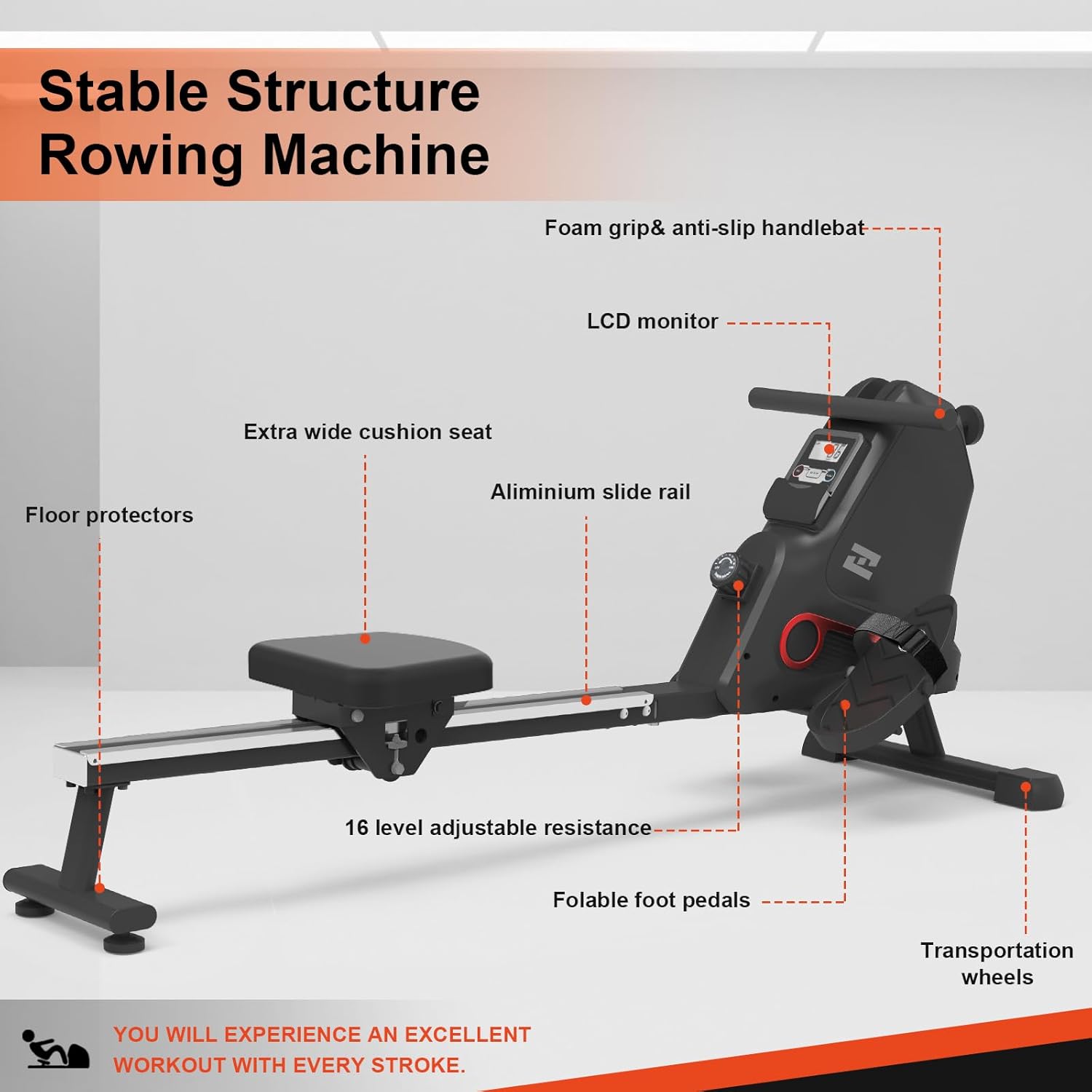
Image: Labeled components of the rowing machine, including the LCD monitor, foam grip handlebar, aluminum slide rail, extra wide cushion seat, foldable foot pedals, floor protectors, and transportation wheels.
5. Operating Instructions
5.1 Adjusting Magnetic Resistance
The Neezee Rowing Machine offers 16 levels of magnetic resistance, allowing you to customize your workout intensity. To adjust the resistance:
- Locate the manual rotation knob on the main unit.
- Turn the knob clockwise to increase resistance (higher numbers, 13-16 for high intensity).
- Turn the knob counter-clockwise to decrease resistance (lower numbers, 1-4 for low intensity).
- Adjust the resistance before or during your workout to match your fitness level and training goals.

Image: Detail of the resistance adjustment knob, illustrating the 16 levels from low to high tension.
5.2 Using the LCD Monitor
The easy-to-use LCD monitor tracks your workout progress. It typically displays metrics such as:
- TIME: Duration of your workout.
- CNT (Count): Number of strokes.
- DIST (Distance): Estimated distance rowed.
- CAL (Calories): Estimated calories burned.
- RPM: Revolutions per minute (stroke rate).
- T-CNT (Total Count): Total strokes over time.
- SCAN: Cycles through all metrics automatically.
Refer to the monitor's specific instructions in the detailed guide for button functions (e.g., MODE, RESET, SET) to navigate and reset your workout data.

Image: The LCD monitor showing real-time workout analytics, with icons indicating muscle groups targeted by rowing (back, chest, arms, legs, abdominals, hips).

Image: A closer view of the anti-sweat handlebar and the LCD monitor, highlighting user-friendly design elements.

Image: A detailed view of the adjustable foot pedal, designed for secure foot placement during exercise.
6. Maintenance
Regular maintenance ensures the longevity and safe operation of your rowing machine:
- Cleaning: Wipe down the machine with a damp cloth after each use to remove sweat and dust. Avoid abrasive cleaners.
- Lubrication: The magnetic resistance system requires no lubrication. Periodically check the sliding rail for smooth operation and clean if necessary.
- Inspections: Regularly check all bolts, nuts, and moving parts for tightness and wear. Tighten any loose fasteners.
- Storage: Store the machine in a clean, dry environment away from direct sunlight and extreme temperatures.
7. Storage
The Neezee Rowing Machine features a convenient foldable design for easy storage, saving up to 80% of your home space.
- To store, simply tilt the device vertically into an upright position.
- The built-in front transportation wheels allow for easy movement of the machine.
- Ensure the machine is stable and secure in its upright storage position.

Image: A woman demonstrating the ease of moving the rowing machine using its front transportation wheels.

Image: The rowing machine in its upright storage position, illustrating its space-saving design.
8. Troubleshooting
If you encounter any issues with your Neezee Rowing Machine, please refer to the following common solutions:
| Problem | Possible Cause | Solution |
|---|---|---|
| Machine is unstable or wobbles. | Uneven surface; loose assembly bolts. | Ensure the machine is on a flat surface. Check and tighten all assembly bolts. |
| Resistance feels inconsistent or too low/high. | Resistance knob not set correctly. | Adjust the resistance knob to your desired level (1-16). |
| LCD monitor not displaying data. | Batteries are low or incorrectly installed; loose cable connection. | Replace batteries. Check that all cables connecting to the monitor are securely plugged in. |
| Unusual noise during operation. | Loose parts; debris on the sliding rail. | Inspect all connections and tighten any loose components. Clean the sliding rail. |
If the problem persists, please contact Neezee customer service.
9. Specifications
| Feature | Detail |
|---|---|
| Model Name | HC108A-8 |
| Brand | Neezee |
| Resistance Mechanism | Magnetic (16 Levels) |
| Frame Material | Aluminum and Steel |
| Max Weight Recommendation | 145 kg (319 lbs) |
| Product Dimensions (L x W x H) | 152 cm x 62 cm x 26 cm (59.84" x 24.4" x 10.43") |
| Monitor Type | LCD (displays Time, Count, Distance, Calories, RPM) |
| Portability | Foldable design, Front Transportation Wheels |
| Color | Dark Grey |
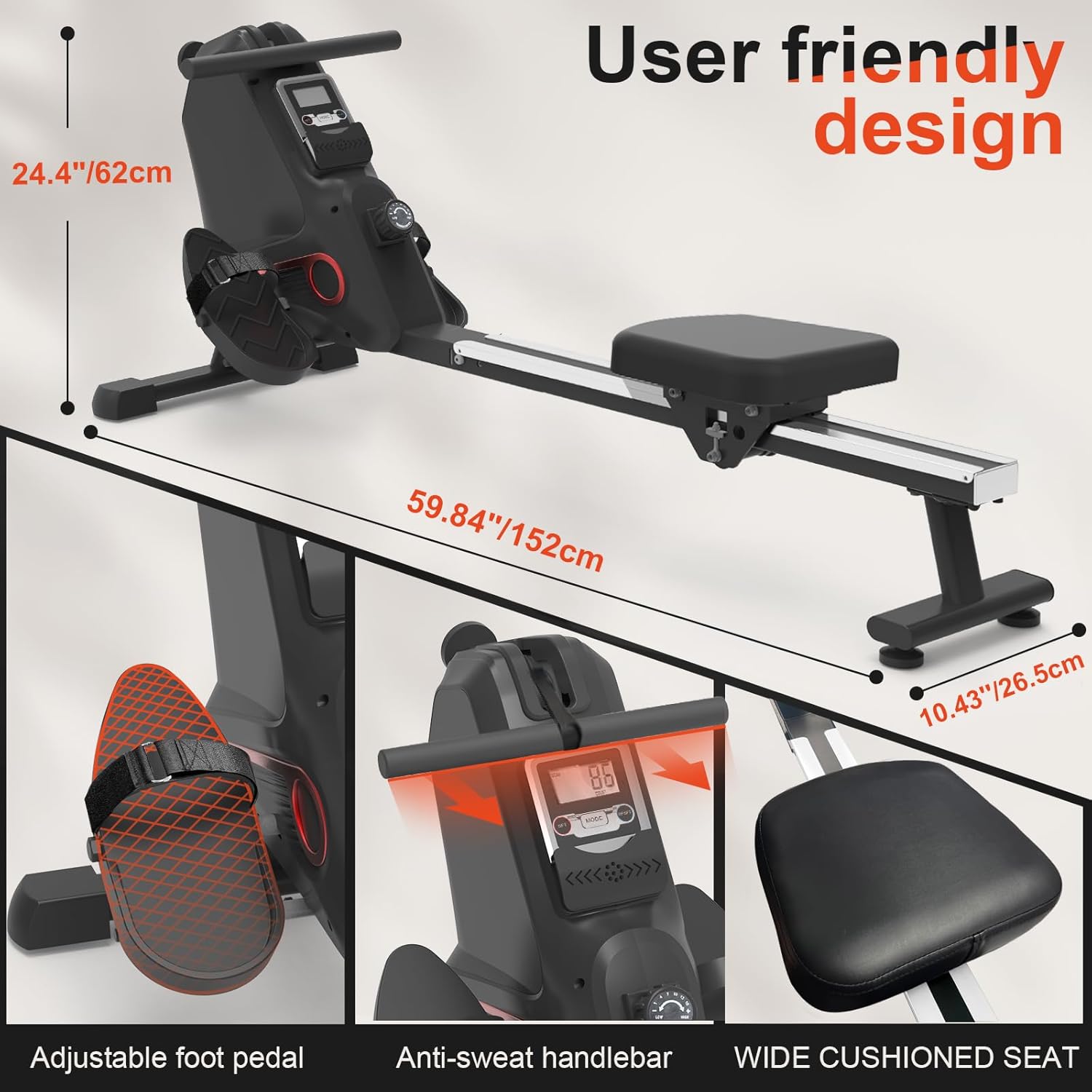
Image: Dimensions of the rowing machine, highlighting its compact and user-friendly design.
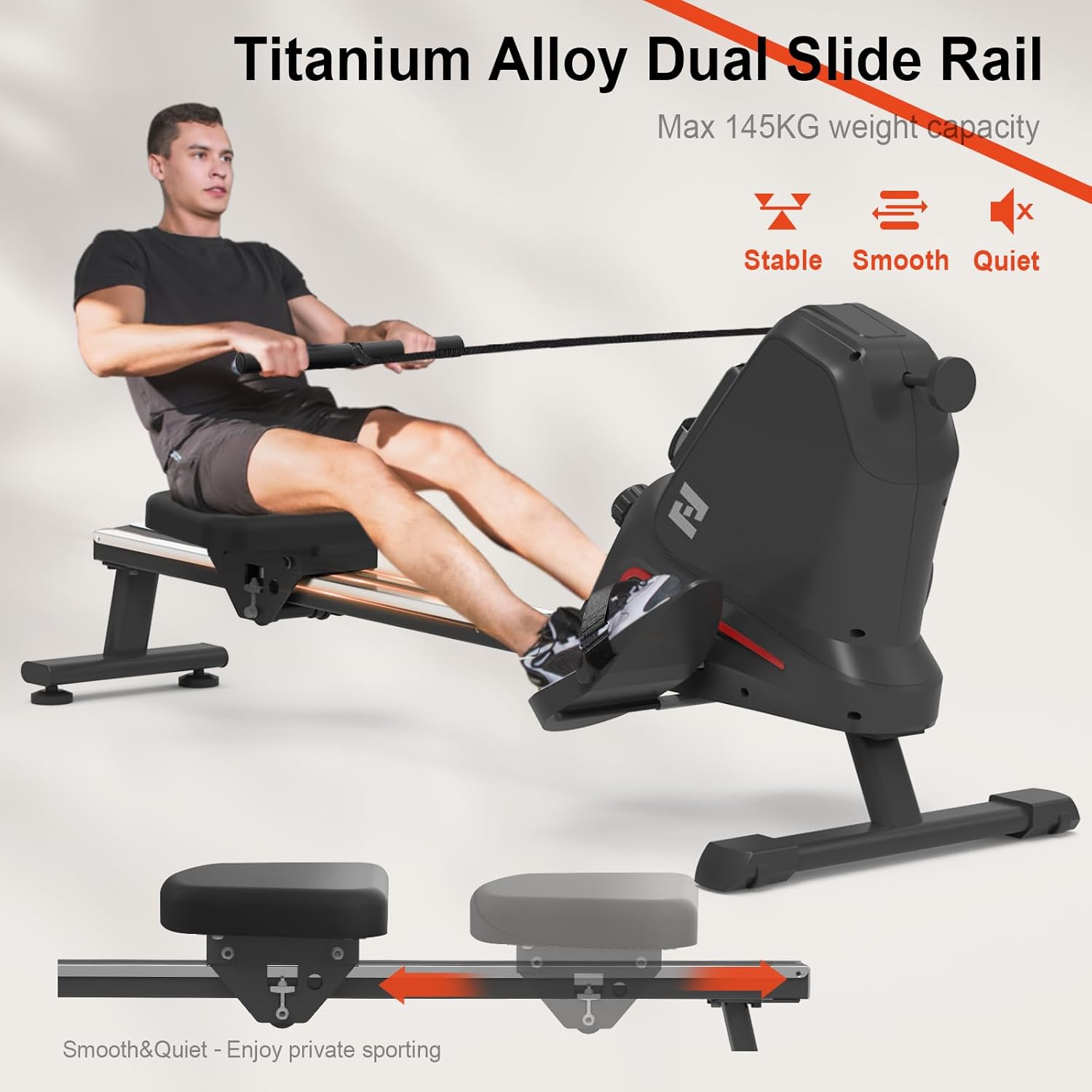
Image: Close-up of the titanium alloy dual slide rail, emphasizing its stability, smoothness, and quiet operation, with a maximum weight capacity of 145 kg.
10. Warranty and Customer Support
Neezee is committed to providing high-quality products and excellent customer service.
- Warranty: The item includes a 12-month parts replacement warranty.
- Customer Service: Our customer service team is available 24 hours a day to assist with any issues or questions regarding your rowing machine. All messages will be responded to within 24 hours.
- Contact: For support, please refer to your order details (Your Orders – Get help with order – Ask a product question).
Ask a question about this manual
Ask about setup, troubleshooting, compatibility, parts, safety, or missing instructions. Manuals+ will review the question and use this page’s manual context to help answer it.