
1. Introduction
This manual provides essential information for the safe and efficient operation, installation, and maintenance of your O-General ASGG18CPAA-B 1.5 Ton 3 Star Inverter Split Air Conditioner. Please read this manual thoroughly before using the appliance and retain it for future reference. Proper use and maintenance will ensure optimal performance and longevity of your air conditioner.
2. Safety Information
Always adhere to the following safety precautions to prevent injury or damage to the unit.
- Professional Installation: Installation, relocation, and maintenance must be performed by a qualified service technician. Improper installation can lead to electric shock, fire, or water leakage.
- Power Supply: Ensure the power supply matches the specifications of the unit. Do not use extension cords or multi-outlet adapters.
- Electrical Safety: Never operate the unit with wet hands. Do not insert objects into the air outlet. Disconnect power before cleaning or servicing.
- Refrigerant: The unit contains R32 refrigerant. Do not discharge refrigerant into the atmosphere. Contact a qualified technician for any refrigerant-related issues.
- Children and Pets: Keep children and pets away from the unit, especially the outdoor unit's fan. Do not allow children to play with the remote control.
- Ventilation: Ensure adequate ventilation around the outdoor unit to prevent overheating.
- Cleaning: Use a soft, dry cloth for cleaning. Do not use volatile liquids or abrasive cleaners.
3. Product Overview
The O-General ASGG18CPAA-B is a 1.5 Ton 3 Star Inverter Split AC designed for efficient cooling. It features Coanda Airflow for uniform cooling and an Anti-Bacterial Filter for improved air quality. The unit consists of an indoor unit, an outdoor unit, and a remote control.




4. Setup and Installation
The installation of your O-General Split AC requires specialized knowledge and tools. It is crucial to have the unit installed by a certified and experienced technician to ensure safety, proper functioning, and to validate the product warranty.
4.1 Pre-Installation Checks
- Location Selection: Choose a location for the indoor unit that allows for even air distribution and is away from direct sunlight or heat sources. The outdoor unit should be placed in a well-ventilated area, away from obstructions.
- Power Requirements: Verify that the electrical supply meets the unit's voltage and current requirements (250 Volts, 1880 Watts). A dedicated circuit is recommended.
- Drainage: Ensure proper drainage for condensate water from the indoor unit.
4.2 Professional Installation Steps (Overview)
- Mounting the indoor unit plate.
- Drilling a hole for refrigerant piping and drain hose.
- Connecting refrigerant pipes and electrical wiring between indoor and outdoor units.
- Securing the outdoor unit on a stable surface.
- Vacuuming the refrigerant lines to remove air and moisture.
- Checking for leaks.
- Connecting the power supply.
- Performing a test run.
Note: Do not attempt to install the unit yourself. Contact O-General authorized service for installation.
5. Operating Instructions
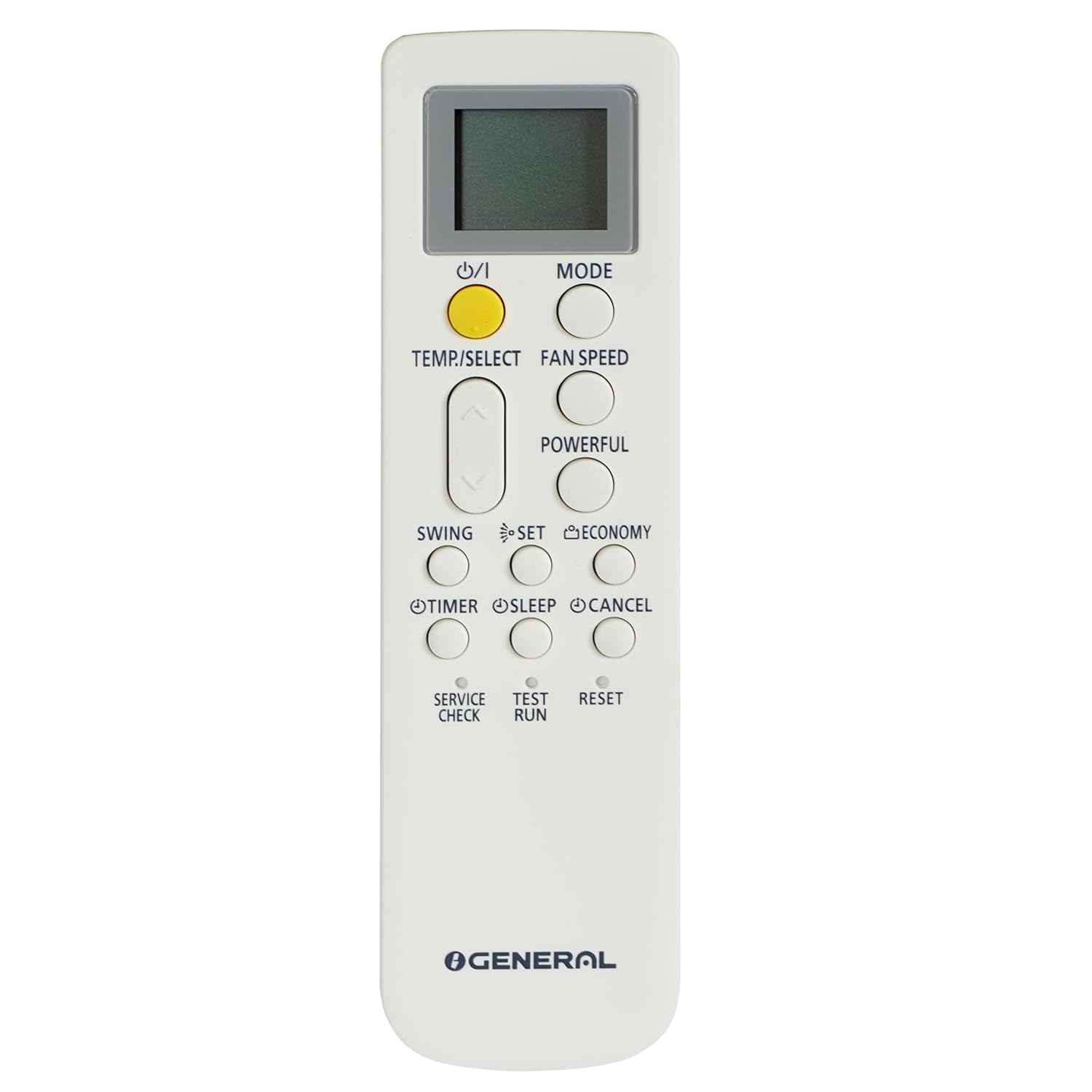
Your O-General AC is operated primarily using the provided wireless remote control.
5.1 Remote Control Functions
- ON/OFF Button: Press to start or stop the air conditioner.
- MODE Button: Cycles through operating modes: Auto, Cool, Dry, Fan.
- TEMP/SELECT Buttons (Up/Down Arrows): Adjusts the desired temperature.
- FAN SPEED Button: Selects fan speed (Auto, Low, Medium, High).
- SWING Button: Controls the vertical airflow direction (louvers).
- POWERFUL Button: Activates maximum cooling/heating for rapid temperature change.
- ECONOMY Button: Operates the unit in an energy-saving mode.
- SLEEP Button: Adjusts temperature and fan speed for comfortable sleep.
- TIMER Button: Sets the ON/OFF timer for automatic operation.
- RESET Button: Resets the remote control settings.
5.2 Operating Modes
- COOL Mode: Provides cooling. Set desired temperature using TEMP buttons.
- DRY Mode: Dehumidifies the room. Fan speed is automatically controlled.
- FAN Mode: Circulates air without cooling or heating. Fan speed can be adjusted.
- AUTO Mode: The unit automatically selects the appropriate mode (Cool, Dry, Fan) based on the room temperature.
5.3 Special Features
- Coanda Airflow: This feature directs airflow upwards towards the ceiling, allowing cool air to gently cascade down, ensuring uniform cooling throughout the room without direct drafts.
- Anti-Bacterial Filter: Helps to capture dust, pollen, and other airborne particles, contributing to cleaner and healthier indoor air.
6. Maintenance
Regular maintenance ensures optimal performance, energy efficiency, and extends the lifespan of your air conditioner.
6.1 Air Filter Cleaning
Clean the air filters every two weeks or more frequently if the unit is used often or in dusty environments.
- Turn off the air conditioner and disconnect the power supply.
- Open the front panel of the indoor unit.
- Remove the air filters.
- Clean the filters with a vacuum cleaner or wash them with lukewarm water and a mild detergent. Rinse thoroughly.
- Allow the filters to dry completely in a shaded area before reinstalling.
- Close the front panel.
6.2 Indoor Unit Cleaning
Wipe the indoor unit's surface with a soft, dry cloth. For stubborn dirt, use a damp cloth with a mild detergent, then wipe dry. Do not use harsh chemicals.
6.3 Outdoor Unit Maintenance
Periodically check the outdoor unit for obstructions around the fan and condenser coils. Clear any leaves, dirt, or debris. For thorough cleaning of the outdoor unit, it is recommended to contact a professional service technician annually.
6.4 Seasonal Checks
- Before the cooling season, ensure all components are clean and functioning correctly.
- Check for any unusual noises or odors during operation.
7. Troubleshooting
Before contacting customer service, please refer to the following common issues and their solutions.
| Problem | Possible Cause | Solution |
|---|---|---|
| Unit does not start | No power supply; Remote control batteries dead; Circuit breaker tripped. | Check power connection; Replace batteries; Reset circuit breaker. |
| Insufficient cooling | Dirty air filters; Temperature setting too high; Doors/windows open; Obstruction at air inlet/outlet; Refrigerant leakage. | Clean air filters; Lower temperature setting; Close doors/windows; Remove obstructions; Contact service technician. |
| Unusual noise | Loose parts; Obstruction in fan; Unit not level. | Check for loose parts; Remove obstruction; Ensure unit is level. If noise persists, contact service. |
| Water leakage from indoor unit | Clogged drain hose; Improper installation. | Clear drain hose; Contact service for inspection. |
| Remote control not working | Dead batteries; Obstruction between remote and unit; Remote out of range. | Replace batteries; Remove obstruction; Operate within effective range. |
If the problem persists after attempting these solutions, please contact O-General customer support.
8. Specifications
Key technical specifications for the O-General ASGG18CPAA-B 1.5 Ton 3 Star Inverter Split AC.
| Feature | Specification |
|---|---|
| Brand | O General |
| Model Name | ASGG18CPAA-B |
| Capacity | 1.5 Tons |
| Cooling Power | 1880 Watts |
| Product Dimensions (Indoor Unit) | 32D x 85W x 56H Centimeters |
| Start Year | 2023 |
| Inverter Type | Has Inverter |
| Installation Type | Split System |
| Compressor Type | Rotary |
| Voltage | 250 Volts |
| Wattage | 1880 Watts |
| Item Weight (Indoor Unit) | 10.5 Kilograms |
| Control Method | Touch, Remote Control |
| Form Factor | Mini-Split |
| Seasonal Energy Efficiency Ratio (SEER) | 3.83 |
| BEE Star Rating | 3 Star |
| Condenser Type | Copper |
9. Warranty Information
The O-General ASGG18CPAA-B air conditioner comes with a limited warranty. The specific terms and duration of the warranty, including coverage for the compressor and other parts, are detailed in the warranty card provided with your product. Please retain your purchase receipt and warranty card for any future claims.
Typically, air conditioner warranties cover manufacturing defects for a specified period. Damage resulting from improper installation, misuse, lack of maintenance, or unauthorized repairs may void the warranty. For detailed warranty terms, refer to the official O-General warranty documentation.
10. Support
For technical assistance, service requests, or inquiries regarding your O-General ASGG18CPAA-B air conditioner, please contact O-General customer support.
- Before Contacting Support: Have your model number (ASGG18CPAA-B), serial number, and date of purchase ready. Describe the issue clearly.
- Authorized Service Centers: Always use authorized O-General service centers for repairs and maintenance to ensure genuine parts and qualified technicians.
Refer to the contact information provided in your product packaging or on the official O-General website for the most up-to-date support details.
