
S42-AUD
S42 True Wireless Earbuds User Manual
Model: S42-AUD
Introduction
Thank you for choosing the S42 True Wireless Earbuds. These earbuds are designed to provide a seamless audio experience with advanced features such as a digital LED display for battery tracking, biometric touch controls, and robust Bluetooth connectivity. They offer crisp sound with satisfying bass, making them ideal for music, calls, and sports activities.
This manual provides detailed instructions on how to set up, operate, maintain, and troubleshoot your S42 earbuds to ensure optimal performance and longevity.
What's in the Box
Please check the package contents to ensure all items are present:
- S42 True Wireless Earbuds (Left and Right)
- Charging Case with Digital LED Display
- USB Charging Cable (Type-C)
- User Manual
- Ear Cushions (3 different sizes: Small, Medium, Large)
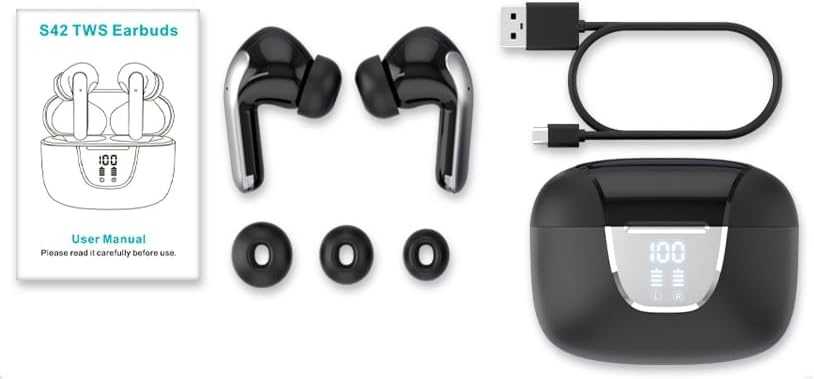
Image: All components included in the S42 True Wireless Earbuds package, laid out for clear viewing. This includes the earbuds, charging case, USB-C charging cable, user manual, and three pairs of ear tips of varying sizes.
Product Overview
Familiarize yourself with the S42 True Wireless Earbuds and their charging case.
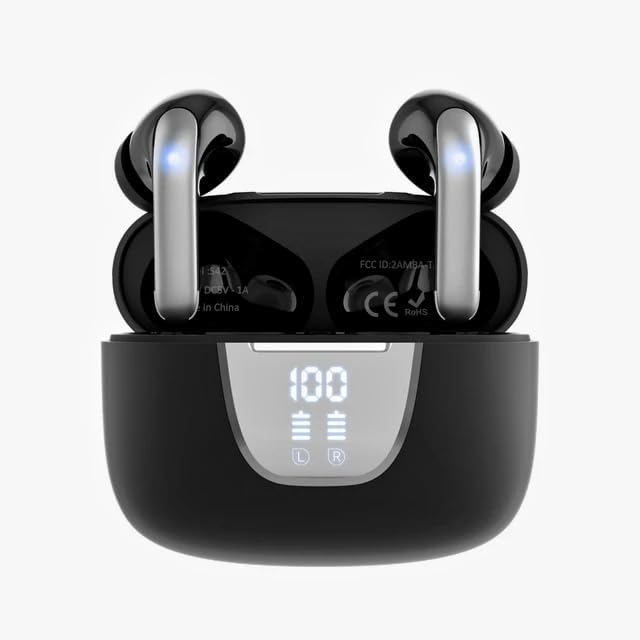
Image: The S42 True Wireless Earbuds resting inside their black charging case. The case features a prominent digital LED display on the front, indicating a 100% charge level and individual battery indicators for the left and right earbuds.

Image: An angled view of the S42 True Wireless Earbuds within their charging case. The lid is open, revealing the earbuds and the internal markings such as the FCC ID and "Made in China" text. The digital display on the front of the case shows "100" indicating full charge.

Image: The S42 True Wireless Earbuds are shown outside their charging case, highlighting their sleek black design with silver accents. The open charging case is visible below, displaying its internal compartments and the digital LED battery indicator.

Image: A visual representation of the LED Digital HD Display on the S42 charging case. The diagram details battery capacities (Each Bud 30mAh, Charging Case 300mAh), playtimes (6.5 hours per bud, 40 hours total with case), and charging times (2 hours for full case charge, 5 full charges from case).

Image: A diagram highlighting the Type-C connector on the S42 charging case. Text indicates that 2 hours of charging provides 40 hours of continuous use, with headphones lasting 6.5 hours for music at 70% volume and 5 hours for calls.
Setup
1. Charging the Earbuds and Case
Before first use, fully charge the S42 earbuds and their charging case.
- Connect the provided USB Type-C cable to the charging port on the case and the other end to a USB power adapter (not included) or a computer's USB port.
- The digital LED display on the case will show the charging progress. A full charge for the case takes approximately 2 hours.
- Place the earbuds into the charging case. They will automatically begin charging. The individual battery indicators for the left and right earbuds on the display will show their charging status.
- Once fully charged, the display will show "100" for the case and full battery icons for the earbuds.
A fully charged case provides up to five full charges for both 30mAh earbuds, offering a total of 40 hours of music playtime.
2. Pairing with Your Device (One-Step Pairing)
The S42 earbuds feature a Hall switch for quick and convenient pairing.
- Ensure Bluetooth is enabled on your smartphone, tablet, or other compatible device.
- Open the lid of the S42 charging case. The earbuds will automatically power on and enter pairing mode.
- On your device, go to the Bluetooth settings and search for available devices.
- Select "S42" from the list of found devices to connect.
- Once connected, you will hear an audible confirmation, and the earbuds will be ready for use.
After the first successful connection, the earbuds will automatically connect to your previously paired device simply by opening the charging case.
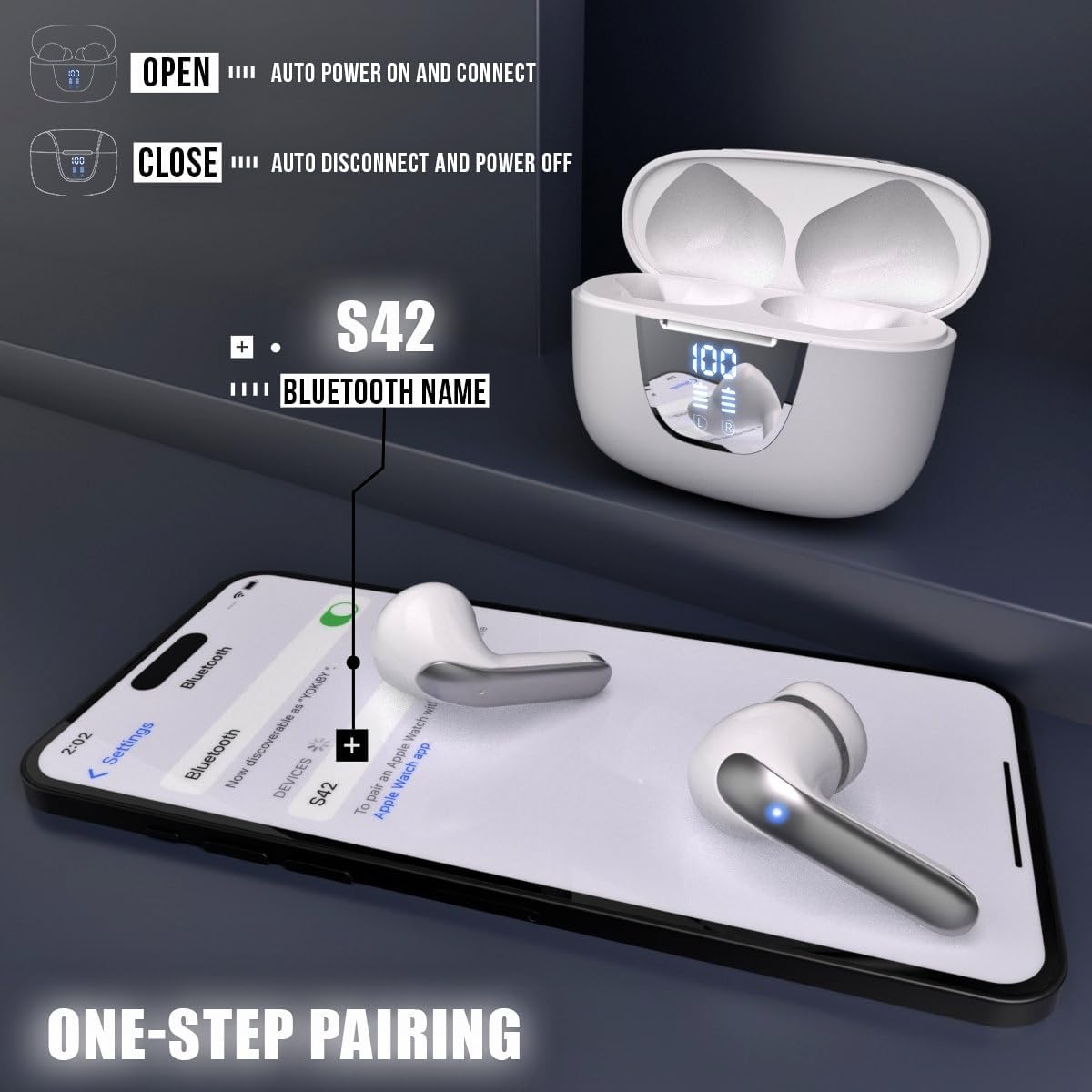
Image: A visual guide demonstrating the "One-Step Pairing" feature of the S42 earbuds. It shows the earbuds in their open charging case, with an arrow pointing to a smartphone displaying Bluetooth settings, indicating that opening the case automatically connects to the "S42" Bluetooth name.
3. Wearing the Earbuds
For optimal sound quality and comfort, choose the correct size ear cushions and ensure a proper fit.
- Select the ear cushions (Small, Medium, or Large) that best fit your ear canal. A good seal is crucial for bass response and noise isolation.
- Gently insert each earbud into your ear canal.
- Rotate the earbud slightly until it feels secure and comfortable.
Operating Instructions
The S42 earbuds feature intuitive biometric touch controls on each earbud.
Touch Controls
| Action | Left Earbud (L) | Right Earbud (R) |
|---|---|---|
| Play/Pause Music | Single Tap | Single Tap |
| Next Track | Triple Tap | Triple Tap |
| Previous Track | Double Tap | Double Tap |
| Volume Up | Press and Hold | N/A |
| Volume Down | N/A | Press and Hold |
| Answer/End Call | Single Tap | Single Tap |
| Reject Call | Press and Hold (2s) | Press and Hold (2s) |
| Activate Voice Assistant | Quadruple Tap | Quadruple Tap |
Note: Control functions may vary slightly depending on your connected device and operating system.
Maintenance
Proper maintenance ensures the longevity and optimal performance of your S42 earbuds.
Cleaning
- Regularly clean the earbuds, especially the ear tips and charging contacts, with a soft, dry, lint-free cloth.
- Remove ear tips and clean them with mild soap and water if necessary, then dry thoroughly before reattaching.
- Do not use abrasive cleaners, alcohol, or chemical solvents.
Storage
- When not in use, always store the earbuds in their charging case to protect them and keep them charged.
- Store the case and earbuds in a cool, dry place, away from extreme temperatures and direct sunlight.
Water Resistance
The S42 earbuds are IPX5 water-resistant, meaning they are protected against low-pressure water jets from any direction. This makes them suitable for workouts and light rain.
- Do not submerge the earbuds in water.
- Do not expose them to saltwater or other liquids.
- Ensure the earbuds are dry before placing them back into the charging case to prevent damage to the charging contacts.
Troubleshooting
If you encounter any issues with your S42 earbuds, refer to the following common solutions:
Earbuds Not Pairing/Connecting
- Check Battery: Ensure both earbuds and the charging case have sufficient charge.
- Bluetooth On: Verify that Bluetooth is enabled on your device.
- Distance: Make sure the earbuds are within the Bluetooth range (typically 10 meters) of your device.
- Forget Device: On your device, "forget" or "unpair" the "S42" from your Bluetooth list, then try pairing again.
- Reset Earbuds: Place both earbuds back into the charging case, close the lid for 5 seconds, then open it again to reset the connection.
No Sound from One or Both Earbuds
- Volume Level: Increase the volume on both your device and the earbuds.
- Re-pair: Disconnect and re-pair the earbuds with your device.
- Clean Contacts: Ensure the charging contacts on both the earbuds and inside the case are clean and free of debris.
- Audio Output: On your device, confirm that the audio output is set to the S42 earbuds.
Charging Issues
- Cable Check: Ensure the USB Type-C charging cable is not damaged and is securely connected.
- Power Source: Try a different USB power adapter or USB port.
- Earbud Placement: Make sure the earbuds are correctly seated in the charging case and the charging contacts align.
Specifications
| Feature | Detail |
|---|---|
| Model Name | S42-AUD |
| Connectivity Technology | Wireless (Bluetooth 5.3) |
| Earbud Battery Capacity | 30mAh (each bud) |
| Charging Case Battery Capacity | 300mAh |
| Playtime (Single Charge) | Up to 6.5 hours |
| Total Playtime (with Charging Case) | Up to 40 hours |
| Charging Time (Case) | Approx. 2 hours |
| Water Resistance Level | IPX5 (Water Resistant) |
| Control Method | Touch, Voice |
| Audio Driver Type | 13mm Dynamic Driver |
| Frequency Range | 20-20,000 Hz |
| Noise Control | Active Noise Cancellation (ANC) |
| Earbud Weight | 3.7g (single earbud) |
| Compatible Devices | Smartphones, Tablets, Computers (Bluetooth enabled) |
| Included Components | Earbuds, Charging Case, USB Cable, User Manual, Ear Cushions |
Warranty and Support
For warranty information and customer support, please refer to the documentation included with your purchase or contact the seller directly. Keep your proof of purchase for any warranty claims.
If you require further assistance or have questions not covered in this manual, please reach out to the manufacturer's customer service or the retailer from whom you purchased the product.
Related Documents - S42-AUD
 |
HENN Cadeira Isa Plus Assembly Instructions Comprehensive assembly instructions for the HENN Cadeira Isa Plus chair, model numbers S42-535 and S42-547. Includes a detailed parts list, hardware guide, step-by-step assembly process, and care information. |
 |
Hisense Air Conditioner User and Installation Manual This manual provides detailed instructions for the installation, operation, and maintenance of Hisense air conditioners. It covers various models and includes safety precautions, functional descriptions, and troubleshooting tips. |
 |
Noise Master Buds Max Wireless Headphones User Manual Comprehensive user manual for the Noise Master Buds Max wireless headphones, covering setup, features, controls, charging, safety, and warranty information. |
 |
Hisense Air Conditioner Use and Installation Instructions Manual Official Hisense Air Conditioner Use and Installation Instructions manual. This guide provides detailed information on installation, operation, safety precautions, and troubleshooting for Hisense air conditioning units. |
 |
Silver Monkey S42 Wireless Keyboard and Mouse Set User Manual User manual for the Silver Monkey S42 Wireless Set, detailing setup, specifications, safety guidelines, and warranty information for this compact wireless keyboard and mouse combo. |
 |
Pulse Bluetooth (BT) Earbuds User Manual and Safety Information User guide for Pulse Bluetooth (BT) Earbuds, including product specifications, pairing instructions, safety warnings, and FCC compliance information. Learn how to use and care for your earbuds. |