
pozdeg M4-V9YF-LG79
pozdeg Metal Storage Cabinet (61"H - 4D) Instruction Manual
Model: M4-V9YF-LG79
Introduction
This manual provides detailed instructions for the assembly, operation, and maintenance of your pozdeg 61-inch Metal Storage Cabinet. Please read all instructions carefully before beginning assembly and retain this manual for future reference.
Safety Information
- Caution: Lift with care due to the weight of the cabinet (approximately 63.9 pounds).
- Do not exceed the maximum weight capacity of 150 LBS per shelf to prevent damage or injury.
- Ensure the cabinet is placed on a stable, level surface. Use the adjustable leveling feet to stabilize on uneven floors.
- Utilize the provided fixing holes to secure the cabinet to a wall, preventing tipping and ensuring safety, especially in households with children or pets.
- Keep small parts away from children during assembly.
Parts List
Before assembly, verify that all components listed below are present. Refer to the assembly video for visual identification of parts.
- Cabinet Panels (Top, Bottom, Sides, Back)
- Adjustable Shelves (4 units)
- Acrylic Glass Doors (4 units)
- Gold-colored Handles (4 units)
- Adjustable Leveling Feet (4 units)
- Assembly Hardware (screws, shelf clips, wall anchor kit)
Assembly Instructions
The cabinet is designed for straightforward assembly. It is recommended to have a drill for faster and more secure fastening of screws. Follow the steps outlined in the video below for a smooth assembly process.
Video: Detailed assembly guide for the pozdeg Metal Storage Cabinet. This video demonstrates each step of the assembly process, from unboxing to final adjustments, ensuring proper construction.
Key Assembly Steps:
- Unboxing and Part Identification: Carefully unpack all components and verify against the parts list.
- Base Assembly: Connect the bottom panels and side frames using the provided screws. Ensure all connections are secure.
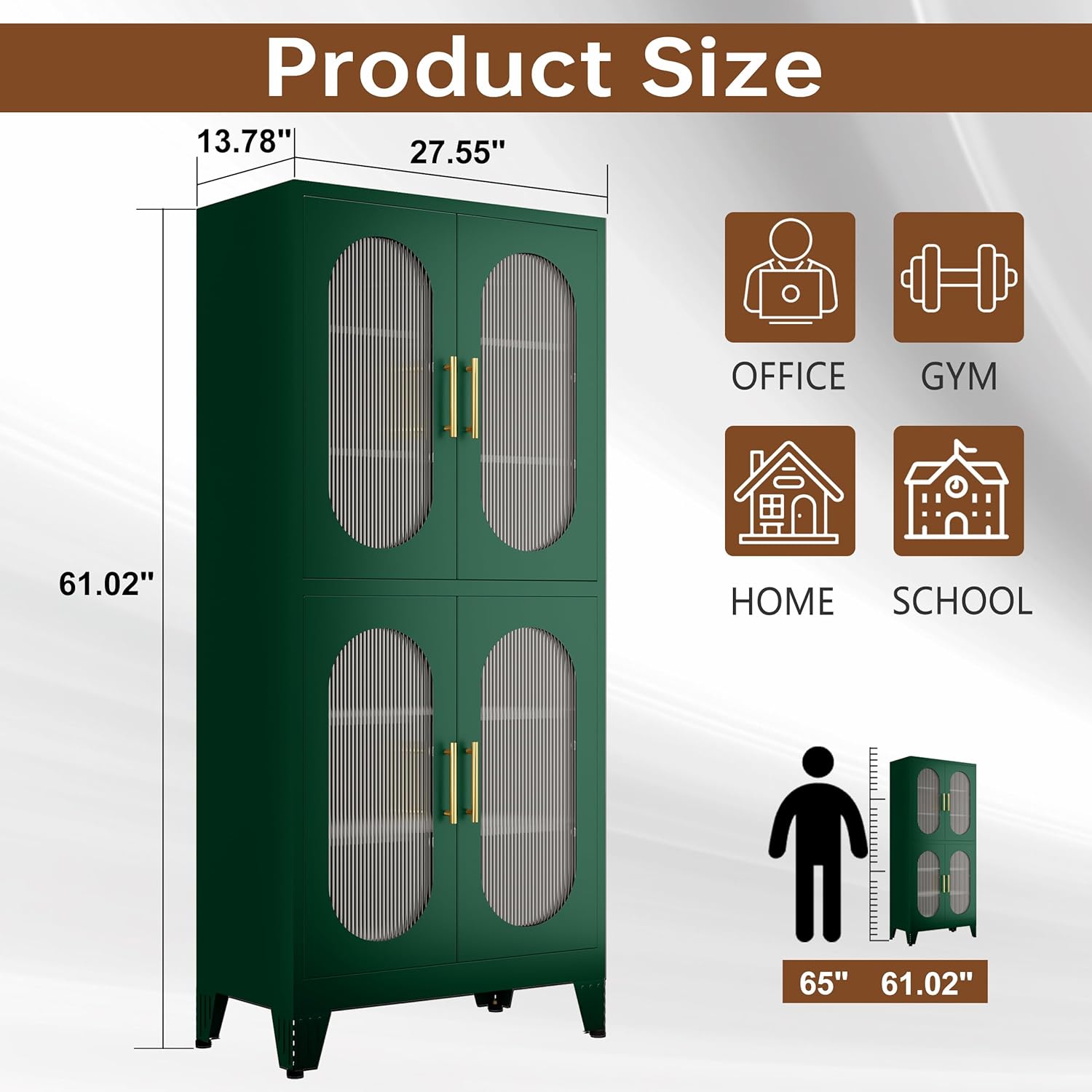
Image: Product dimensions and potential usage areas. This image helps visualize the cabinet's size and where it might fit in a home or office setting.
- Side and Back Panel Attachment: Secure the side and back panels to the base and each other.
- Top Panel Installation: Attach the top panel to complete the main frame of the cabinet.
- Adjustable Feet Installation: Screw in the adjustable leveling feet to the bottom of the cabinet. These can be adjusted later to ensure stability.
- Shelf Clip Placement: Insert the shelf clips into the desired height slots on the interior side panels.

Image: Adjustable shelves feature. This image demonstrates the flexibility of the shelves, allowing users to customize storage space.
- Shelf Placement: Place the adjustable shelves onto the installed clips.
- Door Assembly: Insert the acrylic panels into the door frames and secure them with the provided clips. Attach the gold-colored handles to each door.
- Door Installation: Attach the doors to the cabinet frame using the hinges. Ensure they open and close smoothly.
- Wall Anchoring: For enhanced safety, use the provided wall anchor kit to secure the cabinet to a wall. This prevents accidental tipping.
Operating Instructions
Adjusting Shelves:
The cabinet features 4 height-adjustable shelves. To adjust a shelf, remove any items from it, lift the shelf, remove the shelf clips from their current slots, re-insert the clips into the desired new slots, and then place the shelf back onto the clips. This allows for versatile storage of various item sizes.
Magnetic Doors:
The cabinet doors are equipped with magnetic closures to keep them securely shut. Simply push the door gently to close it, and the magnet will hold it in place.

Image: Close-up of product details, highlighting the magnetic door, gold handles, and adjustable feet.
Maintenance
- Cleaning: The cold-rolled steel plates with environmentally friendly powder-coated finish are easy to clean. Use a soft, damp cloth and mild soap to wipe down surfaces. Avoid abrasive cleaners or harsh chemicals that could damage the finish.
- Acrylic Doors: Clean acrylic panels with a soft cloth and non-abrasive cleaner specifically designed for plastics to prevent scratches.
- Durability: The metal construction is sturdy, rust-resistant, weatherproof, and scratch-resistant, ensuring long-term use with proper care.
- Regular Checks: Periodically check all screws and connections to ensure they remain tight. Re-tighten if necessary.
Troubleshooting
| Problem | Possible Cause | Solution |
|---|---|---|
| Cabinet is wobbly or uneven. | Uneven floor surface or improperly adjusted leveling feet. | Adjust the leveling feet at the bottom of the cabinet until it is stable and level. |
| Doors do not close properly or have uneven gaps. | Cabinet is not level, or hinges are not aligned correctly. | Ensure the cabinet is level using the adjustable feet. Check hinge alignment and adjust if necessary. The assembly video demonstrates how to adjust door gaps using the leveling feet. |
| Shelves are not stable. | Shelf clips are not fully inserted or are damaged. | Ensure all shelf clips are fully and correctly inserted into the designated slots. Replace any damaged clips. |
Specifications
| Feature | Detail |
|---|---|
| Brand | pozdeg |
| Model Name | M4-V9YF-LG79 |
| Product Dimensions | 13.78"D x 27.55"W x 61.02"H |
| Color | Green |
| Material | Metal (Cold-rolled steel plates) |
| Finish Type | Powder Coated |
| Number of Shelves | 4 (Adjustable) |
| Door Style | Flat Panel with Acrylic Glass |
| Weight Limit (per shelf) | 150 LBS |
| Item Weight | 63.9 pounds |
| Special Features | Adjustable Shelf, Heavy Duty, Weatherproof, Magnetic Doors, Adjustable Leveling Feet |
| Assembly Required | Yes (Instructions included) |
Warranty and Customer Support
pozdeg is committed to providing high-quality products. If you encounter any problems with your product, please contact the pozdeg customer service team via email. They are dedicated to resolving issues within 24 hours and ensuring your satisfaction.
For returns, please refer to the seller's 30-day easy returns policy.
Ask a question about this manual
Ask about setup, troubleshooting, compatibility, parts, safety, or missing instructions. Manuals+ will review the question and use this page’s manual context to help answer it.