
OLTEANP OLTEANP 3500W/7000W
OLTEANP 3500W/7000W Pure Sine Wave Inverter User Manual
Model: OLTEANP 3500W/7000W
1. Introduction
Thank you for choosing the OLTEANP 3500W/7000W Pure Sine Wave Inverter. This device is engineered to convert 24V DC power from your battery into stable 230V/240V AC power, suitable for a wide range of electronic devices and appliances. With a continuous output of 3500W and a peak power of 7000W, it is ideal for use in caravans, motorhomes, boats, solar systems, and emergency power situations. This manual provides essential information for the safe and efficient operation of your inverter.
2. Safety Instructions
Please read and understand all safety instructions before operating the inverter. Failure to follow these instructions may result in electric shock, fire, or serious injury.
- Proper Ventilation: Ensure the inverter is installed in a well-ventilated area. Do not block the ventilation openings.
- Avoid Moisture: Do not expose the inverter to rain, water, or excessive moisture.
- Correct Voltage: Connect the inverter only to a 24V DC power source. Connecting to an incorrect voltage may damage the unit.
- Polarity: Always ensure correct polarity when connecting the DC input cables. Reverse polarity protection is built-in, but incorrect connection can still cause issues.
- Load Capacity: Do not exceed the inverter's continuous power rating of 3500W. The peak power is 7000W for short durations.
- Spark Protection: The inverter is equipped with a professional spark protection circuit that automatically stops output if the power supply is incorrectly connected or a short circuit occurs.
- Temperature: The smart dual fans activate automatically when the internal temperature reaches 45°C to prevent overheating.
- Children and Pets: Keep the inverter out of reach of children and pets.
3. Product Overview
The OLTEANP 3500W/7000W Pure Sine Wave Inverter is designed for robust performance and user convenience. It features multiple output ports and a remote control for easy operation.
3.1 Components
- Main Inverter Unit: Converts DC to AC power.
- LCD Remote Control: For monitoring status, adjusting settings, and troubleshooting.
- DC Input Cables: For connecting to a 24V battery bank.
3.2 Features
- Pure Sine Wave Output: Provides clean and stable power, safe for sensitive electronics.
- Multiple Outputs: Includes 2x 220V-240V AC sockets, 1x 5V 3.1A USB port, and 1x 30W Type-C connection.
- Adjustable Input Voltage: New 2024 upgraded function (19V-32V) for compatibility with various battery types, including lithium batteries. This setting must be adjusted when the inverter is off.
- Comprehensive Protection: Soft start, overvoltage, undervoltage, overload, over temperature, short circuit, and reverse polarity protection (built-in fuse).
- Smart Dual Fan Cooling: Built-in silent fans automatically activate at 45°C to maintain optimal operating temperature.

Figure 1: OLTEANP 3500W Pure Sine Wave Inverter with included remote control and cables.

Figure 2: Detailed view of the inverter's AC and DC sides, showing 3.1A USB, LED indicator, remote control port, ON/OFF switch, 230V AC outputs, 30W Type-C, grounding wire, negative terminal, intelligent cooling fan, and positive terminal.
4. Setup
Follow these steps to set up your OLTEANP inverter.
- Choose a Location: Select a dry, well-ventilated, and cool location for the inverter. Ensure there is sufficient space around the unit for airflow.
- Adjust Input Voltage (if necessary): If using lithium batteries or requiring specific voltage thresholds, adjust the input voltage function (19V-32V) using the internal settings. Ensure the inverter is OFF before making this adjustment. Refer to the table below for settings.

Figure 3: Adjustable input voltage settings for various battery types (GEL, SLA, LI, FLD, AGM, CLA, USER). The table indicates corresponding undervoltage shutdown points based on switch positions.
- Connect DC Input: Connect the positive (+) cable (red) from your 24V battery bank to the positive terminal on the inverter. Connect the negative (-) cable (black) from your battery bank to the negative terminal on the inverter. Ensure connections are secure and tight.
- Connect Remote Control: Plug the remote control cable into the designated port on the inverter.
- Connect AC Loads: Plug your AC appliances into the 220V-240V AC outlets on the inverter. For USB and Type-C devices, use the respective ports.
5. Operating Instructions
Operating the OLTEANP inverter is straightforward with its intuitive remote control.
- Power On: Once all connections are secure, switch the ON/OFF button on the inverter to the 'ON' position. The remote control LCD display will illuminate.
- Monitor with LCD Remote Control: The LCD screen provides real-time information about the inverter's status, including battery voltage, AC output voltage, power consumption (watts), and error messages.
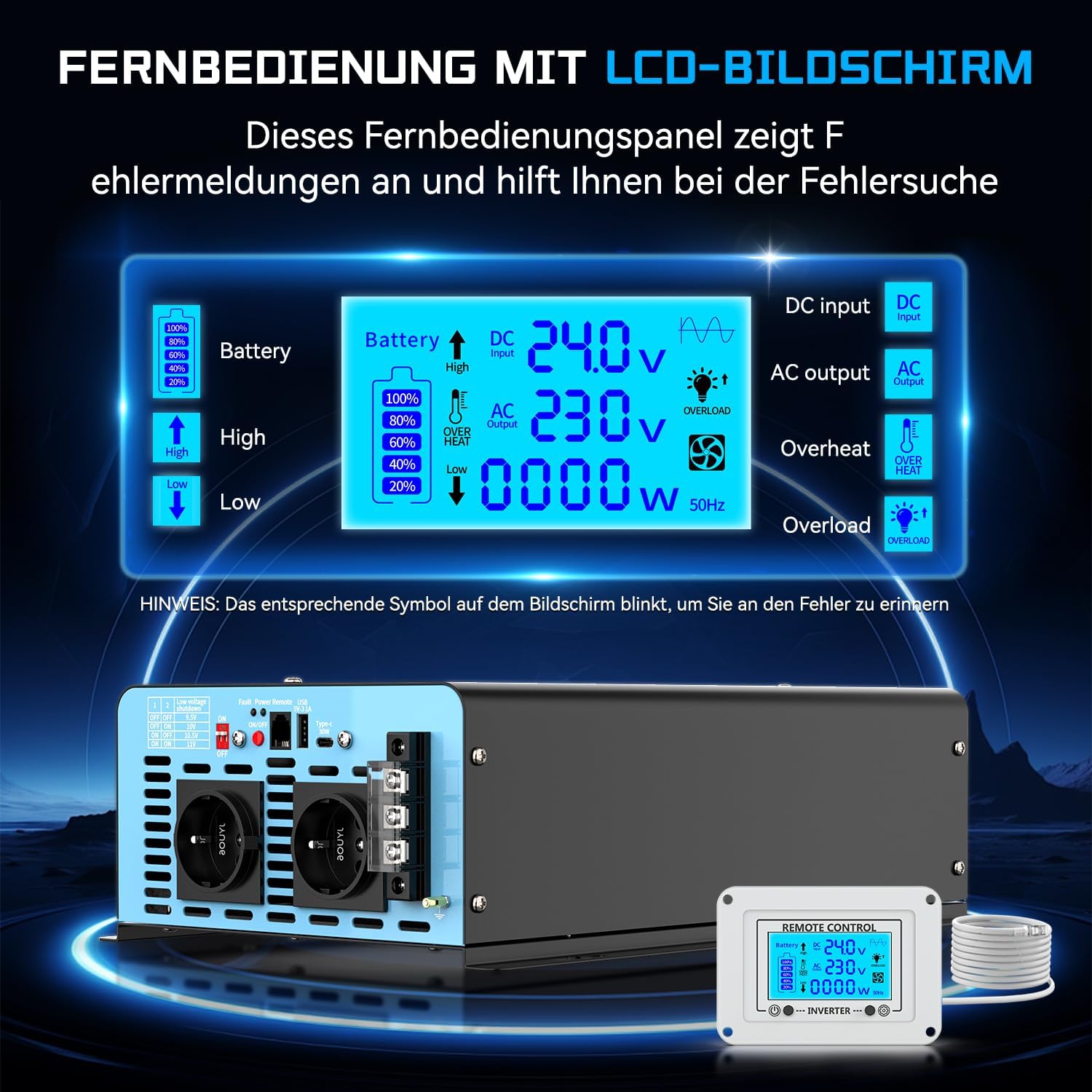
Figure 4: LCD Remote Control display. It shows battery charge level, DC input voltage, AC output voltage, current power draw, and indicators for overheat, overload, and other errors.

Figure 5: The remote control in use, demonstrating its 14.76-foot cable for convenient operation and monitoring.
- Connect Appliances: Plug your desired appliances into the AC outlets or USB/Type-C ports. Ensure the total wattage does not exceed 3500W.
- Power Off: To turn off the inverter, switch the ON/OFF button to the 'OFF' position. Disconnect appliances before prolonged storage.
5.1 Typical Applications
The OLTEANP inverter can power a variety of devices, including but not limited to:
- Laptops and mobile devices
- Small kitchen appliances (e.g., coffee grinders, electric kettles within wattage limits)
- LED lights
- Power tools (e.g., electric drills)
- Televisions and entertainment systems
- Hair dryers (ensure wattage is within limits)

Figure 6: Examples of appliances that can be powered by the inverter, such as electric ovens, cameras, laptops, coffee grinders, hair dryers, LED lights, TVs, and electric drills. Note: Maximum operating power must not exceed 3500 Watts.
6. Maintenance
Regular maintenance ensures the longevity and optimal performance of your inverter.
- Cleaning: Periodically clean the exterior of the inverter with a dry, soft cloth. Do not use liquid cleaners or solvents.
- Ventilation: Ensure the cooling fans and vents are free from dust and debris. The smart dual fans automatically activate to cool the inverter when the internal temperature reaches 45°C.
- Connections: Regularly check all electrical connections (DC input and AC output) to ensure they are tight and free from corrosion.
- Storage: If storing the inverter for an extended period, disconnect it from the power source and store it in a cool, dry place.
7. Troubleshooting
The LCD remote control provides diagnostic information to help identify and resolve common issues.
7.1 Common Issues and Solutions
| Problem/Indicator | Possible Cause | Solution |
|---|---|---|
| Overload Indicator (LCD) | Connected load exceeds 3500W continuous power. | Reduce the total wattage of connected appliances. Disconnect some devices. |
| Overheat Indicator (LCD) | Inverter internal temperature is too high. | Ensure proper ventilation. Clear any obstructions from fans/vents. Allow inverter to cool down. |
| Low Voltage Indicator (LCD) | Input DC voltage is below the safe operating range (e.g., battery is low). | Recharge or replace the 24V battery. Check battery connections. |
| High Voltage Indicator (LCD) | Input DC voltage is above the safe operating range. | Verify the battery charging system. Disconnect the inverter if voltage remains too high. |
| No Output Power | Inverter is off, loose connections, or internal fault. | Ensure inverter is switched ON. Check all DC and AC connections. If problem persists, contact support. |
| Spark Protection Activated | Incorrect power supply connection or short circuit detected. | Disconnect all power. Check all wiring for correct polarity and short circuits. Reconnect carefully. |

Figure 7: The inverter features multi-functional safety protection, including high voltage protection, overload protection, over temperature protection, intelligent IC, undervoltage protection, and short circuit protection.
8. Specifications
| Feature | Specification |
|---|---|
| Model Name | OLTEANP 3500W/7000W |
| Continuous Power | 3500W |
| Peak Power | 7000W |
| Input Voltage | 24V DC (Adjustable 19V-32V) |
| Output Voltage | 230V AC / 240V AC |
| Output Waveform | Pure Sine Wave |
| AC Outlets | 2x Universal Sockets |
| USB Output | 1x 5V 3.1A |
| Type-C Output | 1x 30W |
| Cooling System | Smart Dual Fan (activates at 45°C) |
| Dimensions (Package) | 44.4 x 29.7 x 16.8 cm |
| Weight (Package) | 5.88 kg |
| Efficiency | High |
9. Warranty and Support
For warranty information, technical support, or service inquiries regarding your OLTEANP 3500W/7000W Pure Sine Wave Inverter, please contact the seller or manufacturer directly. Refer to your purchase documentation for specific warranty terms and contact details.