
Introduction
Thank you for choosing the Generic M90 PRO TWS Wireless Earbuds. These earbuds are designed to provide a superior audio experience with advanced features such as Bluetooth 5.3 connectivity, Environmental Noise Cancellation (ENC) for clear calls, IPX-7 waterproofing, and a versatile charging case that doubles as a power bank. This manual will guide you through the setup, operation, maintenance, and troubleshooting of your new earbuds to ensure optimal performance and longevity.

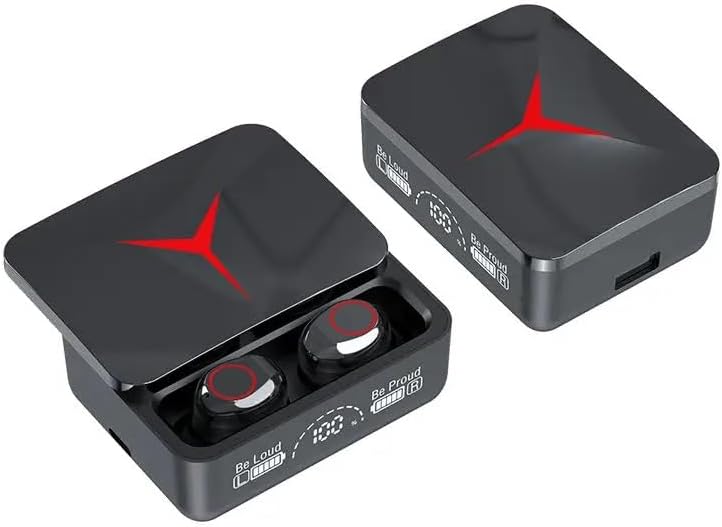
The M90 PRO TWS Wireless Earbuds charging case, featuring a digital display for battery levels and a sleek design.
What's in the Box
Please check the package contents to ensure all items are present:
- M90 Pro TWS Earbuds
- Two Pair of Ear Tips (various sizes)
- Type-C Charging Cable
- Charging Case
- User Manual (this document)
Setup Guide
1. Initial Charging
Before first use, fully charge the earbuds and the charging case. The charging case has a 1200mAh battery capacity, and each earbud has a 40mAh battery. A full charge typically takes about 1 hour.
- Connect the provided Type-C charging cable to the charging port on the case and a USB power source.
- The LED display on the charging case will show the battery percentage.
- Place the earbuds into the charging case. They will automatically begin charging. The earbuds' indicator lights will show charging status.

The 1200mAh charging case provides extended battery life and supports fast charging via Type-C.
2. Pairing with Your Device
The M90 PRO earbuds feature one-step automatic pairing for convenience.
- Ensure Bluetooth is enabled on your smartphone or other device.
- Open the charging case and remove both earbuds. They will automatically power on and enter pairing mode.
- On your device, search for Bluetooth devices and select "M90 Pro" from the list.
- Once connected, you will hear a confirmation prompt, and the earbud indicator lights will change.
Note: If pairing fails, place the earbuds back into the case, close the lid, wait a few seconds, and then repeat the steps.
Automatic pairing simplifies the connection process, allowing instant use upon removal from the case.
Operating Instructions
Touch Controls
The M90 PRO earbuds are equipped with intuitive smart touch controls for easy management of music and calls. Specific touch functions may vary slightly based on the device and application, but common functions include:
- Play/Pause: Single tap on either earbud.
- Next Song: Double tap on the right earbud.
- Previous Song: Double tap on the left earbud.
- Volume Up: Triple tap on the right earbud.
- Volume Down: Triple tap on the left earbud.
- Answer/End Call: Single tap on either earbud.
- Reject Call: Press and hold either earbud for 2 seconds.
- Activate Voice Assistant: Press and hold either earbud for 3 seconds (supports Xiaomi AI, Amazon Alexa, Apple Siri, Google Assistant).
Power Bank Function
The charging case can also serve as an emergency power bank for your mobile phone or other small devices.
- Locate the USB output port on the charging case.
- Connect your device's charging cable to this USB port.
- The charging case will begin to supply power to your device.

The charging case can provide emergency power to your mobile phone via its USB output port.
Call Quality and Noise Cancellation
The earbuds feature HD Voice Technology and Environmental Noise Cancellation (ENC) to separate your voice from surrounding noise, ensuring crystal-clear communication during calls.

Experience clear calls with HD Voice Technology and ENC, minimizing background noise.
Maintenance
Proper maintenance will extend the lifespan of your M90 PRO TWS Wireless Earbuds.
- Cleaning: Regularly clean the earbuds and charging case with a soft, dry, lint-free cloth. Do not use harsh chemicals or abrasive materials.
- Ear Tips: Remove and clean the ear tips periodically with mild soap and water, then ensure they are completely dry before reattaching.
- Water Resistance: The earbuds are IPX-7 waterproof, meaning they can withstand immersion in up to 1 meter of water for 30 minutes. However, the charging case is not waterproof. Avoid exposing the charging case to liquids. Always ensure earbuds are dry before placing them back into the charging case.
- Storage: When not in use, store the earbuds in their charging case to protect them and keep them charged. Store in a cool, dry place away from extreme temperatures.
- Battery Care: To preserve battery health, avoid fully discharging the earbuds and charging case frequently. Charge them regularly, even if not in constant use.
Troubleshooting
If you encounter issues with your M90 PRO TWS Wireless Earbuds, please refer to the following common solutions:
| Problem | |
|---|---|
| Earbuds not pairing with device. |
|
| Only one earbud is working. |
|
| Low volume or poor sound quality. |
|
| Charging case not charging. |
|
Specifications
| General | |
|---|---|
| Model Name | M90 Pro Wireless Earphone |
| Brand | Generic |
| Color | Black |
| Material | Acrylonitrile Butadiene Styrene (ABS), Plastic |
| Item Weight | 3.52 ounces |
| Product Dimensions | 4.49 x 3.94 x 1.57 inches |
| Audio & Connectivity | |
| Connectivity Technology | Wireless (Bluetooth 5.3) |
| Bluetooth Range | 10 Meters |
| Frequency Range | 20 Hz - 20,000 Hz |
| Impedance | 32 Ohm |
| Noise Control | Active Noise Cancellation (ENC) |
| Audio Driver Type | Dynamic Driver |
| Battery & Power | |
| Earpiece Battery Capacity | 40mAh (each) |
| Carrying Case Battery Capacity | 1200 Milliamp Hours |
| Battery Life (Earbuds) | Up to 5 Hours |
| Charging Time | 1 Hour (earbuds & case) |
| Features | |
| Water Resistance Level | IPX-7 Water Resistant |
| Control Type | Touch control, Voice Assistant |
| Special Features | Fast Charging, Lightweight, Noise Cancellation, Touch Control, Wireless Charging (Power Bank Function) |
Warranty and Support
For warranty information and customer support, please refer to the documentation provided with your purchase or contact the seller directly. Keep your proof of purchase for any warranty claims.