1. Safety Information
Please read and understand all safety instructions before assembly and use. Failure to follow these instructions may result in injury or product damage.
- Do not allow children to climb or play on the product. This product is not designed for climbing and could tip over, causing serious injury.
- Always follow assembly instructions carefully to avoid injury. Ensure all parts are correctly installed and tightened.
- Use appropriate safety gear when lifting heavy items during assembly or relocation.
- Place the cabinet on a flat, stable surface to prevent tipping.
- Do not exceed the maximum weight capacity for the top surface or individual drawers.
2. Setup and Assembly
The HOOBRO WT05WJ01G1 5-Drawer Mobile File Cabinet requires assembly. Detailed instructions and an accessory kit are included in the package. Please follow the steps below for a smooth assembly process.
2.1 Package Contents
Before starting, verify that all components are present:
- 1 x File Cabinet (unassembled parts)
- 1 x Accessory Kit (screws, dowels, handles, casters, etc.)
- 1 x Instruction Manual
2.2 Assembly Steps
- Unpack and Identify Parts: Carefully remove all components from the packaging. Lay them out on a clean, soft surface to prevent scratches. Refer to the parts list in the included manual to identify each piece.
- Assemble the Frame: Follow the step-by-step diagrams in the instruction manual to connect the side panels, back panel, and top/bottom panels using the provided hardware. Ensure all connections are secure.
- Install Drawer Slides: Attach the drawer slides to the cabinet frame according to the instructions. Pay attention to the orientation of the slides.
- Assemble Drawers: Construct each of the five drawers. Attach the drawer fronts, sides, and backs, then insert the bottom panels. Install the drawer handles.
- Install Casters: Attach the four casters to the bottom of the cabinet. Two of the casters are equipped with brakes. Ensure they are securely fastened. For easier installation, you may pre-drill very small pilot holes if needed, as suggested by some users.
- Insert Drawers: Carefully slide each assembled drawer into its respective slot in the cabinet frame.
The assembly process is designed to be straightforward. Take your time and refer to the detailed diagrams in the included instructions for best results.
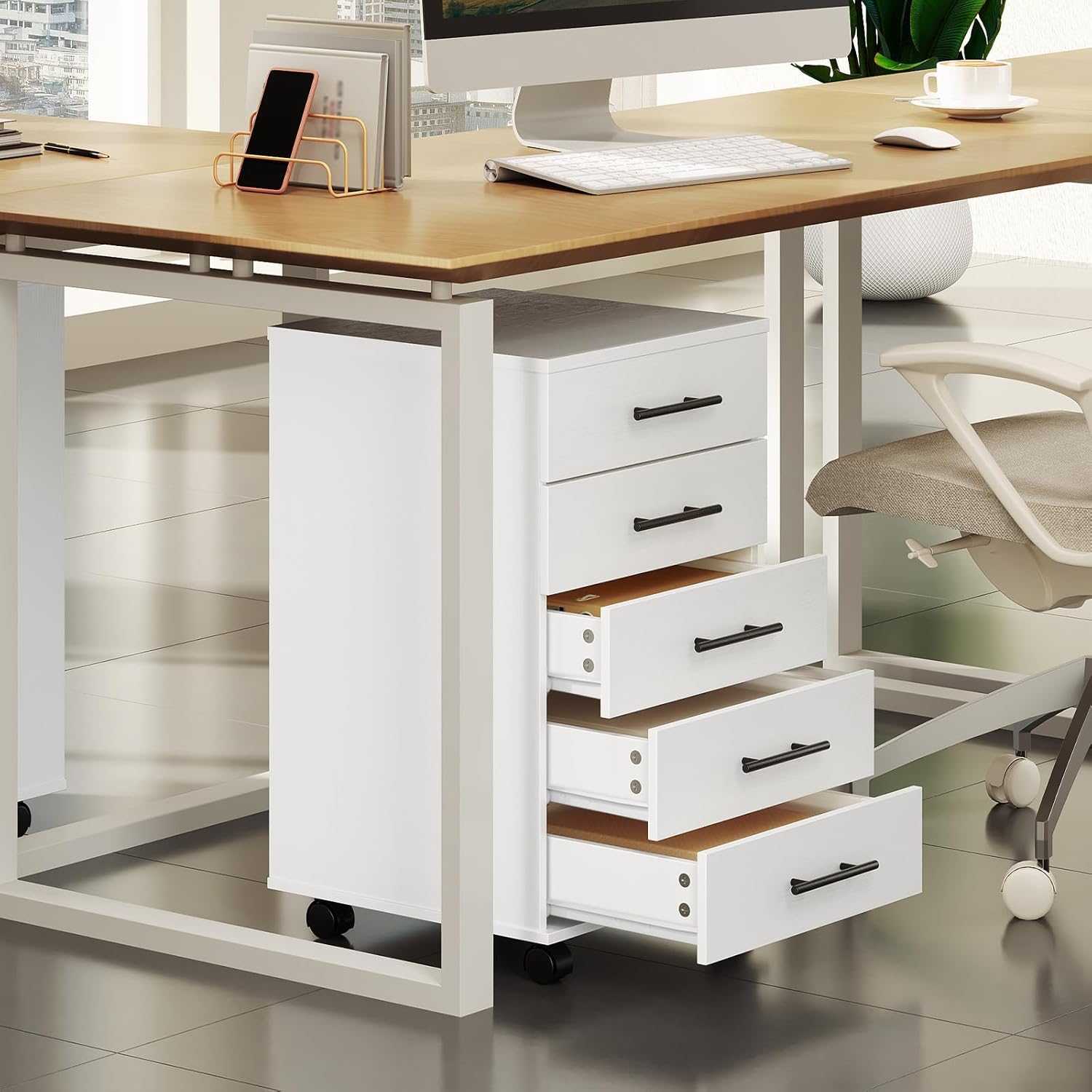
Image: The HOOBRO 5-Drawer File Cabinet positioned under a desk, showcasing its compact design and accessible drawers.
3. Operating Instructions
This mobile file cabinet is designed for convenient storage and easy mobility in various settings.
3.1 Using the Drawers
- The cabinet features five drawers for organizing office supplies, documents, makeup, or other small items.
- To open a drawer, gently pull the handle. To close, push the drawer firmly until it is fully seated.
- Each drawer has a weight capacity of 22 lbs (10 kg). Do not overload drawers to ensure smooth operation and prevent damage.

Image: A close-up view of the cabinet with several drawers open, demonstrating its storage capacity for various items.
3.2 Moving the Cabinet
- The cabinet is equipped with four 360-degree rotating casters for easy movement.
- Two of the casters include locking mechanisms. To move the cabinet, ensure these casters are unlocked.
- To secure the cabinet in place, press down on the locking levers of the two braked casters until they click into the locked position.
- Avoid moving the cabinet over uneven surfaces or with excessive force to prevent damage to the casters or cabinet structure.

Image: Detail of the cabinet's casters, illustrating the 360-degree rotation and the locking mechanism for stability.
3.3 Top Surface Usage
- The top surface of the cabinet can hold items such as a printer, potted plants, or decorative objects.
- The maximum weight capacity for the top surface is 50 lbs (22.7 kg). Do not exceed this limit.

Image: The top surface of the cabinet with a book and glasses, demonstrating its capacity to hold up to 50 lbs.
4. Maintenance
Proper care and maintenance will extend the life and appearance of your HOOBRO file cabinet.
- Cleaning: Wipe the cabinet surfaces with a soft, damp cloth. Avoid using harsh chemicals or abrasive cleaners, as these can damage the finish.
- Dusting: Regularly dust the cabinet with a dry, soft cloth to prevent dust buildup.
- Hardware Check: Periodically check all screws and fasteners to ensure they remain tight. Retighten if necessary to maintain stability.
- Caster Care: Keep the casters free of debris (hair, dust, etc.) to ensure smooth rolling. If casters become stiff, clean them and apply a small amount of silicone lubricant if needed.
- Avoid Moisture: Protect the cabinet from excessive moisture and direct sunlight, which can cause warping or discoloration.
5. Troubleshooting
If you encounter any issues with your file cabinet, refer to the following common problems and solutions:
- Drawers are Sticking or Not Sliding Smoothly:
- Ensure the drawer slides are correctly installed and aligned. Refer to the assembly instructions.
- Check if the drawers are overloaded. Reduce the weight if necessary.
- Inspect the drawer slides for any obstructions or damage. Clean or replace if needed.
- Cabinet is Wobbly:
- Verify that all assembly screws and fasteners are securely tightened.
- Ensure the cabinet is placed on a level surface. Adjust the position or use shims if the floor is uneven.
- Casters are Not Rolling or Locking:
- Check for debris (e.g., hair, dust) caught in the caster wheels. Clean them thoroughly.
- Ensure the locking mechanism is fully engaged or disengaged as intended.
If these solutions do not resolve the issue, please contact HOOBRO customer support for further assistance.
6. Product Specifications
Detailed specifications for the HOOBRO WT05WJ01G1 5-Drawer Mobile File Cabinet:
| Feature | Detail |
|---|---|
| Model Name | WT05WJ01G1 |
| Brand | HOOBRO |
| Color | White |
| Product Dimensions (D x W x H) | 15.7" x 15.7" x 27.2" (40cm x 40cm x 69cm) |
| Item Weight | 35.4 pounds (16.1 kg) |
| Material | Engineered Wood (Particleboard, MDF) |
| Number of Drawers | 5 |
| Top Surface Weight Limit | 50 pounds (22.7 kg) |
| Each Drawer Weight Limit | 22 pounds (10 kg) |
| Special Feature | Wheeled (4 casters, 2 with brakes) |
| Assembly Required | Yes |
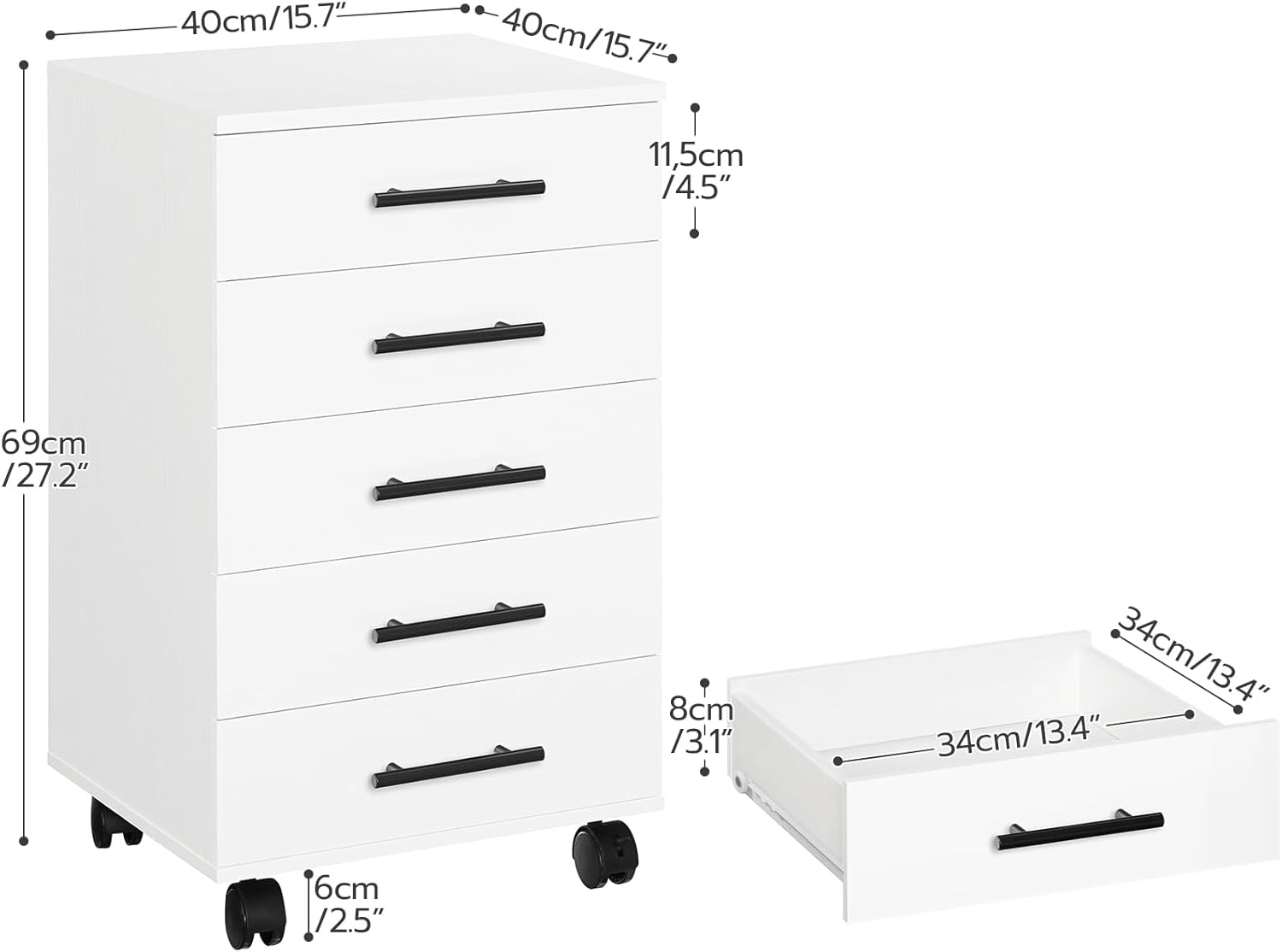
Image: Dimensional diagram of the HOOBRO 5-Drawer File Cabinet, including overall height, width, depth, and individual drawer dimensions.
7. Customer Support
For any questions, missing parts, or assistance with your HOOBRO WT05WJ01G1 5-Drawer Mobile File Cabinet, please contact our customer support team.
Please refer to your purchase documentation or the HOOBRO official website for contact information.