
1. Product Overview
The Waveshare ESP32-H2-DEV-KIT-N4 is an entry-level RISC-V microcontroller development board designed for various applications including smart home, industrial automation, healthcare, and consumer electronics. It integrates Bluetooth 5 and IEEE 802.15.4 (Zigbee 3.0 and Thread) wireless communication capabilities.
This board features the ESP32-H2-MINI-1-N4 module, equipped with a RISC-V 32-bit single-core processor operating at up to 96MHz. It includes a built-in 4MB Flash memory and offers a rich set of peripheral interfaces such as SPI, UART, I2C, I2S, LED PWM, and ADC. The onboard CH343 and CH334 USB HUB chips facilitate simultaneous USB and UART development through a single USB-C port. Its pinout is compatible with the ESP32-H2-DevKitM-1 development board, ensuring strong compatibility and expandability with various peripheral modules.
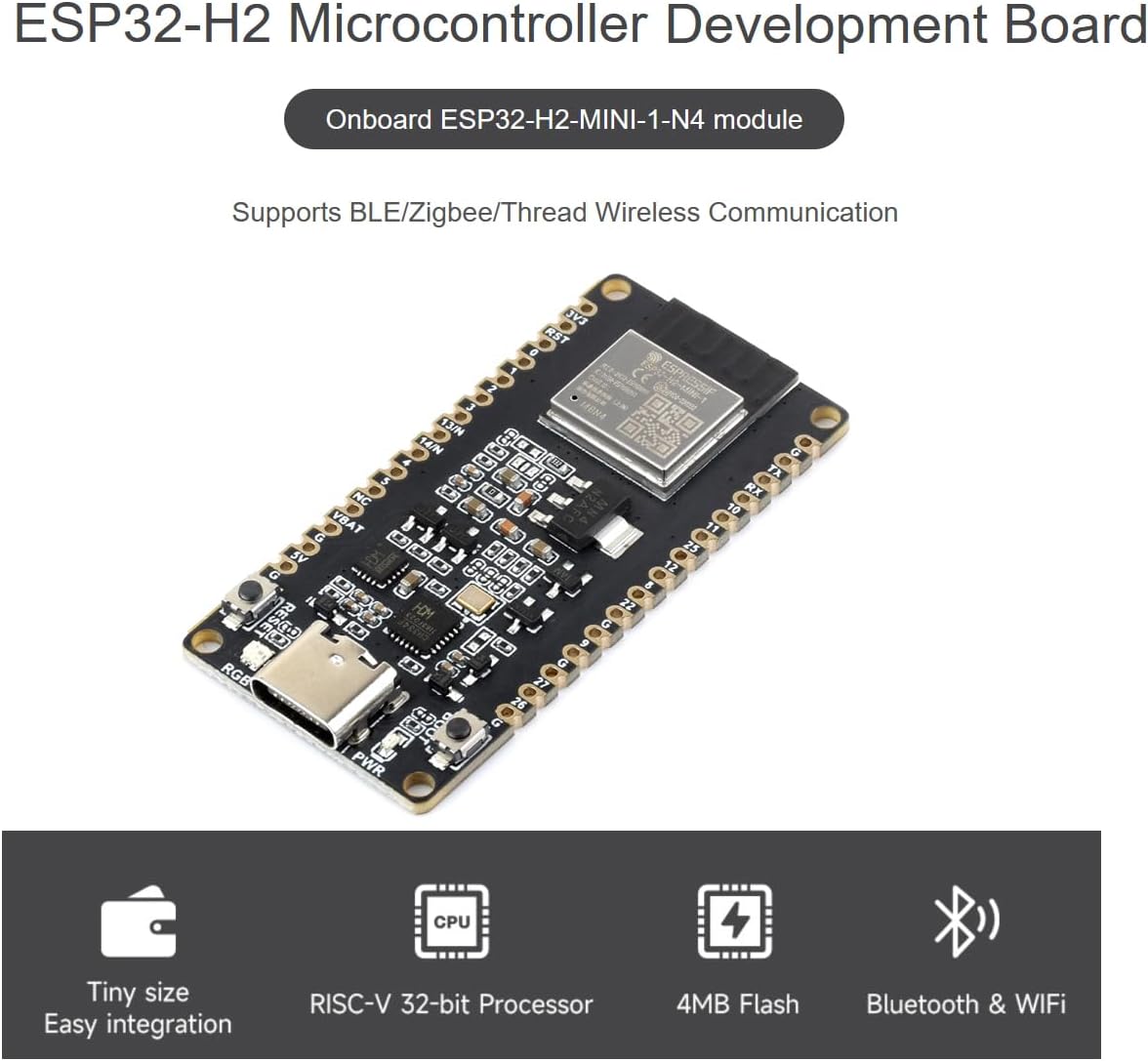
Figure 1: Waveshare ESP32-H2 Development Board highlighting its compact size, RISC-V 32-bit processor, 4MB Flash, and Bluetooth & WiFi capabilities.
Key Features:
- Adopts ESP32-H2-MINI-1-N4 module with RISC-V 32-bit single-core processor, up to 96MHz main frequency, built-in 4MB Flash.
- Integrated Bluetooth 5 and IEEE 802.15.4 (Zigbee 3.0 and Thread) wireless communication, offering superior RF performance.
- Features a Type-C connector for ease of use and connectivity.
- Onboard CH343 and CH334 chips support both USB and UART development via the Type-C interface.
- Rich peripheral interfaces, compatible with the pinout of the ESP32-H2-DevKitM-1 development board, ensuring strong compatibility and expandability.
- Castellated module design allows for direct soldering to carrier boards.
2. Getting Started: Setup
To begin using your Waveshare ESP32-H2 Development Board, follow these basic setup steps:
- Connect the Board: Use a standard USB-C cable to connect the development board to your computer. The onboard CH343 and CH334 chips will manage both USB and UART communication through this single connection.
- Install Drivers: Your operating system may require drivers for the CH343/CH334 USB-to-serial converter. These drivers are typically available from the chip manufacturer's website or Waveshare's product page.
- Choose Development Environment: The board supports popular development environments such as ESP-IDF (Espressif IoT Development Framework) and Arduino IDE. Select the environment that best suits your project needs.
- Install Toolchain: Follow the instructions for your chosen development environment to install the necessary toolchain and SDKs. Waveshare provides online examples and tutorials for the ESP-IDF development environment to help you get started quickly.

Figure 2: Overview of BLE 5, Zigbee, Thread support, and a functional block diagram of the ESP32-H2 Development Board, including ESP-IDF and Arduino IDE support.
3. Operating the Development Board
The ESP32-H2 Development Board is designed for flexible operation, allowing you to leverage its powerful processor and extensive connectivity options.
Wireless Communication
The board integrates Bluetooth 5 and IEEE 802.15.4, supporting Zigbee 3.0 and Thread protocols. These capabilities enable the development of a wide range of wireless applications, from low-power sensor networks to smart home devices. Refer to the ESP-IDF documentation for detailed programming guides for these wireless features.
Peripheral Interfaces
The board provides numerous peripheral interfaces for connecting external components. Understanding the pinout is crucial for proper operation:

Figure 3: Detailed pinout definition of the ESP32-H2 Development Board, compatible with ESP32-H2-DevKitM-1.
The pinout diagram (Figure 3) illustrates the functions of each pin, including General Purpose Input/Output (GPIO), Analog-to-Digital Converter (ADC), PWM capable pins, and various communication interfaces like SPI, UART, and I2C. Ensure correct voltage levels and current limits when connecting external devices.
Onboard Resources
Familiarize yourself with the onboard components for effective use:

Figure 4: Labeled diagram of onboard resources, including the Reset button, RGB LED, USB Type-C port, 3.3V power indicator, BOOT button, USB HUB chip, and voltage regulator.
- Reset Button: Used to restart the microcontroller.
- BOOT Button: Used to enter download mode for flashing firmware.
- RGB LED: A programmable LED for status indication or user feedback.
- USB Type-C: Provides power, USB communication, and UART communication.
- 3.3V Power Indicator: Illuminates when the board is powered.
4. Care and Maintenance
To ensure the longevity and reliable operation of your ESP32-H2 Development Board, observe the following care and maintenance guidelines:
- Handle with Care: Avoid dropping the board or subjecting it to excessive physical force, which can damage components or solder joints.
- Keep Dry: Protect the board from moisture and liquids. Water damage can lead to short circuits and permanent malfunction.
- Prevent Static Discharge: Static electricity can harm sensitive electronic components. Handle the board on an anti-static mat or by touching a grounded object first.
- Cleanliness: Keep the board free from dust and debris. Use a soft, dry brush or compressed air for cleaning. Avoid using harsh chemicals.
- Storage: When not in use, store the board in an anti-static bag in a cool, dry environment.
5. Troubleshooting Common Issues
If you encounter issues while using your ESP32-H2 Development Board, consider the following troubleshooting steps:
- No Power/LEDs Off:
- Ensure the USB-C cable is securely connected to both the board and your computer.
- Try a different USB-C cable or USB port on your computer.
- Verify your computer's USB port is providing sufficient power.
- Computer Not Recognizing Board:
- Check if the necessary USB-to-serial drivers (for CH343/CH334 chips) are installed correctly on your operating system.
- Restart your computer and try reconnecting the board.
- Failed to Upload Code:
- Ensure you have selected the correct board and COM port in your development environment (e.g., Arduino IDE, ESP-IDF).
- Press and hold the BOOT button, then press and release the Reset button, then release the BOOT button to enter download mode before uploading.
- Verify your code compiles without errors.
- Wireless Communication Issues:
- Check your antenna connection if an external antenna is used.
- Ensure your wireless code is correctly configured for Bluetooth 5, Zigbee, or Thread.
- Verify that other wireless devices are not causing interference.
- Peripheral Not Working:
- Double-check your wiring against the pinout diagram (Figure 3).
- Ensure external components are powered correctly and within voltage/current specifications.
- Verify your code correctly initializes and communicates with the peripheral.
For more advanced troubleshooting or specific error messages, consult the official Espressif documentation for the ESP32-H2 series and the Waveshare product support pages.
6. Technical Specifications
Below are the detailed technical specifications for the Waveshare ESP32-H2 Development Board:

Figure 5: Textual representation of the ESP32-H2 Development Board's specifications.
| Feature | Specification |
|---|---|
| Brand | Waveshare |
| Model Name | ESP32-H2 Dev Kit |
| Memory Storage Capacity | 4 MB |
| CPU Speed | 96 MHz |
| Connectivity Technology | Bluetooth 5, Zigbee 3.0, Thread, SPI, UART, I2C, I2S, ADC, USB |
| Processor Speed | 96 MHz |
| Operating System Compatibility | Linux (and other OS with appropriate drivers) |
| Processor Brand | Espressif |
| Wireless Compatibility | Bluetooth, IEEE 802.15.4 (Zigbee, Thread) |
| Compatible Devices | ESP32-H2-DevKitM-1, Devices supporting ESP-IDF or Arduino |
| RAM Memory Technology | DDR (internal to module) |
| Processor Count | 1 (RISC-V 32-bit single-core) |
| Total USB Ports | 1 (USB-C for data and power) |
| UPC | 790885235634 |
| ASIN | B0CWLLH6TB |
7. Package Contents
The Waveshare ESP32-H2 Development Board package includes the following items:
- ESP32-H2-DEV-KIT-N4 Development Board x1
- 40PIN Male Pinheader (black) x2
8. Support and Resources
Waveshare provides comprehensive online development resources and technical support to assist you with your projects. For detailed documentation, examples, and tutorials related to the ESP-IDF development environment, please refer to the official Waveshare product page or Espressif documentation.
If you encounter any problems or require further assistance, please do not hesitate to contact Waveshare's technical support team. You can typically find contact information and support forums on the official Waveshare website: Waveshare Store.
9. Warranty Information
Specific warranty details for the Waveshare ESP32-H2 Microcontroller Development Board are not provided in the available product information. For warranty terms and conditions, please refer to the official Waveshare website or contact their customer service directly.