
1. Introduction
The Chessnut Evo redefines the chessboard experience, offering unmatched functionality, customization, and continuous innovation for chess enthusiasts. This all-in-one smart chessboard integrates powerful AI engines, supports various game modes on popular platforms, and features precise piece recognition with colorful LED indicators. It's designed to enhance your gameplay, analysis, and overall chess journey.

Figure 1: Chessnut Evo Smart AI Chessboard in use.
The Evo combines various functionalities into a single platform for all your chess needs, including powerful engines like Stockfish and the human-like Maia, customized engine generation, and versatile game modes. It also supports third-party apps and engines, ensuring ongoing development and new features.
Video 1: Overview of the Chessnut Evo Smart AI Chessboard features.
This video provides a comprehensive look at the Chessnut Evo, highlighting its smart features and capabilities as an AI chessboard.
2. What's in the Box
Upon unboxing your Chessnut Evo, please ensure all components are present:
- Chessnut Evo Chessboard
- 34 plastic pieces with sensor chips (2 extra queens included)
- USB-C charging cable
- Quick start guide

Figure 2: Contents of the Chessnut Evo packaging.
The chessboard and pieces are securely packaged in foam inserts to prevent damage during transit. Additional felt bottoms for the chess pieces are included for enhanced stability and protection.
3. Setup
3.1 Initial Charging
Before first use, fully charge your Chessnut Evo. A USB-C charging cable is provided. A Power Delivery (PD) charger is recommended for optimal charging at 18 watts. Without a PD charger, it will charge at 5 watts.
3.2 Piece Placement
Place the chess pieces on their starting squares. The board features internal sensors in each piece, allowing the board to recognize piece type and position. LED indicators on the board will confirm correct placement.

Figure 3: Correct piece setup on the Chessnut Evo.
3.3 Connectivity and System Updates
Connect your Chessnut Evo to a Wi-Fi network to access online features and ensure the latest software updates. The device runs on an Android system, allowing for seamless updates and app integration.
- Power on the device using the side button.
- Navigate to the system settings via the touchscreen interface.
- Connect to your preferred Wi-Fi network.
- Check for and install any available system updates to ensure optimal performance and access to new features.
Video 2: Detailed user guide for Chessnut Evo, including setup and interface navigation.
This video demonstrates the initial setup process, including connecting to Wi-Fi and navigating the system settings for updates.
4. Operating Instructions
4.1 Touchscreen Interface
The Chessnut Evo features a responsive touchscreen interface for navigating menus, selecting game modes, and adjusting settings. Audio notifications provide additional feedback during gameplay and navigation.
4.2 Game Modes
The Chessnut Evo offers a variety of game modes to suit different playing preferences:
- Bot Match: Play against built-in AI engines. You can select from Maia (ELO 1100-1900), Stockfish (ELO 600-2850), and Lc0. Adjust the ELO level and engine search depth to match your skill.
- Online Match: Connect to popular online chess platforms like Lichess, Chess.com, ChessKid, and Chessable to play against other users globally. The board's piece recognition technology allows you to make physical moves that are reflected online.
- Board Editor: Customize board positions for specific training scenarios or to analyze particular game states.

Figure 4: Online chess platforms supported by Chessnut Evo.
4.3 Piece Recognition and LED Indicators
Each chess piece contains an internal sensor chip, allowing the board to accurately recognize its type and position. LED lights embedded in the board illuminate to indicate valid moves, opponent's moves, and other game-related information. This feature enhances the interactive experience and provides visual cues for learning and analysis.

Figure 5: Piece recognition and LED feedback on the board.
4.4 Learning and Analysis Tools
The Chessnut Evo provides robust tools for improving your chess skills:
- Real-time Analysis: The board can provide real-time analysis of your moves, indicating optimal lines and potential errors.
- Take-backs: Option to undo moves for learning and experimentation.
- Move Delay: Adjustable delay for piece recognition, useful for players who prefer sliding pieces.
- Game Recording: All your games can be recorded and synchronized with cloud storage for later review and analysis.
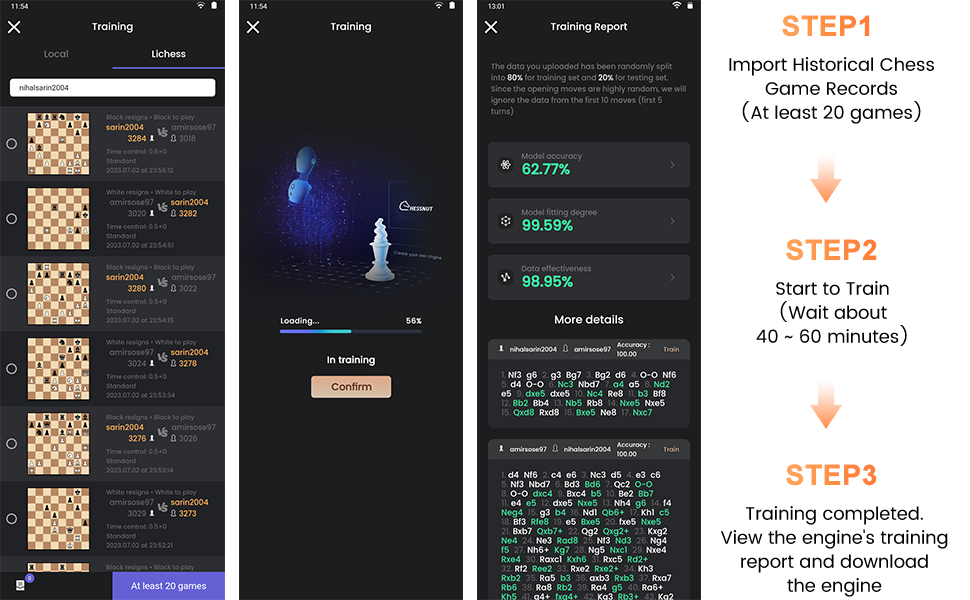
Figure 6: Training report for customized chess engine generation.
4.5 Clock Options
Various clock options are available for timed matches, including standard, Chess 960, and unlimited time controls. These can be customized to suit different game formats.
5. Maintenance
5.1 General Care
To maintain your Chessnut Evo, wipe the board and pieces with a soft, dry cloth. Avoid using abrasive cleaners or excessive moisture.
5.2 Battery Information
The Chessnut Evo is powered by 1 Lithium Polymer battery (included). Ensure the device is charged regularly for uninterrupted use. For optimal battery life, avoid fully discharging the battery frequently.
5.3 Safety Information
Keep the Chessnut Evo away from naked flames and extreme temperatures. Do not attempt to disassemble the device, as this may void the warranty and cause damage.
6. Troubleshooting
6.1 Piece Recognition Issues
If the board is not recognizing piece movements correctly, ensure the pieces are placed firmly on the squares. For sliding pieces, Chessnut recommends setting a recognition delay of four-tenths of a second in the board settings to improve accuracy.
6.2 Connectivity Problems
If you experience issues with Wi-Fi or Bluetooth connectivity, try the following:
- Restart the Chessnut Evo.
- Verify your Wi-Fi network is active and within range.
- Check the device's system settings to ensure Wi-Fi and Bluetooth are enabled.
6.3 Device Reset
In case of unresponsiveness or persistent issues, locate the reset button on the side of the device (often a small pinhole) and use a thin object (like a paperclip) to press it. This will perform a soft reset without erasing your data.
7. Specifications
| Feature | Specification |
|---|---|
| Product Dimensions | 13.25 x 21.17 x 0.04 inches |
| Item Weight | 10.91 pounds |
| Country of Origin | China |
| Manufacturer Recommended Age | 18 months - 5 years (Note: This may be a general classification; actual chess play is suitable for older ages.) |
| Batteries | 1 Lithium Polymer batteries required (included) |
| Manufacturer | Chessnut |
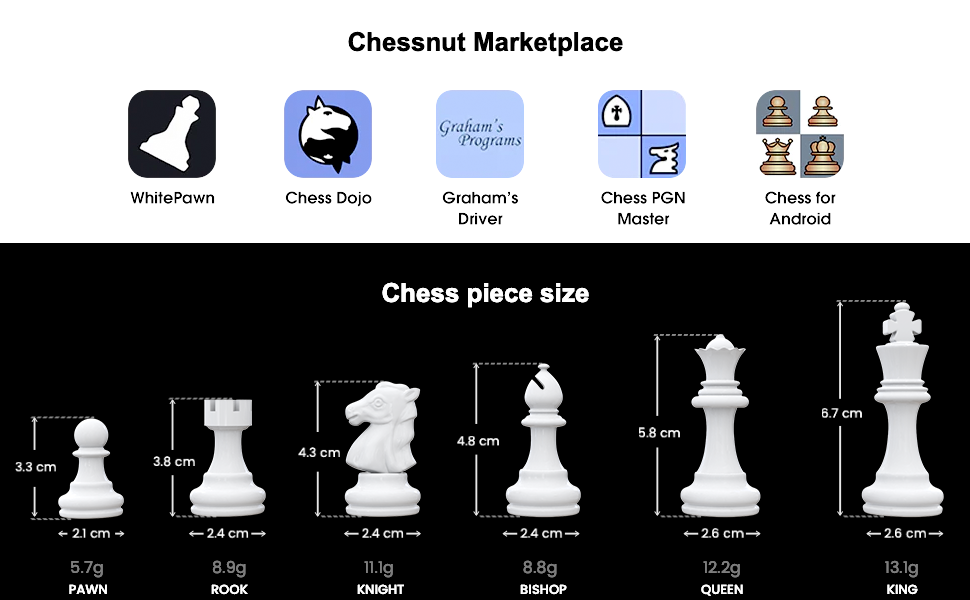
Figure 7: Chess piece sizes and weights.
8. Warranty and Support
For warranty information, technical support, or any inquiries regarding your Chessnut Evo, please visit the official Chessnut website or contact their customer service. Keep your proof of purchase for warranty claims.