1. Introduction
This manual provides essential instructions for the installation, operation, and maintenance of your new Generic Laptop Keyboard. This replacement keyboard is designed for Jumper EZBook 3 SE and EZBook 3 SL 13.3-inch models and features an Italian (IT) layout. Please read this manual thoroughly before proceeding with installation to ensure proper function and to prevent damage.
2. Safety Information
- Always disconnect the laptop's power adapter and battery before performing any installation or maintenance.
- Use appropriate tools for installation to avoid damaging the keyboard or laptop components.
- Handle the keyboard by its edges to prevent damage to the keys or internal circuitry.
- Keep the keyboard away from liquids and extreme temperatures.
- If you are unsure about any step, seek professional assistance.
3. Package Contents
Please verify that your package contains the following items:
- 1 x Generic Laptop Keyboard (Italian Layout)
- (Additional tools or documentation may vary by seller)
4. Setup and Installation
Replacing a laptop keyboard typically involves disassembling parts of the laptop. Proceed with caution.
4.1. Pre-installation Checks
- Ensure the laptop is powered off and disconnected from all power sources.
- Remove the laptop battery if it is external.
- Prepare a clean, static-free workspace.
- Gather necessary tools, such as small screwdrivers and a plastic prying tool.
4.2. Installation Steps (General Guide)
- Access the old keyboard: Depending on your Jumper EZBook model, this may involve removing the bottom cover, battery, or other components to access the keyboard's retaining screws or clips. Some models require removing the top case.
- Disconnect the old keyboard: Carefully detach the ribbon cable(s) connecting the old keyboard to the motherboard. These usually have small latches that need to be gently flipped up.
- Remove the old keyboard: Once disconnected and all retaining mechanisms are released, carefully lift out the old keyboard.
- Install the new keyboard: Position the new Generic Laptop Keyboard into the keyboard bay. Ensure it sits flush.
- Connect the new keyboard: Carefully re-attach the ribbon cable(s) of the new keyboard to the motherboard connectors, ensuring the latches are securely closed.
- Reassemble the laptop: Reinstall any components, screws, or covers that were removed during disassembly.
- Power on and test: Reconnect the battery and power adapter, then power on the laptop to test the new keyboard's functionality.
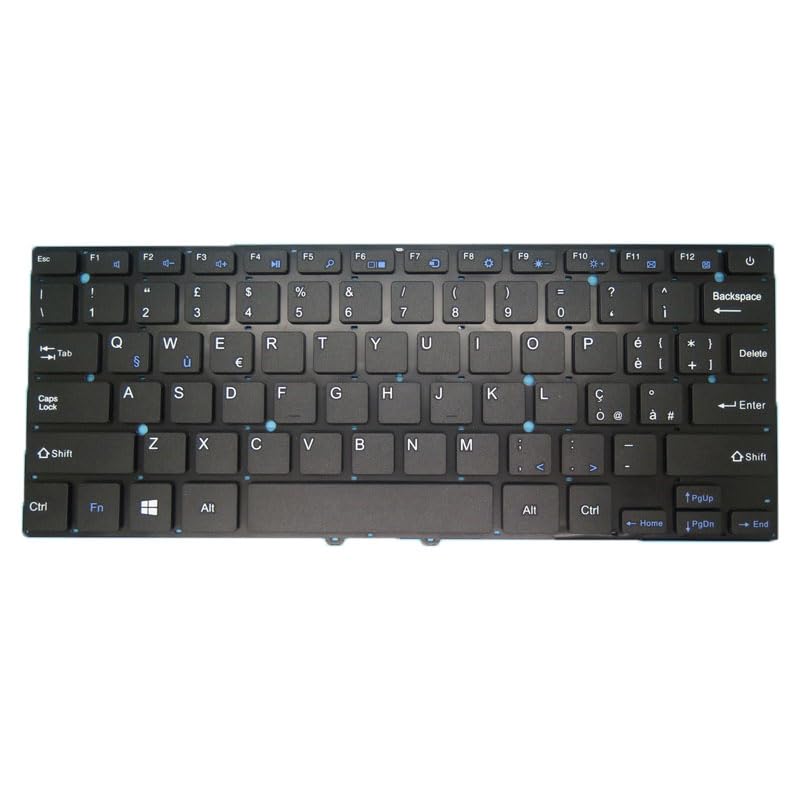
Image 1: Generic Laptop Keyboard (Italian Layout). This image shows the overall appearance of the replacement keyboard, highlighting its layout and key structure.
5. Operating Instructions
Once installed, your new keyboard functions like the original. Below are general operating tips:
- Standard Typing: Use the alphanumeric keys for text input.
- Function Keys (Fn): The 'Fn' key, usually located near the bottom left, can be combined with the F1-F12 keys (and sometimes other keys) to activate special functions like volume control, screen brightness, Wi-Fi toggle, etc. Refer to your laptop's original manual for specific Fn key combinations.
- Italian Layout: This keyboard features an Italian (IT) layout, which includes specific characters and key placements for the Italian language. Ensure your operating system's keyboard language setting is configured to "Italian" for correct character input.
6. Maintenance
Proper maintenance can extend the life of your keyboard.
- Cleaning: Use a soft, lint-free cloth slightly dampened with water or a mild cleaning solution to wipe the keycaps. For dust and debris between keys, use compressed air. Avoid spraying liquids directly onto the keyboard.
- Spills: In case of a liquid spill, immediately power off the laptop, disconnect it from power, and remove the battery. Turn the laptop upside down to drain liquid and allow it to dry completely before attempting to power it on again. Professional inspection is recommended after a significant spill.
- Storage: If the keyboard is not installed immediately, store it in its original packaging in a cool, dry place away from direct sunlight and extreme temperatures.
7. Troubleshooting
If you encounter issues with your new keyboard, try the following troubleshooting steps:
- Keyboard not responding:
- Ensure the ribbon cable(s) are securely connected to the motherboard.
- Restart your laptop.
- Check device manager in your operating system for keyboard drivers. Reinstall or update if necessary.
- Incorrect characters appearing:
- Verify that your operating system's keyboard language setting is set to "Italian (Italy)".
- Ensure no sticky keys or filter keys accessibility options are accidentally enabled.
- Certain keys not working:
- Gently press the non-functional key several times to dislodge any debris.
- If the issue persists, it might indicate a faulty connection or a defective key. Recheck the ribbon cable connection.
If these steps do not resolve the issue, contact customer support or a qualified technician.
8. Specifications
| Feature | Detail |
|---|---|
| Product Type | Laptop Replacement Keyboard |
| Compatibility | Jumper EZBook 3 SE, Jumper EZBook 3 SL (13.3 inch models) |
| Layout | Italian (IT) |
| Color | Black |
| Model Number | Laptop Parts-24-1-22-25 |
| Product Dimensions | 11.81 x 7.87 x 3.94 inches |
| Item Weight | 1.76 pounds |
| Manufacturer | Generic |
9. Warranty and Support
9.1. Warranty Information
This product comes with a 90-day warranty from the date of purchase. This warranty covers manufacturing defects. It does not cover damage caused by improper installation, misuse, accidents, or unauthorized modifications.
Please retain your proof of purchase for warranty claims.
9.2. Customer Support
For technical assistance, warranty claims, or any questions regarding your Generic Laptop Keyboard, please contact the seller or retailer from whom you purchased the product. They will be able to provide specific support and guidance.


