
1. Introduction
This manual provides essential information for the proper installation, operation, and maintenance of the Generic CV628H-T42 LCD TV Motherboard. Designed for integration into compatible television systems, this motherboard serves as the central processing unit, managing display, audio, and input/output functions. Please read this manual thoroughly before proceeding with installation or operation to ensure safe and efficient use.
2. Safety Information
Always observe the following safety precautions to prevent damage to the motherboard or injury to yourself:
- Power Disconnection: Ensure all power sources are disconnected from the television and motherboard before installation, removal, or maintenance.
- Electrostatic Discharge (ESD): Electronic components are sensitive to ESD. Use an anti-static wrist strap or take other ESD precautions when handling the motherboard.
- Proper Tools: Use appropriate tools for installation and removal. Avoid excessive force.
- Ventilation: Ensure adequate ventilation around the motherboard once installed to prevent overheating.
- Professional Installation: If you are unsure about any step, seek assistance from a qualified technician.
3. Package Contents
Verify that all items are present in the package:
- Generic CV628H-T42 LCD TV Motherboard
- (Optional, depending on specific package) Remote control receiver cable
- (Optional, depending on specific package) User manual (this document)
4. Setup and Installation
4.1. Preparation
- Power off and unplug the television from the main power outlet.
- Carefully open the television's back panel to access the internal components. Refer to your television's service manual for specific instructions on panel removal.
- Discharge any static electricity from your body before handling the motherboard.
4.2. Physical Installation
- Locate the existing motherboard within the television chassis.
- Carefully disconnect all cables and connectors from the old motherboard, noting their positions for re-connection.
- Remove the screws securing the old motherboard and gently lift it out.
- Position the new Generic CV628H-T42 motherboard in the chassis, aligning it with the screw holes.
- Secure the new motherboard with the appropriate screws. Do not overtighten.
4.3. Connections
Reconnect all cables and connectors to the new motherboard. Ensure each connection is firm and correctly oriented. Common connections include:
- Power Supply: Connect the main power cable from the TV's power board to the motherboard.
- LVDS Cable: Connect the LVDS (Low-Voltage Differential Signaling) cable from the display panel to the corresponding port on the motherboard. This cable transmits video signals.
- Backlight Cable: Connect the backlight power cable to the motherboard or directly to the power board, depending on the TV model.
- IR/Keypad: Connect the cable for the infrared receiver and physical control buttons.
- Speakers: Connect the speaker cables to the audio output ports.
- Antenna/HDMI/USB: Ensure external input ports are properly aligned with the TV chassis openings.
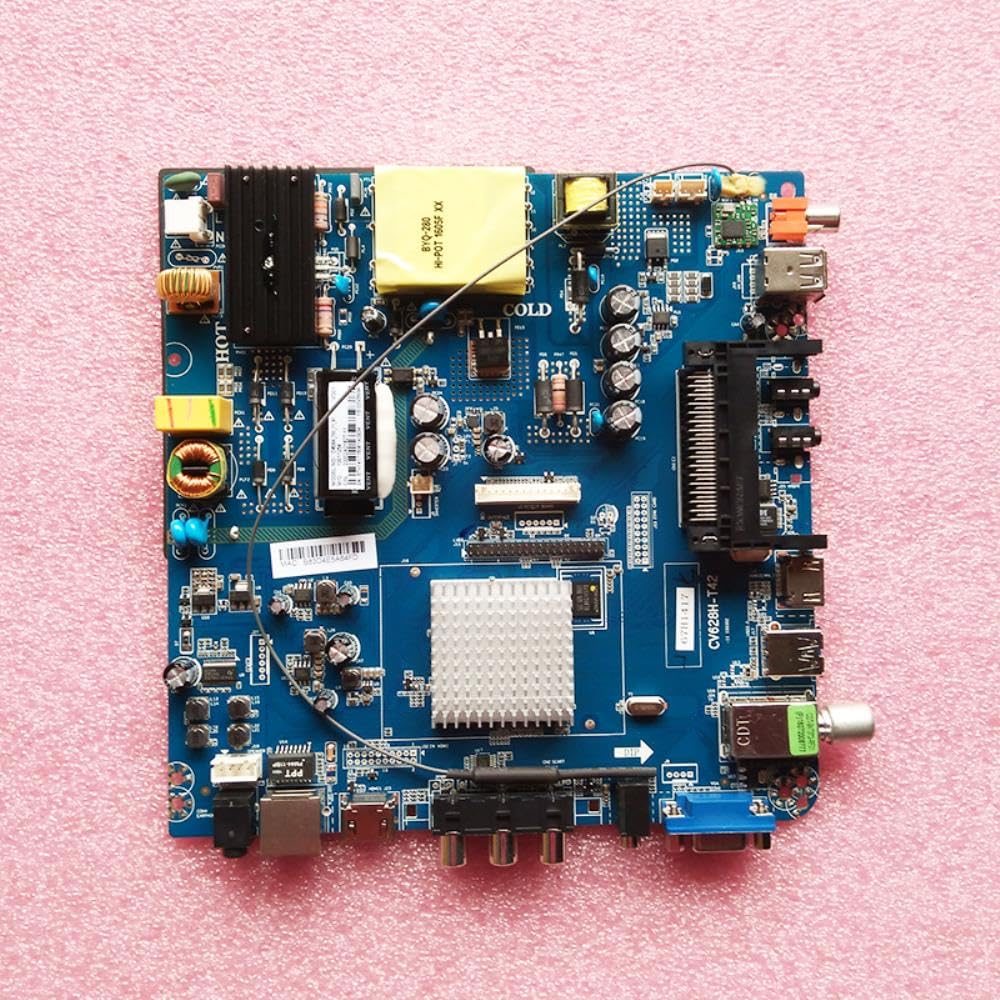
This image displays the Generic CV628H-T42 LCD TV Motherboard. Key features visible include the main processor, memory slots, and various input/output ports such as HDMI, USB, and power connectors, essential for connecting to a television panel and other peripherals.
5. Operating Instructions
5.1. Initial Power-On
- After ensuring all connections are secure and the TV's back panel is re-secured (or temporarily closed for testing), plug the television back into the power outlet.
- Press the power button on the TV or remote control.
- Observe the TV screen for the initial boot sequence or brand logo.
5.2. Software and Firmware
The CV628H-T42 motherboard typically operates on a Linux-based platform. Depending on the TV manufacturer's implementation, it may require specific firmware or software configurations. If the TV does not function correctly after installation, it may be necessary to:
- Firmware Update: Consult the television manufacturer's support resources for instructions on updating the firmware via USB or network.
- Factory Reset: Perform a factory reset through the TV's service menu if accessible, to clear any previous settings.
5.3. Basic Functionality
Once powered on, verify the following basic functions:
- Display: Ensure the screen displays an image clearly.
- Audio: Check for sound output from the speakers.
- Remote Control: Verify that the remote control functions correctly.
- Input Switching: Test switching between different input sources (HDMI, AV, etc.).
6. Maintenance
6.1. Cleaning
To maintain optimal performance and longevity:
- Periodically clean the internal components of the television, including the motherboard, using compressed air to remove dust buildup.
- Ensure the TV is unplugged before cleaning.
- Do not use liquid cleaners directly on the motherboard.
6.2. Firmware Updates
Regularly check the television manufacturer's website for available firmware updates. Updates can improve performance, add features, or fix bugs. Follow the manufacturer's instructions precisely when performing firmware updates.
6.3. Storage
If the motherboard needs to be stored, keep it in an anti-static bag in a cool, dry place, away from direct sunlight and extreme temperatures.
7. Troubleshooting
If you encounter issues, refer to the following common problems and solutions:
- No Power:
Solution: Check all power connections. Ensure the TV is plugged into a working outlet. Verify the power supply unit is functioning. - No Picture/Black Screen:
Solution: Check the LVDS cable connection. Ensure the backlight cable is properly connected. Verify the input source is correctly selected. Try a factory reset if possible. - No Sound:
Solution: Check speaker connections. Ensure audio settings are correct in the TV menu. Test with different input sources. - Remote Control Not Working:
Solution: Check batteries in the remote. Ensure the IR receiver cable is properly connected to the motherboard. - TV Freezes or Restarts:
Solution: This could indicate a firmware issue or overheating. Ensure proper ventilation. Consider a firmware update or factory reset.
If problems persist after attempting these solutions, contact a qualified technician or the television manufacturer's support.
8. Specifications
Key technical specifications for the Generic CV628H-T42 LCD TV Motherboard:
| Feature | Specification |
|---|---|
| Model Number | CV628H-T42 (Internal: 8012111531412) |
| Compatible Devices | Television |
| Platform | Linux |
| Memory Storage Capacity | 8 GB |
| Memory Slots Available | 2 |
| System Bus Standard Supported | SATA 2 |
| Brand | Generic |
9. Warranty and Support
9.1. Warranty Information
This Generic CV628H-T42 LCD TV Motherboard is typically covered by a limited warranty provided by the seller or manufacturer. Please refer to your purchase documentation or contact the seller directly for specific warranty terms and conditions, including duration and coverage details. The warranty generally covers defects in materials and workmanship under normal use.
9.2. Technical Support
For technical assistance, troubleshooting beyond this manual, or warranty claims, please contact the retailer or the manufacturer from whom you purchased this product. Be prepared to provide your product model number (CV628H-T42) and proof of purchase.