
1. Introduction
This user manual provides comprehensive instructions for the safe and effective operation, maintenance, and troubleshooting of your Elitzia Hydro Dermabrasion Hydrafacial Massage 6-in-1 Multifunction Beauty Machine, model ETLB248. This professional-grade device is designed for skin cleaning, tightening, rejuvenation, and wrinkle removal, suitable for both personal and salon use.
Please read this manual thoroughly before operating the machine and retain it for future reference.
2. Safety Information
- Always ensure the machine is unplugged before cleaning or performing any maintenance.
- Do not operate the machine with wet hands or in wet environments.
- Keep the device out of reach of children.
- Do not use on broken, irritated, or infected skin. Consult a dermatologist if you have pre-existing skin conditions.
- Avoid direct contact with eyes and mucous membranes.
- If you experience any discomfort or adverse reactions, discontinue use immediately and consult a medical professional.
- Use only the recommended solutions and accessories with the machine.
- Ensure proper ventilation during operation.
3. Product Components
The Elitzia 6-in-1 Beauty Machine comes with several key components designed for various skin treatments. Familiarize yourself with each part before operation.

Figure 3.1: Main Unit of the Elitzia 6-in-1 Beauty Machine. This image shows the complete machine with its integrated screen and various probes attached to the top.

Figure 3.2: Collection of treatment handles and probes. From left to right: Oxygen Injection Spray, RF Colored Light handle, High Frequency Scrubber, Hydro Aqua Peel Handle, Ultrasound High Frequency, and Cold Hammer.

Figure 3.3: Front view of the machine displaying the three solution tanks labeled A, B, and C, used for different treatment liquids.

Figure 3.4: Side view of the machine showing the various ports for connecting the treatment handles and power cable.
3.1 List of Main Components:
- Main Machine Unit: Central control unit with touch screen display.
- Hydro Aqua Peel Handle (Hydrogen Facial Cleanser): For deep cleansing and exfoliation.
- Ultrasonic Acoustic Import Handle: For high-frequency vibration to aid essence absorption.
- Freezing Probe (Cold Hammer): For pore reduction and nutrient locking.
- High-Frequency Scrubber: For exfoliating dead skin and removing blackheads.
- RF with Colored Light Probe: For skin tightening, wrinkle smoothing, and collagen replenishment.
- Oxygen Injection Pen: For even distribution and absorption of skincare essence.
- Solution Tanks (A, B, C): For holding different treatment solutions.
- Power Adapter: For connecting the machine to a power source.
4. Setup Instructions
Follow these steps to set up your Elitzia 6-in-1 Beauty Machine before first use:
- Unpacking: Carefully remove all components from the packaging. Inspect for any damage.
- Placement: Place the main machine unit on a stable, flat, and dry surface, ensuring adequate ventilation around the device.
- Connect Handles: Connect each treatment handle to its corresponding port on the main unit. Ensure connections are secure. Refer to Figure 3.4 for connection points.
- Fill Solution Tanks:
- Open the caps of tanks A, B, and C.
- Fill tank A with your primary cleansing solution (e.g., AS1).
- Fill tank B with your secondary treatment solution (e.g., SA2).
- Fill tank C with your nourishing or waste solution (e.g., AO3 or empty for waste collection).
- Securely close the caps after filling.
- Power Connection: Connect the power adapter to the machine's power input port, then plug the adapter into a suitable electrical outlet.
- Initial Cleaning: Before first use, it is recommended to run clean distilled water through the system to flush out any manufacturing residues.
5. Operating Instructions
The Elitzia 6-in-1 Beauty Machine offers multiple functions for comprehensive skin care. Ensure the machine is properly set up as per Section 4 before proceeding.
General Operation Steps:
- Power On: Press the power button on the main unit to turn on the machine. The touch screen display will illuminate.
- Select Function: On the touch screen, select the desired treatment function. Each function corresponds to a specific handle.
- Adjust Intensity/Time: Use the controls on the screen to adjust the intensity level and treatment duration according to the client's skin type and desired results. Start with lower intensity for sensitive skin.
- Prepare Skin: Cleanse the client's face thoroughly before starting any treatment. For hydro-dermabrasion, moisten the skin and apply appropriate serum.
- Perform Treatment: Follow the specific instructions for each handle as detailed below.
- Power Off: After treatment, turn off the machine and unplug it from the power source.
5.1 Detailed Function Usage:

Figure 5.1: Diagrams illustrating the Hydro Aqua Peel Handle for deep cleaning and the Ultrasound High Frequency for essence introduction.

Figure 5.2: Diagrams illustrating the Oxygen Injection Spray for essence distribution, RF Colored Light for skin tightening, and High Frequency Scrubber for exfoliation.
5.1.1 Hydro Aqua Peel Handle (Hydrogen Facial Cleanser)
This handle is used for deep facial cleansing and exfoliation. It utilizes a vacuum suction combined with a solution to remove impurities and dead skin cells.
- Usage: Move the suction head quickly from the center of the face outwards.
- Caution: Do not keep the suction head in one place for too long to avoid skin irritation.
- Nozzles: Use the simple, swirling suction head for sensitive skin. For thicker pores and T-zone areas, use the abrasive suction head.
- Function: Deeply cleanses the facial stratum corneum, improves blackhead acne, and removes grease and dirt.
5.1.2 Ultrasonic Acoustic Import Handle
This handle uses high-frequency ultrasonic vibrations to facilitate the absorption of skincare essences into the deeper layers of the skin.
- Frequency: Operates at 1 to 3 million times per second.
- Usage: Apply essence to the skin, then gently glide the ultrasonic handle over the treated area.
- Benefit: Provides better nutrition to the cleansed skin by enhancing essence penetration.
5.1.3 Freezing Probe (Cold Hammer)
The cold hammer function helps to soothe the skin, reduce pore size, and lock in nutrients after other treatments.
- Temperature: Cools to 0-5 degrees Celsius.
- Usage: Gently apply the cold hammer to the treated areas of the face.
- Benefit: Calms and repairs damaged skin, firms skin, and promotes deep skin absorption, leaving a refreshed and smooth feeling.
5.1.4 High-Frequency Scrubber
This scrubber exfoliates dead skin cells, brightens skin tone, and aids in the removal of blackheads through high-frequency vibrations.
- Usage: Apply to moist skin and gently glide the scrubber over the face, focusing on areas with blackheads or dullness.
- Benefit: Peels off dead skin, brightens skin tone, and removes blackheads for a revitalized experience.
5.1.5 RF with Colored Light Probe
This radiofrequency handle, combined with colored light, helps to tighten the skin, smooth fine lines, and replenish facial collagen.
- Usage: Apply a conductive gel to the skin. Gently move the RF probe in circular motions over the treatment area.
- Benefit: Soothes skin, evenly tightens skin, smooths fine lines, replenishes facial collagen, and makes the skin smoother and more delicate.
5.1.6 Oxygen Injection Pen
The oxygen injection pen evenly distributes skincare essence onto the skin, maximizing absorption and benefits.
- Usage: Fill the pen's reservoir with desired essence. Hold the pen a few centimeters from the skin and spray evenly.
- Benefit: Improves absorption of skincare products and enhances the overall effectiveness of your routine.
6. Maintenance and Care
Proper maintenance ensures the longevity and optimal performance of your Elitzia Beauty Machine.
- Daily Cleaning: After each use, clean all detachable parts and handles with warm, soapy water. Rinse thoroughly and dry completely before storage.
- Solution Tanks: Empty and clean the solution tanks (A, B, C) after each use to prevent residue buildup and bacterial growth.
- Main Unit: Wipe the main unit and touch screen with a soft, damp cloth. Do not use abrasive cleaners or immerse the unit in water.
- Filter Cleaning: Regularly check and clean any filters if present, as per the machine's design, to maintain optimal suction and flow.
- Storage: Store the machine and its components in a clean, dry place away from direct sunlight and extreme temperatures.
- Professional Servicing: For any complex issues or internal cleaning, contact qualified service personnel.
7. Troubleshooting
This section addresses common issues you might encounter with your Elitzia Beauty Machine. If the problem persists, please contact customer support.
| Problem | Possible Cause | Solution |
|---|---|---|
| Machine does not power on. | Power cable not connected; power outlet faulty; machine fault. | Ensure power cable is securely plugged in. Test the outlet with another device. If still no power, contact support. |
| No suction from Hydro Aqua Peel Handle. | Solution tank empty; nozzle clogged; hose kinked; incorrect setting. | Check solution levels in tank A. Clean the nozzle. Straighten any kinks in the hose. Verify suction settings on the display. |
| Weak or no output from Oxygen Injection Pen. | Essence reservoir empty; nozzle clogged. | Refill the essence reservoir. Clean the pen's nozzle thoroughly. |
| Handles not functioning correctly. | Handle not securely connected; incorrect function selected; internal fault. | Ensure the handle is firmly connected to its port. Double-check the selected function on the screen. Restart the machine. |
| Skin irritation after use. | Intensity too high; prolonged use on one area; sensitive skin. | Reduce intensity. Keep handles moving. Discontinue use if irritation persists and consult a professional. |
8. Specifications
Technical specifications for the Elitzia Hydro Dermabrasion Hydrafacial Massage 6-in-1 Beauty Machine.
| Feature | Detail |
|---|---|
| Model | ETLB248 |
| Brand | Elitzia |
| Dimensions (L x W x H) | 25 x 36 x 40 cm (9.84 x 14.17 x 15.75 inches) |
| Weight | 12 Kilograms (26.46 lbs) |
| Material | Acrylonitrile Butadiene Styrene (ABS) |
| Power Source | AC Adapter |
| Display Screen | 7 inches |
| Ultrasonic Frequency | 1.1 MHZ |
| Color | Green |
| Suitable Skin Type | All |
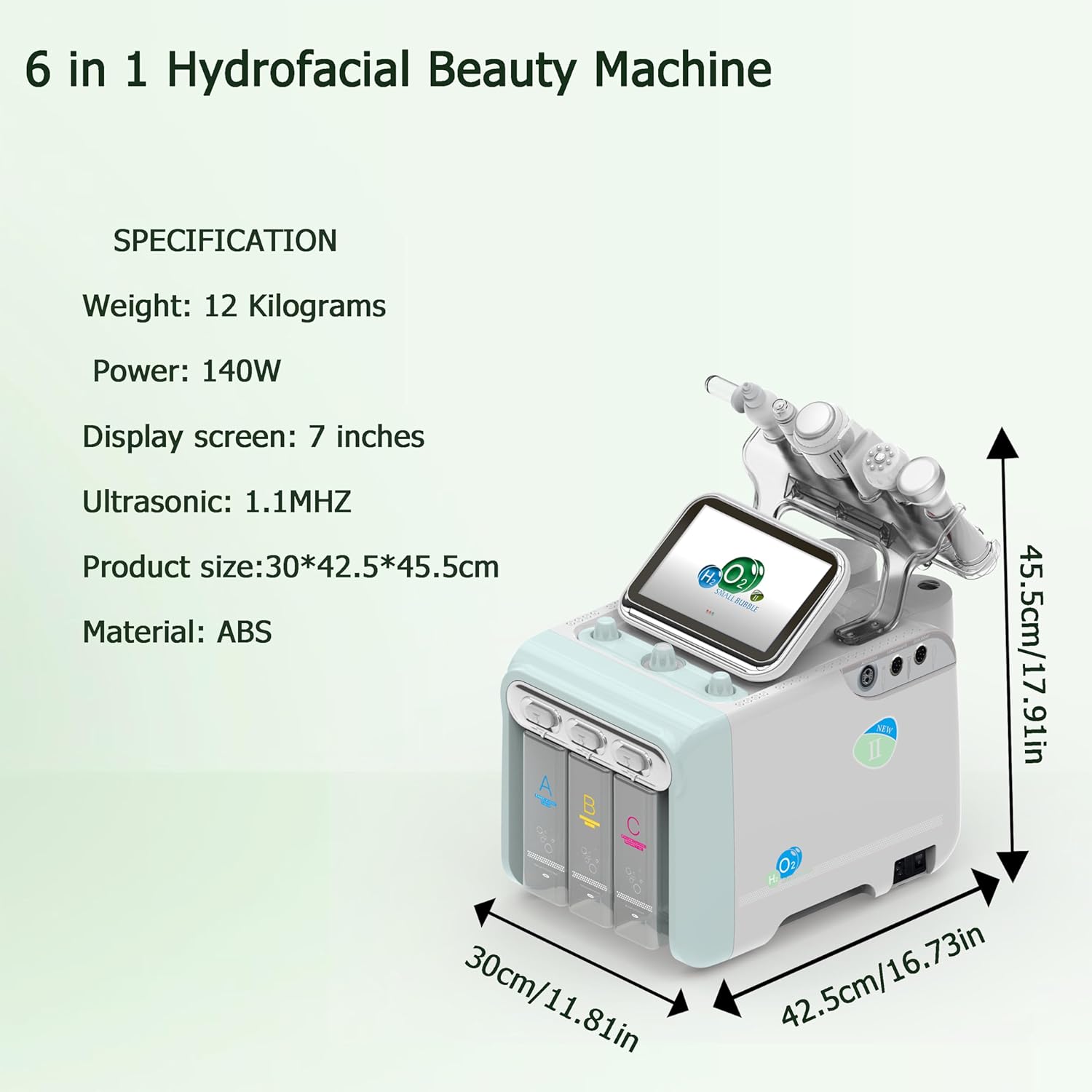
Figure 8.1: Visual representation of the machine's dimensions and key specifications.
9. Warranty and Support
For warranty information, technical support, or service inquiries, please contact Elitzia customer service through the retailer where the product was purchased or visit the official Elitzia website. Please have your model number (ETLB248) and purchase date available when contacting support.
For more information, you can visit the Elitzia Store on Amazon.