
XiL 193max2
XiL 193MAX2 Drone User Manual
Model: 193MAX2
1. Introduction
This manual provides essential information for the safe and effective operation of your XiL 193MAX2 3-Axis Gimbal Drone. Please read this manual thoroughly before operating the drone to ensure proper usage and to prevent damage or injury. Keep this manual for future reference.
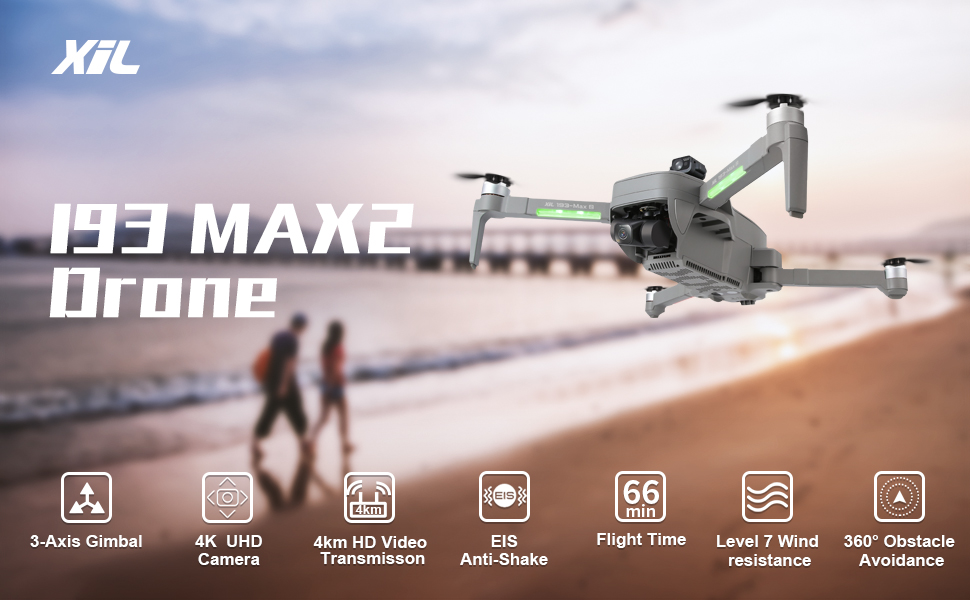
Image: Overview of the XiL 193MAX2 Drone highlighting its 3-Axis Gimbal, 4K UHD Camera, 4km HD Video Transmission, EIS Anti-Shake, 66 min Flight Time, Level 7 Wind Resistance, and 360° Obstacle Avoidance capabilities.
2. Safety Precautions
Always prioritize safety during drone operation. Failure to follow these guidelines may result in injury, property damage, or legal consequences.
- Pre-Flight Check: Ensure all components are securely attached and in good working order before each flight.
- Weather Conditions: Do not fly in strong winds (above Level 7), rain, snow, or fog.
- Line of Sight: Always maintain visual line of sight with the drone during flight.
- Obstacle Avoidance: While the drone features obstacle avoidance, always be aware of your surroundings and potential hazards.
- Battery Safety: Use only approved batteries and chargers. Do not overcharge or puncture batteries.
- No-Fly Zones: Respect all local regulations regarding no-fly zones, including airports, restricted airspace, and private property.
- Age Restriction: This product is intended for adult use.
3. Package Contents
Verify that all items are present in your package:
- XiL 193MAX2 Drone
- Remote Controller
- 7.6V 5000mAh Batteries (x2)
- USB Charging Cable
- Spare Propellers
- Gimbal Protector
- User Manual
- Carrying Case
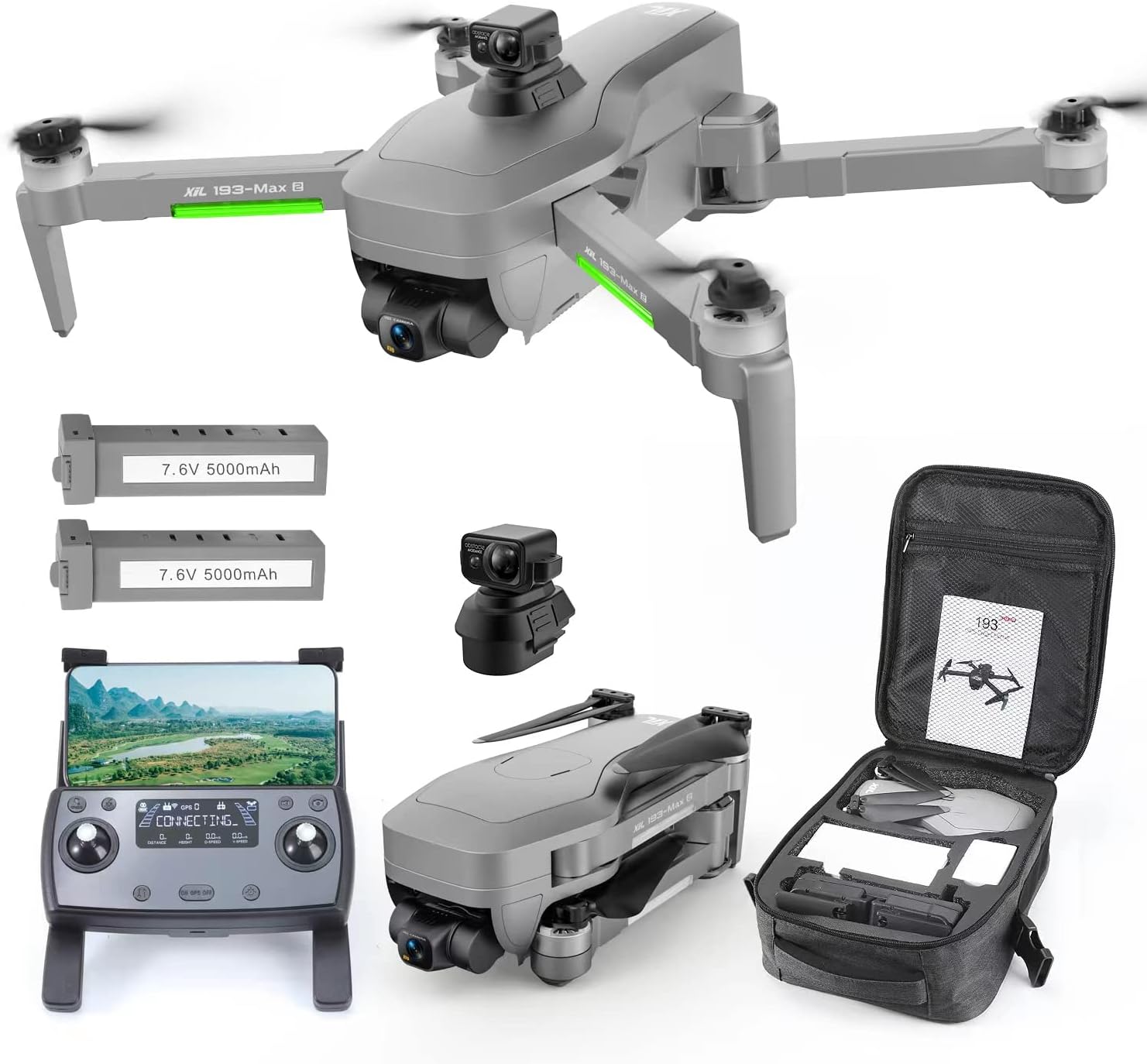
Image: The complete XiL 193MAX2 drone package, showing the drone, remote controller, two 7.6V 5000mAh batteries, a separate gimbal, spare propellers, a USB charging cable, and a soft carrying case.
4. Product Overview
4.1 Drone Components
- 4K Camera with 3-Axis Gimbal + EIS: Captures stable 4K video and 12MP stills. The lens is 120-degree adjustable.
- Brushless Motors: Provide stable flight and strong wind resistance up to Level 7.
- Obstacle Avoidance Sensors: 360° EVO Obstacle Sensing for enhanced flight safety.
- GPS Module: Enables precise positioning, auto return home, and intelligent flight modes.
- LED Indicators: Provide status information during flight.

Image: Detailed view of the drone's camera, highlighting its 20MP Sony CMOS Sensor, 4K UHD Camera, EIS Chip (AMBA A16), 90° Adjustable lens, and 3-Axis Gimbal for stable imaging.

Image: The XiL 193MAX2 drone with its 7.6V 5000mAh batteries, emphasizing the 66 minutes of flight time and the powerful brushless motor, which contributes to Level 7 wind resistance.
4.2 Remote Controller
The remote controller provides full command over the drone's flight and camera functions.
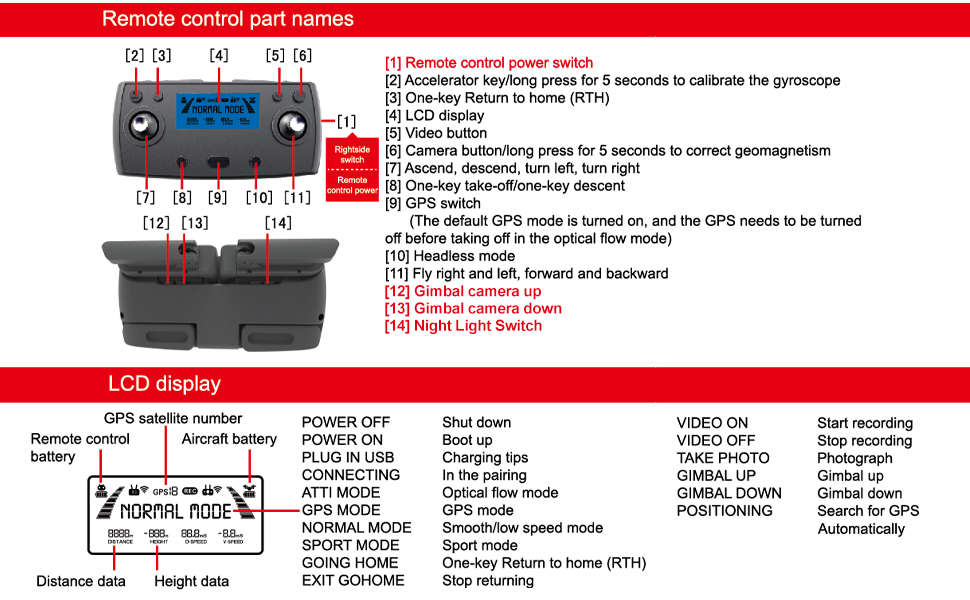
Image: A detailed diagram of the remote control, labeling its various buttons and switches, including the power switch, accelerator key, one-key return, video button, camera button, GPS switch, headless mode, flight direction controls, gimbal controls, and night light switch. The LCD display shows GPS satellite number, remote control battery, aircraft battery, and various flight modes and data.
Remote Control Part Names:
- Remote control power switch
- Accelerator key/long press for 5 seconds to calibrate the gyroscope
- One-key Return to Home (RTH)
- LCD display
- Video button
- Camera button/long press for 5 seconds to correct geomagnetism
- Ascend, descend, turn left, turn right
- One-key take-off/one-key descent
- GPS switch (The default GPS mode is turned on, and the GPS needs to be turned off before taking off in the optical flow mode)
- Headless mode
- Fly right and left, forward and backward
- Gimbal camera up
- Gimbal camera down
- Night Light Switch
LCD Display Information:
- GPS satellite number
- Remote control battery level
- Aircraft battery level
- POWER OFF: Shut down
- POWER ON: Boot up
- PLUG IN USB: Charging tips
- CONNECTING: In the pairing
- ATTI MODE: Optical flow mode
- GPS MODE: GPS mode
- NORMAL MODE: Smooth/low speed mode
- SPORT MODE: Sport mode
- GOING HOME: One-key Return to Home (RTH)
- EXIT GOHOME: Stop returning
- VIDEO ON: Start recording
- VIDEO OFF: Stop recording
- TAKE PHOTO: Photograph
- GIMBAL UP: Gimbal up
- GIMBAL DOWN: Gimbal down
- POSITIONING: Search for GPS Automatically
- Distance data
- Height data
5. Setup
5.1 Battery Charging
Charge both drone batteries and the remote controller before first use. Use the provided USB charging cable.
- Connect the battery to the charging cable.
- Plug the USB cable into a 5V/2A USB power adapter (not included).
- Charging indicators on the battery will show progress. Fully charged when all lights are solid.
5.2 Drone Preparation
- Unfold the drone arms until they click into place.
- Install the charged battery into the drone's battery compartment.
- Remove the gimbal protector.
5.3 Remote Controller Setup
- Ensure the remote controller is charged.
- Attach your smartphone to the controller's phone holder.
- Download and install the official XiL drone app from your device's app store.
- Power on the remote controller.
6. Operation
6.1 Pairing and Calibration
- Place the drone on a flat, open surface.
- Power on the drone, then the remote controller.
- Wait for the drone and controller to pair (indicated by solid lights).
- Calibrate the gyroscope by long-pressing the accelerator key for 5 seconds.
- Calibrate geomagnetism by long-pressing the camera button for 5 seconds. Follow on-screen instructions in the app if prompted.
- Ensure sufficient GPS satellites are acquired for GPS mode (indicated on the LCD display).
6.2 Basic Flight
- Take-off: Press the one-key take-off button or push both joysticks outwards and downwards to arm motors, then push the left joystick up to ascend.
- Landing: Press the one-key descent button or slowly pull the left joystick down to land.
- Directional Control: Use the right joystick for forward/backward and left/right movement. Use the left joystick for altitude and rotation.
6.3 Advanced Features
- GPS Auto Return Home (RTH): The drone will automatically return to its take-off point if signal is lost, battery is low, or the RTH button is pressed.

Image: The XiL 193MAX2 drone illustrating its GPS Auto Return Home function, activated by signal loss, low battery, or button press. Also shown are Night Flight Mode, GPS Follow Me, and Waypoint Flight capabilities.
- Obstacle Avoidance: The 360° intelligent obstacle avoidance system helps prevent collisions.

Image: The XiL 193MAX2 drone flying near trees, with a visual representation of its 360° Intelligent Obstacle Avoidance system detecting obstacles up to 20 meters away, ensuring a safer flight.
- Camera Operation: Use the video button to start/stop recording and the camera button to take photos. Adjust gimbal angle using the dedicated buttons.
- Long Range Transmission: The drone supports 13000 FT (approx. 4km) range transmission for control and FPV video.

Image: A person operating the XiL 193MAX2 drone with a smartphone mounted on the remote controller, demonstrating the 13000ft control range transmission and 5G WiFi FPV live video capability, allowing for longer flights and clearer views.
- Night Light: Activate the night light for improved visibility during low-light conditions.
7. Maintenance
- Cleaning: Wipe the drone and controller with a soft, dry cloth after each use. Do not use harsh chemicals.
- Propeller Inspection: Regularly check propellers for cracks or damage. Replace damaged propellers immediately.
- Battery Storage: Store batteries in a cool, dry place, away from direct sunlight and extreme temperatures. Do not store fully charged or fully depleted for extended periods.
- Firmware Updates: Check the official XiL website or app for any available firmware updates to ensure optimal performance.
8. Troubleshooting
| Problem | Possible Cause | Solution |
|---|---|---|
| Drone does not power on | Low battery; Battery not installed correctly | Charge battery; Reinstall battery securely |
| Drone cannot connect to remote controller | Not paired; Interference | Ensure both are powered on and follow pairing steps; Move to an area with less interference |
| Drone drifts during flight | Gyroscope not calibrated; Wind interference | Recalibrate gyroscope; Avoid flying in strong winds |
| Poor image/video quality | Dirty lens; Insufficient lighting; SD card issue | Clean lens; Fly in well-lit conditions; Check/replace SD card |
| GPS signal weak/lost | Flying indoors; Obstructions; Magnetic interference | Fly outdoors in open area; Avoid areas with strong magnetic fields |
9. Specifications
| Feature | Detail |
|---|---|
| Model Name | 193max2 |
| Brand | XiL |
| Dimensions | 12"L x 5"W x 8"H (approx. 30.5cm x 12.7cm x 20.3cm) |
| Item Weight | 3 Pounds (approx. 1.36 kg) |
| Camera Resolution | 4K Video, 12MP Stills |
| Gimbal | 3-Axis Gimbal + EIS Stabilization |
| Max Flight Time | 66 Minutes (with 2 batteries) |
| Max Control Range | 13000 FT (approx. 4 km) |
| Wind Resistance | Level 7 |
| Obstacle Avoidance | 360° Intelligent Obstacle Sensing |
| Connectivity | Wi-Fi (5G for FPV) |
| Battery Capacity | 5000 mAh (per battery) |
| Battery Type | Lithium Polymer |
| Age Range | Adult |
| UPC | 768523763917 |
10. Warranty and Support
For warranty information and technical support, please refer to the contact details provided with your product packaging or visit the official XiL website. Keep your purchase receipt as proof of purchase for warranty claims.
Ask a question about this manual
Ask about setup, troubleshooting, compatibility, parts, safety, or missing instructions. Manuals+ will review the question and use this page’s manual context to help answer it.