
Introduction
Thank you for choosing the RichBird Wireless Charging Station. This multi-functional device combines a wireless charger for your iPhone, Apple Watch, and AirPods, a digital alarm clock, and a nightstand lamp with adjustable brightness and color temperatures. This manual provides detailed instructions for setup, operation, maintenance, and troubleshooting to ensure optimal performance and longevity of your device.
What's in the Box
- RichBird Wireless Charging Station
- 18W Power Adapter
- 3.3ft Type-C Cable
- USB to USB-C Adapter
- USB to Apple Lightning Adapter
- User Manual
Product Overview
Familiarize yourself with the components and controls of your RichBird Wireless Charging Station.
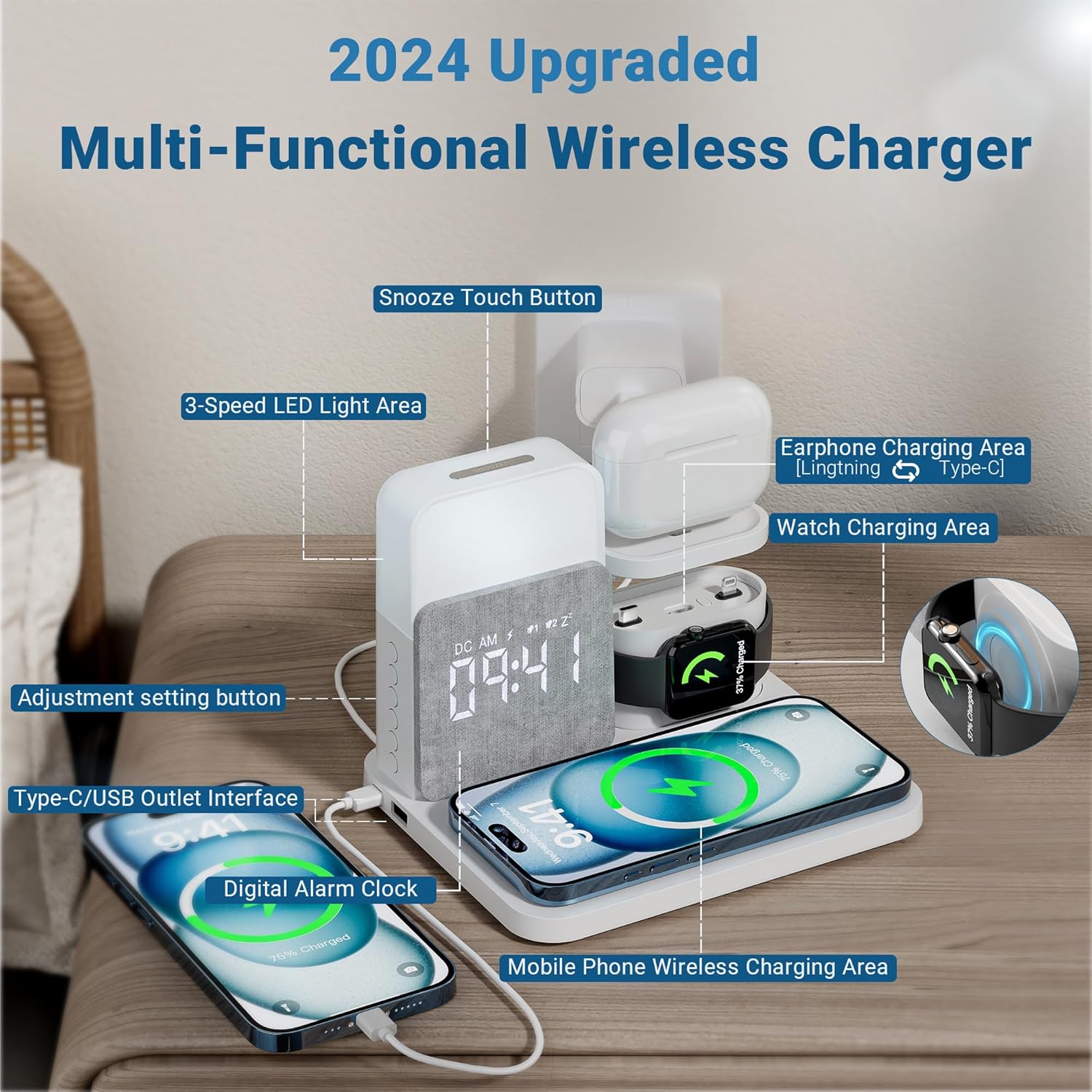
Components
- Mobile Phone Wireless Charging Area: Main pad for Qi-compatible smartphones.
- Watch Charging Area: Dedicated stand for Apple Watch charging.
- Earphone Charging Area: Stand with interchangeable Lightning/Type-C connector for AirPods/earbuds.
- Digital Alarm Clock: LED display for time and alarm settings.
- Nightstand Lamp: Integrated light with adjustable brightness and color.
- Snooze Touch Button: Located on top of the lamp for snooze and light control.
- Adjustment Setting Buttons: Side buttons for time, alarm, and other settings.
- Type-C/USB Outlet Interface: Additional ports for wired charging of other devices.
Setup
- Power Connection: Connect the provided 3.3ft Type-C cable to the input port on the back of the charging station and plug the 18W power adapter into a wall outlet. The digital clock display will illuminate.
- Watch Charger Installation: The watch charging module is integrated. Ensure it is securely in place.
- Earphone Charger Setup: The earphone charging stand supports both Lightning and Type-C connectors. Select the appropriate adapter (USB to Apple Lightning or USB to USB-C) and insert it into the earphone charging port on the stand.
Operating Instructions
Charging Devices
This station allows simultaneous charging of multiple devices.
- For Smartphones: Place your Qi-compatible smartphone (e.g., iPhone 15/14/13/12 Pro Max, Samsung Galaxy S24/S23/S22 Ultra, Google Pixel 8 Pro/7/6a) on the mobile phone wireless charging area. Ensure the phone is centered for optimal charging.
- For Apple Watch: Place your Apple Watch (e.g., Ultra 2, Watch Series 9/8/7, Watch SE) onto the watch charging stand. The watch will magnetically align and begin charging.
- For AirPods/Earbuds: Place your AirPods (1/2/3/Pro 1) or other compatible earbuds onto the earphone charging stand, ensuring the charging port aligns with the installed connector.
- Additional Devices: Use the Type-C or USB-A output ports on the side of the unit to charge other devices via their respective cables.

Alarm Clock Functions
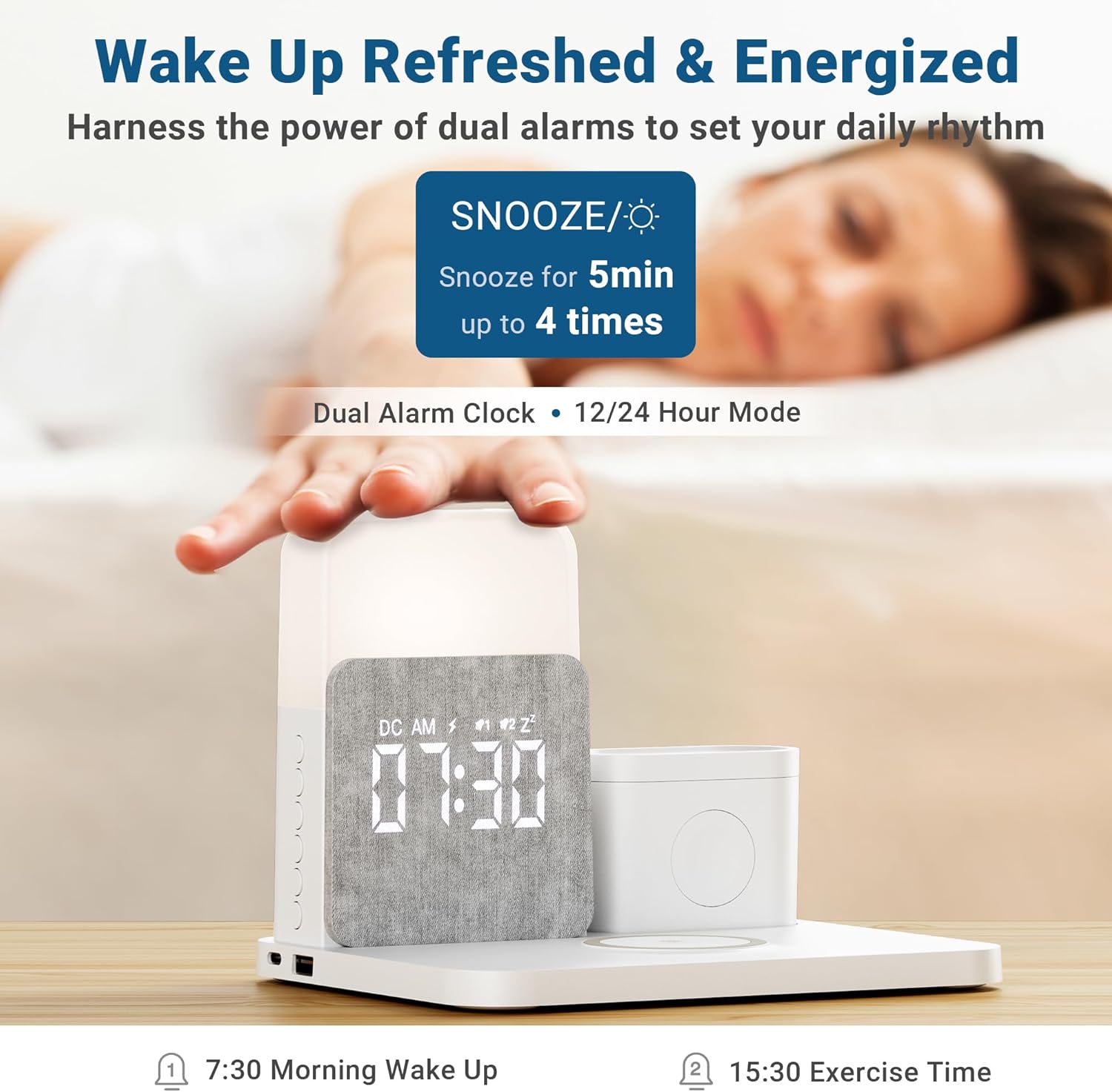
The digital alarm clock features dual alarms and a snooze function.
- Setting Time: Use the 'Time Set' button (often indicated by a clock icon) on the side to enter time setting mode. Use '+' and '-' buttons to adjust hours and minutes. Press 'Time Set' again to confirm.
- Setting Alarms: Use the 'Alarm 1' or 'Alarm 2' buttons (bell icons) to enter alarm setting mode. Adjust the alarm time using '+' and '-' buttons. Press the alarm button again to confirm and activate the alarm.
- Snooze Function: When an alarm sounds, briefly touch the Snooze Touch Button on top of the lamp to activate snooze for 5 minutes. This can typically be repeated up to 4 times.
- Disabling Alarm: To turn off a sounding alarm, press any side button other than the Snooze Touch Button. To disable an alarm permanently, press the corresponding 'Alarm' button until the alarm indicator disappears from the display.
Nightstand Lamp Functions
The integrated nightstand lamp offers adjustable brightness and three color temperatures.
- Turning On/Off: Briefly touch the Snooze Touch Button on top of the lamp to turn the light on or off.
- Adjusting Brightness: When the light is on, press and hold the Snooze Touch Button to cycle through brightness levels (0-100% dimmer). Release when the desired brightness is reached.
- Changing Color Temperature: Briefly press the 'Light' button (sun icon) on the side to cycle through the three available light colors: Warm Light, Natural Light, and Cold Light.

Maintenance
- Cleaning: Disconnect the power before cleaning. Use a soft, dry cloth to wipe the surface of the charging station. Do not use liquid cleaners or abrasive materials.
- Storage: Store the device in a cool, dry place away from direct sunlight and extreme temperatures when not in use for extended periods.
- Safety: Avoid dropping the device or exposing it to water. Do not attempt to disassemble or repair the unit yourself.
Troubleshooting
| Problem | Solution |
|---|---|
| Device not charging wirelessly. | Ensure your device is Qi-compatible and properly aligned on the charging pad. Check if the charging station is powered on and connected correctly. Remove any thick phone cases. |
| Alarm clock display is off or flickering. | Verify the power connection. If the issue persists, try a different power outlet or adapter. |
| Nightstand lamp is not working. | Ensure the charging station is powered on. Briefly touch the Snooze Touch Button to turn the light on. If it still doesn't work, check the power connection. |
| Alarm is not sounding. | Check if the alarm is set and activated (indicator icon visible). Ensure the volume is not muted or set too low. |
Specifications
| Feature | Detail |
|---|---|
| Brand | RichBird |
| Model Number | 1 |
| Connectivity Technology | Wireless |
| Connector Type | USB |
| Compatible Devices | iPhone, Apple Watch, AirPods |
| Compatible Phone Models | iPhone 15/15 Pro/15 Pro Max/15 Plus/14/14 Pro/14 Pro Max/14 Plus/13/13 Pro/13 Pro Max/13 Mini/ 12/12 Pro/12 Pro Max/12 Mini/11/11 Pro/11 Pro Max/X/XR/XS/XS Max/8/8Plus; Apple iPhone 16 |
| Special Feature | Wireless Charging, Alarm Clock, Nightstand Lamp (0-100% Dimmer, 3 Light Colors) |
| Color | White |
| Input Voltage | 120 Volts |
| Total USB Ports | 1 (USB-A output) |
| Wattage | 15 watts (wireless charging) |
| Output Current | 0.13 Amps |
| Output Voltage | 5 Volts (DC) |
| Power Source | Battery Powered (for clock) / AC Adapter (for charging) |
| Power Plug Type | Type A - 2 pin (North American) |
| Mounting Type | Tabletop Mount |
| Specification Met | Qi |
Warranty & Support
RichBird products are designed for reliability and performance. For warranty information, technical support, or customer service inquiries, please refer to the contact details provided on the product packaging or the official RichBird website. Please retain your proof of purchase for warranty claims.