
1. Introduction
Thank you for choosing the raydrop 2.2L Cool Mist Humidifier, Model KC-RD06S. This manual provides essential information for the safe operation, maintenance, and troubleshooting of your new humidifier. Please read these instructions thoroughly before use and retain them for future reference.

Image 1: Front view of the raydrop 2.2L Cool Mist Humidifier, Model KC-RD06S, featuring the digital knob and transparent water tank.
2. Important Safety Instructions
To reduce the risk of fire, electric shock, or injury, please observe the following safety precautions:
- Always place the humidifier on a firm, flat, waterproof surface at least 12 inches (30 cm) away from walls and appliances.
- Do not operate the humidifier if the cord or plug is damaged.
- Do not use attachments not recommended by the manufacturer.
- Unplug the humidifier before filling, cleaning, or moving it.
- Do not immerse the humidifier in water or other liquids.
- Keep out of reach of children and pets.
- Use only clean, cool tap water. Do not add essential oils directly into the water tank as this may damage the unit.
- Do not block air vents.
- If the humidifier emits an unusual odor or sound, discontinue use immediately.
- The humidifier features an automatic shut-off function when water levels are low or the timer expires.
3. Product Components
Familiarize yourself with the parts of your raydrop humidifier:
- Water Tank (2.2L capacity)
- Base Unit
- Digital Display Knob
- Mist Nozzle
- Power Cord
- Cleaning Brush (included)

Image 2: Overview of humidifier features, including asymmetrical design, easy-fill opening, digital display knob, and optional night light.
4. Setup
- Unpack: Carefully remove all packaging materials and place the humidifier on a flat, stable surface.
- Fill Water Tank:
- Remove the water tank from the base.
- Unscrew the tank cap and fill the tank with clean, cool tap water. The 2.2L tank capacity provides up to 30 hours of continuous mist.
- Securely replace the tank cap.
- Place the filled water tank back onto the base, ensuring it is seated correctly.
- Connect Power: Plug the power cord into a standard 110V electrical outlet.
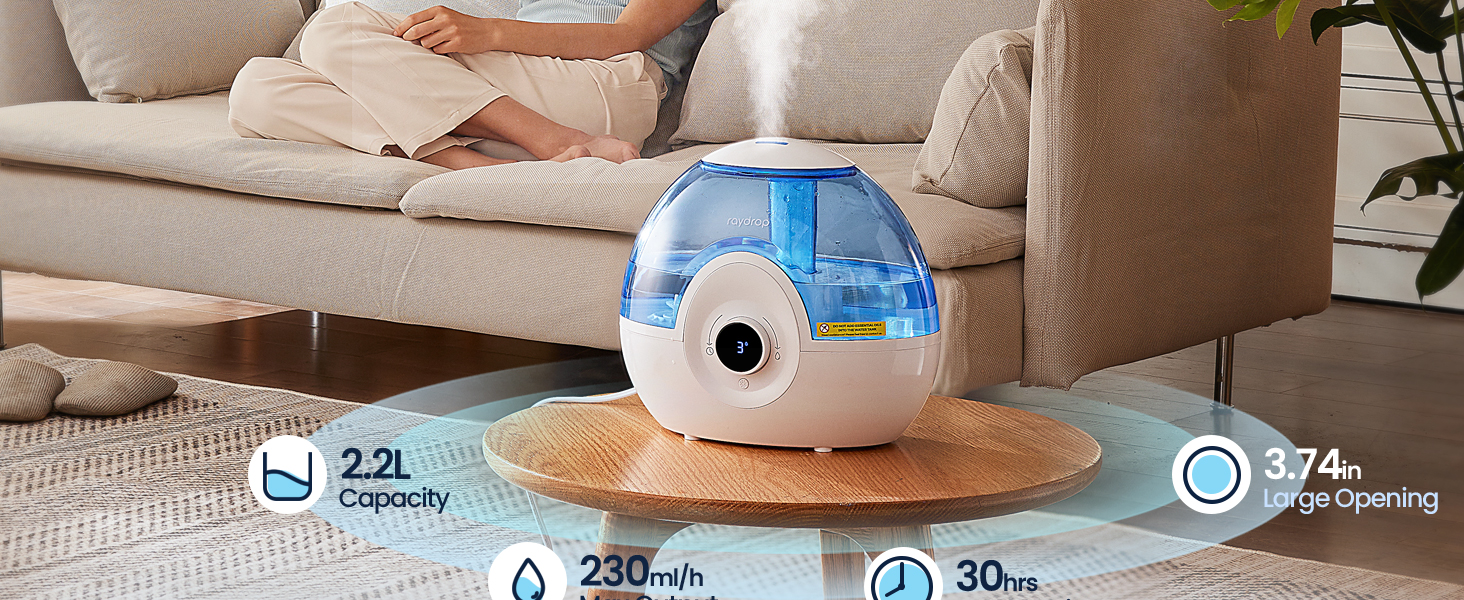
Image 3: The humidifier in use, illustrating its 2.2L capacity, 230ml/h maximum output, 30-hour runtime, and 3.74-inch large opening for easy refilling.
5. Operation
Your humidifier features an intuitive digital display knob for easy control.
- Power On/Off: Tap the digital display knob to turn the humidifier on or off.
- Adjust Mist Level: Rotate the digital display knob clockwise to select from 3 different mist levels (Low, Mid, High). The current mist level will be shown on the digital display.
- Level 1 (Low): Approximately 70ml/h output, up to 30 hours runtime.
- Level 2 (Medium): Approximately 130ml/h output, up to 16 hours runtime.
- Level 3 (High): Approximately 230ml/h output, up to 9 hours runtime.
- Set Timer: Rotate the digital display knob counter-clockwise to set a timer for automatic shut-off, from 1 to 9 hours. The selected timer duration will be displayed. The humidifier will turn off automatically once the set time expires.
- Night Light: The humidifier includes an optional colorful night light feature. Refer to the product diagram for the night light button location. Press the button to cycle through light modes or turn off the light.
- Auto-Dim Display: The digital display will automatically turn off after 180 seconds of inactivity to conserve energy and minimize light disturbance in dark environments.

Image 4: Detailed view of the digital knob, illustrating how to adjust mist levels and set the timer.
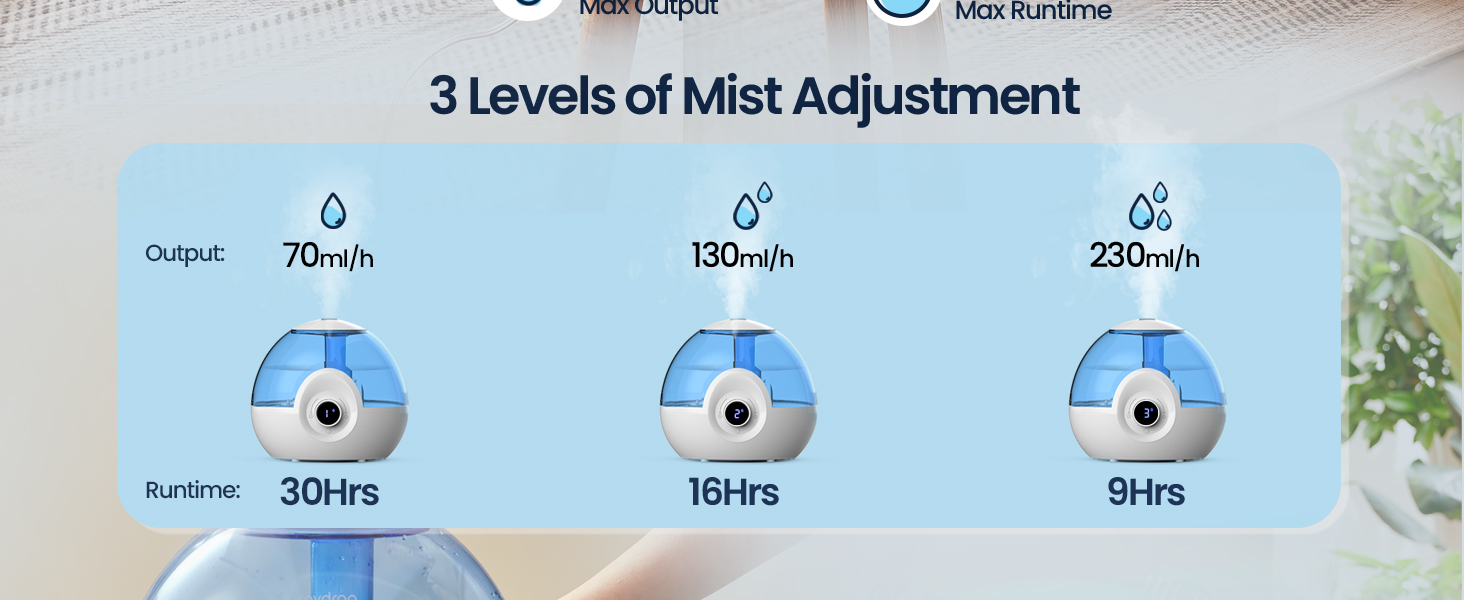
Image 5: Visual representation of the three mist adjustment levels (Low, Medium, High) and their respective runtimes (30 hours, 16 hours, 9 hours).
6. Maintenance and Cleaning
Regular cleaning is crucial for optimal performance and hygiene. The humidifier features a 3.74-inch wide opening for easy access.
- Daily Maintenance:
- Unplug the humidifier.
- Empty any remaining water from the tank and base.
- Rinse the tank and base with fresh water.
- Wipe all surfaces dry with a clean cloth.
- Weekly Cleaning (to remove mineral buildup):
- Unplug the humidifier and empty all water.
- Pour 1 cup (240ml) of white vinegar into the water tank and base.
- Let it soak for 30 minutes.
- Use the provided cleaning brush to gently scrub the inside of the tank and the nebulizer in the base.
- Rinse thoroughly with clean water until the vinegar smell is gone.
- Dry all parts completely before reassembling or storing.
- Storage: When not in use for an extended period, clean the humidifier as described above, ensure all parts are dry, and store it in a cool, dry place.
7. Troubleshooting
If you encounter issues with your humidifier, please refer to the following common problems and solutions:
| Problem | Possible Cause | Solution |
|---|---|---|
| No mist or low mist output |
|
|
| Unusual odor |
|
|
| Leaking water |
|
|
| Humidifier turns off unexpectedly |
|
|
If the problem persists after trying these solutions, please contact raydrop customer support.
8. Specifications
| Brand | raydrop |
| Model Name | KC-RD06S |
| Operation Mode | Ultrasonic |
| Water Tank Capacity | 2.2 Liters |
| Max Mist Output | 230 ml/h |
| Max Runtime | Up to 30 hours (on low setting) |
| Noise Level | 28 dB |
| Coverage Area | Up to 300 Square Feet |
| Product Dimensions | 5.51"D x 9.45"W x 8.66"H |
| Item Weight | 1.76 Pounds |
| Voltage | 110 Volts |
| Wattage | 16 Watts |
| Special Features | Auto Shut Off, Digital Display, Night Light, Quiet Operation, Timer |
9. Warranty and Support
The raydrop 2.2L Cool Mist Humidifier (Model KC-RD06S) comes with a comprehensive 5-Year Warranty. This warranty covers defects in materials and workmanship under normal use.
For warranty claims, technical assistance, or any questions regarding your product, please contact raydrop customer support. Our dedicated team is available to assist you.
Please visit the official raydrop store for more information or to contact support: raydrop Official Store