
1. Introduction
The BROLEO Smart Health Ring is a wearable device designed to monitor various health indicators, including exercise data and sleep quality. This manual provides essential information for setting up, operating, maintaining, and troubleshooting your smart ring to ensure optimal performance and a comprehensive understanding of its features.

Figure 1: BROLEO Smart Health Ring (Gold)
2. Product Overview
2.1 Package Contents
- 1 x BROLEO Smart Ring
- 1 x Instruction Manual
- 1 x Charging Cable
2.2 Key Features
- Health Tracking: Advanced sensors monitor key body signals, exercise data, and sleep quality.
- Durable Design: Constructed from polished ceramic and stainless steel, offering a lightweight, stylish, and comfortable fit.
- Extended Battery Life: Up to 7 days of continuous monitoring on a single charge.
- Water and Dust Resistance: IP68 rated, suitable for daily water exposure such as hand washing, bathing, and swimming.
- App Compatibility: Compatible with the JYouPro app for Android and iOS systems, allowing convenient data viewing and management.
2.3 Components
The smart ring features an outer casing made of ceramic and stainless steel, and an inner surface equipped with various sensors for health monitoring. A small charging contact is located on the inner surface.
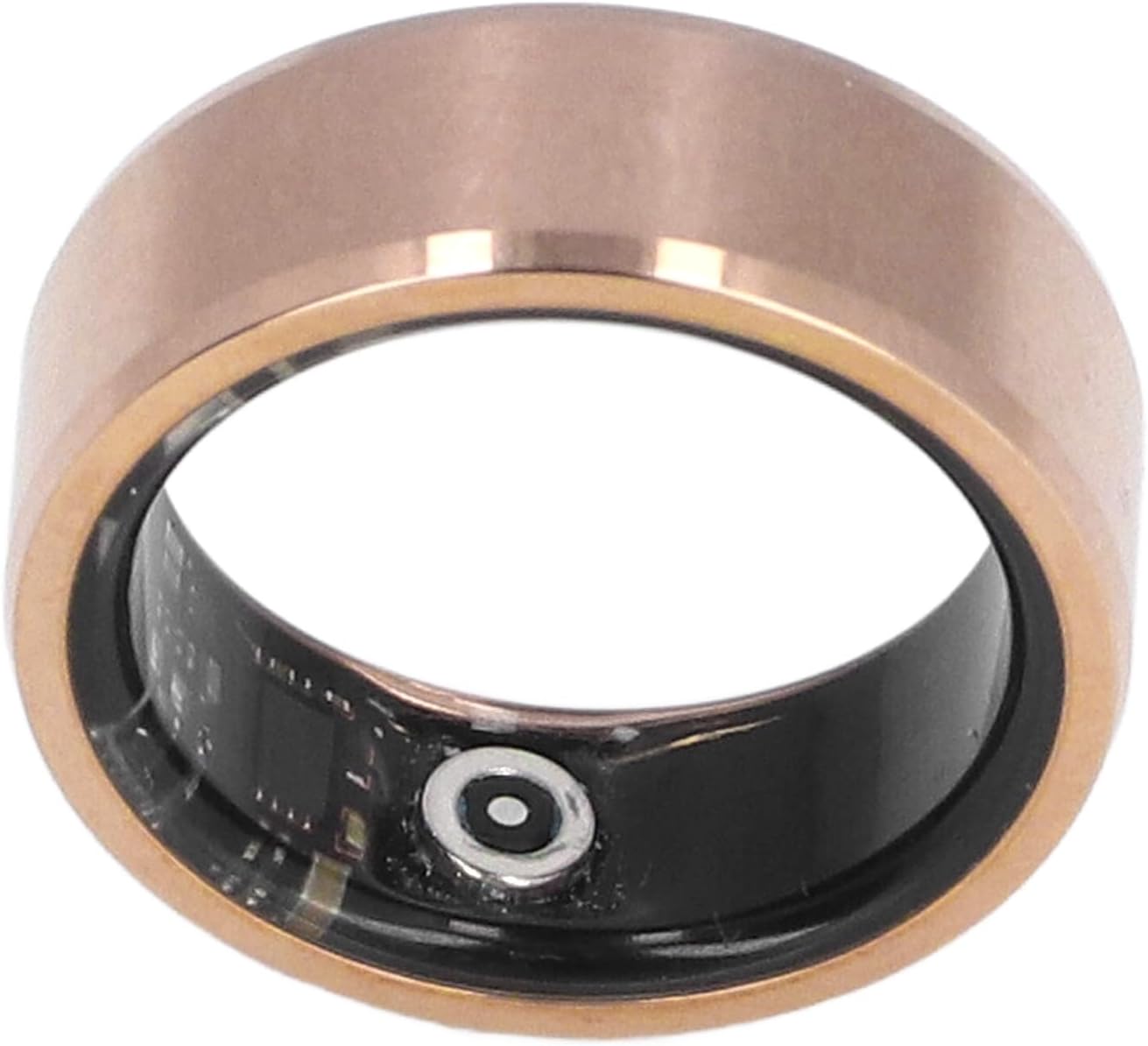
Figure 2: Internal sensors of the Smart Health Ring
3. Setup
3.1 Charging the Ring
- Connect the provided charging cable to a USB power source.
- Align the charging contacts on the ring with the charging cable connector. The ring will magnetically snap into place.
- Charge the ring for approximately 60 minutes for a full charge. The battery indicator in the app will show charging status.

Figure 3: Smart Health Ring with charging cable

Figure 4: Detail of the charging contact
3.2 App Installation and Pairing
- Download the 'JYouPro' app from your device's app store (available for Android and iOS).
- Open the app and follow the on-screen instructions to create an account or log in.
- Ensure Bluetooth is enabled on your smartphone.
- Within the JYouPro app, navigate to the device pairing section and select your BROLEO Smart Health Ring from the list of available devices.
- Confirm the pairing request on both your phone and, if prompted, on the ring (though typically automatic for rings).
3.3 Wearing the Ring
For accurate health data monitoring, wear the smart ring snugly on your finger. The sensors on the inner surface should be in consistent contact with your skin. Experiment with different fingers to find the most comfortable and secure fit.

Figure 5: Proper wearing of the Smart Health Ring

Figure 6: Ring size guide
4. Operating Instructions
4.1 Health Data Monitoring
The BROLEO Smart Health Ring continuously tracks various health metrics:
- Sleep Quality: Monitors sleep stages, duration, and consistency.
- Exercise Data: Records activity levels and potentially other exercise-related metrics.
- Other Body Signals: Advanced sensors analyze additional health indicators.
4.2 Viewing Data with the JYouPro App
All collected health data is synchronized with the JYouPro app on your smartphone. Open the app to view detailed reports and trends for your sleep, activity, and other monitored parameters. The app provides a user-friendly interface for managing your health information.
5. Maintenance
5.1 Cleaning the Ring
To maintain hygiene and sensor accuracy, regularly clean your smart ring. Use a soft, damp cloth to wipe the outer and inner surfaces. Avoid harsh chemicals or abrasive materials that could damage the finish or sensors.
5.2 Water Resistance (IP68)
The ring is IP68 rated, meaning it is resistant to dust and can withstand immersion in water up to 1.5 meters for up to 30 minutes. You can wear it during hand washing, bathing, and swimming. However, avoid exposing it to high-pressure water jets, hot water, or corrosive liquids, as these may compromise the seal over time.
5.3 Battery Care
To prolong battery life, avoid fully discharging the ring frequently. Charge it when the battery level is low. Store the ring in a cool, dry place when not in use for extended periods.
6. Troubleshooting
6.1 Common Issues and Solutions
- Ring not connecting to app:
- Ensure Bluetooth is enabled on your phone.
- Check if the ring is charged.
- Restart your phone and the JYouPro app.
- Try unpairing and re-pairing the device in the app's settings.
- Inaccurate readings:
- Ensure the ring is worn snugly and the sensors are in full contact with your skin.
- Clean the sensors to remove any dirt or debris.
- Ensure the app is updated to the latest version.
- Ring not charging:
- Verify the charging cable is properly connected to both the ring and the power source.
- Check for any obstructions or damage to the charging contacts on both the ring and the cable.
- Try a different USB power adapter.
7. Specifications
| Parameter | Value |
|---|---|
| Model Name | BROLEO3zgdeu69nw-11 |
| Brand | BROLEO |
| Color | Gold |
| Materials | Ceramic, Stainless Steel |
| Water Resistance | IP68 |
| Special Feature | Sleep Monitor |
| Battery Type | Lithium Battery |
| Battery Capacity | 18 mAh |
| Battery Life | Approximately 7 Days |
| Charging Time | Approximately 60 Minutes |
| Connectivity | Bluetooth |
| GPS | No GPS |
| Shape | Round |
| Item Package Dimensions | 3.23 x 3.23 x 1.1 inches |
| Package Weight | 0.07 Kilograms |
8. Safety Information
- Do not attempt to disassemble or modify the smart ring. This can damage the device and void any warranty.
- Keep the device away from extreme temperatures, direct sunlight, and open flames.
- Do not use the ring as a medical device. The data provided is for informational purposes only and should not be used for diagnosis or treatment. Consult a healthcare professional for any health concerns.
- Dispose of the device and its battery according to local regulations. Do not dispose of in household waste.
9. Warranty and Support
Specific warranty information for the BROLEO Smart Health Ring is not provided within this manual. For details regarding warranty coverage, technical support, or service inquiries, please refer to the manufacturer's official website or contact their customer service directly. Please retain your proof of purchase for warranty claims.