
1. Introduction
This manual provides instructions for the KRPTQJoo AA59-00784C replacement remote control. This remote is designed to function as a direct replacement for specific Samsung Smart LED UHD HDTV models. It operates using infrared (IR) technology and does not require programming.
Important Note: This remote control is not universal and does not support voice search functions. Ensure your TV model is listed below for full compatibility.
Compatible Samsung TV Models:
- UN50H6400AF, UN50H6400AFXZA
- UN55H6400AF, UN55H6400AFXZA
- UN60H6350AFXZA, UN60H6400AF, UN60H6400AFXZA
- UN65H6350AF, UN65H6350AFXZA
- UE40F6510SB, UE40F6510SS, UE55F6510SB, UE55F6510SS
- UE58H5203AW, UE48H5030AW, UE40H5030AW, UE32H5030AW
- UE50H5000AW, UE48H5000AW, UE40H5000AW
- UE65H6470SS, UE65H6475SU, UE55H6750SV, UE55H6770SV
- UE55H6850AW, UE55H6850AY, UE55H6890SS, UE55H6895SU
- UE65H6400AK, UE65H6400AW, UE65H6470AS
2. Setup
2.1 Battery Installation
The remote control requires two AAA alkaline batteries (not included). Follow these steps to install them:
- Locate the battery compartment cover on the back of the remote control.
- Slide the cover downwards or press the latch (if present) to open the compartment.
- Insert two AAA batteries, ensuring the positive (+) and negative (-) terminals match the diagrams inside the compartment.
- Slide the battery compartment cover back into place until it clicks securely.

Image: Rear view of the remote control with the battery compartment open, illustrating correct battery placement.
2.2 Initial Use
Once batteries are installed, the remote is ready for use. No programming is required. Simply point the remote control directly at your Samsung TV's infrared receiver.
3. Operating Instructions
This section outlines the primary functions of the buttons on your replacement remote control.
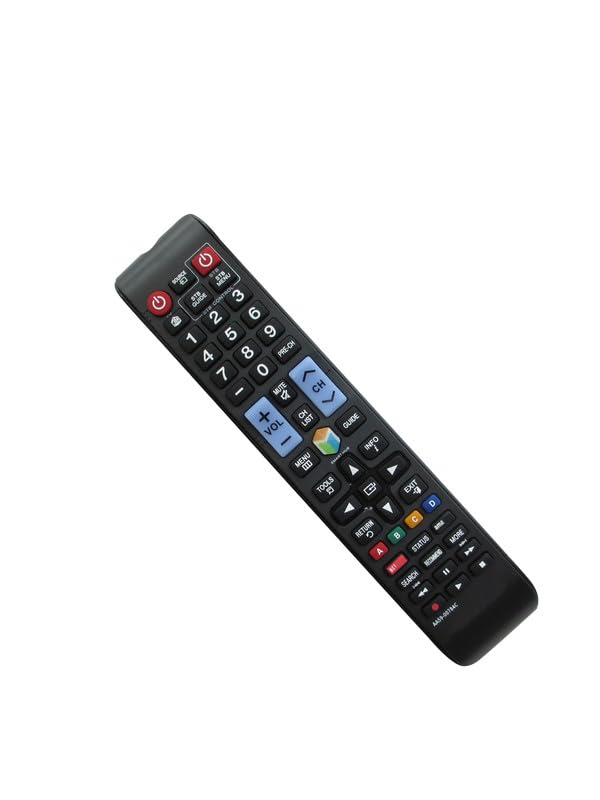
Image: Front view of the KRPTQJoo AA59-00784C remote control, showing all buttons.
3.1 Button Functions
- Power (Red Button): Turns the TV on or off.
- Source: Selects the input source (e.g., HDMI 1, AV).
- STB Guide / STB Menu: Functions related to a connected Set-Top Box (if applicable).
- Number Buttons (0-9): Directly enter channel numbers.
- PRE-CH: Returns to the previous channel.
- Volume (+/-): Adjusts the TV volume up or down.
- Channel (CH +/-): Changes the TV channel up or down.
- Mute: Mutes or unmutes the TV audio.
- MENU: Accesses the TV's main menu.
- Smart Hub: Opens the Samsung Smart Hub for apps and streaming services.
- GUIDE: Displays the electronic program guide.
- TOOLS / INFO: Provides additional options or information depending on the current screen.
- Directional Pad (Up, Down, Left, Right) & Enter: Navigates through menus and confirms selections.
- RETURN: Goes back to the previous screen or menu.
- EXIT: Exits the current menu or application.
- Color Buttons (A, B, C, D): Perform context-sensitive functions, often indicated on-screen.
- SEARCH / RECOMMEND: Accesses search functions or content recommendations.
- Playback Controls (Play, Pause, Stop, Rewind, Fast Forward): Controls media playback.
4. Maintenance
To ensure the longevity and proper functioning of your remote control:
- Keep the remote clean by wiping it with a soft, dry cloth. Avoid using liquid cleaners.
- Do not expose the remote to extreme temperatures, humidity, or direct sunlight.
- If the remote will not be used for an extended period, remove the batteries to prevent leakage.
5. Troubleshooting
5.1 Remote Not Responding
- Check Batteries: Ensure batteries are inserted correctly with the correct polarity (+/-). Replace old batteries with new AAA alkaline batteries.
- Line of Sight: Make sure there is a clear path between the remote control and the TV's infrared receiver. Obstructions can block the signal.
- Distance: Ensure you are within the maximum operating range of 8 meters.
- TV Compatibility: Verify that your TV model is listed as compatible in Section 1. This remote is not universal.
5.2 Limited Functionality
- This replacement remote is designed to replicate the primary functions of the original remote for the specified models. It does not include advanced features such as voice control.
- If certain basic functions are not working, re-check compatibility and battery status.
6. Specifications
| Brand | KRPTQJoo |
| Model Number | AA59-00784C |
| Connectivity Technology | Infrared (IR) |
| Number of Buttons | 25 |
| Power Source | 2 x AAA Alkaline Batteries (not included) |
| Maximum Range | 8 Meters |
| Color | Black |
| Compatible Devices | Television |
7. Warranty Information
This KRPTQJoo remote control comes with a 90-day warranty from the date of purchase. This warranty covers manufacturing defects under normal use.
To make a warranty claim, please retain your proof of purchase and contact the seller directly. The warranty does not cover damage caused by misuse, accidents, unauthorized repairs, or normal wear and tear.
8. Support
For further assistance or if you encounter issues not covered in this manual, please refer to your Samsung TV's original user manual or contact the seller through your purchase platform.
Please provide your remote control model number (AA59-00784C) and your TV's full model number when seeking support to ensure the quickest resolution.