
ROVSUN G46000722
ROVSUN 2.6 Cu.Ft Portable Clothes Dryer User Manual
Model: G46000722
1. Introduction
Thank you for purchasing the ROVSUN 2.6 Cu.Ft Portable Clothes Dryer. This manual provides important information for the safe and efficient operation of your new appliance. Please read it thoroughly before use and retain it for future reference.
This portable clothes dryer is designed for convenience and efficiency, featuring a 1400W motor, stainless steel tub, and an intuitive LCD control panel with six drying modes. Its compact size makes it suitable for apartments, dorms, and small living spaces.
2. Important Safety Instructions
WARNING: To reduce the risk of fire, electric shock, or injury to persons when using your appliance, follow basic precautions, including the following:
- Read all instructions before using the appliance.
- Do not dry articles that have been previously cleaned in, washed in, soaked in, or spotted with gasoline, dry-cleaning solvents, or other flammable or explosive substances, as they emit vapors that could ignite or explode.
- Do not allow children to play on or in the appliance. Close supervision of children is necessary when the appliance is used near children.
- Before the appliance is removed from service or discarded, remove the door to the drying compartment.
- Do not reach into the appliance if the tub is moving.
- Do not install or store this appliance where it will be exposed to the weather.
- Do not tamper with controls.
- Do not repair or replace any part of the appliance or attempt any servicing unless specifically recommended in the user-maintenance instructions or in published user-repair instructions that you understand and have the skills to carry out.
- Do not use fabric softeners or products to eliminate static unless recommended by the manufacturer of the fabric softener or product.
- Do not use heat to dry articles containing foam rubber or similarly textured rubber-like materials.
- Clean lint screen before or after each load.
- Keep the area around the exhaust opening and adjacent surrounding areas free from the accumulation of lint, dust, and dirt.
- The interior of the appliance and exhaust duct should be cleaned periodically by qualified service personnel.
- Do not place items exposed to cooking oils in your dryer. Items contaminated with cooking oils may contribute to a chemical reaction that could cause a load to catch fire.
- Unplug the appliance before servicing.
- If you open the door while the machine is running, it will automatically stop running to ensure your safety.
3. Product Features
The ROVSUN Portable Clothes Dryer offers several key features designed for efficient and safe laundry drying:
- Powerful & Fast Drying: 1400W power with a maximum temperature of 149°F for quick drying. Recommended for up to 9 pounds of clothes per load for optimal results.
- Excellent Performance & Safety: Durable stainless steel tub. Forward & reverse tumble actions prevent tangling, remove wrinkles, and restore fluffiness. Automatic stop feature when the door is opened during operation.
- Innovative LCD Touch Screen with 6 Modes: Intuitive control panel for easy operation and selection of drying modes.
- Portable & Space-Saving Design: Compact dimensions (23.6" x 17.1" x 27.5") and lightweight (49 lbs) for easy placement in apartments, dorms, or small spaces. Built-in handles for portability.
- Multi-mode Installation: Can be installed on a firm, level ground (free-standing), stacked, or wall-mounted with the included kit.
Control Panel Overview
The innovative LCD touch screen provides clear access to all functions and operations.
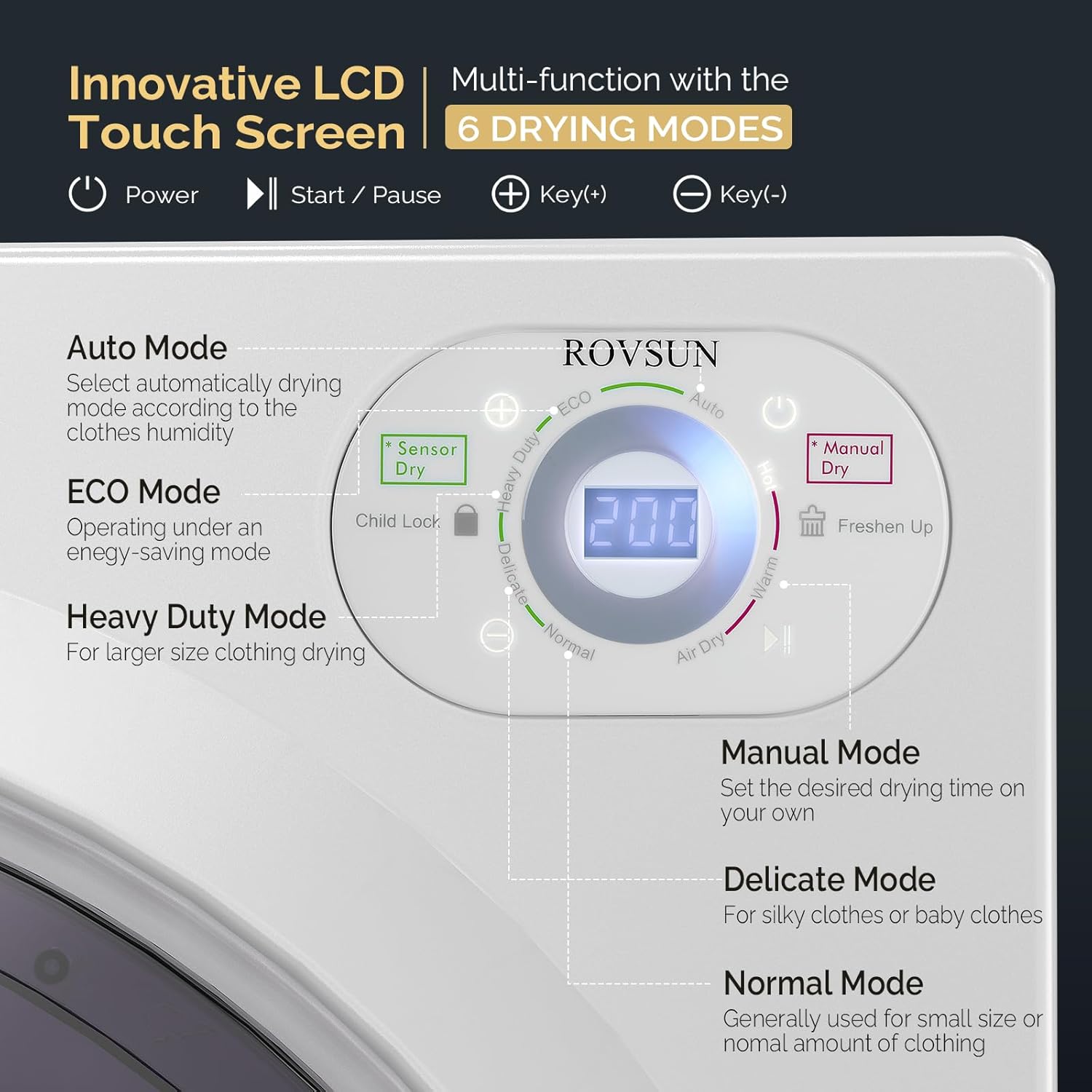
Image: Close-up of the ROVSUN Portable Clothes Dryer's LCD touch control panel, showing various drying modes and settings.
- Power: Turns the dryer on/off.
- Start / Pause: Initiates or temporarily stops the drying cycle.
- Key(+) / Key(-): Used for time setting in Manual Mode.
- Child Lock: Press Key(+) and Key(-) simultaneously for 3 seconds to lock the control panel.
- Fresh Up: Indicates that the filter needs cleaning.
- Select Circle: Swipe your finger to choose the desired drying mode.
Drying Modes
- Auto Mode: Automatically selects the drying mode based on clothes humidity.
- ECO Mode: Operates under an energy-saving setting.
- Heavy Duty Mode: Suitable for larger size clothing or heavy loads.
- Manual Mode: Allows setting a desired drying time.
- Delicate Mode: For silky clothes or baby clothes, using lower heat.
- Normal Mode: Generally used for small to normal amounts of clothing.
- Air Dry: Dries clothes without heat.
- Warm: Provides a warm air cycle.
4. Setup and Installation
The ROVSUN Portable Clothes Dryer offers flexible installation options. Ensure the chosen location is well-ventilated and has access to a standard 120V/60Hz power outlet.
Unpacking
- Carefully remove the dryer from its packaging.
- Inspect the dryer for any shipping damage. Contact customer support immediately if damage is found.
- Ensure all included components are present: Clothes Dryer, mounting kit (if wall-mounting).
Placement Options

Image: Illustration showing three installation methods for the ROVSUN Portable Clothes Dryer: free-standing, stacked on a washing machine, and wall-mounted.
- Free-Standing:
Place the dryer on a firm, level ground. Ensure there is adequate space around the unit for ventilation, especially at the rear exhaust opening.
- Stacking:
The dryer can be stacked on top of a compatible washing machine. Ensure the washing machine is stable and capable of supporting the dryer's weight (49 lbs). Use appropriate stacking kits if available and recommended by the manufacturer.
- Wall-Mounted:
A mounting kit is included for wall installation. Follow the detailed instructions provided with the mounting kit for secure installation. Ensure the wall material can support the dryer's weight and that mounting hardware is properly secured into studs or appropriate anchors.
Electrical Connection
- Connect the dryer to a grounded 120V/60Hz electrical outlet.
- Do not use extension cords or adapters.
- Ensure the electrical circuit can handle the 1400W power requirement of the dryer.
5. Operating Instructions
Before Each Load
- Ensure the lint filter is clean.
- Check clothing labels for drying instructions.
- Do not overload the dryer. For quick drying, do not exceed 9 pounds of clothes. The maximum wet clothes capacity is 14.5 lbs.
- Remove any foreign objects from pockets.
Drying a Load
- Load Clothes: Open the dryer door and place the wet clothes into the stainless steel tub. Close the door securely.
- Power On: Press the Power button on the LCD touch panel.
- Select Mode: Swipe your finger on the Select Circle to choose your desired drying mode (e.g., Auto, ECO, Heavy Duty, Manual, Delicate, Normal, Air Dry, Warm).
- Adjust Time (Manual Mode): If Manual Mode is selected, use the Key(+) and Key(-) buttons to set the desired drying time.
- Start Cycle: Press the Start / Pause button to begin the drying cycle.
- Child Lock (Optional): To prevent accidental changes, press Key(+) and Key(-) simultaneously for 3 seconds to activate the Child Lock. Repeat to deactivate.
- During Operation: The dryer will automatically stop if the door is opened during a cycle. Close the door and press Start / Pause to resume.
- Cycle Completion: The dryer will signal when the cycle is complete. Remove clothes promptly to minimize wrinkles.
Tips for Best Drying Results
- Sort clothes by fabric type and weight.
- Do not mix heavy items with delicate ones.
- Shake out items before placing them in the dryer to reduce tangling.
- For optimal drying, ensure the load size is appropriate for the selected mode.
6. Maintenance and Care
Regular maintenance ensures the longevity and efficient operation of your ROVSUN Portable Clothes Dryer.
Cleaning the Lint Filter
The lint filter should be cleaned before or after each load. A clogged lint filter can reduce drying efficiency and increase energy consumption.
- Open the dryer door.
- Locate the lint filter, typically inside the drum near the door opening.
- Remove the filter and gently pull off any accumulated lint.
- Reinsert the clean filter securely.
- If the "Fresh Up" indicator illuminates, it signals that the filter needs cleaning.
Cleaning the Exterior
- Wipe the exterior surfaces with a soft, damp cloth.
- Do not use abrasive cleaners or solvents.
- Ensure the control panel is kept dry.
Cleaning the Interior Drum
- Periodically wipe the interior of the stainless steel tub with a damp cloth.
- For stubborn stains, a mild, non-abrasive cleaner can be used, followed by thorough rinsing and drying.
Exhaust Duct Maintenance
The exhaust duct should be cleaned periodically by qualified service personnel to prevent lint buildup and ensure proper ventilation.
7. Troubleshooting Guide
Before contacting customer service, please refer to the following table for common issues and their solutions.
| Problem | Possible Cause | Solution |
|---|---|---|
| Dryer does not start. |
|
|
| Clothes are not drying completely. |
|
|
| Dryer stops during operation. |
|
|
| Unusual noise during operation. |
|
|
8. Product Specifications
Detailed specifications for the ROVSUN 2.6 Cu.Ft Portable Clothes Dryer (Model: G46000722).
| Feature | Detail |
|---|---|
| Brand | ROVSUN |
| Model Info | G46000722 |
| Control Method | LCD Touch Screen |
| Rated Power | 1400W |
| Voltage | 120V / 60Hz |
| Color | White |
| Item Weight | 49 lbs (approx. 22.2 kg) |
| Tumble Capacity | 2.6 Cubic Feet |
| Recommended Drying Capacity | 9 lbs |
| Max Wet Clothes Capacity | 14.5 lbs |
| Material | Acrylonitrile Butadiene Styrene (ABS), Plastic, Stainless Steel |
| Product Dimensions (L x W x H) | 23.6" x 17.1" x 27.5" (60 cm x 43.4 cm x 69.8 cm) |
| Form Factor | Front Load |
| Included Components | Clothes Dryer, Mounting Kit |

Image: Diagram illustrating the dimensions of the ROVSUN Portable Clothes Dryer: 23.6 inches (L), 17.1 inches (W), and 27.5 inches (H).
9. Warranty and Customer Support
ROVSUN provides a 1-Year warranty on this clothes dryer. For any questions, concerns, or technical assistance, please do not hesitate to contact our professional after-sales team.
For support, please refer to the contact information provided with your purchase or visit the official ROVSUN website.
Online Resources: Visit the ROVSUN Store on Amazon
Ask a question about this manual
Ask about setup, troubleshooting, compatibility, parts, safety, or missing instructions. Manuals+ will review the question and use this page’s manual context to help answer it.