
ZTIANFOTO YT-1500
YT-1500 Auto Motorized Rotating Panoramic Head User Manual
Model: YT-1500
1. Introduction
The ZTIANFOTO YT-1500 is an intelligent electronic pan-tilt head designed for cameras and phones, supporting a bearing capacity of up to 2kg (70.5 ounces). This device offers precise motorized control for panoramic photography and videography, enhancing your creative possibilities.
Key features include:
- AB Point Infinite Round-Trip: Allows free selection of A and B points for positioning and shooting, supporting automatic cycle shooting without frequent manual operation.
- Horizontal 360-Degree Infinite Rotation: Provides full horizontal rotation with 8 adjustable speed levels.
- Vertical Tilt: Offers vertical movement with 8 adjustable speed levels.
- Horizontal and Vertical Screen Switching: Seamlessly switch between horizontal and vertical screen shooting modes to meet diverse video shooting needs.

Figure 1.1: YT-1500 Auto Motorized Rotating Panoramic Head with remote control and camera.
2. What's in the Box
Please check the contents of your package to ensure all items are present:
- YT-1500 Cloud Platform (Pan-Tilt Head)
- Remote Control
- Phone Holder
- Instruction Manual
- Data Cable (USB charging cable)

Figure 2.1: Package Contents of the YT-1500.
3. Setup
- Charge the Device: Before first use, fully charge the YT-1500 using the provided data cable. The device uses 2 Lithium Ion batteries (included).
- Mounting:
- Attach the YT-1500 to a tripod or stable surface using its standard 1/4-inch screw thread at the base.
- For cameras, screw your camera onto the 1/4-inch screw on the pan-tilt head's mounting plate. Ensure it is securely fastened.
- For smartphones, attach the phone holder to the pan-tilt head's mounting plate, then secure your smartphone firmly within the holder.
- Power On: Locate the power switch on the YT-1500 unit and slide it to the 'ON' position.
- Remote Control Pairing: The remote control should automatically pair with the unit upon power-on. If not, refer to the specific pairing instructions in the included printed manual.
4. Operating Instructions
4.1 Basic Movement Control
Use the remote control to operate the pan and tilt movements of the head. The joystick or directional buttons on the remote allow for precise control.
- Horizontal (Pan) Movement: Control left and right rotation. The unit supports 360-degree infinite rotation.
- Vertical (Tilt) Movement: Control up and down tilting. The unit supports approximately 27 degrees of tilt.
- Speed Adjustment: The remote control allows you to adjust the movement speed, typically with 8 levels for both horizontal and vertical motion. Adjust the speed according to your shooting requirements for smooth or rapid movements.
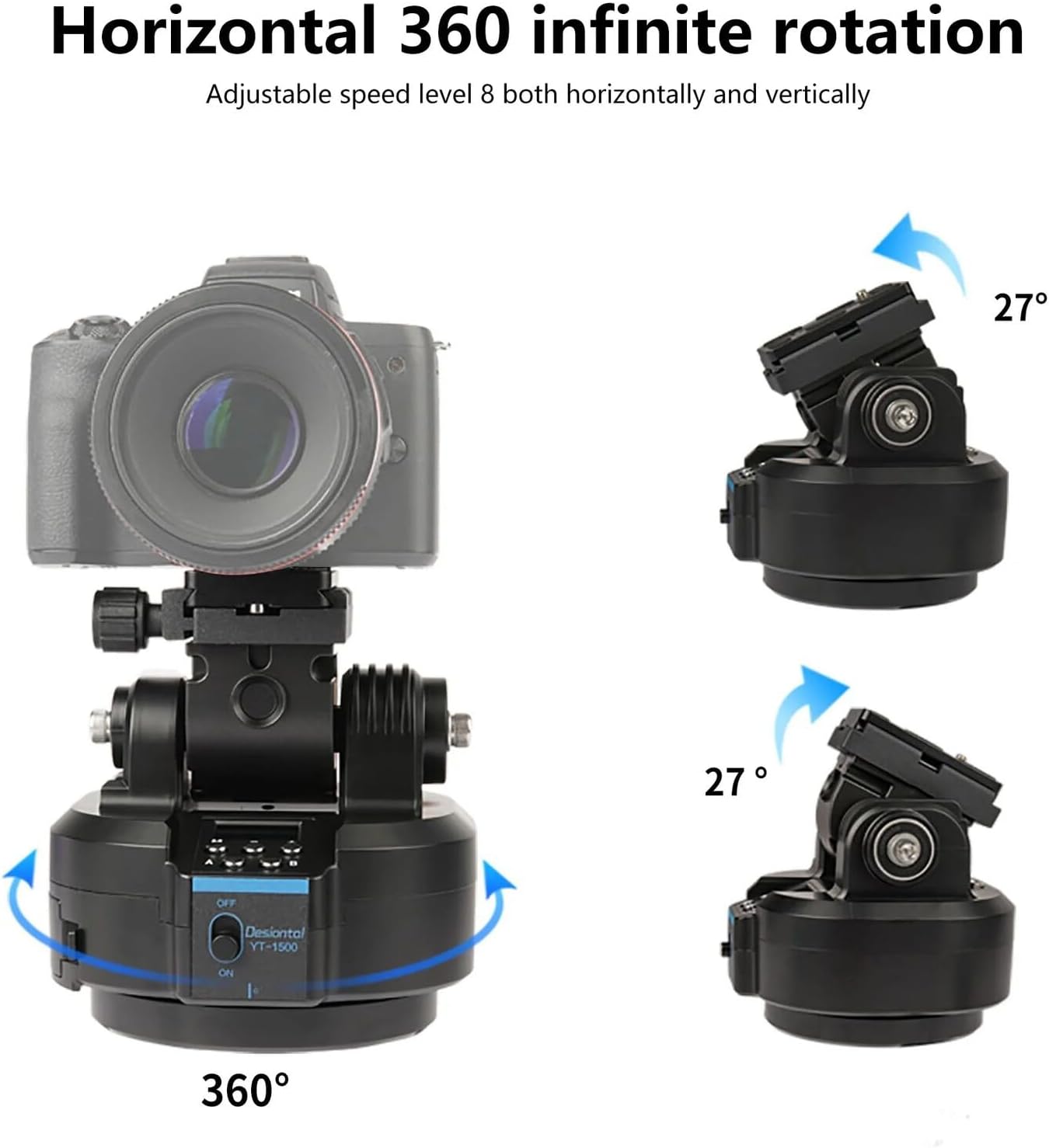
Figure 4.1: Horizontal 360-degree rotation and vertical tilt capabilities.
4.2 AB Point Infinite Round-Trip
This feature allows you to set two specific points (A and B) and have the pan-tilt head automatically move between them, ideal for time-lapse or repetitive motion shots.
- Set Point A: Manually position the camera to your desired starting point (Point A). Press the 'A' button on the remote control or unit to save this position.
- Set Point B: Manually position the camera to your desired end point (Point B). Press the 'B' button on the remote control or unit to save this position.
- Start Cycle: Once both points are set, activate the cycle mode (refer to your remote's specific button for this function, often labeled 'Cycle' or 'Loop'). The head will then automatically move from A to B and back, continuously.

Figure 4.2: Setting and utilizing AB points for automated movement.
4.3 Horizontal and Vertical Screen Switching
The YT-1500 supports quick switching between horizontal (landscape) and vertical (portrait) shooting orientations, especially useful for smartphone videography.
- To switch orientation, adjust the mounting plate or the phone holder as needed. The design allows for flexible positioning to achieve the desired screen orientation.
- Ensure your camera or phone is securely fastened in the new orientation before operating the pan-tilt head.

Figure 4.3: Support for horizontal and vertical screen modes.
5. Maintenance
- Cleaning: Use a soft, dry cloth to clean the exterior of the pan-tilt head. Do not use liquid cleaners or solvents, as they may damage the electronic components.
- Storage: Store the device in a cool, dry place away from direct sunlight and extreme temperatures.
- Battery Care: If storing for an extended period, ensure the batteries are partially charged (around 50%) to prolong their lifespan. Avoid fully discharging the batteries before storage.
- Avoid Overloading: Do not exceed the maximum weight recommendation of 2kg to prevent damage to the motor and gears.
6. Troubleshooting
- Device Not Powering On:
- Ensure the device is fully charged.
- Check the power switch is firmly in the 'ON' position.
- Remote Control Not Responding:
- Check the batteries in the remote control and replace if necessary.
- Ensure there are no obstructions between the remote and the pan-tilt head.
- Re-pair the remote control if pairing was lost (refer to the specific pairing instructions in the included manual).
- Shaky or Juddering Motion:
- Ensure the camera/phone is securely mounted and balanced on the head.
- Verify that the pan-tilt head is securely attached to a stable tripod or surface.
- Reduce the movement speed setting. Slower speeds generally result in smoother motion.
- Ensure the total weight of your camera setup does not exceed the 2kg bearing capacity.
- AB Point Settings Not Working:
- Ensure both Point A and Point B are correctly set and confirmed according to the instructions.
- Verify that the cycle function is activated after setting the points.
7. Specifications
| Parameter | Value |
|---|---|
| Product Model | YT-1500 |
| Bearing Capacity | 2000g (2kg / 70.5 ounces) |
| Horizontal Rotation | 360 degrees (infinite) |
| Vertical Tilt | Approx. 27 degrees |
| Speed Levels | 8 (horizontal and vertical) |
| Power Source | 2 Lithium Ion batteries (included) |
| Item Weight | 2.48 pounds |
| Package Dimensions | 7.56 x 5.71 x 5.67 inches |
| Compatible Devices | Camera, Phone |
| Manufacturer | LookingSky |
| Country of Origin | China |
| UPC | 777192164642 |
8. Warranty and Support
For warranty information and technical support, please refer to the specific warranty card included with your product or contact the manufacturer directly. Keep your purchase receipt as proof of purchase for any warranty claims.