
TEISQI B0CWGRL3V3
TEISQI 12-Amp Car Battery Charger User Manual
Model: B0CWGRL3V3
1. Introduction
This manual provides comprehensive instructions for the TEISQI 12-Amp Car Battery Charger, a smart, fully automatic maintainer and trickle charger designed for 12V and 24V lead-acid batteries. It features temperature compensation and pulse repair functions, making it suitable for a wide range of vehicles including trucks, motorcycles, lawn mowers, boats, and marine applications. The charger is engineered for reliable and efficient battery care, from daily use to long-term storage.

Figure 1: TEISQI 12-Amp Car Battery Charger with its components.
2. Key Features
- Nine-Stage Charging Function: The charger employs a sophisticated nine-stage charging mode for optimal battery health. These stages include devulcanization, trickle charging, constant current charging, constant voltage charging, battery current detection, compensation charging, floating charging, optimized charging, and small current charging.
- Automatic Temperature Compensation: The device automatically adjusts charging parameters based on ambient temperature, ensuring efficient charging in both winter and summer conditions.
- Pulse Repair Mode: A dedicated repair mode (PUL) is available to help revive and desulfate batteries, indicated by a blinking PUL on the screen.
- Large LCD Display: The clear LCD screen provides real-time information on battery charging status, current, voltage, ambient temperature, charger distribution temperature, and charge percentage.
- Memory Mode: The charger retains the last used charging mode, simplifying repeated use (repair mode does not have memory function).
- Multiple Protections: Includes intelligent detection and anti-error trigger mode to prevent issues like reverse connection, overheating, and overcharging.
- Silent Intelligent Cooling Fan: Features a dual hydraulic high-speed silent cooling fan for improved heat dissipation, reduced internal working temperature, and extended product lifespan.
3. Setup Instructions
- Connect Battery Clamps: Ensure the charger is unplugged from the power outlet. Connect the red positive (+) clamp to the positive terminal of the battery and the black negative (-) clamp to the negative terminal of the battery.
- Plug into Power: Once the clamps are securely connected to the battery, plug the charger's AC power cord into a standard home power supply (100-240V 50/60Hz).
- Initial Display: Upon connecting to power, the screen will typically show 'dF5', indicating it is entering the devulcanization stage. Automatic charging will begin approximately 5 minutes later. (Note: Devulcanization stage is skipped in start/stop/water bottle modes).

Figure 2: Proper connection of charger clamps to a car battery.
Video 1: Official product video demonstrating the unboxing and initial setup of the TEISQI battery charger, including connecting it to a car battery.
4. Operating the Charger
4.1 Automatic Charging Process
Once connected and powered on, the charger automatically detects the battery type and current state. The LCD screen will cycle through displaying the battery voltage, current, ambient working temperature, and current charging progress. The charger will automatically select the appropriate charging mode (e.g., standard, AGM/GEL, wet, motorcycle) and adjust for winter or summer conditions based on temperature.

Figure 3: The intelligent digital display provides clear, easy-to-understand information during charging.
4.2 Mode Selection
To manually select a mode, press the 'Mode Selection' button. The charger has a memory function that defaults to the last state used before power-off, except for repair mode. To switch modes after the charger has entered the charging state (approximately 25 seconds after connection), you must first unlock it by removing either the battery clamps or disconnecting the power supply. This prevents accidental mode changes during operation.
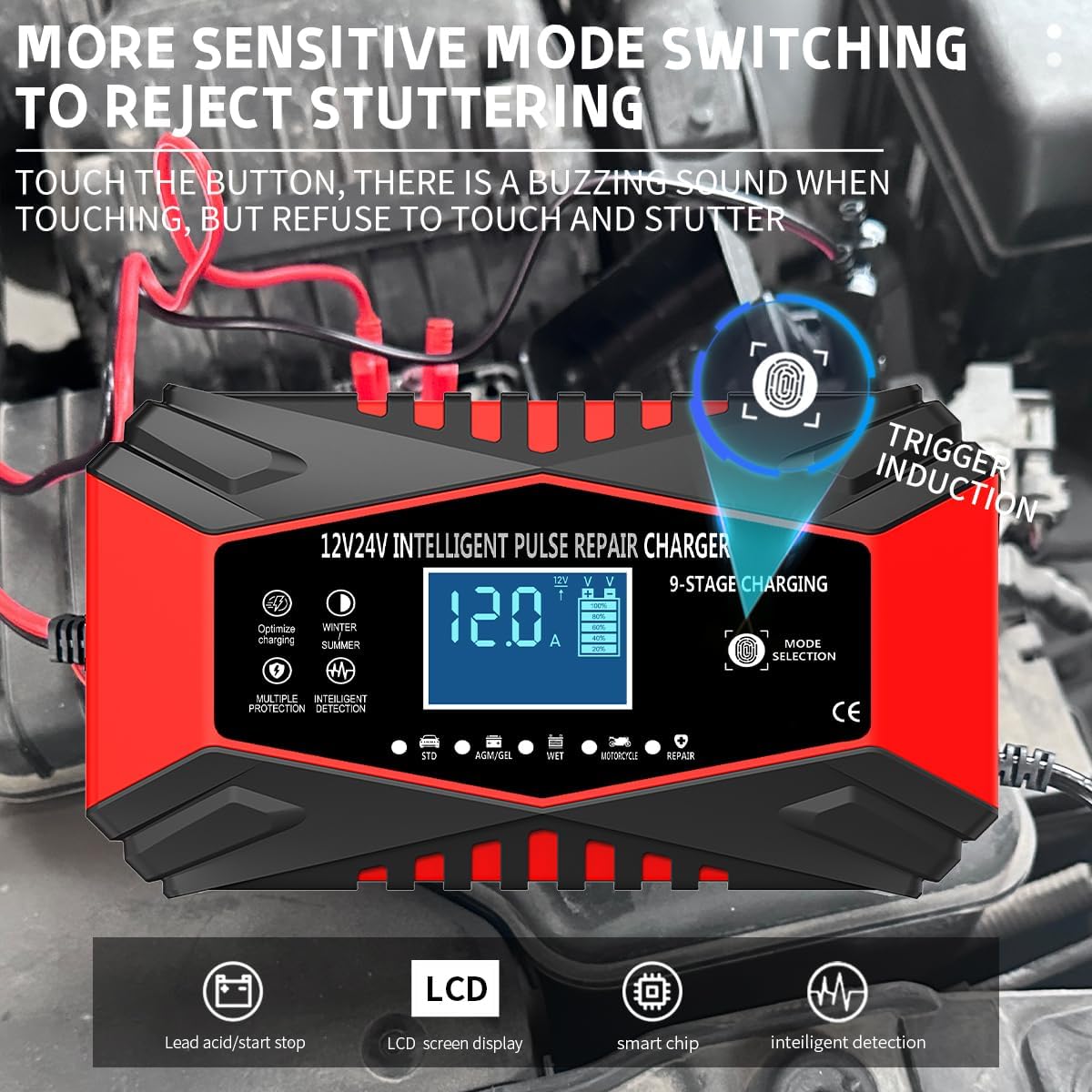
Figure 4: The mode selection button allows for manual override of charging modes.
4.3 Repair Mode (PUL)
To enter repair mode, connect the battery and plug in the charger, then trigger the mode key five times. The screen will display 'PUL' blinking. It is recommended to repair car batteries for approximately 4 hours and motorcycle or water bottle batteries for about 2 hours. The battery should not heat up during this process; if it does, reduce the repair time. The repair mode also supplies current, allowing the battery to charge fully over a longer period. Repair is complete when the screen shows 'OFF'.
4.4 Charging Completion
When the charger screen shows the battery charge bar full (100%) and displays 'FUL', it is recommended to continue floating charging and optimize charging for about 1 to 3 hours for a more complete charge. The charging process is fully complete when the screen displays 'OFF' and the unit shuts down.

Figure 5: The nine-stage charging curve ensures efficient and safe charging without damaging the battery.
5. Maintenance
The TEISQI charger is designed for durability and ease of use. It features a silent intelligent cooling fan that helps maintain optimal operating temperature and prevents dust inhalation, extending the charger's service life. Regularly inspect the charger and its cables for any signs of damage. Keep the battery terminals clean to ensure proper connection and efficient charging. Store the charger in a dry, cool place when not in use.

Figure 6: The silent intelligent cooling fan ensures optimal performance and longevity.
6. Troubleshooting
- Charger Not Activating: Ensure the battery is not completely dead. The charger is not designed to activate or charge batteries with absolutely no residual electricity.
- 'dF5' Display: This indicates the devulcanization stage, which is a normal part of the charging process. Allow approximately 5 minutes for automatic charging to begin.
- 'EH-' Display: This indicates a reverse connection exception. Immediately disconnect the charger from both the power supply and the battery, then re-connect the clamps to the correct terminals (red to positive, black to negative).
- 'FUL' Display: The battery is fully charged. It is recommended to continue floating and optimizing charge for 1-3 hours for best results.
- 'OFF' Display: The charging process is complete, and the charger has shut down. You may now safely disconnect the unit.
- Mode Switch Issues: If the mode button is unresponsive, ensure the charger has been connected for at least 25 seconds. To switch modes after this period, you must temporarily remove a battery clamp or disconnect the power supply to unlock the button.
7. Specifications
| Attribute | Value |
|---|---|
| Product Dimensions | 6.92 x 3.74 x 2.63 inches |
| Item Weight | 1.5 pounds (0.68 Kilograms) |
| Brand | TEISQI |
| Color | red |
| Output Voltage | 24 Volts |
| Manufacturer | Tianchang Baoda electronic technology Co., LTD |
| Date First Available | February 26, 2024 |
8. Warranty Information
Specific warranty details for this product are not provided in the available information. Please refer to the product packaging or contact TEISQI customer support for warranty terms and conditions.
9. Customer Support
For any inquiries, technical assistance, or support regarding your TEISQI 12-Amp Car Battery Charger, please visit the official TEISQI store on Amazon or refer to the contact information provided with your product packaging.
Related Documents - B0CWGRL3V3
 |
NOCO GENIUS5 Smart Battery Charger User Guide and Warranty Comprehensive user guide and warranty information for the NOCO GENIUS5 smart battery charger. Learn about its features, charging modes, safety precautions, and technical specifications for 6V and 12V lead-acid, AGM, and Lithium batteries. |
 |
Sears 1.5 Amp Fully Automatic Onboard Battery Charger Maintainer Owner's Manual Owner's manual for the Sears 1.5 Amp Fully Automatic Onboard Battery Charger Maintainer (Model No. 200.71202). Provides safety instructions, installation, charging procedures, and maintenance information for 12-volt lead-acid batteries. |
 |
BLACK+DECKER VEC1093DBD Smart Battery Charger User Manual Comprehensive user manual for the BLACK+DECKER VEC1093DBD Fully Automatic Electronic Smart Battery Charger. This guide details operation, safety, features, troubleshooting, and warranty for 12-volt lead-acid batteries, offering multiple charge rates and engine start functionality. |
 |
NEXPEAK NC350 35Amp Automatic Smart 12V & 24V Battery Charger Maintainer User Guide User guide and warranty for the NEXPEAK NC350 35Amp Automatic Smart Battery Charger Maintainer. Covers technical specifications, usage, safety, troubleshooting, and maintenance for 12V/24V lead-acid, lithium, and LiFePO4 batteries. |
 |
DEWALT DXAEC10 10 Amp Battery Charger Manual Comprehensive instruction manual for the DEWALT DXAEC10 10 Amp Battery Charger, covering safety guidelines, operating instructions, troubleshooting, and maintenance for 6V/12V lead-acid and 12V lithium batteries. |
 |
Tower Top Smart Battery Charger 2/8/15 AMP User Manual Comprehensive user manual for the Tower Top Smart Battery Charger, covering intended use, specifications, safety information, product parts, operating instructions, maintenance, and troubleshooting for the TP106MB model. |
Ask a question about this manual
Ask about setup, troubleshooting, compatibility, parts, safety, or missing instructions. Manuals+ will review the question and use this page’s manual context to help answer it.