
Introduction
This manual provides detailed instructions for the installation, operation, and maintenance of your Aigo Darkflash DK353 ARGB Mid-Tower Gaming PC Case. Please read this manual carefully before proceeding with installation to ensure proper setup and optimal performance.

Figure 1: Side view of the Aigo Darkflash DK353 PC case, showcasing the tempered glass side panel and internal components.
Key Features
- Motherboard Support: ATX / M-ATX / ITX
- Side Panel: Tempered Glass
- I/O Ports: 1 x USB 3.0, 2 x USB 2.0, HD Audio
- Drive Bays: 2 x HDD / 4 x SSD
- Expansion Slots: 7
- Fan Support: Front: 3 x 120mm; Top: 2 x 120mm or 2 x 140mm; PSU Cover: 2 x 120mm; Rear: 1 x 120mm
- Liquid Cooling Support: Front: 360mm / 240mm / 120mm radiators
- Max VGA Length: 340mm
- Max CPU Cooler Height: 165mm
- Power Supply Support: Bottom mount, up to 200mm length
- Included Fans: 4 x CL6 ARGB Fans (120x120x25mm, 1100 RPM, 26.0dB max noise)
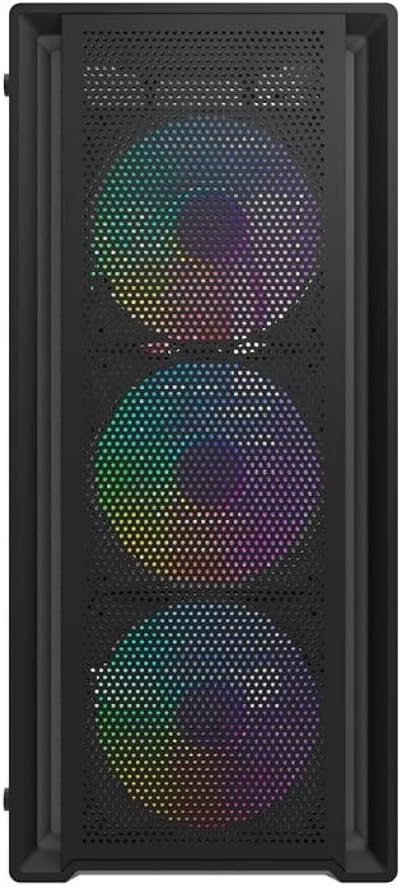
Figure 2: Front view of the Aigo Darkflash DK353 PC case, highlighting the mesh front panel and the three pre-installed ARGB fans.
Package Contents
Please verify that all items are present in the package:
- Aigo Darkflash DK353 PC Case
- User Manual (this document)
- Accessory Screws Kit
- 4 x CL6 ARGB Fans
Setup Instructions
Follow these steps to set up your Aigo Darkflash DK353 PC case:
- Unpacking: Carefully remove the PC case from its packaging. Inspect for any damage during transit.
- Side Panel Removal: Locate and remove the screws securing the tempered glass side panel. Gently slide or pivot the panel to remove it. Repeat for the solid side panel if necessary.
- Motherboard Installation: Install the appropriate standoffs for your motherboard form factor (ATX, M-ATX, ITX). Carefully place your motherboard into the case and secure it with screws.
- Power Supply Installation: Install your power supply unit (PSU) into the dedicated compartment at the bottom of the case. Secure it with screws from the rear.
- Drive Installation: Install your HDDs and SSDs into the designated drive bays. Refer to the case's internal layout for specific bay locations.
- Component Installation: Install your CPU cooler, graphics card (VGA), and any other expansion cards into their respective slots. Ensure maximum length and height clearances are respected.
- Fan and Radiator Installation: The case comes with 4 pre-installed ARGB fans. If installing additional fans or liquid cooling radiators, refer to the fan support section for compatible sizes and locations.
- Cable Management: Route all power and data cables neatly behind the motherboard tray to ensure optimal airflow and a clean build.
- Front Panel Connections: Connect the front panel I/O cables (USB 3.0, USB 2.0, HD Audio, Power, Reset, LED) to the corresponding headers on your motherboard.
- Final Assembly: Reattach the side panels, ensuring they are securely fastened.

Figure 3: Exploded view of the Aigo Darkflash DK353 PC case, illustrating the removable tempered glass side panel, solid side panel, and internal layout for component installation.
Operating Your PC Case
Once all components are installed and connected, you can power on your system. The Aigo Darkflash DK353 case is designed to provide optimal airflow and aesthetics for your gaming PC.
- Power Button: Press the power button on the front I/O panel to turn on your computer.
- ARGB Lighting: The included CL6 ARGB fans feature customizable lighting. Connect the ARGB cables to a compatible motherboard header or a dedicated ARGB controller (if included or purchased separately) to manage lighting effects.
- USB Ports: Use the front panel USB 3.0 and USB 2.0 ports for connecting peripherals and external devices.
- Audio Jacks: The HD Audio jacks allow for easy connection of headphones and microphones.

Figure 4: Angled top-front view of the Aigo Darkflash DK353 PC case, highlighting the accessible front I/O panel with USB ports and audio jacks, and the top ventilation mesh.
Maintenance
Regular maintenance helps ensure the longevity and performance of your PC case and components.
- Dust Cleaning: Periodically clean dust filters (if present) and internal components using compressed air or a soft brush. Ensure the system is powered off and unplugged before cleaning.
- Exterior Cleaning: Wipe the exterior surfaces with a soft, damp cloth. Avoid abrasive cleaners or solvents that may damage the finish or tempered glass.
- Cable Management Check: Occasionally check cable routing to ensure no cables are obstructing airflow or fan operation.
Troubleshooting
If you encounter issues with your PC case, consider the following common solutions:
- No Power:
- Ensure the power supply is properly connected and switched on.
- Verify that the front panel power button cable is correctly connected to the motherboard.
- Fans Not Spinning/No ARGB Lighting:
- Check if fan power cables are securely connected to the motherboard or fan controller.
- Ensure ARGB cables are properly connected to a compatible ARGB header or controller.
- Consult your motherboard manual for ARGB software control.
- Front USB/Audio Ports Not Working:
- Verify that the front panel USB and HD Audio cables are correctly connected to the corresponding headers on your motherboard.
- Check your motherboard's BIOS/UEFI settings to ensure USB/Audio ports are enabled.
Specifications
| Feature | Detail |
|---|---|
| Model | DK353-BK |
| Material | 0.5mm SPCC Steel, Tempered Glass |
| Motherboard Support | ATX / M-ATX / ITX |
| Side Panel | Tempered Glass |
| I/O Ports | 1 x USB 3.0, 2 x USB 2.0, HD Audio |
| Drive Bays | 2 x HDD / 4 x SSD |
| Expansion Slots | 7 |
| Fan Support (Front) | 3 x 120 mm |
| Fan Support (Top) | 2 x 120 mm or 2 x 140 mm |
| Fan Support (PSU Cover) | 2 x 120 mm |
| Fan Support (Rear) | 1 x 120 mm |
| Liquid Cooling Support (Front) | 360 mm / 240 mm / 120 mm |
| Max VGA Length | 340 mm |
| Max CPU Cooler Height | 165 mm |
| PSU Support | Bottom, up to 200 mm |
| Dimensions (L x W x H) | 385 x 195 x 449 mm |
| Included Fans | 4 x CL6 ARGB Fans |
| Fan Dimensions | 120 x 120 x 25 mm |
| Fan Speed | 1100 ± 10% RPM |
| Fan Noise Level | 26.0dB (MAX) |
| Fan Airflow | 32.18 CFM |
| Fan Static Pressure | 0.62 mm H²O |
| Fan Bearing Type | Rifle |
Warranty and Support
For warranty information and technical support, please refer to the manufacturer's official website or contact their customer service. Keep your proof of purchase for warranty claims.
Manufacturer: aigo