
HiPO HO-014
HiPO Screen Cleaning & Polishing Wet Wipes User Manual
Model: HO-014
Introduction
The HiPO Screen Cleaning & Polishing Wet Wipes are designed for effective and effortless cleaning of various screen surfaces. Each container includes 300 pre-moistened wipes, ensuring a long-lasting supply for maintaining clear and pristine displays. The gentle formula is specifically crafted to remove dirt and smudges without causing damage to sensitive screens.

Image: Front view of the HiPO Screen Cleaning & Polishing Wet Wipes container, showing the brand logo and product details.
Safety Information
Please read and understand the following safety precautions before using the product:
- Keep away from open flames or direct heat sources.
- Avoid contact with eyes. In case of contact, rinse thoroughly with water.
- Keep out of reach of children and pets.
- Do not ingest. If swallowed, seek medical attention immediately.
- Use in a well-ventilated area.
Ingredients
The gentle cleaning solution contains the following ingredients:
- Aqua (Water)
- Isopropanol
- Alkyl Poly Glucoside
- Fatty Alcohol Ethoxylates
- Fragrance
- Methylchloroisothiazolinone
- Methylisothiazolinone
- Non-woven fabric (wipe material)
Setup and Usage
Follow these simple steps to use your HiPO Screen Cleaning & Polishing Wet Wipes:
- Open the Lid: Locate the red tab on the lid of the container. Gently pop the lid open to reveal the wipes.
- Pull Out Wipes: Pull out one or more wipes as needed from the center of the roll.
- Close the Lid Properly: After dispensing, ensure the lid is closed properly and securely to maintain the freshness and moisture of the remaining wipes and prevent them from drying out.

Image: Visual guide demonstrating how to open the lid, pull out wipes, and properly close the container.
Operating Instructions
These wipes are versatile and can be used on a variety of screen types and electronic surfaces. Always ensure the device is turned off and cool before cleaning.
Cleaning Procedure:
- Gently wipe the screen surface from top to bottom or side to side, using light pressure.
- For stubborn smudges or dirt, use a fresh wipe and apply slightly more pressure, but avoid excessive rubbing.
- Allow the screen to air dry completely before turning on the device. The formula is designed to dry quickly without leaving streaks.
Compatible Surfaces:
- Television Screens (LCD, Plasma, LED, OLED)
- Desktop Computer Monitors
- Laptop Screens
- Tablet Screens (e.g., iPad)
- Smartphone Screens
- GPS Devices
- Pocket Console Screens
- Glass Surfaces (e.g., mirrors, windows)
- Metal Glass Screens

Image: A large television screen being cleaned with a HiPO wet wipe, demonstrating its effectiveness on various displays.
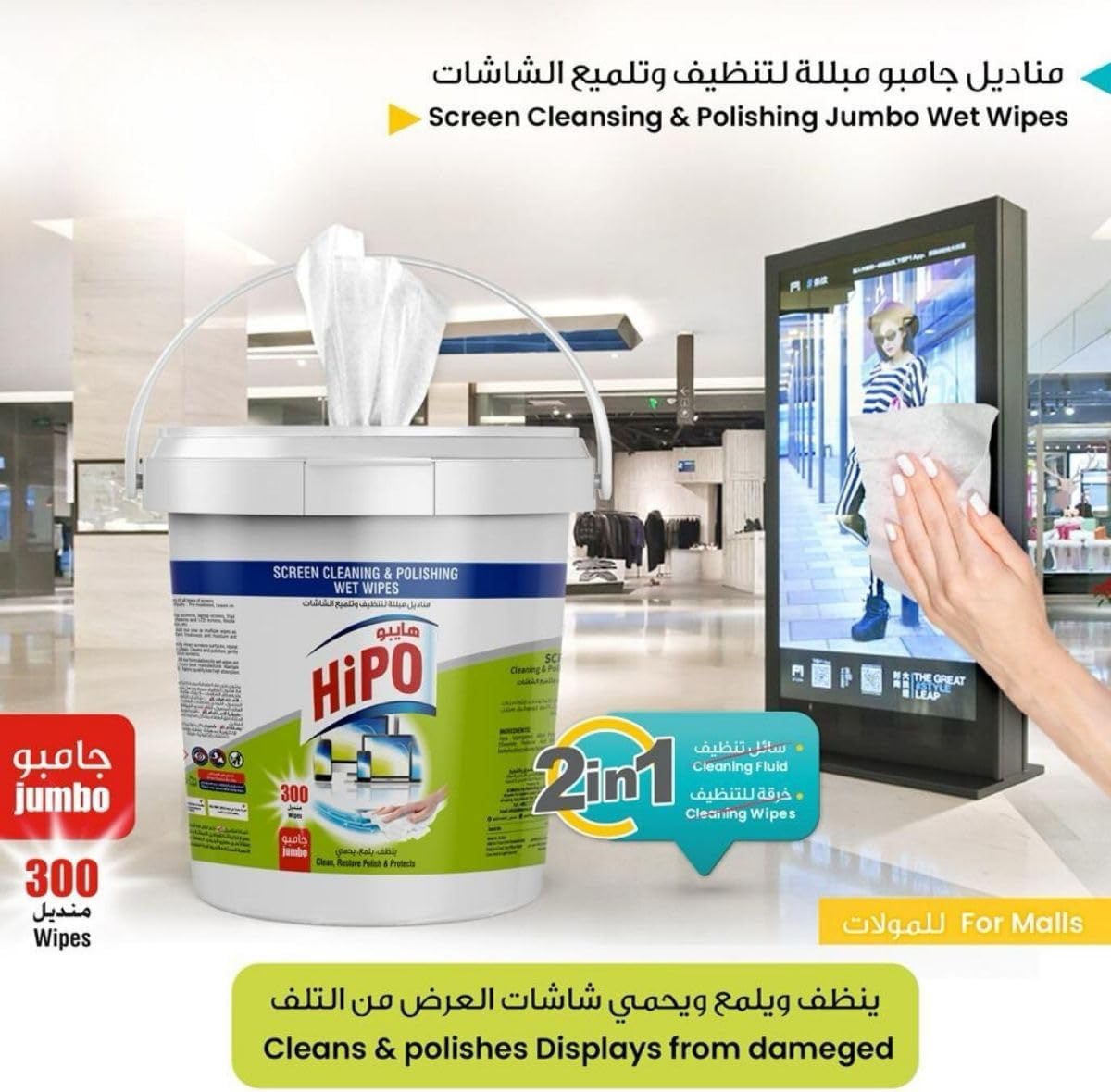
Image: A person cleaning a large digital display in a mall environment with a HiPO wet wipe, highlighting its use for commercial screens.
Maintenance
To ensure the longevity and effectiveness of your HiPO wet wipes, follow these maintenance tips:
- Always close the lid tightly after each use to prevent the wipes from drying out.
- Store the container in a cool, dry place, away from direct sunlight and extreme temperatures.
- Do not store near heat sources or open flames.

Image: An open HiPO wipes container, illustrating the tightly rolled wipes inside, emphasizing the importance of proper closure.
Troubleshooting
While HiPO Screen Cleaning & Polishing Wet Wipes are designed for ease of use, here are some common issues and their solutions:
| Problem | Possible Cause | Solution |
|---|---|---|
| Wipes feel dry or less effective. | Lid was not closed properly, leading to moisture evaporation. | Ensure the lid is sealed tightly after each use. Store in a cool, dry place. If wipes are completely dry, they may need to be replaced. |
| Streaks left on screen after cleaning. | Excessive solution, dirty wipe, or not allowing to air dry completely. | Use a fresh wipe. Ensure the screen is completely dry before use. For very dirty screens, use multiple wipes. |
| Wipes tearing easily. | Improper pulling technique or excessive force. | Pull wipes gently from the dispenser. Avoid tugging or pulling at an extreme angle. |
Specifications
| Feature | Detail |
|---|---|
| Brand | HiPO |
| Model Number | HO-014 |
| Product Dimensions | 22.45 x 22.45 x 17.75 cm |
| Item Weight | 1.23 kg |
| Wipe Dimensions | 15 cm x 20 cm |
| Number of Wipes | 300 |
| Scent | Unscented |
| Product Form | Wet Wipes |
| Country of Origin | Jordan |
| First Available Date | March 6, 2024 |
Warranty and Support
For any inquiries, support, or warranty information regarding your HiPO Screen Cleaning & Polishing Wet Wipes, please contact the manufacturer directly through their official website or customer service channels. Please refer to your purchase receipt for specific warranty terms and conditions, if applicable.
While specific warranty details are not provided in this manual, HiPO is committed to customer satisfaction. If you experience any issues with the product, please reach out to their support team for assistance.
Related Documents - HO-014
 |
HERAN 空調全型錄:智能溫濕控制、空氣淨化與智能聲控 探索 HERAN 空調的最新型錄,了解智能溫濕控制、Femtoe Fresh 芬多殺菌、智能聲控系統、霜效潔淨及沼氣防護等先進功能,為您的居家環境提供最佳舒適與健康。 |
 |
Lochinvar HO-LBF Boiler Spare Parts List (GCE & PGCE Models) Find official spare parts for Lochinvar HO-LBF high-efficiency boilers and water heaters (GCE & PGCE models). This comprehensive list details components, part numbers, and compatibility across models HO-LBF 120, 160, 240, 320, and 382. |
 |
Sterilight Platinum UV Disinfection System Replacement Components & Lamp Installation Guide Comprehensive guide for replacing UV lamps and components in Sterilight Platinum Ultraviolet Disinfection Systems (SPV-1.5 to SPV-20 models). Includes detailed installation steps, safety notes, and a list of replacement parts like UV lamps, quartz sleeves, controllers, and UV sensors. |
 |
Kuppersberg HO 622 B/BB/BL/BX: Руководство пользователя электрического духового шкафа Подробное руководство пользователя для электрического духового шкафа Kuppersberg моделей HO 622 B, BB, BL, BX. Включает инструкции по установке, эксплуатации, безопасности и уходу. |
 |
CryoPen XP/XPS Medical User Manual | H&O Equipments This comprehensive medical user manual from H&O Equipments details the CryoPen XP and CryoPen XPS devices, advanced tools for professional cryotherapy and cryosurgery. Learn about their precise nitrous oxide application for treating benign skin lesions, device operation, safety guidelines, contraindications, and accessories. |
 |
CryoPen XP/XPS User Manual: Cryotherapy Device Guide This user manual provides comprehensive instructions for the H&O Equipments CryoPen XP and CryoPen XPS cryotherapy devices. It covers product identification, intended use for treating benign skin lesions, contraindications, detailed operating procedures, safety notices, side effects, applicator selection, and treatment duration guidelines. |
Ask a question about this manual
Ask about setup, troubleshooting, compatibility, parts, safety, or missing instructions. Manuals+ will review the question and use this page’s manual context to help answer it.