
Introduction
Thank you for choosing the ebemate EB29 Video Baby Monitor. This manual provides essential information for setting up, operating, and maintaining your device. Please read it thoroughly before use to ensure proper functionality and safety. The ebemate EB29 offers reliable monitoring with both local and remote viewing options, ensuring you stay connected with your baby.
Product Features

Image: ebemate EB29 Video Baby Monitor Camera and Parent Unit showcasing its main features.
- Dual-Mode Monitoring: Choose between a secure local connection (up to 1200ft range) with the parent unit, requiring no Wi-Fi, or connect to 2.4GHz Wi-Fi (5G Wi-Fi not supported) for remote viewing via the ebemate app on iOS/Android devices.
- Enhanced Security: Features bank-level security with FHSS technology for local connections and exclusive user pairing/encryption for Wi-Fi remote viewing, ensuring privacy.
- No-Glow Night Vision: Automatic infrared night vision allows clear viewing in total darkness without disturbing your baby's sleep.
- Soothing Lullabies: Built-in calming melodies to help lull your baby to sleep.
- Two-Way Talk: Comfort your baby remotely with clear two-way audio.
- Pocket-Sized Portability: The compact 2.8" LCD parent unit is easy to carry, making it ideal for use at home or while traveling.
- Smart VOX Mode: Intelligently conserves battery by darkening the screen during silence and activating with sound alerts.
- Multi-Scene Monitoring: The system supports adding up to 4 cameras (additional cameras sold separately) for monitoring multiple areas.
- Temperature Display: Monitors and displays the room temperature on the parent unit.
- Feeding Reminder: Set reminders for feeding times directly from the parent unit.
What's in the Box
- Baby Camera Unit (EB29)
- Parent Unit (2.8" LCD Monitor)
- Power Adapter for Camera Unit
- Power Adapter for Parent Unit
- User Manual (this document)
Setup
1. Initial Power-Up
- Unpack all components from the box.
- Connect the power adapter to the baby camera unit and plug it into a power outlet.
- Connect the power adapter to the parent unit and plug it into a power outlet. The parent unit will automatically power on.
- The camera and parent unit are pre-paired from the factory for local monitoring. The video feed should appear automatically on the parent unit's screen.
2. Camera Placement
Place the baby camera unit on a flat surface or mount it on a wall (mounting hardware not included) in a location that provides a clear view of your baby. Ensure the camera is at a safe distance from the baby's reach and any cords are secured to prevent strangulation hazards.
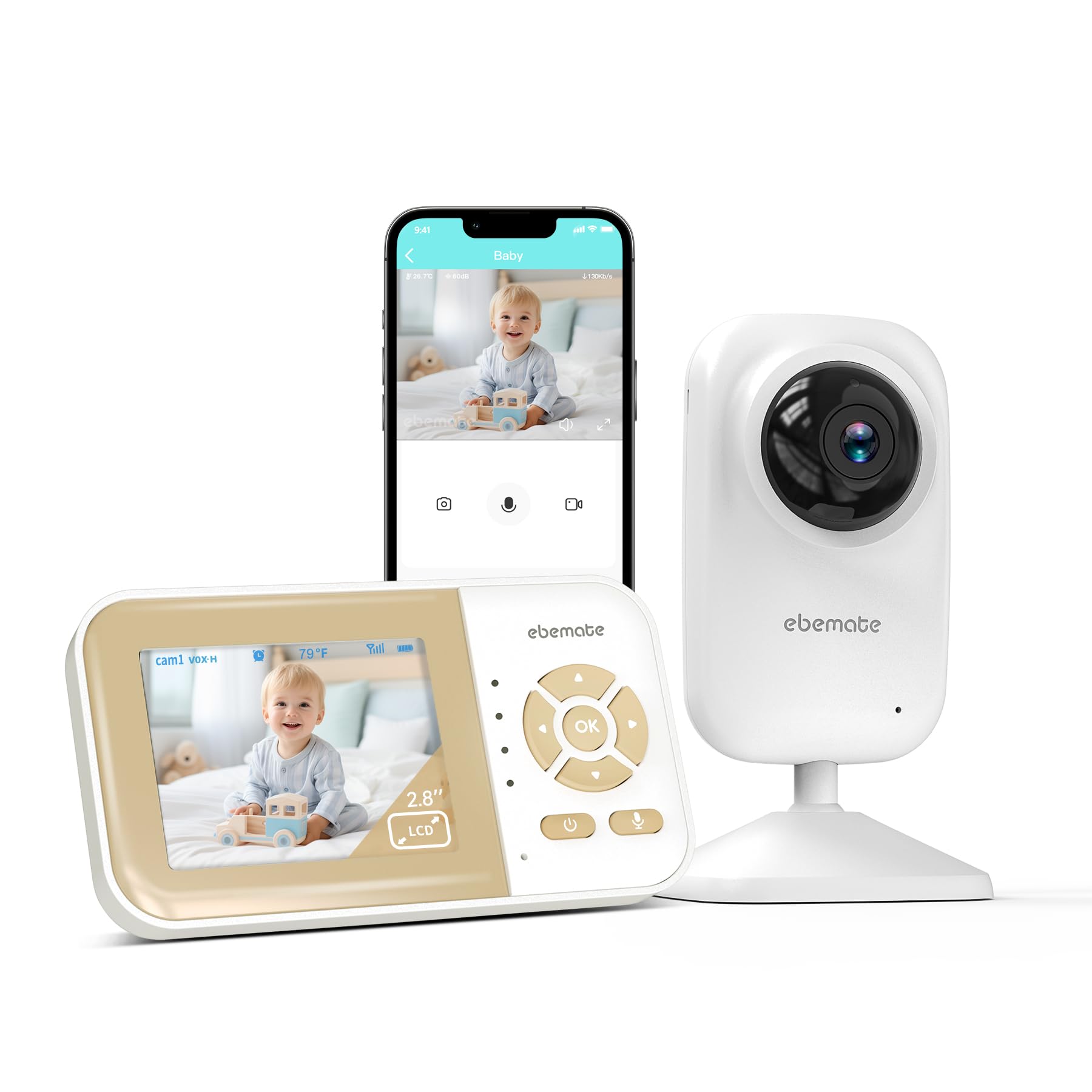
Image: The ebemate EB29 Baby Camera Unit, designed for stable placement or wall mounting.
3. Mobile App Setup (for Remote Viewing)
For remote monitoring via your smartphone, download the ebemate app. This feature requires a 2.4GHz Wi-Fi connection (5G Wi-Fi is not supported).
- Scan the QR code below or visit https://fileusa.ebemate.com/SouthSun/downloadEbemateHomeApp to download the ebemate app for iOS or Android.
- Follow the in-app instructions to create an account and add your EB29 camera. This typically involves connecting the camera to your home's 2.4GHz Wi-Fi network.

Image: QR code for downloading the ebemate mobile application.
Operating Instructions
1. Parent Unit Overview
The parent unit features a 2.8" LCD screen and intuitive controls for easy operation.

Image: The ebemate EB29 Parent Unit displaying a baby, with a smartphone showing the mobile app view.
2. Two-Way Talk
To speak to your baby through the camera, press and hold the microphone button on the parent unit. Release the button to stop speaking.

Image: A parent in the kitchen using the ebemate EB29 parent unit to communicate with their baby via two-way talk.
3. Lullabies
Access the menu on the parent unit to select and play built-in lullabies to soothe your baby. You can choose from various melodies and adjust the volume.

Image: A baby sleeping peacefully in a crib with musical notes floating around, illustrating the soothing lullabies feature.
4. VOX Mode (Voice Operated Exchange)
VOX mode helps conserve battery life. When activated, the parent unit's screen will turn off when no sound is detected from the baby's room. It will automatically turn on when sound is detected, alerting you to your baby's needs. Adjust VOX sensitivity in the menu settings.
5. Night Vision
The camera automatically switches to infrared night vision in low-light conditions, providing a clear black-and-white image of your baby without any visible light that could disturb them.

Image: The ebemate EB29 Parent Unit showing a clear night vision view of a baby sleeping in a dimly lit room.
6. Temperature Monitoring
The parent unit displays the current temperature of the baby's room, allowing you to ensure a comfortable environment.

Image: The ebemate EB29 camera unit positioned near a sleeping baby, with a thermometer icon indicating its temperature monitoring capability.
7. Feeding Reminder
Set a feeding reminder through the parent unit's menu to help you keep track of your baby's feeding schedule.

Image: A baby holding a bottle, with the ebemate EB29 parent unit in the foreground showing a feeding reminder icon.
8. Multi-Camera Support
The EB29 system supports up to four cameras. You can add additional cameras (sold separately) and switch between them or view them in a split-screen mode (if supported by the parent unit) via the menu options.

Image: An illustration showing the ebemate EB29 parent unit centrally displaying a baby, surrounded by four camera units monitoring different areas, highlighting multi-camera support.
9. Video Demonstration
Video: An official ebemate video demonstrating the features and usage of the ebemate Video Baby Monitor Camera.
Maintenance
- Cleaning: Use a soft, dry cloth to clean the camera and parent unit. Do not use abrasive cleaners or solvents.
- Storage: If storing the device for an extended period, ensure it is clean, dry, and stored in a cool, dry place away from direct sunlight.
- Battery Care: For optimal battery life of the parent unit, avoid extreme temperatures and fully charge it before long periods of non-use.
Troubleshooting
| Problem | Possible Solution |
|---|---|
| No video/audio on parent unit. | Ensure both camera and parent unit are powered on and within range. Check power connections. Re-pair the units if necessary (refer to the full user manual for pairing instructions). |
| Poor video/audio quality. | Reduce distance between camera and parent unit. Remove obstructions. Check for interference from other 2.4GHz devices. |
| Parent unit battery drains quickly. | Reduce screen brightness. Enable VOX mode. Ensure the unit is fully charged before use. Battery life varies with usage. |
| Cannot connect to mobile app. | Ensure your Wi-Fi network is 2.4GHz (not 5GHz). Check Wi-Fi signal strength. Restart your router, camera, and phone. Follow in-app pairing instructions carefully. |
Specifications
| Feature | Detail |
|---|---|
| Brand | ebemate |
| Model Name | EB29 |
| Connectivity Technology | Wired (for power), Wireless (2.4GHz FHSS for local, Wi-Fi for remote) |
| Special Features | 2-Way Audio, No-Glow Night Vision, Lullabies, VOX Mode, Temperature Display, Feeding Reminder |
| Indoor/Outdoor Usage | Indoor |
| Video Capture Resolution | 720p |
| Item Dimensions | 2 x 2 x 2 inches (Camera Unit) |
| Item Weight | 0.41 Kilograms |
| Material | Acrylonitrile Butadiene Styrene (ABS) |
Warranty and Support

Image: After-sale warranty details including professional support, return policy, quality guarantee, and contact email.
- Return Policy: This product is eligible for a 90-day free return policy.
- Quality Guarantee: A 1-year quality guarantee is provided for this product.
- Customer Support: For any inquiries or support needs, please contact our professional after-sales team via email at hello@ebemate.com.