
1. Introduction
This manual provides instructions for the VINABTY NB305 replacement remote control. This remote is designed to be compatible with specific Funai DVD/HDD/VCR Combo models without requiring any programming or setup. It functions as a direct replacement for your original remote control.
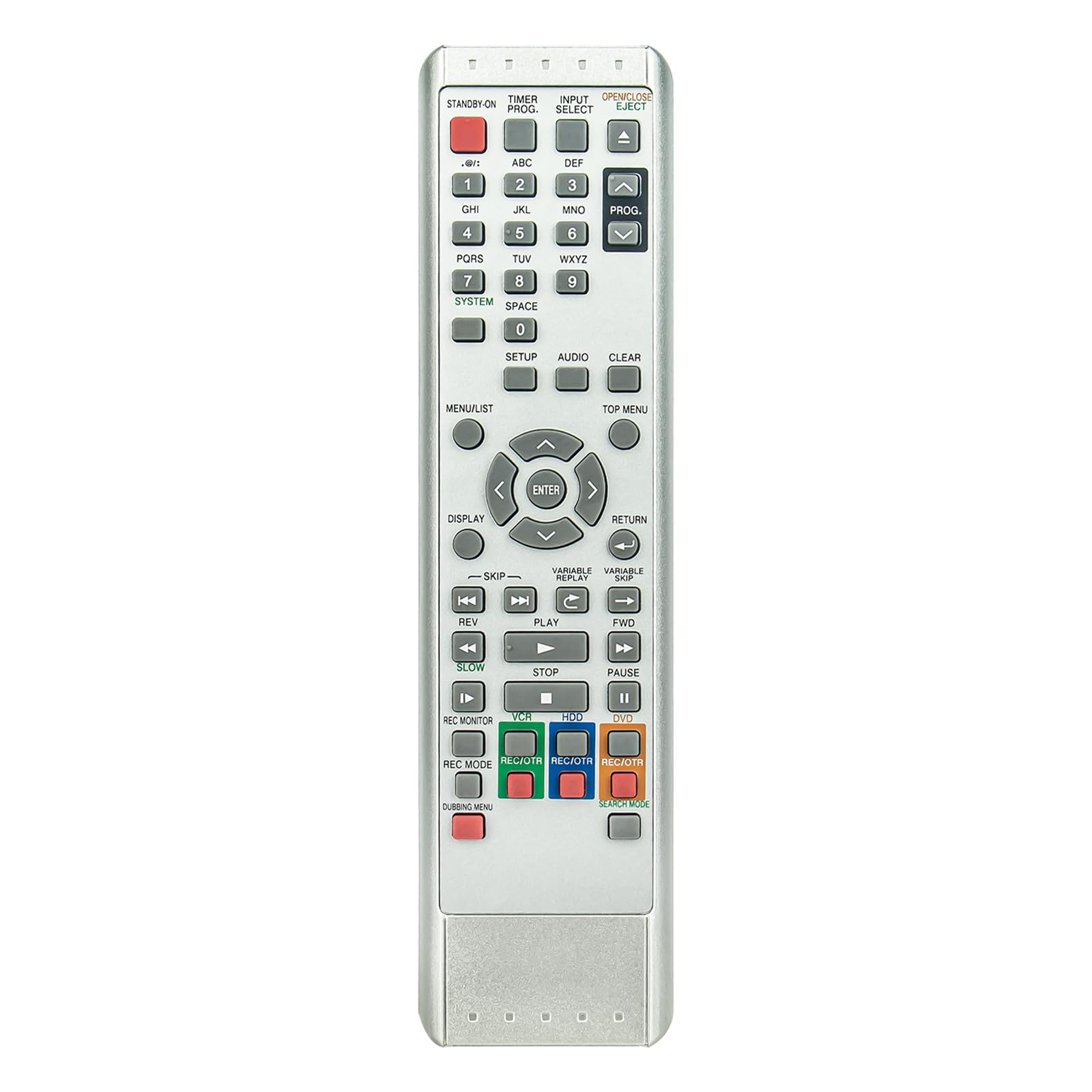
Figure 1: Front view of the VINABTY NB305 Remote Control, showing all buttons and layout.
2. Setup and Battery Installation
The VINABTY NB305 remote control requires no programming or complex setup. Simply install the batteries, and it is ready for use with compatible Funai DVD/HDD/VCR Combo units.
2.1 Battery Requirements
- Two (2) AA size alkaline batteries are required.
- Batteries are not included with the remote control.
2.2 Installing Batteries
- Locate the battery compartment on the back of the remote control.
- Press down on the latch and slide the battery cover downwards to open it.
- Insert two AA alkaline batteries, ensuring the positive (+) and negative (-) terminals align correctly with the markings inside the compartment.
- Slide the battery cover back into place until it clicks securely.

Figure 2: Rear view of the remote control with the battery compartment open, showing correct battery placement.
3. Operating the Remote Control
The VINABTY NB305 remote control is designed for intuitive operation with clear, sensitive buttons. It uses infrared technology to communicate with your Funai DVD/HDD/VCR Combo unit.
3.1 Basic Operation
- Power On/Off: Press the STANDBY ON button to power on or off your device.
- Input Select: Use the INPUT SELECT button to cycle through available input sources.
- Navigation: Use the directional arrow buttons (UP, DOWN, LEFT, RIGHT) and the ENTER button for menu navigation and selection.
- Playback Controls: Dedicated buttons are provided for PLAY, PAUSE, STOP, FWD, REV, SKIP, SLOW.
- Recording: Use the REC/OTR buttons for recording functions on your VCR or HDD.
- Numeric Keypad: Use the number buttons (0-9) for direct channel selection or inputting numerical values.
3.2 Optimal Performance
- Ensure a clear line of sight between the remote control's infrared emitter and the receiver on your Funai device.
- The maximum effective range for operation is approximately 10 meters (33 feet).
- Avoid obstructions between the remote and the device.
4. Maintenance
Proper care and maintenance will ensure the longevity and reliable performance of your VINABTY NB305 remote control.
4.1 Cleaning
- Wipe the remote control with a soft, dry cloth.
- Do not use abrasive cleaners, solvents, or chemical sprays, as these can damage the surface or internal components.
4.2 Battery Replacement
- Replace batteries when the remote's response becomes sluggish or stops functioning.
- Always replace both batteries at the same time with new AA alkaline batteries.
- Remove batteries if the remote control will not be used for an extended period to prevent leakage.
4.3 Storage
- Store the remote control in a cool, dry place away from direct sunlight and extreme temperatures.
- Avoid dropping the remote or exposing it to excessive force.
5. Troubleshooting
If you experience issues with your VINABTY NB305 remote control, refer to the following troubleshooting steps:
- Remote not responding:
- Check if the batteries are inserted correctly with the correct polarity (+/-).
- Replace old batteries with new AA alkaline batteries.
- Ensure there are no obstructions between the remote control and your Funai device.
- Verify that you are within the operational range (up to 10 meters).
- Point the remote directly at the infrared sensor on your Funai device.
- Specific buttons not working:
- Clean the remote control, especially around the unresponsive buttons, to remove any dirt or debris.
- If only certain buttons are affected after trying new batteries, the remote may be damaged.
6. Specifications
| Feature | Description |
|---|---|
| Brand | VINABTY |
| Model Name | NB305 |
| Compatible Devices | Funai DVD/HDD/VCR Combo (HDRD2835D, HDRD2885, HDRD2835) |
| Connectivity Technology | Infrared |
| Maximum Range | 10 Meters (33 feet) |
| Battery Type | 2 x AA Alkaline Batteries (not included) |
| Item Weight | 80 Grams |
| Item Dimensions (L x W x H) | 18L x 4W x 1.5H centimetres |
| Special Features | No Programming Required |
| Controller Type | Button Control |
7. Warranty and Support
The VINABTY NB305 remote control is manufactured with high-quality ABS material, designed for durability and a long service life. If you encounter any issues with your product or have questions regarding its compatibility or operation, please contact the seller or manufacturer directly for assistance.
For quality service and support, it is recommended to reach out to the point of purchase or the VINABTY customer service channels for a satisfactory solution.