
1. Introduction
The CHIPEL TC-200 is a versatile underground metal detector designed for various applications, including searching for gold, silver, coins, and other metallic objects. Its adjustable features and robust design make it suitable for both beginners and experienced treasure hunters. This manual provides essential information for the safe and effective use of your metal detector.
2. Safety Information
WARNING:
- The device is battery-powered. Ensure batteries are inserted correctly and dispose of them responsibly.
- Keep the metal detector away from water and extreme heat sources to prevent damage and ensure safe operation.
- Exercise caution when detecting metals, as some buried objects may be hazardous (e.g., sharp objects, unexploded ordnance). Always verify the safety of an excavation site.
- Do not operate the device near power lines or electrical installations.
3. Product Overview and Features
The CHIPEL TC-200 metal detector is engineered with several features to enhance your metal detecting experience.
Key Features:
- Waterproof Search Coil: The 11-inch DD oval search coil is designed for use in various conditions, including shallow water.
- Pinpoint Searching Mode: A dedicated pinpoint button allows for accurate localization of detected objects.
- Adjustable Stem: The detector's length can be adjusted from 80cm to 115cm for comfortable use by different users.
- Human Mechanics Handle: Ergonomically designed handle for a comfortable and anti-slip grip.
- Detection Indication: Features a mechanical pointer and audio alerts to indicate metal detection.
- Headphone Jack: Compatible with both stereo and mono headphones for private listening and clearer audio signals.
- All Metal & Discrimination Modes: Allows for detection of all metal types or filtering out unwanted metals.
Components:

The main components include the control box, adjustable stem, search coil, and armrest. The control box houses the display, controls, and battery compartment. The adjustable stem connects the control box to the search coil, allowing for length customization. The search coil is the part that detects metal objects. The armrest provides support during use.

The control panel features an intuitive display providing information on battery level, depth indication, and adjustable sensitivity. It includes controls for power, sensitivity, and mode selection (All Metal, Discrimination, Pinpoint), along with a headphone jack.
4. Setup
- Assembly:
- Attach the search coil to the lower stem.
- Connect the lower stem to the middle stem, and then to the upper stem with the control box and armrest.
- Ensure all connections are secure.
- Battery Installation:
- Locate the battery compartment on the control box.
- Insert two 9V 6F22 batteries (not included), ensuring correct polarity.
- Close the battery compartment securely.
- Adjusting Length:
- Loosen the locking collar on the adjustable stem.
- Extend or retract the stem to a comfortable length (80cm to 115cm).
- Tighten the locking collar to secure the stem in place.
- Armrest Adjustment: Position the armrest for comfortable and stable operation.
5. Operating Instructions
- Power On/Off: Turn the "POWER" knob clockwise to power on the detector. Turn counter-clockwise to power off.
- Sensitivity Adjustment:
- Adjust the "SENSITIVITY" knob to control the detection depth and stability.
- Higher sensitivity settings increase detection depth but may also increase false signals in mineralized ground.
- Start with a moderate sensitivity and adjust as needed for your environment.
- Mode Selection:
- Use the "MODE" switch to select between "ALL METAL" and "DISCRIMINATION" modes.
- All Metal Mode: Detects all types of metal. Ideal for general searching or when you want to find any metallic object.
- Discrimination Mode: Allows the detector to ignore certain types of metal (e.g., iron) and focus on more valuable targets. Adjust the discrimination level using the "DISCRIMINATE" control if available, or rely on the pre-set discrimination.
- Sweeping the Search Coil:
- Hold the detector with the search coil parallel to the ground, about 1-2 inches above the surface.
- Sweep the coil slowly from side to side in overlapping arcs.
- Maintain a consistent height and speed for optimal detection.
- Detection Indication:
- When metal is detected, the mechanical pointer on the display will oscillate, and an audio alert will sound.
- The strength of the signal (pointer deflection and audio volume) can indicate the size and proximity of the object.
- Pinpointing:
- Once a target is detected, use the pinpoint function (if available, often a button) to narrow down its exact location.
- Move the coil slowly over the detected area in a cross-pattern until the strongest signal is found, indicating the center of the target.
- Headphone Use: Plug headphones into the "EARPHONE" jack for clearer audio signals, especially in noisy environments, and to conserve battery life.

The CHIPEL TC-200 is capable of detecting a wide range of metals, from common iron and aluminum to precious metals like gold and silver. The discrimination mode helps in filtering out unwanted targets.
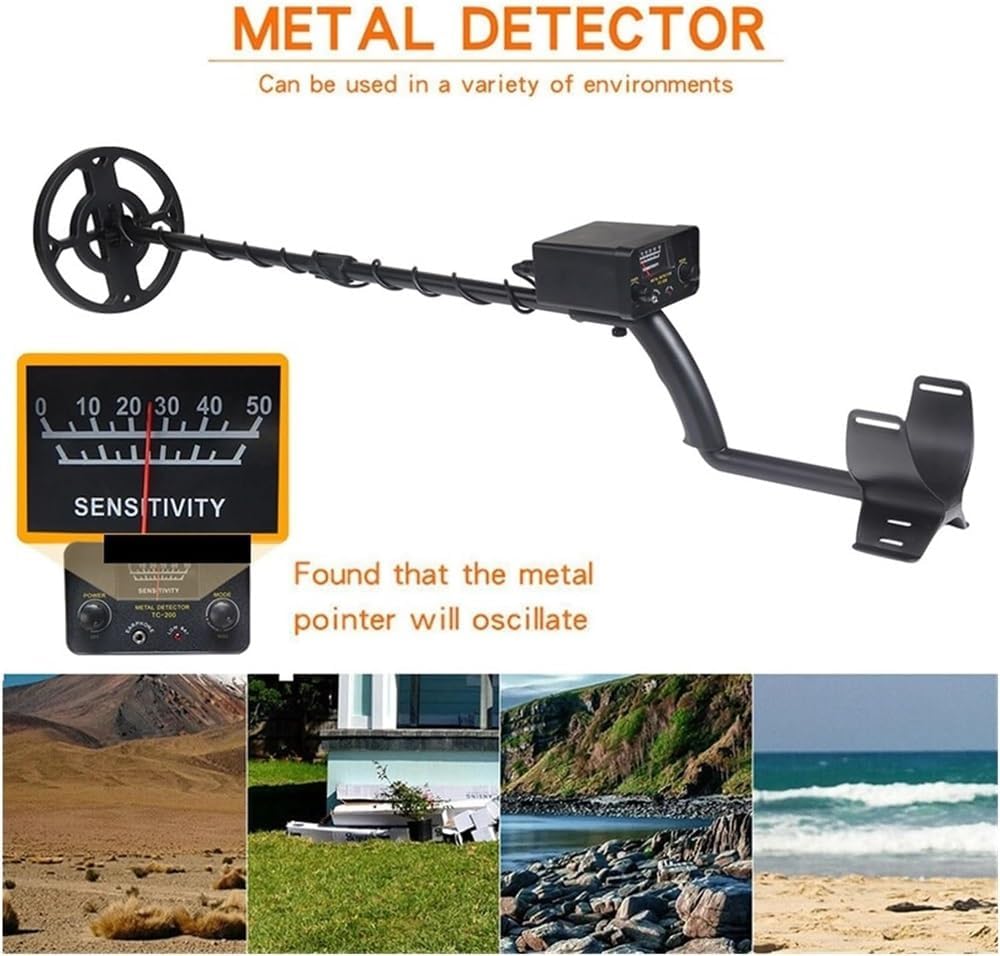
The detector is designed for use in various environments, including fields, beaches, and shallow water, thanks to its waterproof search coil.
6. Maintenance
- Cleaning:
- Wipe down the detector with a damp cloth after each use, especially the search coil if used in wet or sandy conditions.
- Do not use abrasive cleaners or solvents.
- Ensure the control box remains dry.
- Storage:
- Store the detector in a cool, dry place when not in use.
- Remove batteries if storing for extended periods to prevent leakage.
- Battery Care:
- Replace batteries when the low battery indicator appears.
- Use high-quality 9V 6F22 batteries.
- Coil Protection: Avoid striking the search coil against hard objects.
7. Troubleshooting
- No Power:
- Check if batteries are correctly installed and fully charged.
- Ensure the power knob is turned on.
- False Signals/Chatter:
- Reduce the sensitivity setting.
- Move away from sources of electromagnetic interference (e.g., power lines, other electronic devices).
- Ensure the search coil cable is not loose or damaged.
- No Detection:
- Verify the detector is powered on and batteries are good.
- Increase sensitivity.
- Ensure the search coil is sweeping correctly and close enough to the ground.
- Check if the mode is set to "ALL METAL" if you are not sure what you are looking for.
- Weak Signal:
- Increase sensitivity.
- Ensure the search coil is parallel to the ground.
- The target might be very deep or very small.
8. Specifications
| Feature | Specification |
|---|---|
| Brand | CHIPEL |
| Model | TC-200 |
| Detection Sensitivity | Min. 130mm / 5.12" (for US 25 cent coin) |
| Detect Objects | Iron nail, iron die, aluminum ring, small aluminum product, coins, gold, bronze, silver |
| Detection Modes | All Metal, Discrimination |
| Operating Frequency | 6 KHz |
| Power Supply | 2 x 9V 6F22 Batteries (Not Included) |
| Power Consumption | Standby 10mA, Max 70mA |
| Operating Voltage | 9V |
| Detection Indication | Mechanical Pointer, Audio Mode |
| Detection Depth | 3-40cm (varies by object size and ground conditions) |
| Adjustable Height | 80-115cm (31.5-45.2 inches) |
| Operating Temperature | -15°C to 45°C (5°F to 113°F) |
| Storage Temperature | -20°C to 60°C (-4°F to 140°F) |
| Material | Plastic |
| Item Weight | Approximately 50 Grams (control box) / 1.76 ounces (overall package weight) |
| International Protection Rating | IP67 (for search coil, not entire unit) |

9. Warranty and Support
For warranty information and customer support, please refer to the retailer's policy or contact CHIPEL customer service directly. Keep your purchase receipt as proof of purchase.
For further assistance, please visit the official CHIPEL website or contact your local distributor.